Key Takeaways
- TLS is a cryptographic protocol that encrypts data in transit between a client and server, providing privacy, authentication and data integrity.
- The TLS handshake uses asymmetric encryption to verify identities and establish session keys, then switches to symmetric encryption for fast, secure data transfer.
- Organizations using EAP-TLS authentication with a managed PKI can extend TLS encryption beyond web traffic to Wi-Fi, VPN and network access control.
Every enterprise network relies on Transport Layer Security (TLS) to keep data safe in transit, making it the core foundation for wireless authentication under IEEE 802.1X.
Managing these connections at scale comes with real engineering challenges like dropping outdated cipher suites and handling network latency.
This guide goes beyond the basic textbook definitions to look at the actual handshake mechanics, version differences and certificate deployment strategies you need to secure your infrastructure.
What Is TLS Encryption?
Transport Layer Security (TLS) encryption is a cryptographic protocol that establishes an encrypted channel between two endpoints, typically a client (browser, application, or device) and a server.
TLS sits between the transport layer (Transport Control Protocol) and the application layer in the network stack, encrypting data before it leaves the sender and decrypting it on arrival.
TLS performs three functions:
- Encryption: Converts plaintext into ciphertext so third parties cannot read intercepted data
- Authentication: Verifies the identity of the server (and optionally the client) using digital certificates issued by a Certificate Authority (CA)
- Data integrity: Uses message authentication codes (MACs) to detect any modification or tampering during transit
Note: HTTPS, the secure version of HTTP, is the most visible implementation of TLS. When a browser shows a padlock icon, it means that TLS encryption is active.
But TLS encryption extends well beyond web browsing. The following technologies and protocols rely on TLS to secure communications:
- Email (SMTP over TLS)
- File transfers (File Transfer Protocol Source or FTPS)
- Voice over Internet Protocol (VoIP)
- Domain Name System (DNS) over TLS
- Enterprise Wi-Fi authentication using Extensible Authentication Protocol–Transport Layer Security (EAP-TLS)
How Does TLS Encryption Work?
A TLS connection is initiated using a structured sequence known as the TLS handshake. It takes place between the client device and the web server before any application data is sent, as illustrated below:
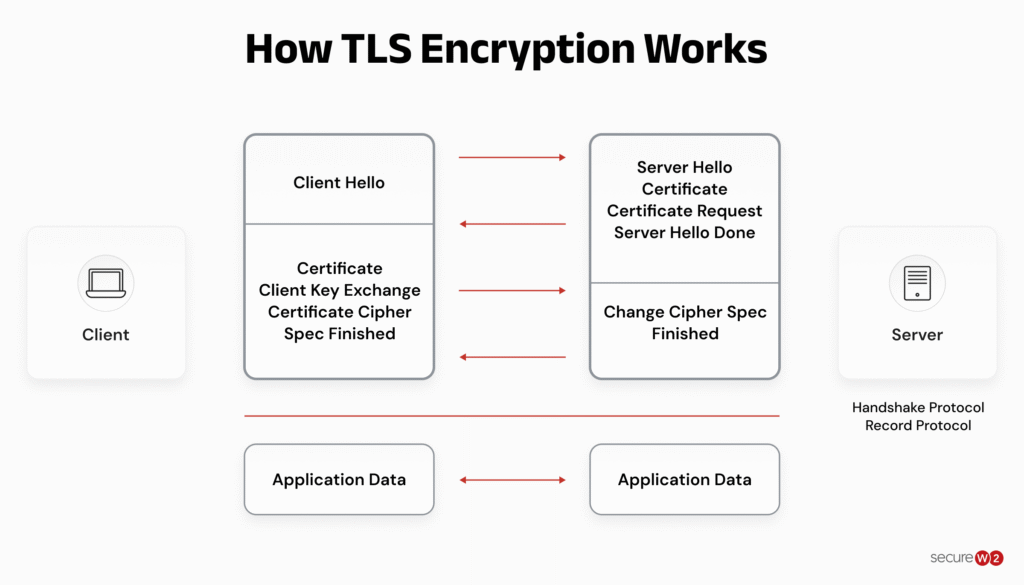
During this handshake, the two endpoints establish the security parameters for the communication session by completing four core tasks:
- Select the protocol version: The devices specify which version of TLS they will use, such as TLS 1.2 or 1.3.
- Agree on a cipher suite: They decide on a specific set of algorithms that defines the cryptographic rules and matching session keys for that individual session.
- Authenticate the server: The client verifies the identity of the server using the server’s digital TLS certificate.
- Generate session keys: Both sides generate matching symmetric encryption keys to protect all messages sent after the handshake finishes.
The TLS handshake relies on public key cryptography to securely set these matching session keys over an unencrypted channel.
This technology uses one-way encryption. Anyone possessing the server’s public key, which is embedded in its TLS certificate, can unscramble data encrypted with the server’s private key to verify its authenticity.
However, only the server holds the private key required to encrypt that data in the first place.
Once the handshake is complete, the connection switches entirely to using the shared session keys.
To ensure total data integrity, every encrypted and authenticated message is signed with a message authentication code (MAC).
When the recipient receives the packet, they verify this MAC to confirm that the data was not tampered with or altered in transit.
See your security gap before attackers do.
See continuous trust in action on a platform that includes RADIUS, PKI and AI security.
What Are the Benefits of Using Transport Layer Security (TLS)?
For any modern infrastructure, deploying TLS provides three distinct, immediate advantages:
- Eliminates cleartext vulnerability: TLS stops unauthorized third parties from intercepting data in transit. By converting traffic into unreadable ciphertext, it prevents hackers from reading passwords, financial transactions or sensitive network data.
- Guarantees untampered data: Every data packet is cryptographically signed with a MAC. This acts as a digital tamper seal, ensuring that network providers or malicious actors cannot inject malware, alter content or hijack the session.
- Enforces absolute identity verification: Before data transfers, the protocol forces the server to prove its identity using digital certificates. This process directly stops phishing sites and man-in-the-middle (MITM) scams by confirming the user is connected to the actual domain.
One of the simplest ways to prevent an MITM attack is by using EAP-TLS certificate-based authentication. Learn how in the video below:
The following are some core use cases of TLS encryption:
- Web security (HTTPS): Encrypts customer browser sessions to secure login portals, e-commerce checkouts and data input forms.
- Enterprise network control (802.1X): Operates as the foundation for frameworks like EAP-TLS, replacing insecure password logins with secure, certificate-based authentication.
- Corporate communications: Safeguards background services, including automated email syncing, VoIP phone systems and secure API data transfers between cloud applications.
The benefits of EAP-TLS cannot be overstated. Companies are getting on board too.
A Fortune 100 technology company, looking to implement EAP-TLS in a bring-your-own-device (BYOD) environment, equipped about 200,000 of its devices with certificates.
Their users with BYOD devices can enroll and renew certificates in just a few minutes and they no longer have to worry about any credential leaks or password-related help desk tickets.
What is the difference between TLS and SSL?
While the industry frequently uses the terms “SSL” and “TLS” interchangeably, they represent entirely different generations of cryptographic protocols.
Secure Sockets Layer (SSL) is the legacy protocol developed in the 1990s, which has since been completely deprecated due to known security vulnerabilities. TLS is its modern, highly secure successor that fixes those historical flaws and powers all modern internet encryption.
Info: From a practical standpoint, there is no difference between SSL and TLS certificate. The certificate itself is just a digital file containing your public key and identity data; it remains completely identical regardless of the protocol used.
The actual protocol, whether it uses outdated SSL or modern TLS, is determined entirely by the configuration of your web server and the user’s browser during the handshake, not by the certificate you purchase.
The table below dives into a deeper comparison of the two.
| Comparison Criteria | Secure Sockets Layer (SSL) | Transport Layer Security (TLS) |
| History and Status | Developed by Netscape in 1995; completely deprecated and unsafe for production use | Introduced by the IETF in 1999 as the upgrade to SSL 3.0; currently active and standard |
| Handshake Process | Uses a complex, multi-step connection process that adds noticeable latency | Streamlined handshake (especially in TLS 1.3) that cuts connection times in half |
| Cipher Support | Relies on older, weak cryptographic algorithms that are easily broken by modern computers | Supports modern, authenticated encryption algorithms (AEAD) to prevent data tampering |
| Alert Messages | Uses generic error codes that make it difficult to diagnose failed connections | Provides specific, encrypted error alerts to securely troubleshoot network issues |
| Data Integrity | Uses basic Message Authentication Codes (MAC) to check if data was altered | Uses advanced Hash-based Message Authentication Codes (HMAC) for superior tamper protection |
SSL vs. TLS: Which One Should You Use?
You should always use TLS.
Implementing TLS, specifically TLS 1.2 or TLS 1.3, is the only way to ensure your data remains protected against modern intercept attacks and compliant with current industry security standards.
Danger: All versions of SSL contain severe, unfixable security flaws, modern web browsers will flag SSL connections as insecure or block them entirely.
What Are the Versions of Transport Layer Security (TLS)?
TLS has gone through several versions since it replaced SSL in 1999.
TLS 1.0 and TLS 1.1 are the oldest, and both are now deprecated due to known vulnerabilities. TLS 1.2, released in 2008, is still the most widely supported version in use today.
TLS 1.3, released in 2018, is the current standard and the version organizations should use wherever possible.
Each new version cut handshake time and removed weaker cryptographic algorithms from the one before it.
TLS 1.3 vs TLS 1.2 vs TLS 1.0
The table below compares TLS 1.0, TLS 1.2 and TLS 1.3 across key security and performance features.
| Feature | TLS 1.0 | TLS 1.2 | TLS 1.3 |
| Year Released | 1999 | 2008 | 2018 |
| Status | Deprecated | Widely supported | Current standard |
| Handshake Round Trips | 2 | 2 | 1 (0-RTT for resumed connections) |
| Forward Secrecy | No | Optional | Mandatory |
| Key Exchange | RSA, static DH | RSA, DHE, ECDHE | DHE, ECDHE only |
| Cipher Suites | Limited, includes weak ciphers | Dozens, some insecure | 5, all AEAD |
| Vulnerable to BEAST | Yes | Mitigated | No |
| Vulnerable to POODLE-Style Downgrade | Yes | No | No |
TLS 1.0 and 1.1 should be disabled on any modern server.
TLS 1.2 remains acceptable for compatibility, but TLS 1.3 should be the default wherever the client and server both support it.
RFC 9849: TLS Closes One of Its Last Privacy Gaps
TLS 1.3 significantly improved internet security by encrypting most of the TLS handshake, protecting sensitive information such as certificates and session keys from anyone monitoring network traffic.
However, one important piece of information remained visible: the Server Name Indication (SNI).
Info: SNI tells a server which website a user wants to access so the correct TLS certificate can be presented, but it also allows internet service providers, network administrators and attackers to see the destination website even though the rest of the connection is encrypted.
To address this privacy gap, the IETF published RFC 9849: TLS Encrypted Client Hello (ECH) in 2025.
ECH extends TLS 1.3 by encrypting the entire ClientHello message, including the SNI, supported application protocols and other handshake information that could reveal browsing activity.
Instead of sending this information in plaintext, the client encrypts it using the server’s published public key. The server then decrypts the protected ClientHello and continues the TLS handshake normally.
This enhancement provides an important privacy improvement by preventing network observers from identifying the websites users are visiting simply by inspecting TLS handshakes.
It also complements earlier TLS security recommendations in RFC 9325: Recommendations for Secure Use of Transport Layer Security (TLS) and Datagram Transport Layer Security (DTLS), which anticipated stronger protection for handshake metadata as TLS continued to evolve.
For enterprise security teams, however, ECH introduces new operational considerations.
Many security appliances, secure web gateways, and inspection tools have traditionally relied on plaintext SNI to classify traffic, enforce policies or detect suspicious connections. As ECH adoption increases, that visibility will gradually disappear.
Organizations will need to rely more heavily on DNS security, endpoint protection, TLS-aware proxies and zero trust access controls instead of passive SNI inspection.
Warning: ECH does not weaken enterprise security, but it does require security teams to modernize their monitoring of encrypted traffic.
As browsers, operating systems and web services continue to adopt RFC 9849, encrypted metadata will become the norm rather than the exception, strengthening privacy while encouraging more advanced approaches to network visibility.
What Is a TLS Certificate?
A TLS certificate (also called an SSL certificate or X.509 certificate) is a digital document that binds a domain name to a public key. A trusted CA signs it to vouch for the server’s identity.
The table below outlines what a TLS certificate contains.
| Field | Purpose |
| Subject | Domain name (e.g., securew2.com) |
| Public Key | Used in the TLS handshake |
| Issuer | The CA that signed the certificate |
| Validity Period | Start and expiration dates |
| Signature | Proves authenticity |
| Serial Number | Unique ID used for revocation |
Browsers check these fields against a trust store on every connection.
- Valid, unexpired and signed by a recognized CA → the handshake proceeds.
- Expired, mismatched or untrusted → the connection is rejected.
Certificate types mainly differ in how much the certificate authority verifies before signing. The table below has the key types of TLS certificates, such as Domain Validated (DV) and Organization Validated (OV).
| Type | Verifies | Used For |
| Domain Validated (DV) | Domain ownership only | Standard websites |
| Organization Validated (OV) | Domain + organization identity | Business sites |
| Extended Validation (EV) | Legal entity, highest scrutiny | E-commerce, banking |
| Client Certificates | A device or user, not a server | mTLS, EAP-TLS network authentication |
The Role of Encryption Keys in TLS
TLS encryption relies on multiple key types working together.
Public and Private Keys (Asymmetric)
Every TLS certificate pairs a public key with a corresponding private key. The public key is shared openly in the certificate. The private key stays on the server and never leaves.
During the handshake, the client uses the server’s public key to encrypt the pre-master secret (TLS 1.2) or to verify the server’s signature on the key exchange (TLS 1.3). Only the server’s private key can decrypt or produce these values, which proves the server’s identity.
Your public key is the mailbox. This is where anyone can drop mail in. Anyone knows what your public key is. The private key is what’s needed to open the mailbox.
Micah Spady, Director of Product Marketing at SecureW2
Session Keys (Symmetric)
After the handshake, both sides derive identical session keys from the shared secret. These session keys encrypt and decrypt all application data using fast symmetric algorithms like AES-256-GCM.
Session keys are ephemeral, generated fresh for every connection and discarded when the session ends. This limits the exposure window if a key is ever compromised and supports forward secrecy.
You can dive in deeper with our symmetric vs. asymmetric encryption guide.
How to Implement TLS Encryption: Step by Step
The steps depend on what you’re securing.
A public website needs a certificate trusted by browsers. An enterprise network needs certificates that identify its own users and devices. Here’s how to do both.
TLS for Web Servers
- Get a certificate. Buy one from a publicly trusted CA or use ACME-based automation like Let’s Encrypt if you want it free and renewed automatically.
- Install the certificate and private key on your web server (Nginx, Apache, IIS, or your load balancer, depending on your setup).
- Restrict supported protocols to TLS 1.2 and TLS 1.3. Most servers let you set this in a config file with a single directive.
- Turn off everything older. Disable SSL 3.0, TLS 1.0, TLS 1.1, and any cipher suite flagged as weak or export grade.
- Turn on HSTS. This forces browsers to only connect over HTTPS, so an attacker can’t downgrade the connection to plain HTTP.
- Test the setup. Run the domain through a tool like Qualys SSL Labs to confirm there are no misconfigurations before calling it done.
TLS for Enterprise Network Authentication
Securing Wi-Fi and VPN access with EAP-TLS works differently. Instead of a public CA, you need a private CA that issues certificates to your own users and devices.
That takes three pieces working together:
- A managed PKI to issue, renew, and revoke X.509 client certificates.
- A RADIUS server to authenticate devices against those certificates when they try to join the network.
- An MDM or onboarding tool to push certificates onto managed and BYOD devices without making users install them manually.
Most IT teams don’t have staff dedicated to running a PKI, which is why many go with a turnkey managed PKI instead of building one in-house.
Look for a managed PKI that plugs directly into your existing identity provider (Entra ID, Okta, Google Workspace) and MDM (Intune, Jamf, Kandji), so certificate issuance is tied to your existing user and device records rather than a separate system to maintain.
A global fintech leader used SecureW2 to set-up an EAP-TLS cloud environment for their network.
The entire PKI was set up from scratch and enrolled 1,200 devices with certificates and a fully capable BYOD system enabled with certificate self-enrollment.
The security plan that scales with you.
Our solutions can scale from mid-market to global enterprises. Compare options and see how our solutions protect you from costly breaches and ensure peace of mind.
47-Day TLS Certificates: What IT Teams Need to Know
In April 2025, the CA/Browser Forum approved Ballot SC-081v3, which phases in shorter maximum TLS certificate lifetimes, on the following timeline:
- March 2026: 200-day maximum validity
- March 2027: 100-day maximum validity
- March 2029: 47-day maximum validity
This change affects every organization that uses publicly trusted TLS certificates. Manual certificate renewal at these intervals is impractical, so automation becomes mandatory.
Warning: Organizations that already use ACME-based issuance and automated certificate lifecycle management will adapt smoothly. Those still managing certificates manually face significant operational risk.
For enterprise Wi-Fi and VPN certificates issued by a private CA, these public CA rules do not apply directly.
However, the industry trend toward shorter certificate lifetimes and automated lifecycle management reinforces the value of a managed PKI that handles issuance, renewal and revocation without manual intervention.
Understand PKI and certificate management better with the video below:
Extend TLS Encryption Security to Your Network With SecureW2
TLS encryption secures web traffic, email and remote access. The same cryptographic foundation can protect your Wi-Fi and VPN infrastructure.
SecureW2 JoinNow Dynamic PKI automates the issuance, renewal, and revocation of X.509 certificates for EAP-TLS authentication.
Paired with JoinNow Cloud RADIUS, every Wi-Fi and VPN connection is authenticated against real-time identity data from your directory, not with shared passwords that can be phished or stolen.
The platform integrates with Entra ID, Okta, Google Workspace, Intune, Jamf and Kandji. BYOD users self-enroll through JoinNow MultiOS in under a minute, with no IT tickets required.
Schedule a demo to see how certificate-based network authentication eliminates credential theft and simplifies access management.
Frequently Asked Questions
Is TLS the same as SSL?
No. TLS is the successor to SSL. All SSL versions have been deprecated due to known vulnerabilities. The terms are sometimes used interchangeably (as in "SSL certificate"), but modern encrypted connections use TLS 1.2 or TLS 1.3.
What port does TLS use?
TLS itself does not define a port. Instead, it wraps the underlying application protocol. HTTPS uses port 443. SMTPS uses port 465. IMAPS uses port 993. RadSec uses port 2083.
Is TLS encryption end-to-end?
TLS encrypts data between two endpoints (client and server). It is point-to-point encryption, not end-to-end in the messaging sense.
If a TLS connection terminates at a load balancer or reverse proxy, data may be decrypted and re-encrypted before reaching the origin server.
What is mutual TLS (mTLS)?
Standard TLS authenticates only the server. Mutual TLS (mTLS) requires both the server and the client to present certificates.
This is the model used in EAP-TLS network authentication, where devices prove their identity with client certificates before gaining network access.
Does TLS operate at Layer 4 or Layer 7?
TLS sits between Layer 4 (Transport) and Layer 7 (Application) in the OSI model. It relies on a TCP connection (Layer 4) but operates above it, encrypting application-layer data before transmission.
What are the benefits of using TLS encryption?
TLS encryption helps protect sensitive data by encrypting information as it travels between devices, preventing attackers from intercepting or reading it.
It also verifies the identity of servers and devices through digital certificates, helping users avoid spoofed or malicious connections.
In addition to improving security and privacy, TLS supports compliance with many industry regulations and helps build trust for online services, applications and networks.
What is TLS 1.3 and AES 256?
TLS 1.3 is the current version of the Transport Layer Security protocol, used to encrypt data moving between a client and a server.
AES 256 is the encryption algorithm TLS often uses to actually scramble that data, using a 256-bit key. They are not competing technologies.
TLS is the protocol that sets up a secure connection, and AES 256 is one of the ciphers that the protocol can use once the connection is established.
Together, they secure both the handshake and the data sent afterward.
Is Gmail TLS encrypted?
Yes. Gmail uses TLS to encrypt email in transit between Google's servers and the sending or receiving mail server, as long as both sides support it.
If the other server does not support TLS, the message may fall back to being sent unencrypted, though Google flags this in some cases. TLS in this context protects the email while it travels across the internet, but it does not encrypt the message once it lands in an inbox or is stored on a server.
What are the best practices for Transport Layer Security (TLS)?
Some of the best practices for TLS are:
- Use TLS 1.2 or TLS 1.3 only, and disable SSL 3.0, TLS 1.0, and TLS 1.1.
- Remove weak or outdated cipher suites from your server configuration.
- Enable HSTS to stop protocol downgrade attacks.
- Renew certificates before they expire and automate renewal wherever possible instead of tracking dates manually.
- Use certificates from a trusted CA for public sites, and a private CA for internal or client authentication.
- Test your configuration periodically with a tool like SSL Labs to catch misconfigurations before they become vulnerabilities.
