Key Takeaways
- RADIUS (Remote Authentication Dial-In User Service) protocol is a client-server protocol that centralizes Authentication, Authorization, and Accounting (AAA) for network access, deployable on-premises or in the cloud.
- While it supports password-based authentication with PEAP-MSCHAPv2 and EAP-TTLS/PAP, the RADIUS protocol is more secure with certificate-based methods like EAP-TLS.
- JoinNow Cloud RADIUS is a managed RADIUS service enabling passwordless EAP-TLS authentication for better security and scalability.
RADIUS protocol controls who gets into your network, what they can access, and keeps a full record of everything they do, across Wi-Fi, VPN, wired, and cloud environments, all from a single system. For enterprises managing hundreds or thousands of users and devices, that level of centralized control is what separates a secure network from a vulnerable one. With more than 2,200 cyberattacks occurring every day, a centralized, policy-driven authentication system is not optional. This article covers how RADIUS works, its core components, authentication methods, known vulnerabilities, and how modern cloud-based deployments compare to traditional on-premises implementations.
Remote Authentication Dial-In User Service (RADIUS) protocol controls who gets into your network, what they can access and keeps a full record of everything they do, across Wi-Fi, VPN, wired, and cloud environments, all from a single system.
For enterprises managing hundreds or thousands of users and devices, that level of centralized control is what separates a secure network from a vulnerable one. With organizations worldwide experiencing an average of 2,336 cyberattacks every week, a centralized, policy-driven authentication system is not optional.
This article covers how RADIUS works, its core components, authentication methods, known vulnerabilities and how modern cloud-based deployments compare to traditional on-premises implementations.
What Is the RADIUS Protocol?
The RADIUS protocol, or Remote Authentication Dial-In User Service, is a client-server network security protocol that bundles user authentication, authorization, and accounting (AAA) into one access control system.
Its user-friendliness, effectiveness, and capacity for expansion makes RADIUS the clear choice for security-conscious organizations such as Internet Service Providers (ISPs), cellular network providers, and corporate and educational networks.
RADIUS serves three fundamental purposes, which are often referred to as AAA:
- Authentication: Matches user credentials to verify identity
- Authorization: Determines user permissions
- Accounting: Tracks user network resource-use
The RADIUS protocol is an essential component of 802.1X, the larger port-based authentication framework for secure network access control.
802.1X uses RADIUS and other protocols to create a thorough, verifiable authentication system that protects your organization across private connections, shared networks and public Wi-Fi.
See your security gap before attackers do.
See continuous trust in action on a platform that includes RADIUS, PKI and AI security.
History of RADIUS
RADIUS has evolved significantly since its development decades ago, with updates that have helped the protocol adapt to changing authentication and security requirements.
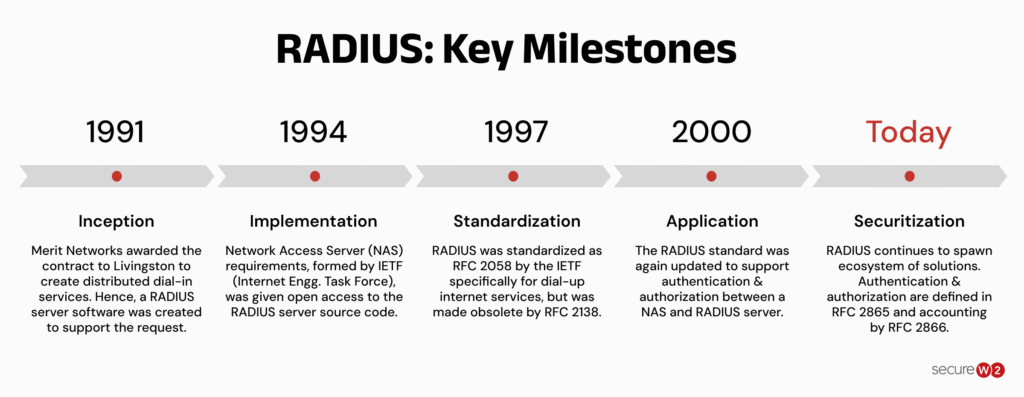
The table below breaks down each milestone and summarizes how the protocol has developed over time.
|
Year |
Milestone |
Summary |
|
Pre-1991 |
Inception |
NSF grants Merit Networks funding to build a centralized dial-up authentication protocol. Merit contracts Livingston Enterprises to develop it. |
|
1991 |
First Version |
First version of the RADIUS protocol delivered by Livingston Enterprises. |
|
1994 |
Implementation |
Protocol relaunched with major updates — client/server operation, request routing logic, and large-scale NAS vendor adoption. |
|
1997 |
Standardization |
IETF standardizes RADIUS via RFC 2058, superseded that same year by RFC 2138. |
|
2000 |
Application |
RFC 2865 replaces RFC 2138, adding NAS-to-server authentication and authorization support. Still the governing standard today. |
|
Today |
Securitization |
RADIUS supports passwordless authentication via digital certificates, EAP-TLS, stronger encryption, and cloud-based deployment for zero-trust environments. |
Who Regulates the RADIUS Protocol?
The Internet Engineering Task Force (IETF) regulates the RADIUS protocol with Request for Comments (RFC) documents dating back to 1997. The IETF outlines current standards in RFC 2865, published in 2000.
RADIUS is also part of the Institute of Electrical and Electronics Engineers (IEEE) 802.1X authentication protocol.
Components of RADIUS
RADIUS consists of 3 main components:
- RADIUS Client/RADIUS Supplicant: a lightweight software that validates credentials by sending them to the RADIUS server
- Network Access Server (NAS): a gateway between the user and the network
- RADIUS Server: the server that validates credentials, assesses connection details, and conducts time tracking

Managing separate credentials for Wi-Fi, VPN, and wired access creates security gaps. One centralized protocol eliminates those gaps.
How Does RADIUS Server Authentication and Authorization Work?
The RADIUS protocol uses a client/server model built on four elements working together:
|
Element |
Role |
|
Client |
Initiates the access request |
|
Client device |
The endpoint seeking network access |
|
RADIUS server |
Validates credentials or certificates |
|
Identity provider (IdP) |
The directory RADIUS verifies against |
Once a request comes in, the RADIUS server checks the user’s credentials or certificates against the IdP. If they match, 802.1X opens the network port and grants access.
Authentication and authorization happen simultaneously, meaning identity is verified and permissions are assigned in the same exchange.
Watch the video below for a quick explanation on why 802.1X needs a RADIUS server.
Organizations can authenticate through one of two methods, and the flow differs slightly for each.
Credential-Based Authentication and Authorization
RADIUS servers don’t store credentials; they reference a directory to verify credentials and current authorization attributes. To protect data during referencing, clients and servers use a shared secret, a security key or password they both know but never transmit.
Here’s how the RADIUS packet request process works:
- User or Device Sends Access Request to Network Access Server (NAS)
The end user or device submits an authentication request to the NAS containing their username and encrypted password. - NAS Delivers Access Request to the RADIUS Server
The NAS forwards the authentication packet request to the appropriate RADIUS server. - RADIUS Server Analyzes and Responds to Request
The server reads the shared secret and verifies the user’s credentials against the user database. Based on its findings, the RADIUS server responds to the NAS with an ACCESS ACCEPT message to authenticate the user, an ACCESS CHALLENGE packet to request more details, or an ACCESS REJECT packet if the credentials can’t be verified. - (If ACCESS ACCEPT) Client Authorization Grants User Access
Once the RADIUS server authenticates and authorizes the user, the client receives the ACCESS ACCEPT response with the shared secret and Filter ID attribute. This grants access to a RADIUS group containing other authorized users with the same permissions (typically same department and/or authority level).
Certificate-Based Authentication and Authorization
Certificate-based authentication for managing user access follows these steps:
- Device Sends Access Request with Certificate to NAS
To start the process, the device requesting access sends its certificate to the NAS. - NAS Forwards Access Request to RADIUS Server
The NAS receives the access request packet and certificate, pushing it to the RADIUS server. - RADIUS Server Analyzes Certificate
The RADIUS server checks expiration conditions and a Certificate Revocation List (CRL) to determine if the certificate is expired or revoked. - (If Certificate Is Valid) Certificate Authorization Grants User Access
If the certificate is expired or revoked, the access request will be denied. If not, the RADIUS server confirms and grants access.
Credential-Based vs. Certificate-Based Authentication
The following table explains some of the key differences between credential-based and certificate-based authentication methods.
|
Credential-Based Authentication |
Certificate-Based Authentication |
|
|
User Input Required |
Username and password |
Digital certificate |
|
Common Protocols |
PEAP-MSCHAPv2, EAP-TTLS/PAP |
EAP-TLS |
|
Passwordless |
No |
Yes |
|
Risk of Credential Theft |
Higher |
Lower |
|
Mutual Authentication |
Often partial |
Yes |
|
Long-Term Security |
Moderate |
High |
|
Best For |
Legacy environments |
Zero-trust and modern enterprise security |
How Does RADIUS Accounting Work?
Accounting is the process of recording and managing user access details. There are 3 steps:
- Accounting Start: Once a user gains access to the network, the RADIUS client sends a RADIUS accounting request packet (Accounting Start) to the RADIUS server. This contains the user’s network address, credentials, MAC address, wired or wireless access point, and unique session identifier. When the RADIUS server receives the Start packet, it sends an Accounting Response back to the client.
- Session Updates: The client periodically sends additional request packets for new details about the session; the RADIUS server sends responses.
- Accounting Stop: Whether a user logs off or has access revoked, when a session ends, the RADIUS client sends one last accounting request packet (Accounting Stop) containing the session duration, data accessed, bytes, starting and interim packets, and reason the session ended. The server stores these details for records and audits.
Note: Thanks to RADIUS accounting, network administrators get a clear picture of individual use and broad trends. They can use this information to maintain security, revoke authorization, bill users based on data usage, and forecast future needs.
The RADIUS Server Protocol in Network Security
RADIUS is the most common implementation for 802.1X network access control management. It’s also the de facto network security standard for modern dial-up, DSL, wireless and mobile networks.
RADIUS servers’ centralized AAA capabilities, flexibility and adaptability maximize privacy and security and increase efficiency. For greater security, organizations can add modern security standards such as multi-factor authentication (MFA), Transport Layer Security (TLS) and VPNs to encrypt payloads.
The Benefits of Using RADIUS Protocol
From centralized authentication to granular access policies, RADIUS provides several benefits for managing network access at scale.
- Centralized AAA: A single system handles authentication, authorization, and accounting across all network access points, reducing administrative overhead and inconsistency.
- Granular access controls: Role-based policies let administrators define exactly what each user or device can access, down to VLAN assignment and session limits.
- Instant access revocation: When authorization is revoked, the user loses access immediately without waiting for session expiry or manual intervention on individual devices.
- Scalability: RADIUS handles large user bases and high volumes of simultaneous authentication requests without requiring changes to the underlying network architecture.
- Open standard: RFC 2865 defines RADIUS as a vendor-neutral protocol, meaning it works across hardware and software from different vendors without proprietary lock-in.
The Challenges of Using RADIUS Protocol
Despite its widespread use, RADIUS has limitations that organizations need to consider.
- UDP reliability: RADIUS uses User Datagram Protocol (UDP), which is connectionless and does not guarantee packet delivery. Under heavy load or poor network conditions, authentication requests can time out, causing access delays.
- MD5 cryptographic weaknesses: RADIUS relies on MD5 for password encryption and message integrity, which is no longer considered cryptographically strong.
- Complex configuration: Deploying RADIUS correctly across multiple NAS devices, directory integrations, and EAP methods requires detailed technical knowledge and careful coordination.
- On-premises hardware burden: Self-managed RADIUS servers require dedicated infrastructure, ongoing maintenance, and in-house expertise to keep running reliably.
- Shared secret management: Static shared secrets between NAS devices and the RADIUS server must be manually managed and rotated, creating operational risk if neglected.
Common Use Cases for the RADIUS AAA Protocol
RADIUS is an ideal networking protocol for many business needs, including:
- Wi-Fi authentication: Replaces shared SSIDs and passwords with per-user authentication. Administrators can revoke individual access instantly without resetting network-wide credentials.
- VPN access: Authenticates remote users before a tunnel is established. Dynamically assigns users to VLANs based on group membership, enforcing least-privilege access for distributed teams.
- Wired network access (802.1X): Enforces port-based access control on managed switches, blocking unauthenticated or unmanaged devices from connecting through a physical port.
- Network infrastructure administration: Centralizes authentication for routers, switches, and firewalls. Eliminates the need to manage local credentials on each device individually.
- Internet service providers (ISPs): Manages subscriber authentication, session tracking, and usage-based billing at scale using RADIUS accounting data, including bytes transferred and session duration.
- Intranet and internal network access: Gates access to internal systems and resources, ensuring only authenticated, authorized users and devices can reach sensitive infrastructure, on-site or remotely.
For more detailed use cases, see our article on the advantages of cloud-based RADIUS servers.
On-Premises vs. Cloud RADIUS Server
Choosing between on-premises and cloud RADIUS depends on your infrastructure, management requirements, scalability needs and authentication methods.
|
On-Premises RADIUS |
Cloud RADIUS |
|
|
Infrastructure |
Local servers and hardware required |
Virtual servers, no physical hardware needed |
|
Administration |
In-house management and maintenance |
Managed offsite by the provider |
|
Directory Integration |
Integrates with on-prem directories like Active Directory |
Integrates with cloud directories like Azure AD and Okta |
|
Physical Security |
You secure the servers and equipment |
Provider handles physical security |
|
Scalability |
Additional hardware needed to scale |
Scales on demand |
|
Authentication Strength |
Often limited to older credential-based methods |
Well suited for certificate-based EAP-TLS authentication |
Using a managed cloud RADIUS that employs certificate-based authentication mitigates security risks such as phishing and hacking, while enhancing the efficiency and security of the authentication process.
A cybersecurity SaaS provider found this gap in their own network: their on-premises RADIUS server still ran on credential-based Wi-Fi, the exact vulnerability they’d flag if they found it in a client’s environment.
Moving to a managed cloud RADIUS freed their lean IT team from manual patching and troubleshooting, replacing passwords with certificate-based EAP-TLS checked against Okta on every login.
“What’s great about passwordless cloud-based RADIUS is that you eliminate the risk of credential theft, you eliminate annoying password reset network disconnects, and you have the ability to do device trust. You’re able to point your network devices to the cloud RADIUS and it just works.”
Micah Spady, Director of Product Marketing at SecureW2
RADIUS Authentication Protocols for Wi-Fi
RADIUS supports several authentication protocols for Point-to-Point Protocol (PPP) connections. The three foundational ones are:
- Challenge Handshake Authentication Protocol (CHAP): The server sends a challenge to the client, adding a layer of security above basic password transmission.
- Password Authentication Protocol (PAP): Credentials are sent as plain text, making it the least secure option and generally avoided in modern deployments.
- Extensible Authentication Protocol (EAP): The most flexible of the three, the EAP protocol supports multiple authentication methods, including passwordless certificates.
Within each protocol category, there are many modern variations:
|
WPA2 & WPA3 Enterprise Common Protocols |
Level of Encryption |
Authentication Speed |
Directory Support |
Credentials |
|
EAP-TLS |
Public-private key cryptography |
Fast – 12 steps |
Universal |
Passwordless |
|
PEAP-MSCHAPv2 |
Bad encryption (MD4, compromised since 1995) |
Slow 22 steps |
Active Directory |
Passwords |
|
EAP-TTLS/PAP |
No credential encryption |
Slowest – 25 steps |
Non-AD LDAP Servers |
Passwords |
EAP-TLS
Extensible Authentication Protocol-Transport Layer Security (EAP-TLS) is a form of certificate-based authentication that requires mutual authentication, meaning both clients and servers have certificates.
Client certificates contain the user’s email address for server-side authentication, and clients receive a certificate with the corresponding key on connection.
PEAP-MSCHAPv2
PEAP-MSCHAPv2 is a combination of the Protected Extensible Authentication Protocol (PEAP) and the Microsoft Challenge Handshake Authentication Protocol version 2 (MS-CHAPv2).
PEAP-MSCHAPv2 is credential-based. The user submits their credentials and the RADIUS server receives and validates the credentials, authenticating the user before granting access.
EAP-TTLS/PAP
EAP-TTLS/PAP stands for Extensible Authentication Protocol (EAP), Tunneled Transport Layer Security (TTLS), Password Authentication Protocol (PAP).
It is a credential-based protocol designed for accessible setup with server-side authentication.
EAP-TTLS/PAP is the standard for WPA2-Enterprise Wi-Fi authentication, but optional client authentication creates vulnerabilities.
The security plan that scales with you.
Our solutions can scale from mid-market to global enterprises. Compare options and see how our solutions protect you from costly breaches and ensure peace of mind.
Which Authentication Protocol Is Most Secure With RADIUS?
EAP-TLS is the most secure authentication protocol for use with RADIUS. Unlike other EAP protocols, it requires both the server and the client to connect using digital certificates signed by a trusted Certificate Authority (CA).
Here are the benefits of the protocol:

- Increased security: X.509 digital certificates with strong cryptography offer better security than other protocols.
- MITM protection: Resistant to man-in-the-middle (MITM) attacks; real-time detection isolates new threats.
- No password resets: Without credentials, there are no clunky password reset requirements.
- Mutual authentication: Server- and client-side authentication reduce the risk of unauthorized users.
- Certificate-based authentication: Digital certificates are more secure than credentials, which can be shared, misplaced, or guessed.
- Simple user experience: There are no usernames or passwords to remember and no reset requirements.
- Fewer steps, faster authentication: EAP-TLS has fewer steps than other protocols (12 vs. 22-25) for more efficient authentication and faster connections.
- One certificate for multiple applications: Authorize a single certificate for multiple networks, resources, services, or apps, managing policies through your directory.
Here is a video to recap how RADIUS authentication works and why EAP-TLS certificate-based authentication is considered the gold standard for secure 802.1X deployments.
The Future of the RADIUS Network Protocol
Today, industries from healthcare to the military rely on RADIUS for secure authentication services. Looking ahead, RADIUS will likely remain the standard for network security and will also remain an essential defense against cyberattacks.
Goldman Sachs estimates cloud computing sales will reach $2 trillion by 2030.
This kind of rapid growth requires continued improvements in large-scale data processing, remote network environments, and global deployment.
All of this demands enhanced security, including cloud-based, passwordless network solutions like RADIUS servers with EAP-TLS. And organizations are preparing for this scenario. In fact, a health research organization created by U.S. Congress runs this exact setup, pairing EAP-TLS with dual RADIUS servers across separate locations so authentication keeps running through failover, protecting the patient-outcomes data it’s mandated to secure.
How JoinNow Cloud RADIUS Protects Your Organization
SecureW2 JoinNow Cloud RADIUS is a 100% passwordless, cloud-based solution protecting your organization from credential theft. It’s designed for global workforces and adaptable to all network environments and infrastructures.
The image below shows you an overview RADIUS authentication with SecureW2 JoinNow Cloud RADIUS.

Cloud RADIUS has no hardware requirements, meaning there is no server installation, management, or maintenance, and no risk of physical equipment theft.
Features like Azure MFA authentication, Intune auto revocation, and Windows Hello for Business login allow for a highly configurable environment without major infrastructure changes.
Our solutions are built for enterprises of any size. Cloud RADIUS from SecureW2 is highly extensible for continued scalability, and built-in redundancy protects authentication during high-traffic events.
Ready to experience the freedom and security of a cloud-based, managed RADIUS solution? Try it out with a no-risk demo to see how solutions from SecureW2 integrate with your systems.
Frequently Asked Questions
What's the difference between RADIUS and TACACS+?
Terminal Access Controller Access-Control System Plus (TACACS+) is a device administration protocol developed by Cisco primarily for use with Cisco devices.
It uses Transmission Control Protocol (TCP), which is reliable and requires a connection before sending data packets, but can be slow. TACACS+ encrypts all packets during communications and treats authentication, authorization, and accounting (AAA) as separate processes, and additionally doesn’t support 802.1X network access control.
Remote Authentication Dial-In User Service (RADIUS) is an open standard network access authentication protocol that primarily uses User Datagram Protocol (UDP), which is efficient, but can be unreliable — modern RADIUS also supports TCP.
RADIUS encrypts passwords during communications, combines AAA processes, and supports 802.1X port-based access control.
High-regulation industries prefer TACACS+ for reliability and packet encryption. Companies prioritizing simplicity, configurability, and scalability choose RADIUS.
What's the difference between LDAP and RADIUS?
Lightweight Directory Access Protocol (LDAP) is a directory access protocol that provides authentication and authorization; it lacks the built-in standardized accounting (usage tracking) framework of RADIUS. LDAP is credential-based, but doesn't secure credentials in transit by default, and it lacks mutual authentication (no server certificate validation).
Remote Authentication Dial-In User Service (RADIUS) supports both credential- and certificate-based authentication, encrypting users' passwords with shared secrets. RADIUS typically uses UDP, but can support TCP. It includes all AAA features (authentication, authorization, and accounting), and supports mutual authentication. RADIUS can be either on-prem or cloud-based.
Compared to LDAP, RADIUS is more robust, configurable, and secure.
Is the RADIUS Protocol TCP or UDP?
RADIUS typically transports with UDP, but RFC 6613 in 2012 updated the protocol to include TCP.
TCP (Transmission Control Protocol) and UDP (User Datagram Protocol) both transmit data packets, but there are important differences. TCP is connection-based: it won't send data until it establishes a connection with the recipient, making it more reliable but slower. UDP is not connection-based: it will transmit data even if there's no connection, making it less reliable but more efficient.
Is RADIUS Still Relevant?
The RADIUS network protocol is highly relevant because it's a modern Authentication, Authorization, and Accounting (AAA) solution offering secure identity verification, continuous trust validation, extensive customization, and flexible scalability.
After its debut in the 1990s, RADIUS has been continually updated by governing institutions such as the IETF and IEEE, adding new features (like TCP) that maintain RADIUS’ robust security.
RADIUS is ideal for enterprises and any business with a complex network involving wired and wireless access, network devices (including unmanaged and IoT devices), remote users, and other unique requirements.
What is the difference between RADIUS and 802.1X?
RADIUS and 802.1X work together, but they serve different purposes in network authentication.
IEEE 802.1X is a network access control framework that determines how devices request and gain access to a wired or wireless network. RADIUS is the backend authentication protocol commonly used by 802.1X deployments to verify user or device identities.
In a typical enterprise Wi-Fi environment, 802.1X controls the authentication process between the client device and the network switch or access point, while the RADIUS server validates credentials and returns an access decision.
hey serve different purposes in network authentication. IEEE 802.1X is a network access control framework that determines how devices request and gain access to a wired or wireless network. RADIUS is the backend authentication protocol commonly used by 802.1X deployments to verify user or device identities. In a typical enterprise Wi-Fi environment, 802.1X controls the authentication process between the client device and the network switch or access point, while the RADIUS server validates credentials and returns an access decision.
What is the RADIUS protocol used for?
RADIUS protocol is used to centrally manage network access through Authentication, Authorization, and Accounting (AAA). It verifies the identity of users and devices attempting to connect to a network, determines what resources they are permitted to access, and logs session activity for auditing and reporting. Organizations use RADIUS across Wi-Fi networks, VPNs, wired connections, and network infrastructure equipment like routers and switches. It is the standard authentication protocol for WPA2-Enterprise wireless networks and is widely deployed by enterprises, universities, and internet service providers to enforce consistent, policy-driven access control at scale.
