Key Takeaways
- Conventional credentials-based authentication protocols, such as PEAP-MSCHAPv2 and EAP-TTLS/PAP, are susceptible to various over-the-air attacks and usually take a lot more time to communicate.
- These drawbacks can be easily eliminated by using EAP-TLS, the most secure protocol that relies on mutual server certificate validation. In this protocol, both the client and server present digital certificates to verify each other identities.
- EAP-TLS uses public-private key encryption and usually carries out authentication in 12 steps, which is twice as fast as credential-based protocols.
- SecureW2 has helped over a thousand organizations adopt EAP-TLS by providing managed cloud RADIUS and PKI services that integrate directly with cloud identity services.
Extensible Authentication Protocol–Transport Layer Security (EAP-TLS) is the authentication protocol most commonly deployed on WPA2-Enterprise networks to enable the use of X.509 digital certificates for authentication. It is an Internet Engineering Task Force (IETF) open standard defined in RFC 5216.
EAP-TLS is considered the gold standard for network authentication security, but despite being universally recognized as ultra-secure, it’s still not widely implemented. That’s largely because EAP-TLS was developed before the industry had the mature device onboarding solutions necessary for smooth device configuration at an enterprise scale.
Fortunately, EAP-TLS is much more viable with automated device onboarding solutions for bring-your-own-device (BYOD) and mobile device management (MDM). Streamlined onboarding makes configuration a simple task, making premium Wi-Fi security viable for a larger proportion of organizations.
What Is EAP-TLS?
EAP-TLS is a very secure and commonly used authentication protocol in networking settings. In a nutshell, it uses digital certificates to verify the identities of both devices and servers.
EAP-TLS relies on public-key cryptography, further strengthening its security posture. The protocol ensures the confidentiality and integrity of data transmitted between the client and the server by employing encryption techniques.
Certificates are created and function using asymmetric cryptography. EAP-TLS is often used in business settings, secure Wi-Fi networks, and virtual private networks (VPNs) to protect data and confirm identities.
See your security gap before attackers do.
See continuous trust in action on a platform that includes RADIUS, PKI and AI security.
How Does EAP-TLS Work?
In EAP-TLS, the authentication approach is made up of several important steps, each of which helps create a secure connection:
- Initiation: The client requests the server to start EAP-TLS authentication.
- Server Hello and certificate: The server answers with “Server Hello” and its certificate. The server’s certificate includes its public key and other data.
- Client certificate request: The server requests the client’s authentication certificate. The server sends a “Client Certificate Request” message if it needs the client’s certificate.
- Key exchange: Clients transmit certificates to servers. The client’s certificate contains its public key and other information. After sending its certificate, the client and server may exchange keys to create a shared secret.
- Server verification: The server checks the client certificate. It validates the client’s certificate and may examine the certificate revocation list (CRL) or certificate chain.
- Client verification: The client checks the server’s certificate similarly to how the server checks the client’s. The client verifies the server’s certificate.
- Session key generation: After authenticating, the client and server produce a session key or set of keys to encrypt data.
- Secure communication: Once the session key is set, the client and server may use Transport Layer Security (TLS) to transmit data securely.
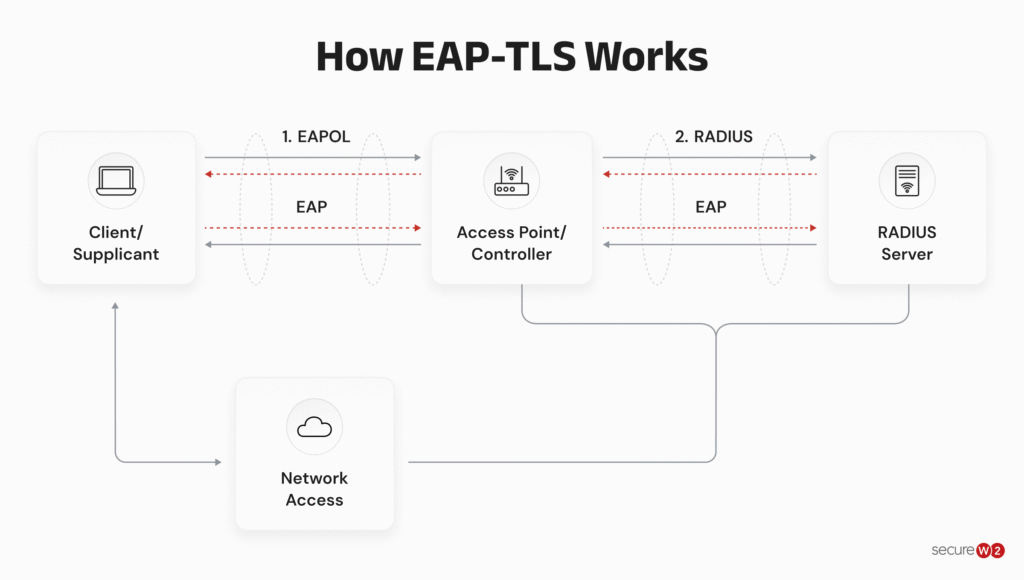
This image shows how EAP-TLS authentication works between a client device, an access point or controller, and a Remote Authentication Dial-In User Service (RADIUS) server before the client is granted network access.
Is EAP-TLS Secure?
EAP-TLS is widely regarded as the most secure authentication protocol for 802.1X networks. The requirement for mutual certificate authentication has kept the protocol relevant and dominant for over 15 years.
One of the primary security benefits of EAP-TLS networks is the ability to perform server certificate validation. This technique renders your users all but invulnerable to common over-the-air attacks, such as man-in-the-middle (MITM) attacks.
MITM and other over-the-air attacks rely on spoofed access points (APs) to fool users’ devices into automatically attempting to authenticate to the fake AP. The device will automatically submit real credentials without the user’s knowledge, allowing the hacker to farm credentials with little effort.
Server certificate validation requires both the client and the server to validate each other's identity, so a device configured for EAP-TLS authentication (and thus server certificate validation) won’t mistake a spoofed AP for the real one.
That mutual authentication requirement is fundamental to all certificate-based authentication and is the source of EAP-TLS’s strength. Certificates perform similar roles in secure applications like S/MIME and digital signature signing.
Benefits of EAP-TLS
EAP-TLS offers many advantages that make it a popular choice for organizations looking to strengthen their security infrastructure while creating an easy user experience. Let’s look at the key benefits of EAP-TLS.
Unparalleled Authentication Security
EAP-TLS is one of the most reliable options when comparing authentication security protocols. When X.509 digital certificates are encrypted using state-of-the-art cryptographic methods like elliptic curve cryptography (ECC), the protocol provides the highest level of security possible.
Due to its elaborate security mechanisms, EAP-TLS is very resistant to eavesdropping, man-in-the-middle attacks, and other forms of network intrusion. Businesses can set up a secure communication channel using digital certificates and robust encryption, protecting the privacy and security of information sent over the network.
Enhanced Network Visibility and Access Control
EAP-TLS is an alternative to password-based authentication that uses digital certificates bound to individual users or devices. This feature greatly improves network visibility, letting admins easily identify and authenticate connected devices.
Organizations can mitigate risks of unauthorized access and potential security breaches by ensuring only authenticated devices with valid certificates are permitted access. This function helps to improve the organization’s security by making the network architecture stronger and easier to manage.
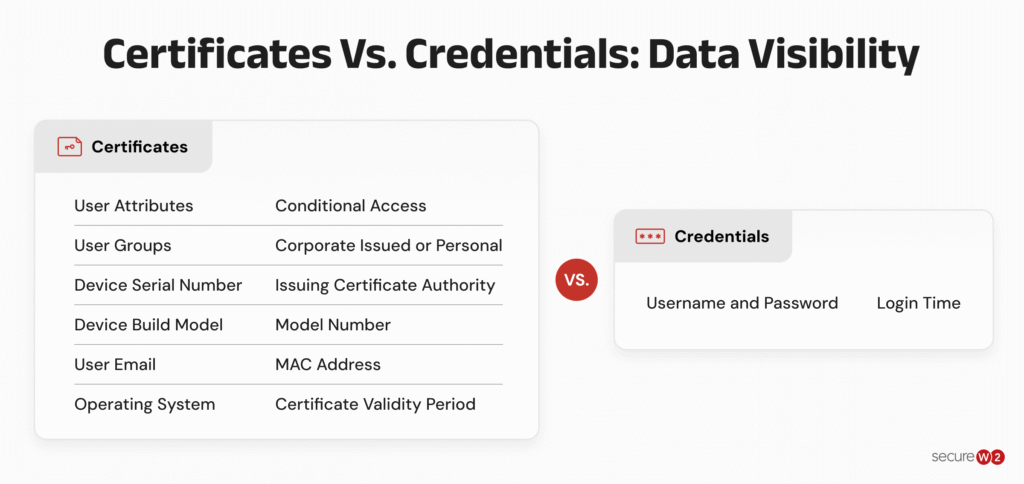
EAP-TLS authentication, which uses digital certificates, improves network visibility and access control. Certificates provide rich context, including user types, device ownership, device specifications, authorization history, user roles, and current situation. This information improves network security and administration.
The image below shows the difference in the user or client data that is available for certificates versus credentials:
Improved User Experience and Reduced Overhead
Compared with credential-based networks, EAP-TLS provides a better user experience. Certificates free users from the stress of memorizing and storing complicated passwords by attaching them to devices and enabling automatic authentication.
IT departments can save time and effort by reducing common authentication problems like forgotten passwords and frequent password changes. Administrators control a certificate’s validity period, allowing them to manage re-verification cycles and guaranteeing safe network access.
Superior Security Over Password-based Systems
Password reuse is a major security concern in password-based systems since it increases the likelihood of unauthorized access and data breaches. EAP-TLS, on the other hand, uses digital certificates to prevent certificate duplication and reuse, making it impossible to use stolen credentials.
EAP-TLS provides a stronger security framework that protects sensitive data and resources by reducing the risks of password theft and reuse and strengthening the network against sophisticated cyberattacks.
Incorporating EAP-TLS into a company’s network infrastructure can increase security, improve the user experience, and simplify administration, all of which contribute to a more secure, resilient network better suited to long-term operations and data protection.
Does EAP-TLS Require Certificates?
Technically, the standard does not mandate using X.509 digital certificates. However, the reality is that omitting certificates would negate the security benefits of the protocol and render much of the infrastructure pointless.
Since EAP-TLS requires mutual authentication, you’re unlikely to find an implementation that does not require client-side certificates.
Other Extensible Authentication Protocol (EAP) methods use different authentication approaches, and their certificate requirements vary.
Examples of EAP methods include:
- EAP Tunneled Transport Layer Security (EAP-TTLS)
- EAP Pre-Shared Key (EAP-PSK)
- EAP Password (EAP-PWD)
- Lightweight Extensible Authentication Protocol (LEAP)
- EAP Encrypted Key Exchange (EAP-EKE)
- EAP Transport Layer Security (EAP-TLS)
- EAP-MD5
- EAP Protected One-Time Password (EAP-POTP)
- EAP Internet Key Exchange v. 2 (EAP-IKEv2)
- EAP Authentication and Key Agreement (EAP-AKA)
- EAP Authentication and Key Agreement Prime (EAP-AKA’)
- EAP Flexible Authentication via Secure Tunneling (EAP-FAST)
- Tunnel Extensible Authentication Protocol (TEAP)
- EAP Subscriber Identity Module (EAP-SIM)
- EAP Generic Token Card (EAP-GTC)
- Nimble out-of-band authentication for EAP (EAP-NOOB)
These methods differ in how they authenticate users and devices. EAP-TLS relies on certificates for mutual authentication, while other methods may use passwords, pre-shared keys, or tunneled authentication. The right method depends on an organization's security requirements and network environment.
EAP-TLS Compared
Not all EAP methods are created equal. It could be a critical mistake to assume that an authentication protocol is secure because it is ubiquitous.
Many legacy systems still use outdated wireless security paradigms, including authentication protocols with known vulnerabilities. Unfortunately, connecting to some of these systems (particularly on-premises networks) may require special infrastructure to bridge the gap or force you to sacrifice the security and convenience of modern authentication solutions.
The differences between EAP methods become clearer when you compare their encryption, authentication speed, directory support, and credential requirements. The table below highlights key differences between EAP-TLS and two common alternatives, PEAP-MSCHAPv2 and EAP-TTLS/PAP.
|
WPA2 & WPA3 Enterprise Common Protocols |
Level of Encryption |
Authentication Speed |
Directory Support |
Credentials |
|---|---|---|---|---|
|
EAP-TLS |
Public-private key cryptography |
Fast |
Universal |
Passwordless |
|
PEAP-MSCHAPv2 |
Bad encryption (MD4, compromised since 1995) |
Slow |
Active Directory |
Passwords |
|
EAP-TTLS/PAP |
No credential encryption |
Slowest |
Non-AD LDAP servers |
Passwords |
What Is the Difference Between PEAP and EAP-TLS?
PEAP is an EAP protocol, even though it breaks the naming convention a little bit. The ‘P’ in ‘PEAP’ stands for “Protected”.
PEAP was the product of a collaborative effort between Cisco, Microsoft, and RSA, meant to add intrinsic protection to EAP, which relies on protected communications by default.
PEAP itself technically does not define a particular method; rather, it contains instructions for chaining together EAP protocols for additional security. In practice, almost every PEAP implementation is PEAP-MSCHAPv2 due to its inclusion in ubiquitous Microsoft environments.
Unfortunately, PEAP is highly susceptible to man-in-the-middle attacks and has been for more than a decade now. This is particularly crippling in an era when hackers are taking the time to be more hands-on.
Imagine a dedicated hacker spoofing your office access point from a van parked outside your house, a scenario made all the more likely as C-suite level executives continue to work remotely.
EAP-TLS entirely circumvents this issue by using server certificate validation. Even in the scenario described above, it’s relatively simple to use a VPN to secure a connection to your office RADIUS server for remote authentication.
What Is the Difference Between EAP-TTLS and EAP-TLS?
The main difference between EAP-TTLS and EAP-TLS is that the former requires only server-side certificates, while EAP-TLS uses mutual certificate authentication.
To compensate, TTLS uses a tunnel (hence “Tunneled” Transport Layer Security). It is essentially an SSL wrapper encapsulating the standard EAP message. However, it does not encrypt the message.
Unfortunately, EAP-TTLS communicates everything (including credentials) in clear text. And because TTLS doesn't use server certificate validation, it’s especially susceptible to over-the-air attacks — which bypass the tunnel and deliver credentials in clear text directly into a hacker's hands.
The security plan that scales with you.
Our solutions can scale from mid-market to global enterprises. Compare options and see how our solutions protect you from costly breaches and ensure peace of mind.
What Is Required for EAP-TLS Authentication?
EAP-TLS authentication relies on several components working together to verify device identities and control network access. These include a RADIUS server, network access equipment, and a public key infrastructure (PKI) to issue and manage digital certificates.
The diagram below illustrates how these components interact during authentication, including how cloud-based RADIUS solutions communicate with an identity provider to validate a connection.
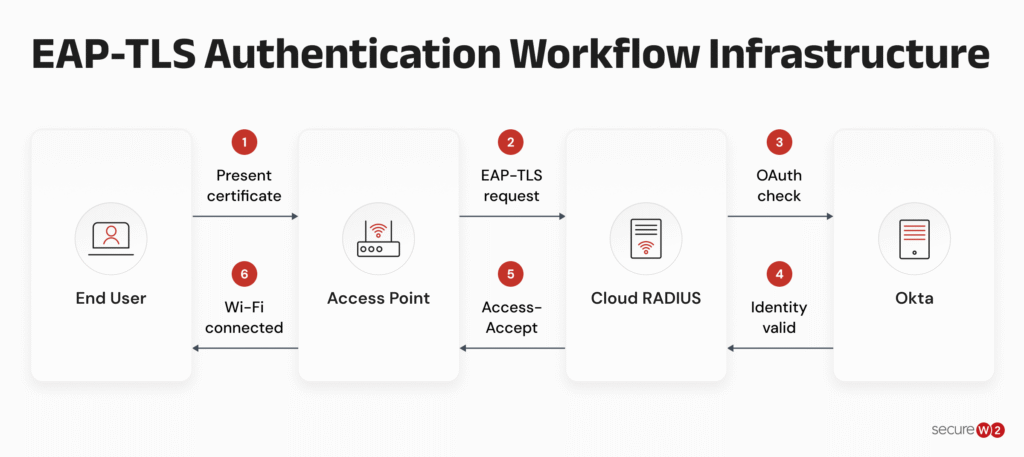
The minimum infrastructure for EAP-TLS authentication typically includes:
- AAA/RADIUS server: Handles authentication requests and communicates with network access equipment.
- User directory or identity provider: Supplies identity information for authentication and access policies, depending on the deployment.
- 802.1X-capable access point, switch, or controller: Enforces network access based on the authentication result.
- Public key infrastructure: Issues and manages the digital certificates used to authenticate clients and servers.
However, establishing this infrastructure is only part of the process. The PKI must support the issuance, provisioning, renewal, and revocation of digital certificates throughout their lifecycle.
A PKI may include several components and processes, such as a certificate authority (CA), a registration authority (RA), certificate templates or issuance policies, and certificate revocation mechanisms such as certificate revocation lists (CRLs). Organizations must also consider how private keys are protected and whether key recovery is necessary for their use case.
Certificate provisioning and onboarding are especially important. Every client device needs an appropriate certificate, and the authentication server must present a certificate that clients can validate. Organizations must establish a reliable way to distribute these certificates and keep them up to date.
Depending on the size and complexity of the network, certificate management may involve MDM systems, automated enrollment methods, customized network policies, or manual distribution. Planning these processes helps organizations maintain secure, reliable access as devices are added, replaced, or removed from the network.
Cloud-Based vs. On-Premises EAP-TLS Infrastructure
Organizations can build an EAP-TLS network using open-source and free tools, including FreeRADIUS, Microsoft Network Policy Server (NPS), and Active Directory Certificate Services (AD CS).
The video below walks through how to set up EAP-TLS with an existing RADIUS server, including certificate enrollment, identity provider integration, and authentication testing.
However, these on-prem deployments may require organizations to manage their own authentication servers and certificate infrastructure.
SecureW2 JoinNow Dynamic PKI is cloud-based, giving it a significant edge over on-premises. Because of the cloud-based architecture, organizations can handle their certificate-based authentication from any location.
The graphic below depicts the Dynamic PKI’s workflow, demonstrating how it automates the certificate management process.
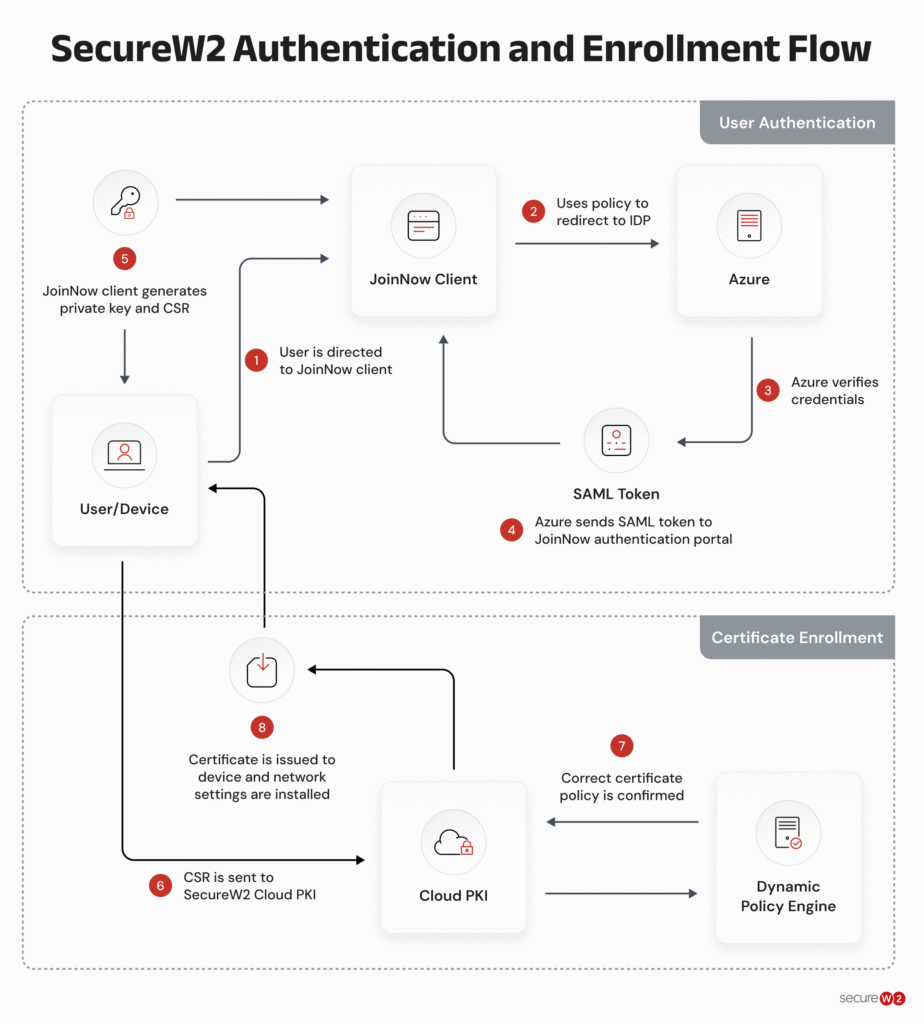
This cloud-based strategy lets organizations adopt EAP-TLS authentication securely without being constrained by on-premises infrastructure, increasing flexibility and operational efficiency.
Simplify EAP-TLS Deployment With SecureW2
EAP-TLS provides strong network authentication by verifying identities with digital certificates instead of relying on passwords. The challenge for IT teams is managing those certificates across every device that needs network access.
SecureW2 JoinNow Dynamic PKI helps automate certificate issuance and lifecycle management, while JoinNow Cloud RADIUS handles certificate-based authentication and network access policies. Together, they help organizations implement EAP-TLS without having to build and maintain all the underlying infrastructure themselves.
Schedule a demo to see it in action.
Frequently Asked Questions
Should we use EAP-PEAP or EAP-TLS for our WPA2 Enterprise network?
EAP-TLS is highly recommended. While PEAP relies on vulnerable MSCHAPv2 passwords, EAP-TLS uses cryptographic certificates for mutual authentication. Many organizations upgrade to EAP-TLS to eliminate password-related IT tickets and enhance their zero-trust security posture.
How do devices verify the RADIUS server during EAP-TLS authentication?
During the EAP-TLS handshake, the client device must mutually validate the RADIUS server's identity. You achieve this by pushing the RADIUS server’s Root CA to the client’s trust store, ensuring the device only authenticates against legitimate infrastructure.
What is the difference between user-based and device-based EAP-TLS certificates?
Device certificates live in the machine store, allowing devices to connect to Wi-Fi at the login screen before a user signs in. User certificates live in the personal store and only authenticate after the user inputs their credentials.
Can EAP-TLS stop users from sharing their Wi-Fi access?
Yes. Unlike passwords that are easily shared across an entire student body or staff, EAP-TLS relies on non-exportable certificates tied cryptographically to specific hardware. This effectively neutralizes credential spreading and locks down unauthorized access.
What is the difference between TLS and EAP-TLS?
Transport Layer Security (TLS) is a cryptographic protocol that protects communications by encrypting data and authenticating the parties involved. EAP-TLS uses TLS within the Extensible Authentication Protocol (EAP) framework to authenticate users or devices on networks such as WPA2-Enterprise and WPA3-Enterprise Wi-Fi. It uses digital certificates for mutual authentication, allowing both the client and authentication server to verify each other's identities before network access is granted. In short, TLS secures communications, while EAP-TLS applies TLS to network access authentication.
