Introduction
SecureW2 JoinNow offers API access for Managed Service Providers (MSPs) to automate the lifecycle of their child organizations. MSPs can now provision and manage child organizations programmatically by using the /v1/organizations endpoint with a REST API Organization Management Token, replacing the manual setup in the JoinNow Management Portal that was time-consuming and hard to scale.
This token is available exclusively for MSP organizations and supports two configurable access levels:
- Read-Only — retrieve child organization details (GET)
- Read-Write — create, update, and retrieve organization details (GET, POST, PATCH)
This document describes how to configure the REST API Organization Management Token and use the /v1/organizations endpoint to create, retrieve, and update child organizations under an MSP.
SAML Authentication Without DNS Entry
New organizations no longer require a DNS entry for SAML authentication. This applies to organizations created through both the JoinNow Management Portal and the API.
Existing organizations continue to use DNS entries by default. To enable or disable the DNS entry for any organization, use the Enable DNS Entry checkbox under General > Organization > Basic in the JoinNow Management Portal.
Prerequisites
The following prerequisite is required to configure the REST API Organization Management Token.
- An active JoinNow Management Portal subscription with an APEX, Guardian, or Campus license. Base Tier subscriptions (Apex Professional, Guardian Core, and Campus Core) are not supported.
- REST API Organization Management Token is applicable only to MSP organizations.
Creating a Device Management Platform
This section describes how to create a REST API Organization Management Token in the JoinNow Management Portal and configure the generated API Key and API Secret in the API Response screen, enabling MSPs to automate child organization provisioning via the /v1/organizations endpoint.
To generate the REST API Organization Management Token, perform the following steps:
- Navigate to Integration Hub > Device Management Platforms.
- Click Add.
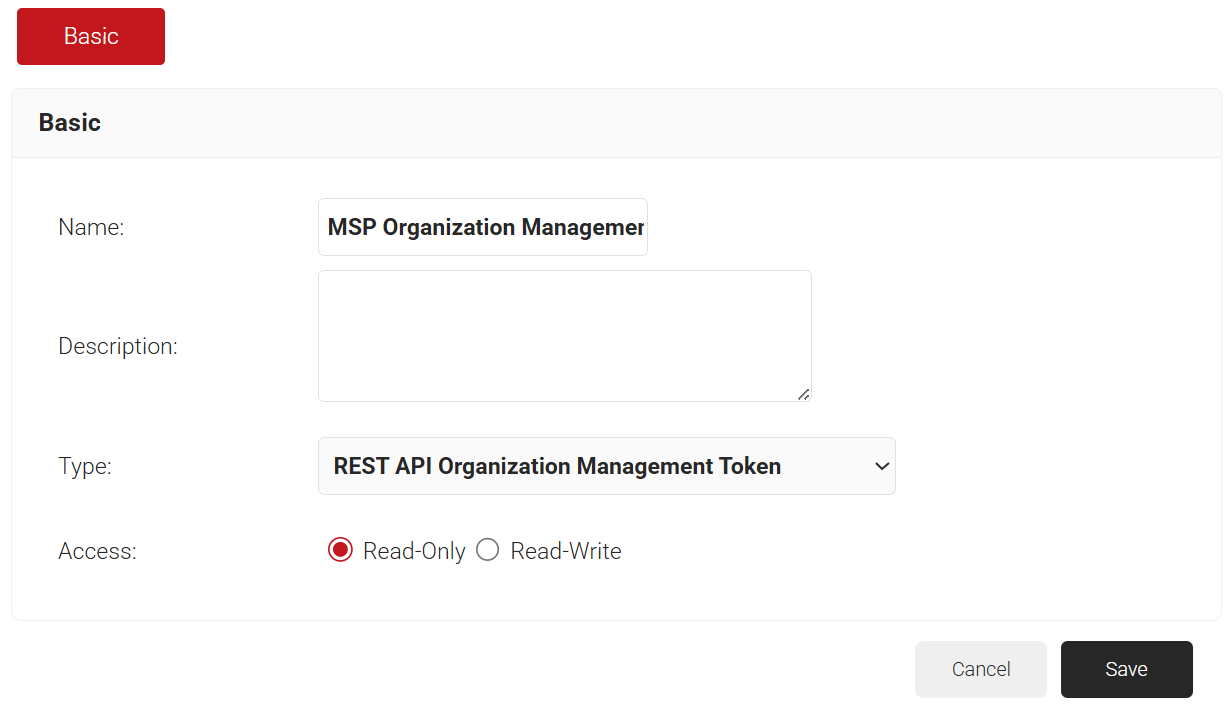
- In the Name field, enter a name for the device management platform.
- In the Description field, enter a brief description for the device management platform.
- From the Type drop-down list, select REST API Organization Management Token.
- In the Access field:
- Read-Only: Allows the MSP to retrieve child organization details.
- Read-Write: Allows the MSP to create, update, and retrieve child organization details.

- Click Save. A .csv file containing the API Key ID and API Secret is downloaded. Save the .csv file securely. This file is downloaded only once during token creation and cannot be retrieved if lost.
Use this token in the header of the following APIs:- Get an Organization
- Get All Organizations of an MSP
- Create a New Organization
- Update an Organization
Note: The REST API Organization Management Token can be used only with the /v1/organizations endpoint. It does not support device, user, or certificate management endpoints.
Organization Management API Reference
To authenticate API requests, configure the API Key in the API Response screen generated in the Creating a Device Management Platform section.
- In the API Response screen, navigate to the Headers tab.
- Add Authorization as the header key.
- Enter the API Secret obtained from the Creating a Device Management Platform section as the value.
- Select the required request method — GET, POST, or PATCH.
- In the URL field, enter the API endpoint URL: https://api.securew2.com/v1/organizations
- Click Send to execute the request.
Two new fields, createdDate and updatedDate, have been added to the organization record in the database. These fields are returned in the API response to indicate when the organization was created and last updated.
Read-Only Access
Get All Organizations of an MSP
This API retrieves all child organizations under the MSP, with paginated results.
URL | https://api.securew2.com/v1/organizations/ |
Method | GET |
URL Query Parameters | page (integer, optional): The page number to return, starting from 0. Default: 0 size (integer, optional): The number of records returned per page. Default: 25 |
Request Header | Authorization: Bearer<space><secret> |
Response Header | x-request-id: A unique identifier assigned to each API request, used for tracing and troubleshooting. x-total-count: The total number of child organizations under the MSP. |
Applicable Error Responses |
|
Sample Success Response
Sample success response that returns the list of child organizations.
					[
{
"name": "manualMSPChildOrg",
"domainName": "msp-securew2.com",
"allowOrganizationCodeSearch": true,
"allowDomainNameSearch": true,
"notifyOnCriticalEvents": true,
"notifyOnSubscriptionUpdates": false,
"notifyOnSubscriptionExpiration": false,
"subscriptionExpirationNotificationFrequency": "5,3,2,1",
"createdDate": "2026-04-16T12:23:25Z",
"organizationCode": "18702",
"organizationIdentifier": "manualMSPChildOrg",
"subscriptionSummary": {
"subscriptions": [],
"utilization": []
}
},
{
"name": "mspchild-1",
"domainName": "mspchild1.com",
"allowOrganizationCodeSearch": true,
"allowDomainNameSearch": true,
"notifyOnCriticalEvents": true,
"notifyOnSubscriptionUpdates": false,
"notifyOnSubscriptionExpiration": false,
"subscriptionExpirationNotificationFrequency": "5,3,2,1",
"createdDate": "2026-04-21T12:53:54Z",
"updatedDate": "2026-04-22T11:23:56Z",
"organizationCode": "1231",
"organizationIdentifier": "mspchild1",
"subscriptionSummary": {
"subscriptions": [
{
"name": "Dynamic PKI",
"type": "Apex Absolute",
"purchaseDate": "2026-04-20T00:00:00Z",
"purchaseExpiryDate": "2026-04-30T00:00:00Z",
"supportExpiryDate": "2026-04-30T00:00:00Z",
"status": "Expired"
},
{
"name": "Dynamic Cloud RADIUS",
"type": "Apex Absolute",
"purchaseDate": "2026-04-20T00:00:00Z",
"purchaseExpiryDate": "2026-04-30T00:00:00Z",
"supportExpiryDate": "2026-04-30T00:00:00Z",
"status": "Expired"
},
{
"name": "Advanced Security Ecosystems - SASE",
"type": null,
"purchaseDate": "2026-04-20T00:00:00Z",
"purchaseExpiryDate": "2026-04-30T00:00:00Z",
"supportExpiryDate": "2026-04-30T00:00:00Z",
"status": "Expired"
}
],
"utilization": []
}
}
]
Get an Organization
This API retrieves a specific child organization under the MSP, identified by its organizationCode in the URL path. You can also use optional query parameters to filter by name, domainName, or organizationIdentifier.
URL | https://api.securew2.com/v1/organizations/<organizationCode> |
Method | GET |
URL Path Parameters | organizationCode (string): A unique identifier assigned to the child organization. Example: 12345 |
URL Query Parameters | name (string, optional): The name of the child organization. Example: SecureW2 domainName (string, optional): The domain name associated with the child organization. Example: securew2.com organizationIdentifier (string, optional): A unique identifier used to reference the child organization. Example: securew2-org |
Request Header | Authorization: Bearer<space><secret> |
Response Header | x-request-id: Unique request ID (e.g. 9e656f02-83f1-4917-9329-ad7f76eb524b) |
Applicable Error Responses |
|
Sample Success Response
Sample success response that returns the details of an organization.
					{
        "name": "mspchild-1",
        "domainName": "mspchild1.com",
        "allowOrganizationCodeSearch": true,
        "allowDomainNameSearch": true,
        "notifyOnCriticalEvents": true,
        "notifyOnSubscriptionUpdates": false,
        "notifyOnSubscriptionExpiration": false,
        "subscriptionExpirationNotificationFrequency": "5,3,2,1",
        "createdDate": "2026-04-21T12:53:54Z",
        "updatedDate": "2026-04-22T11:23:56Z",
        "organizationCode": "1231",
        "organizationIdentifier": "mspchild1",
        "subscriptionSummary": {
            "subscriptions": [
                {
                    "name": "Dynamic PKI",
                    "type": "Apex Absolute",
                    "purchaseDate": "2026-04-20T00:00:00Z",
                    "purchaseExpiryDate": "2026-04-30T00:00:00Z",
                    "supportExpiryDate": "2026-04-30T00:00:00Z",
                    "status": "Expired"
                },
                {
                    "name": "Dynamic Cloud RADIUS",
                    "type": "Apex Absolute",
                    "purchaseDate": "2026-04-20T00:00:00Z",
                    "purchaseExpiryDate": "2026-04-30T00:00:00Z",
                    "supportExpiryDate": "2026-04-30T00:00:00Z",
                    "status": "Expired"
                },
                {
                    "name": "Advanced Security Ecosystems - SASE",
                    "type": null,
                    "purchaseDate": "2026-04-20T00:00:00Z",
                    "purchaseExpiryDate": "2026-04-30T00:00:00Z",
                    "supportExpiryDate": "2026-04-30T00:00:00Z",
                    "status": "Expired"
                }
            ],
            "utilization": []
        }
    }
Read-Write Access
Get All Organizations of an MSP and Get an Organization
These APIs retrieve child organization details under the MSP — either all organizations with paginated results, or a specific organization identified by its organizationCode in the URL path. For more information, refer to Get All Organizations of an MSP and Get an Organization.
Create a New Organization
This API creates a new child organization under the MSP. The new organization is automatically linked to the MSP organization.
URL | https://api.securew2.com/v1/organizations/ |
Method | POST |
URL Query Parameters | NA |
Request Header | Authorization: Bearer<space><secret> Content-Type: application/json |
Applicable Error Responses |
|
Note: The organizationIdentifier field must contain only letters, numbers, and hyphens. Special characters are not allowed because the identifier is used in DNS-derived URLs for legacy organizations.
The following table describes the fields used in Create a New Organization API requests.
Field | Type | Constraints | Default |
Required Fields | |||
name | string | Max 99 characters; must be unique | NA |
domainName | string | Max 99 characters; must be unique | NA |
organizationIdentifier | string | Max 49 characters; alphanumeric and hyphens only; must be unique | NA |
Optional Fields | |||
organizationCode | Number | Max 10 characters; numeric only; must be unique | NA |
allowOrganizationCodeSearch | boolean | NA | true |
allowDomainNameSearch | boolean | NA | true |
notifyOnCriticalEvents | boolean | NA | true |
notifyOnSubscriptionUpdates | boolean | NA | false |
notifyOnSubscriptionExpiration | boolean | NA | false |
subscriptionExpirationNotificationFrequency | string | Must be one of: “5,3,2,1” or “45,30,14,10,7,3,2,1” | “5,3,2,1” |
cspAllowedDomains | string | Comma-separated list of domains | NA |
Sample Request
					{
"name": "SecureW2",
"domainName": "securew2.com",
"organizationCode": "12345",
"organizationIdentifier": "securew2-org",
"allowOrganizationCodeSearch": false,
"allowDomainNameSearch": false,
"notifyOnCriticalEvents": true,
"notifyOnSubscriptionUpdates": false,
"notifyOnSubscriptionExpiration": false,
"subscriptionExpirationNotificationFrequency": "5,3,2,1",
"cspAllowedDomains": "mydomain1.com,mydomain2.com"
}
Sample Success Response
A successful request returns a 200 OK status code with the new organization in the response body.
					{
"name": "SecureW2",
"domainName": "securew2.com",
"allowOrganizationCodeSearch": false,
"allowDomainNameSearch": false,
"notifyOnCriticalEvents": true,
"notifyOnSubscriptionUpdates": false,
"notifyOnSubscriptionExpiration": false,
"subscriptionExpirationNotificationFrequency": "5,3,2,1",
"cspAllowedDomains": "mydomain1.com,mydomain2.com",
"createdDate": "2026-05-07T10:15:00Z",
"updatedDate": "2026-05-07T10:15:00Z",
"organizationCode": "12345",
"organizationIdentifier": "securew2-org",
}
Update an Organization
This API updates the configurable properties of an existing child organization. The organizationCode and organizationIdentifier cannot be modified after the organization is created.
URL | https://api.securew2.com/v1/organizations/<organizationCode> |
Method | PATCH |
URL Path Parameters | organizationCode (string): The unique code of the child organization you want to update. |
Request Header | Authorization: Bearer<space><secret> Content-Type: application/json |
Applicable Error Responses |
|
The following table describes the fields used in Update an Organization API requests.
Field | Type | Constraints | Default |
Updatable Fields | |||
name | string | Max 99 characters; must be unique | NA |
domainName | string | Max 99 characters; must be unique | NA |
allowOrganizationCodeSearch | boolean | NA | true |
allowDomainNameSearch | boolean | NA | true |
notifyOnCriticalEvents | boolean | NA | true |
notifyOnSubscriptionUpdates | boolean | NA | false |
notifyOnSubscriptionExpiration | boolean | NA | false |
subscriptionExpirationNotificationFrequency | string | Must be one of: “5,3,2,1” or “45,30,14,10,7,3,2,1” | “5,3,2,1” |
cspAllowedDomains | string | Comma-separated list of domains | NA |
Immutable Fields | |||
organizationIdentifier | string | Max 49 characters; alphanumeric and hyphens only; must be unique | NA |
organizationCode | Number | Max 10 characters; numeric only; must be unique | NA |
Note: Immutable fields cannot be modified once the organization is created.
Sample Request
					{
"name": "SecureW2",
"domainName": "securew2.com",
"allowOrganizationCodeSearch": true,
"allowDomainNameSearch": false,
"notifyOnCriticalEvents": true,
"notifyOnSubscriptionUpdates": true,
"notifyOnSubscriptionExpiration": false,
"subscriptionExpirationNotificationFrequency": "5,3,2,1",
"cspAllowedDomains": "mydomain1.com,mydomain2.com"
}
Sample Success Response
A successful request returns a 200 OK status code with the updated organization in the response body.
					{
"name": "SecureW2",
"domainName": "securew2.com",
"allowOrganizationCodeSearch": true,
"allowDomainNameSearch": false,
"notifyOnCriticalEvents": true,
"notifyOnSubscriptionUpdates": true,
"notifyOnSubscriptionExpiration": false,
"subscriptionExpirationNotificationFrequency": "5,3,2,1",
"cspAllowedDomains": "mydomain1.com,mydomain2.com",
"createdDate": "2026-04-05T14:30:00Z",
"updatedDate": "2026-05-07T11:42:00Z",
"organizationCode": "12345",
"organizationIdentifier": "securew2-org",
"subscriptionSummary": {
            "subscriptions": [
                {
                    "name": "Dynamic PKI",
                    "type": "Apex Absolute",
                    "purchaseDate": "2026-04-20T00:00:00Z",
                    "purchaseExpiryDate": "2026-04-30T00:00:00Z",
                    "supportExpiryDate": "2026-04-30T00:00:00Z",
                    "status": "Expired"
                },
                {
                    "name": "Dynamic Cloud RADIUS",
                    "type": "Apex Absolute",
                    "purchaseDate": "2026-04-20T00:00:00Z",
                    "purchaseExpiryDate": "2026-04-30T00:00:00Z",
                    "supportExpiryDate": "2026-04-30T00:00:00Z",
                    "status": "Expired"
                },
                {
                    "name": "Advanced Security Ecosystems - SASE",
                    "type": null,
                    "purchaseDate": "2026-04-20T00:00:00Z",
                    "purchaseExpiryDate": "2026-04-30T00:00:00Z",
                    "supportExpiryDate": "2026-04-30T00:00:00Z",
                    "status": "Expired"
                }
            ],
            "utilization": []
        }
    }

}
Error Responses
This chapter includes the following sections:
Error Codes
HTTP Status | Message | Description |
200 | OK | Request was successful. |
400 | Bad Request | The request contains invalid input, missing required fields, or an organizationIdentifier with characters other than letters, numbers, or hyphens. |
401 | Unauthorized | The token is invalid, does not belong to an MSP organization, or lacks the access level required for the operation. |
404 | Not Found | The specified URL is invalid, or no organization with the given organizationCode exists under the MSP. |
500 | Internal Server Error | An internal error occurred. Contact support for more information. |
Code | Message | Field | Issue |
1003 | Organization name is required | name | Missing |
1004 | Organization name is invalid | name | Length exceeds 99 characters |
1003 | Domain name is required | domainName | Missing |
1004 | Organization domain name is invalid | domainName | Length exceeds 99 characters |
1003 | Organization identifier is required | organizationIdentifier | Missing |
1004 | Organization identifier is invalid | organizationIdentifier | Invalid format or length exceeds 49 characters |
1002 | Organization not found | NA | Not found |
5015 | Organization name already exists | name | Duplicate |
5015 | Domain name already exists | domainName | Duplicate |
5015 | Organization identifier already exists | organizationIdentifier | Duplicate |
5015 | Organization code already exists | organizationCode | Duplicate |
5018 | Invalid field <fieldName> in request body | The field name is not present in our body | Bad request |
1004 | Invalid Domain name <input> | domainName | Bad request |
1004 | Invalid Domain Name <input> | cspAllowedDomains | Bad request |
1004 | Invalid Invalid subscription expiration notification frequency<input> | subscriptionExpirationNotificationFrequency | Bad request |
Sample Error Responses
Invalid Token
Returned when the token is missing, invalid, expired, or not associated with an MSP organization.
					{
"code": 2,
"message": "Unauthorized: Invalid credentials",
"timestamp": "Thu, 07 May 2026 10:22:51 UTC",
"requestId": "717f5782-272d-4e12-9a28-0377163734fc"
}
Invalid URL
Returned when the request URL does not match a supported endpoint.
					{
"timestamp": 1746609981788,
"status": 404,
"error": "Not Found",
"message": "Not Found",
"path": "/v2/organizations/"
}
Organization Not Found
Returned by the Get an Organization and Update an Organization endpoints when the specified organizationCode doesn’t exist under the MSP.
					{
"code": 1002,
"message": "Organization not found",
"timestamp": "Thu, 07 May 2026 10:35:29 UTC",
"requestId": "84e64617-a59e-4710-a6f8-5e0fe94ffb10"
}
Invalid Input Data
Returned by the Create a New Organization and Update an Organization endpoints when one or more required fields are missing, or a field value fails validation.
					{
"code": 1003,
"message": "Domain Name is required",
"timestamp": "Thu, 07 May 2026 11:02:14 UTC",
"requestId": "e1c7f0e3-7a1b-4d3e-9f24-9b1d4f4c20a1"
}
Organization Identifier Has Invalid Characters
Returned by the Create a New Organization endpoint when the organizationIdentifier contains characters other than alphabets, numbers, or hyphens.
					{
"code": 1004,
"message": "Organization identifier should be alphanumeric",
"timestamp": "Thu, 07 May 2026 11:14:02 UTC",
"requestId": "5b3c8a91-2f10-4cd1-bd62-2a7c8f9c6b34"
}
Invalid Field
Returned by the Create a New Organization and Update an Organization endpoints when the request body contains a field that isn’t supported by the endpoint.
					{
"code": 5018,
"message": "Invalid field `invalidd` in request body",
"timestamp": "Thu, 07 May 2026 11:14:02 UTC",
"requestId": "5b3c8a91-2f10-4cd1-bd62-2a7c8f9c6b34"
}
Duplicate Input
Returned by the Create a New Organization and Update an Organization endpoints when the request body contains a value that already exists for a unique field.
					{
"code": 5015,
"message": "Domain name already exists",
"timestamp": "Thu, 07 May 2026 11:14:02 UTC",
"requestId": "5b3c8a91-2f10-4cd1-bd62-2a7c8f9c6b34"
}
Data and Monitoring
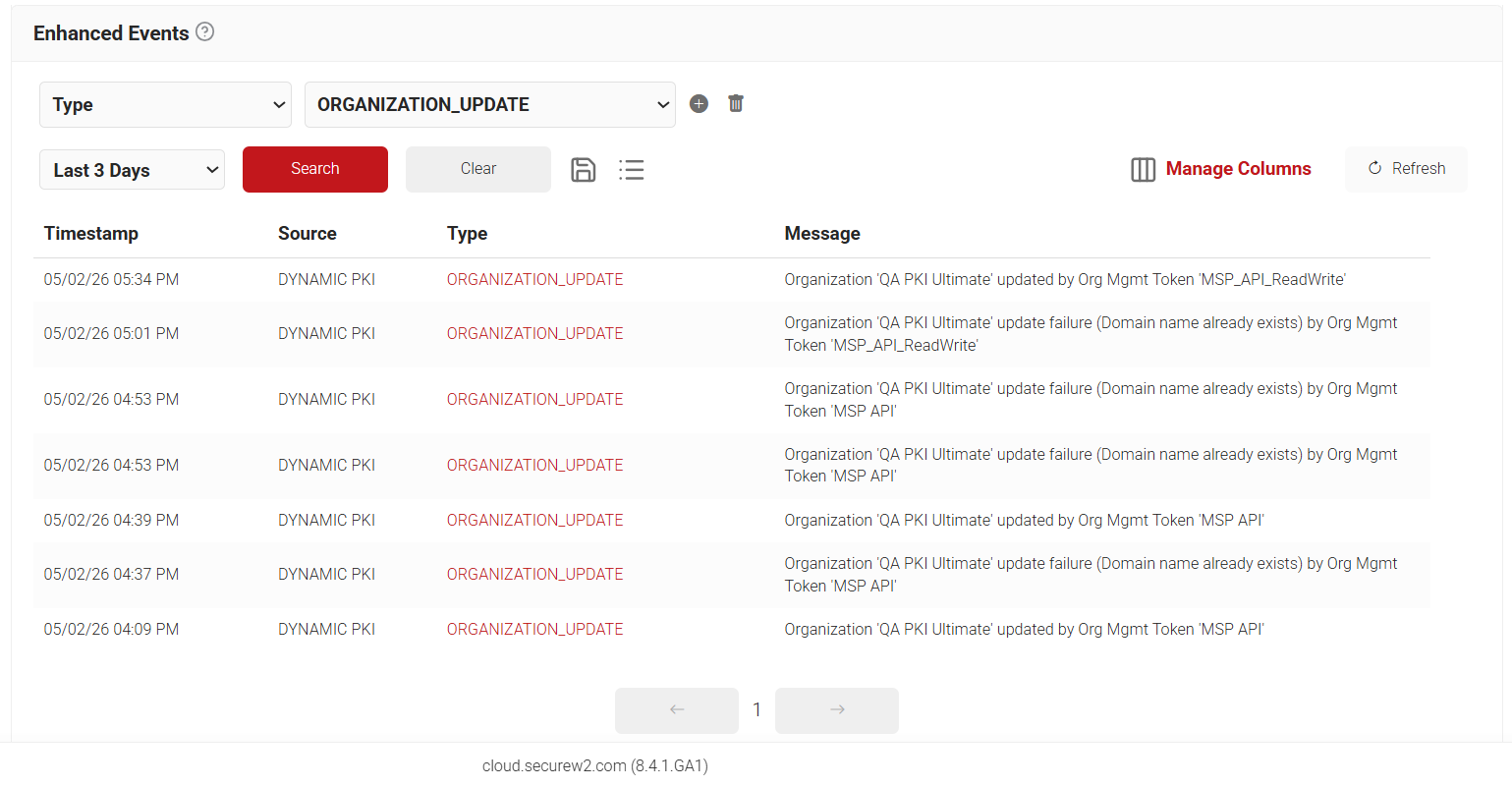
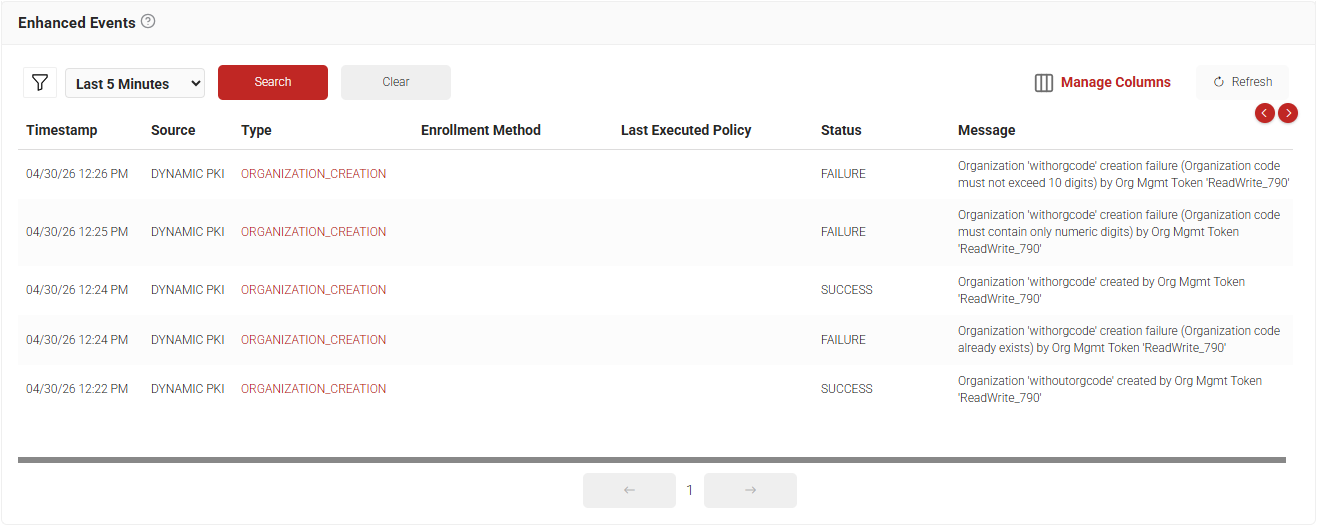
After an organization is created or updated through these APIs, the corresponding event appears in the Enhanced Events page. To access the Enhanced Events page, navigate to Data and Monitoring > Enhanced Events.
Events are logged for both successful and failed operations, with failures including the appropriate error messages.
Organization Creation Event
Organization Update Event