Key Takeaways
- In mTLS, a two-way handshake between client and server lets each validate the other’s identities by presenting digital certificates.
- mTLS is more secure than standard TLS, where only the server identity is authenticated by the client, making standard TLS susceptible to unauthorized access and attacks.
- Pair mTLS with 802.1X authentication using managed solutions like the SecureW2 JoinNow platform for trusted, low-overhead network security.
Mutual Transport Layer Security (mTLS) is a form of mutual authentication that makes sure everyone on a network is who they claim to be and helps prevent intruders from accessing sensitive information.
mTLS can improve the network security of your organization and is an important factor when implementing or improving cryptographic encryption.
In this article, we will:
- Explain how mTLS safeguards sensitive data in a continuous-trust security framework via two-way authentication
- Explore how it compares with other authentication methods and what to consider when implementing mutual TLS
What is mTLS Authentication?
mTLS (Mutual TLS) authentication is a form of mutual authentication that extends the standard Transport Layer Security (TLS) protocol to securely verify users, devices, and servers within a network. In traditional TLS (often called “one-way TLS”), only the server proves its identity to the client via a TLS certificate.
With mTLS, both parties present valid X.509 certificates, which are verified against trusted certificate authorities (CAs). This ensures that the client and server mutually confirm each other’s identity before any data is exchanged.
“We don’t have to do this kind of thing in real life. If you’re standing in line at the airport, you already know that the TSA authority is the person with the badge. You know you’re talking to the right person when you verify your identity.”
Micah Spady, Director of Product Marketing at SecureW2
But if checking in at the airport were like mutual TLS, you would check the TSA agent’s badge and credentials just as thoroughly as they check yours before letting you through the gate.
In mutual TLS authentication:
- During the TLS handshake, the client presents its certificate (containing its public key) to the server.
- The server validates the client’s certificate against a trusted CA, checks revocation status, and confirms the client holds the corresponding private key.
- The client performs the same verification on the server’s certificate.
- Only after both sides successfully authenticate does the secure, encrypted session begin.
Attackers can attempt to spoof a web server to a user, or vice versa. However, requiring both parties to authenticate each other with TLS certificates makes such spoofing attacks significantly more difficult to execute.
What Is Transport Layer Security (TLS)?
Transport Layer Security (TLS), or Secure Sockets Layer (SSL), is a cryptographic protocol designed to provide secure communication over a network. It works by setting up a secure encrypted channel that protects transmitted information from eavesdropping, data manipulation and attacks. When browsers want to connect to a secure web server, they use TLS to provide privacy and data integrity for communications between applications.
These are the components and steps involved in TLS:
1. Public Key and Private Key
TLS relies on public key cryptography, which operates through a matched pair of keys, one public, and one private. Data encrypted with the public key can only be unlocked by its corresponding private key.
This relationship is what proves server identity: the server signs a hash of the handshake transcript with its private key, and the client verifies that signature using the public key in the server’s certificate. The public key itself is freely visible to anyone who inspects the domain’s TLS certificate.
2. TLS Certificates
A TLS certificate, or X.509 certificate, is a structured data file that establishes a server’s or device’s authenticity. It bundles several critical pieces of information: the server’s public key, the identity of the issuing certificate authority (the trusted organization that vouches for its validity), and an expiration date that enforces regular renewal.
3. TLS Handshake
The TLS handshake is an authentication sequence that confirms two things: the legitimacy of the server’s TLS certificate and that the server genuinely holds the matching private key. Beyond identity verification, the handshake also negotiates the encryption method that will protect all subsequent communication.
In TLS, when a client initiates a secure connection with a server, both parties perform a handshake to establish the identity of the server and to derive shared secret keying material. After the handshake, session keys are used for symmetric encryption of the subsequent messages during the established session. The TLS handshake is illustrated here:

TLS makes sure sensitive information such as credit card numbers, personal information, and passwords can’t be intercepted and exploited. TLS-based authentication offers a way to ensure that user data is shared with the intended recipient, such as a bank, and not an imposter.
See your security gap before attackers do.
See continuous trust in action on a platform that includes RADIUS, PKI and AI security.
How Does mTLS Authentication Work?
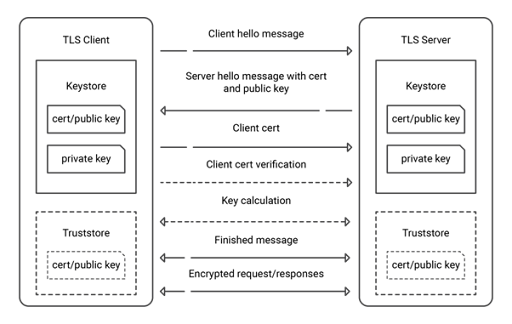
mTLS is an extension of standard TLS. In TLS, only the server proves its identity. The client, which could be a browser or an AI agent, reviews the server’s certificate and then passes along data, but the server never knows who, or what, is on the other end of the connection. Traffic touching the the endpoint is anonymous until an application-layer credential is presented.
Mutual TLS changes that. Both sides present a certificate so that each proves they hold the corresponding private key. mTLS establishes two-way trust before any application data is sent.
Here’s an in-depth look at mTLS:
1. Standard TLS (one-way authentication):
This is how standard TLS works:
- Client connects to the server.
- Server presents its TLS certificate.
- Client verifies the server’s certificate against a trusted CA.
- Client and server exchange data over an encrypted connection.
2. Mutual TLS (two-way authentication):
The mTLS handshake is built on the TLS 1.3 specification (RFC 8446) with client certificate authentication, formalized for OAuth contexts in RFC 8705. If there’s an AI agent involved, the exchange looks like this:
- Client hello: The agent begins a TLS connection and communicates its supported cipher suites and TLS version. It also typically provides a key share used to establish shared secret keying material.
- Server hello and certificate: The server responds with ServerHello and additional TLS parameters. It then sends its certificate and, for mTLS, a CertificateRequest asking the agent to authenticate with a client certificate. The agent’s TLS stack validates the server’s certificate chain against its configured trust store.
- Client certificate: The agent sends its X.509 certificate, which may contain an identity such as order-processing-agent in its subject or SAN fields. The server uses the certificate and its own authorization policies to determine whether the presented identity is trusted.
- CertificateVerify: The agent signs a hash of the handshake transcript with its private key. That signature shows the agent holds the private key corresponding to the certificate’s public key without ever sending the key itself.
- Server verification: The server validates the agent’s certificate chain and verifies the CertificateVerify signature. Depending on the PKI and TLS implementation, it may also check certificate revocation using mechanisms such as OCSP or CRLs.
- Both sides establish session keys: TLS 1.3 derives shared symmetric traffic keys as part of the handshake. These keys are used to protect application data exchanged between the AI agent and server.
- Finished, encrypted session established: Both sides send Finished messages, and all communications that follow are encrypted and authenticated.
Steps 2 through 5 are what differentiates TLS and mTLS. They also show why mTLS authentication fits agent-to-agent and agent-to-service traffic: the server gets cryptographic proof of the caller’s identity before doing anything else.
TLS vs. mTLS
While TLS and mTLS both provide encrypted communication, their authentication processes differ. In TLS, only the server’s identity is authenticated by the client, whereas in mTLS, both client and server identities are authenticated mutually.
mTLS offers a higher level of security than standard TLS because it requires both the client and the server to authenticate each other.
By confirming the identities of both parties involved in the data transmission, mTLS authenticates the client during the handshake, before any application data is sent, and significantly mitigates the risk of a data breach.
TLS vs. mTLS Comparison Table
Here are some of the key differences between TLS and mTLS:
| Feature | TLS | mTLS |
| Server authentication | Yes | Yes |
| Client authentication | No | Yes |
| Uses digital certificates | Server only | Client and server |
| Encryption | Yes | Yes |
| Protection against spoofing | Moderate | Strong |
| Common use cases | HTTPS websites | APIs, Zero-Trust, B2B integrations |
| Complexity | Lower | Higher |
| Certificate management requirements | Moderate | High |
mTLS provides significantly stronger security than standard TLS, but the extra certificate management can add complexity.
When to Use TLS vs mTLS
The table below explains when TLS or mTLS is recommended and why:
| Use Case | Recommended Protocol | Why |
| Basic web browsing | TLS | Only the server’s identity must be confirmed; the client doesn’t need its own certificate. |
| B2B data exchanges | mTLS | Both parties validate the other’s identities before exchanging sensitive information. |
| Cloud services | mTLS | Verifies both client and server, reducing risk of unauthorized access between services. |
| High-security applications | mTLS | Mutual verification enhances trust where one-way authentication isn’t enough. |
| Enterprise network authentication (e.g., EAP-TLS for 802.1X Wi-Fi authentication) | mTLS | RADIUS servers check client certificates before allowing network access. This calls for mutual trust. |
See how how to set up EAP-TLS in this video:
What Is a Mutual TLS Certificate?
A mutual TLS certificate is a digital certificate that verifies the identity of an entity in an mTLS data transmission.
A trusted CA issues this certificate, which includes the entity’s public key and other identifying information. mTLS certificates:
- Serve as proof of identity in an mTLS handshake
- Are critical in establishing trust between the two communicating entities
- Help ensure that only authenticated entities can communicate data, preventing unauthorized access and data breaches
Example of an mTLS Certificate
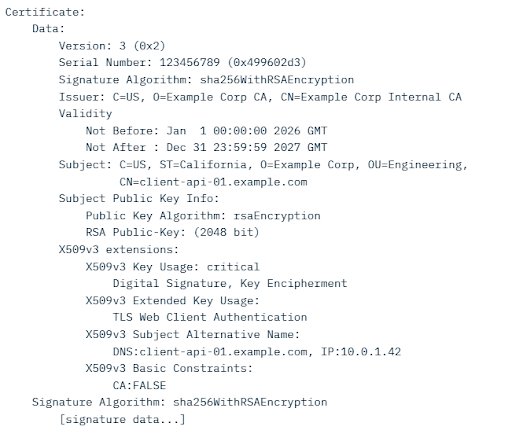
An mTLS certificate has the same X.509 structure as any other TLS certificate, but client and server certificates are not always interchangeable. A server certificate needs the serverAuth Extended Key Usage and a client certificate needs clientAuth and where that extension is present, the certificate may only be used for the purposes it indicates
Here’s an example of what a decoded certificate could look like:
What Is the Role of a Certificate Authority in mTLS?
A certificate authority (CA) is responsible for issuing and validating the digital certificates that make mTLS work.
When an entity needs an mTLS certificate, it submits a certificate signing request (CSR) to a trusted CA, which verifies the entity’s identity and issues a certificate containing its public key and identifying information. This certificate is then presented during mTLS handshakes to prove the entity’s identity to the other party.
CAs are instrumental in establishing and maintaining trust in an mTLS environment. They ensure that only authenticated entities can communicate, and they prevent unauthorized access and potential data breaches.
Why Use mTLS Authentication?
mTLS authentication secures traffic in both directions between client and server. This makes it valuable for authenticating both human users logging into a network and silent devices like IoT endpoints that never go through a login flow.
mTLS stops a wide range of attacks:
- Credential stuffing: Leaked username/password pairs become useless; without a valid TLS certificate, stolen credentials can’t open the door.
- Brute force: Guessing a password gets an attacker nowhere if they can’t also produce a trusted certificate. This presents a significant barrier for attackers, since password spray attacks are exceedingly common.
- Phishing: Even if a user hands over their credentials, the attacker still needs a matching certificate and private key to do anything with them.
- Spoofing: Impersonating a server (or client) is drastically harder when both sides must authenticate with certificates.
- On-path attacks: Intercepting traffic is effectively neutralized — an attacker sitting between client and server can’t authenticate to either side.
- Malicious API requests: mTLS ensures every API call comes from a verified source, blocking attempts to exploit endpoints or abuse intended functionality.
- Session hijacking: Stolen session tokens are worthless without the client’s certificate to back them up, preventing attackers from taking over active sessions.
- Man-in-the-Middle replay attacks: Captured and replayed requests fail — each connection requires live, mutual certificate verification that can’t be reused.
The security plan that scales with you.
Our solutions can scale from mid-market to global enterprises. Compare options and see how our solutions protect you from costly breaches and ensure peace of mind.
mTLS Error Codes: A Quick-Reference for Troubleshooting
When mTLS fails, it’s uninformative by design. The protocol was built to reveal only minimal information, which increases security at the cost of debugging time. These are the errors most likely to arise:
| Error/Message | Likely Cause | Where to Look |
| certificate verify failed | The verifying side doesn’t trust the CA that issued the peer’s certificate. | Confirm the CA bundle on both sides includes the correct issuing CA. |
| unknown certificate authority | The client certificate was signed by a CA the server’s trust store doesn’t recognize. | Check that the server’s trusted CA bundle is up to date and includes the right internal or private CA. |
| certificate has expired | A certificate in the chain has passed its notAfter date. | Check certificate expiry dates and system clocks; clock skew between hosts can invalidate otherwise valid certificates. |
| no client certificate CA names sent / bad certificate | The server never requested a client certificate. | Confirm the server is configured to request and require client certificates, rather than allowing client authentication to remain optional. |
| tlsv1 alert unknown ca | The server received a client certificate but doesn’t trust its issuing CA. | Update the server’s trust store to ensure it’s up to date. |
| Certificate does not match private key | The certificate and private key files don’t correspond to the same key pair. | Regenerate or re-pair the certificate and key; check for old files left over after a previous rotation. |
| EKU / Extended Key Usage mismatch | The certificate’s Extended Key Usage doesn’t permit the role for which it’s being used(for example, a server cert used for client auth). | Verify serverAuth is set on server certs, and clientAuth is set on client or agent certs. |
For live debugging, openssl s_client, openssl verify, and openssl x509 -text -noout are the standard tools for inspecting a certificate chain outside of application logs.
Mutual TLS vs. Other Authentication Methods
Here’s how mTLS compares to other widely used authentication methods:
| Method | Layer | What It Verifies | How It Works | Best Suited For |
| mTLS | Transport layer | Identity of both client and server | Both sides authenticate with digital certificates before data exchange, protecting the whole communication channel. | Zero-trust architectures, API security, service meshes, high-security channel-level protection. |
| JWT | Application layer | Claims about a user/entity (authentication & authorization data) | Self-contained, digitally signed JSON token conveying identity or claims between parties. | Decentralized or distributed systems needing portable, self-contained identity data. |
| OAuth2 | Application layer | Delegated access/authorization (not identity of the channel) | Uses bearer tokens to give third-party apps limited access to resources on a user’s behalf. | Third-party login and delegated access scenarios (e.g., “Sign in with Google”). |
| SPIFFE/SPIRE | Application layer (identity management) | Workload identity in dynamic environments | Issues short-lived X.509 certificates (SVIDs) or JWTs via SPIRE, automating identity issuance, rotation, and attestation. | Cloud-native, ephemeral environments like Kubernetes where workloads scale or restart frequently. |
mTLS uses mutual certificate-based authentication to secure the communication channel itself , while JWT, OAuth2, and SPIFFE run at the application layer. As mTLS requires a PKI for its certificates, organizations often add SPIFFE/SPIRE for dynamic identity management in cloud-native environments.
Should You Enable IEEE 802.1X Authentication With mTLS?
Organizations commonly pair mTLS with 802.1X authentication to further increase network security. 802.1X provides a framework for authenticating and controlling user traffic to a protected network based on a particular standard. It effectively prevents unauthorized access to network resources, which can be critical in a corporate or enterprise setting.
See how a senior care provider upgraded to 802.1X authentication that included integrations with Azure and Intune for a largely BYOD network using the SecureW2 platform.
This graphic illustrates the 802.1X authentication process:

However, while 802.1X provides strong user authentication, it doesn’t necessarily secure communication between the client and server, especially in a non-enterprise context over a wide area network (WAN).
This is where mTLS works best. It not only provides mutual authentication at the start but also maintains encrypted communication during the session’s entirety. mTLS ensures that the data in transit is safe from eavesdropping or tampering.
In situations where both robust authentication and data security are important, combining 802.1X for access control with mTLS for data security can be a powerful solution.
Learn more about 802.1X basics in this video:
How to Implement mTLS
Implementing mutual TLS authentication involves several key steps: setting up a certificate authority, issuing certificates to both clients and servers, configuring your applications or infrastructure to require and validate certificates, and managing the certificate lifecycle.
Prerequisites for mTLS
Before starting, you’ll need to have:
- A reliable Public Key Infrastructure(PKI) or CA to issue and manage certificates.
- Access to configure your servers, load balancers, APIs, or service mesh.
- Certificates that include the Client Authenticationextended key usage (EKU) for client certs.
- A plan for certificate rotation and revocation.
Organizations often use a private/internal CA for client certificates, as public CAs have largely stopped issuing client authentication certificates.
High-Level mTLS Implementation Steps
- Set Up Your Certificate Authority: Deploy a secure PKI system to issue, renew, and revoke certificates. This can be a cloud-managed PKI, an internal CA, or a third-party service. The CA must be trusted by both clients and servers.
- Issue Certificates: These include:
- Server certificates: Issued to your servers or domains with appropriate SANs (Subject Alternative Names).
- Client certificates: Issued to users, devices, services, or workloads. Each client gets a unique certificate containing its identity.
- Configure the Server to Require mTLS: Update your server, reverse proxy, or API gateway to request and validate client certificates during the TLS handshake. Common examples:
- Nginx: Use ssl_client_certificate, ssl_verify_client on, and ssl_verify_depth.
- Apache: Set SSLVerifyClient require.
- Kubernetes/Istio or Linkerd service mesh: Enable mTLS mode (PERMISSIVE or STRICT).
- Application servers (e.g., Java Spring Boot, Node.js, Go): Configure the TLS listener to require client auth.
- Configure Clients: Clients must present their certificate during connection attempts. Most programming languages and HTTP clients support this via libraries or configuration.
- Test and Validate: Use tools like openssl s_client, curl -v, or browser developer tools to verify that both server and client certificates are being exchanged and validated. Check logs for handshake errors.
- Implement Certificate Lifecycle Management: Automate renewal before expiration, set up certificate revocation lists (CRL) or OCSP, and monitor for compromised certificates. Short-lived certificates significantly reduce risk.
While it is possible to implement mTLS manually, the operational overhead of certificate issuance, rotation, revocation, and trust management can be substantial. This is where a managed PKI solution becomes particularly valuable.
Replace Legacy 802.1X Infrastructure With Certificate-Based Network Access
802.1X is only as strong as the infrastructure behind it. Password-based methods such as PEAP-MSCHAPv2 introduce credential risk that no firewall can fully neutralize whereas certificates remove that risk entirely.
Our JoinNow platform delivers cloud-native 802.1X enforcement built around EAP-TLS, with streamlined certificate enrollment for both managed and unmanaged devices, eliminating the need for on-premises RADIUS hardware while simplifying secure network access at scale.
Organizations that move to SecureW2 solutions minimize credential-based support tickets, and close attack surfaces left wide open by legacy network access control systems.
See how SecureW2 simplifies certificate-based 802.1X for your environment: Schedule a demo.
Frequently Asked Questions
Can mutual TLS work without a PKI?
Yes, but it becomes difficult to manage at scale. Mutual TLS relies on certificates to authenticate clients and servers, but a formal PKI is not strictly required. Small environments can use self-signed certificates and manually configured trust stores. However, production environments typically use a PKI to centrally issue, distribute, renew, and revoke certificates and manage which certificate authorities are trusted. Without centralized certificate and trust management, larger mTLS deployments can become difficult to maintain and more prone to configuration errors, expired certificates, or compromised credentials.
Is mutual TLS faster than standard TLS?
No. mTLS generally adds some overhead compared with standard TLS because the client must also present a certificate and prove possession of its corresponding private key, and the server must validate the client certificate. Standard TLS typically requires only the server to authenticate with a certificate. The additional processing and network overhead is usually small on modern systems, but the exact performance impact depends on the TLS version, cryptographic algorithms, implementation, and connection patterns.
How can you check if mutual TLS is enabled?
Check whether the server is configured to request and require a client certificate and whether it validates that certificate against a trusted CA. Administrators can check server, reverse-proxy, API gateway, or load-balancer configurations; inspect TLS handshake logs; or use tools such as OpenSSL or cURL to test the connection and determine whether a client certificate is requested and accepted. Browser developer tools generally provide limited visibility into client-certificate authentication, so they may not be the best tool for verifying mTLS.
Does 802.1X use TLS?
Yes, 802.1X uses Transport Layer Security (TLS) when it relies on specific Extensible Authentication Protocol (EAP) methods like EAP-TLS or PEAP. EAP-TLS is an IETF open standard that uses the TLS protocol to secure the authentication process, and uses certificate-based verification between client and network to granting access.
What is the difference between EAP-TTLS vs. TLS?
EAP-TLS and EAP-TTLS are both EAP authentication methods, but they use certificates differently. EAP-TLS uses TLS with certificate-based authentication and can provide mutual certificate authentication between the client and authentication server. EAP-TTLS establishes a TLS tunnel using a server certificate and can then protect a second, inner authentication method, which may use passwords or other credentials. EAP-TTLS can therefore support authentication methods that do not require a client certificate, while EAP-TLS provides strong certificate-based authentication.
Is mutual TLS being deprecated?
No. Mutual TLS is not being deprecated and remains widely used for applications such as API security, service-to-service authentication, and zero-trust architectures. However, public certificate policies are changing. Major public certificate authorities have moved to restrict or remove the clientAuth Extended Key Usage (EKU) from publicly trusted TLS certificates. As a result, organizations that previously used a single publicly trusted certificate for both server authentication and client authentication may need to use separate certificates or a private PKI for client authentication. These changes affect the use of public TLS certificates for client authentication, but they don’t deprecate mTLS itself.
Is mutual TLS the same as 2-way SSL?
Yes, mutual TLS and 2-way SSL are the same thing — the only difference is in the name. Both involve the client and server presenting and verifying certificates before data moves. "2-way SSL" is the older term and is most often seen in enterprise and financial services. "Mutual TLS" began to be used as SSL was replaced by TLS 1.2 and 1.3. If you see 2-way SSL, it refers to the same handshake and certificate exchange as in mTLS.
