Key Takeaways
- 802.1X EAP-TLS authentication creates a trusted connection through mutual authentication, securely exchanging certificates between a user's device and the authentication server.
- Compared to other EAP methods, EAP-TLS provides faster and more secure authentication, making it ideal for high-traffic networks.
- Beyond standard EAP-TLS certificate validation, JoinNow Dynamic PKI and Cloud RADIUS also validate users/devices in identity provider (IdP) and Mobile Device Management (MDM) systems for enhanced security.
802.1X authentication is many organizations’ first line of defense against online threats. This IEEE standard defines how port-based network access control should proceed, and it’s a common choice for enterprise. But 802.1X is also one of the most targeted attack vectors so choosing the right 802.1X authentication mechanism is a top priority.
One common authentication method is the Extensible Authentication Protocol (EAP). It uses the EAP tunnel to send information through an encrypted channel.
While there are multiple EAP methods, only EAP-TLS (Extensible Authentication Protocol-Transport Layer Security) supports certificate-based authentication, which offers enhanced security compared to authorization via user credential.
In this guide, we’ll explain what 802.1X EAP-TLS is and how it works, cover 802.1X components, go over a step-by-step workflow for 802.1X authentication, and explain how EAP-TLS compares to other EAP types. We’ll also discuss how your organization can implement 802.1X EAP-TLS for optimal network security.
What Is 802.1X EAP Authentication
802.1X is a port-based network access control (PNAC) mechanism that verifies device authentication before granting network access, which prevents unauthorized devices from connecting. It’s a standard of the Institute of Electrical and Electronics Engineers (IEEE), and is also known as IEEE 802.1X.
EAP (Extensible Authentication Protocol) is the network access authentication framework used by 802.1X. EAP exchanges information between the client and the authentication server.
802.1X EAP authentication, then, is the process of using EAP as the identity verification method for 802.1X network access control. This process 802.1X EAP authentication begins when a device requests permission to access the network. In response, the network requests proof to verify the user’s identity before granting access.
There are kinds of EPA, each using a different kind of proof, which can be a password, digital certificate, token, or other credentials.
The flexibility of the Extensible Authentication Protocol (EAP) framework allows network administrators to choose the authentication type that best fits their security requirements, device ecosystem, and management capabilities.
See your security gap before attackers do.
See continuous trust in action on a platform that includes RADIUS, PKI and AI security.
What Is EAP-TLS? Features and Benefits
Extensible Authentication Protocol-Transport Layer Security (EAP-TLS) is widely considered the most secure standard EAP authentication method. It requires mutual authentication by issuing certificates on both the client (supplicant) and server sides, making it the EAP type preferred by enterprises with high security requirements.
EAP-TLS certificate-based mutual authentication offers:
- Phishing Protection: Certificates aren’t phishable, but passwords are.
- Unauthorized Network Access Prevention: Users can’t misplace certificates or accidentally share them with malicious parties, unlike passwords and pre-shared keys.
- Spoofing Attack Protection: Devices will never connect to spoofed access points (as in evil twin attacks) because the client verifies the server’s certificate before proceeding.
- MITM Attacks: When properly configured, EAP-TLS significantly lowers the risk of over-the-air attacks like man-in-the-middle (MITM) attacks.
- Improved User Experience: No need to remember complex passwords, deal with frequent resets, or manually enter credentials.
- Simplified Management: Without user credentials to reissue or renew, network administrators spend less time on access management.
- Seamless Authentication: Once certificates are provisioned, authentication is automatic.
These features make EAP-TLS ideal for high-security environments, including WPA3-Enterprise deployments requiring the strongest protection.
What Components Are Involved in EAP-TLS?
EAP-TLS authentication involves information transmission between 3 parties.
Supplicant
The supplicant is either the client device (such as a laptop, smartphone, or IoT endpoint) attempting to gain access to the network or the client software sending credentials to the authenticator. It initiates the authentication process by responding to authenticator challenges and proving its identity.
Authenticator
The authenticator is the network access control point that enforces access through physical or logical port control. It may be a wireless access point for Wi-Fi, wired network Ethernet switch, or Virtual Private Network (VPN) concentrator.
The authenticator acts as a middleman, forwarding authentication messages between the supplicant and the authentication server while keeping the port in an unauthorized state until authentication succeeds.
Authentication Server (RADIUS Server)
The authentication server validates the supplicant’s credentials against a directory (such as Active Directory or LDAP) and decides whether to grant or deny network access. It’s typically a RADIUS server (Remote Authentication Dial-In User Service).
After checking the directory, the authentication server delivers an accept/reject decision to the authenticator. The message also includes authorization attributes such as VLAN assignments and other access controls.
What Is the 802.1X EAP-TLS Authentication Process?
EAP-TLS authentication is typically faster than credential-based authentication, and it occurs automatically without involvement from the user. When an authenticated device is in range of the secure network, it will initiate and complete the connection on its own.
The authentication process has 4 broad categories: initialization, initiation, negotiation, and authentication.
- Initialization: The authenticator detects a supplicant seeking to authenticate to the secure network.
- Initiation: The supplicant, authenticator, and authentication server acknowledge each other before transmitting information.
- Negotiation: The supplicant and authentication server exchange identifying information to determine whether the user should be authenticated to the network.
- Authentication: If the server approves the authentication request, the authenticator opens a port for the confirmed user to connect to the 802.1X network and browse securely.
This is the basic process. Next, we’ll explore EAP-TLS authentication step by step.
How the 802.1X EAP Authentication Process Works
Pictured here is a step-by-step image breaking down the 802.1X EAP-TLS authentication method.
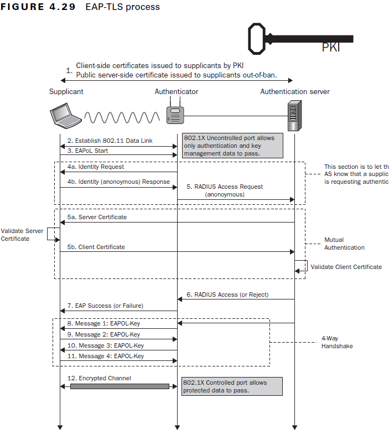
Here’s a closer look at each step:
- Supplicant Certificates and Authenticator Connection: The Public Key Infrastructure (PKI) issues client-side certificates supplicants and public server-side certificates to out-of-band supplicants.
- Establish 802.11 Data Link: The supplicant establishes a connection to the authenticator, which allows secure information exchange between the two parties.
- EAPoL Start: EAPoL (Extensible Authentication Protocol over LAN) indicates that all three parties can exchange information over a secure LAN channel. This stage determines the specific authentication method — in this case, EAP-TLS.
- Identity Request/Response:
- Identity Request: The authenticator requests the identity of the supplicant with an EAP-Request/Identity, ensuring it sends the client certificate to the correct place.
- Identity (Anonymous) Response: The supplicant sends an EAP-Response/Identity back to the authenticator.
- RADIUS Access Request (Anonymous): The identifying information for the supplicant and authenticator is sent to the RADIUS server, which confirms their identities and allows transmission of authenticating information. This is known as mutual authentication.
- Server Certificate: The RADIUS sends its server certificate to the supplicant to confirm its identity through server certificate validation.
- Client Certificate: The supplicant validates the identity of the authentication server certificate, then sends its client certificate to the RADIUS.
- RADIUS Access-Accept (or Reject): The RADIUS authentication server receives the client certificate and authenticates its identity as an approved network user. Depending on the user’s certificate, the RADIUS server sends an Access-Accept or Access-Reject message to the authenticator.
- EAP Success (or Failure): Based on the RADIUS message, the authenticator sends a Success or Failure message to the supplicant, indicating whether their network access has been approved or denied. If the message reads Success, the authenticator opens the switch port for direct communication between the supplicant and authentication server.
- Message 1: EAPOL-Key: This is the first message in the EAPOL-Key exchange 4-way handshake. The authenticator and supplicant exchange a series of messages to generate encryption keys for wireless network access. This encrypts data in ongoing communications so outside parties can’t read them. See detailed list of keys.
- Message 2: EAPOL-Key
- Message 3: EAPOL-Key
- Message 4: EAPOL-Key
- Encrypted Channel: Once authentication is successful, EAP-TLS creates an encrypted channel of communication. The 802.1X controlled port allows secure network access to all permitted resources.
Other Common EAP Types
EAP types include EAP-PEAP, EAP-FAST, and EAP-TTLS.
A brief comparison of these variations:
| Authentication Method | Advantages | Disadvantages | Ideal Use Case | |
| EAP-PEAP | TLS tunnel & credentials | Simple deployment, lower costs | Vulnerable to credential theft (cleartext credential transmission), requires password reset policies | Broad, low-tech user bases |
| EAP-FAST | TLS tunnel & Protected Access Credentials (PAC) | Simple deployment, efficient authentication, lower costs | Requires password reset policies | Low-budget, low-security environments |
| EAP-TTLS | TLS tunnel & credentials | Can use mutual authentication if you opt in to client-side certificates | Dual-certificate mutual authentication not required, vulnerable to credential theft (cleartext credential transmission), complex configuration, requires password reset policies | None — not recommended due to better alternatives |
| EAP-TLS | Certificates | Rapid authentication, simpler end-user experience vs. credentials, advanced traceability (link issues to specific devices), mutual authentication | Setup can be complex (mitigated with managed service providers) | High-security environments, including WPA3-Enterprise |
EAP-PEAP
Protected Extensible Authentication Protocol (PEAP), sometimes called EAP-PEAP, is a common EAP method using a server-side certificate to establish a secure TLS tunnel for authentication. Authentication usually relies on a username and password via MSCHAPv2 (PEAP-MSCHAPv2). PEAP doesn’t use mutual authentication.
EAP-PEAP provides a balance of security and manageability. It’s easier to deploy than fully certificate-based methods since it uses existing directory credentials and doesn’t require client certificates on every device. Plus, the tunnel protects credentials from direct eavesdropping.
However, PEAP has notable security limitations. It doesn’t encrypt passwords, leaving you vulnerable to phishing, credential stuffing, or brute-force attacks. And misconfigured clients (those that skip or weakly validate the server certificate) open the door to evil twin and man-in-the-middle attacks.
EAP-FAST
EAP-FAST (Extensible Authentication Protocol-Flexible Authentication via Secure Tunneling) creates a mutually authenticated TLS tunnel using Protected Access Credentials (PACs) instead of full certificates.
PACs must be securely provisioned and rotated to avoid compromise. This adds manual work for network administrators. Also, EAP-FAST often uses password-based inner authentication (not as secure as certificates) and has the same phishing and credential theft vulnerabilities as PEAP.
EAP-TTLS
EAP-TTLS (Extensible Authentication Protocol-Tunneled Transport Layer Security) establishes a secure TLS tunnel authenticated by the server’s certificate, then allows flexible inner EAP methods (e.g., PAP, CHAP, MSCHAPv2, or EAP methods) to verify the client. This tunnel protects legacy or non-EAP credentials from exposure over the air.
Like PEAP, it simplifies deployment by requiring only server-side certificates and supporting existing username/password systems. However, password-based inner methods expose organizations to phishing, credential reuse attacks, and brute-force risks.
While EAP-TTLS offers more inner-method flexibility than PEAP, that flexibility may compromise your overall security.
The security plan that scales with you.
Our solutions can scale from mid-market to global enterprises. Compare options and see how our solutions protect you from costly breaches and ensure peace of mind.
Which EAP Method Should I Use?
Our Comprehensive Guide to the EAP Protocol in Networking has highly specific details about the main EAP types: server-side methods such as EAP-PEAP, EAP-FAST, EAP-TTLS, and mutually authenticated passwordless protocols like EAP-TLS.
802.1X EAP-TLS allows for a certificate-based, rapid, and mutual authentication process, giving it the most robust security of any EAP protocol.
How to Implement EAP-TLS for 802.1X
802.1X with EAP-TLS is a preferred authentication method with top-tier security for your organization. But implementation can be complex, requiring careful planning around certificates, infrastructure, and testing.
Here’s an 802.1X authentication step-by-step overview for enterprise deployments:
- Set up a Public Key Infrastructure (PKI): Learn to set up your own PKI.
- Configure the RADIUS authentication server: Learn how RADIUS authentication
- Configure network access devices (authenticators): Learn to configure WPA2 and WPA3.
- Onboard and configure supplicants (client devices): Learn to configure managed devices (MDMs) and unmanaged Bring Your Own Devices (BYODs).
- Test, monitor, and roll out: Adopt a flexible continuous improvement mindset, researching additional authentication protocols and implementing new authentication methods as needed.
In addition to being secure and user-friendly, 802.1X EAP-TLS authentication offers a higher level of efficiency than less-secure EAP types like PEAP-MSCHAPv2 and EAP-TTLS/PAP. That speed can prevent congestion on high-traffic networks.
In addition to our managed PKI service and Cloud RADIUS, SecureW2 provides all the tools to configure 802.1X EAP-TLS, simplifying the distribution and management of digital certificates.
Ready to move to seamless, secure certificate-based authentication? Schedule a demo to see how SecureW2 tools work with your processes today.
Frequently Asked Questions
Is 802.1X obsolete?
No, in fact quite the opposite. 802.1X is still a widely used standard for securing WPA2/WPA3-Enterprise Wi-Fi. It easily integrates with RADIUS architecture to give IT teams a solution that works with modern identity providers like Entra ID and Okta. 802.1X serves as an important identity verification tool for zero trust authentication frameworks, but choosing the right authentication method is what makes it secure.
Can EAP-TLS stop users from sharing their Wi-Fi access?
Yes. Unlike passwords that are easily shared across an entire company or school staff, EAP-TLS relies on non-exportable certificates tied to specific hardware via cryptography. This makes it virtually impossible to share credentials between devices and locks down unauthorized access.
What is the difference between user-based and device-based EAP-TLS certificates?
Device certificates live in the machine store, allowing devices to connect to Wi-Fi at the login screen before a user signs in. User certificates live in the personal store and only authenticate after the user inputs their credentials.
