Key Takeaways
- Wi-Fi networks are vulnerable due to weak passwords, rogue access points and outdated security protocols.
- Legacy security methods like WEP and WPA are obsolete and easily exploited by attackers. WPA2 remains a standard but has vulnerabilities, while WPA3 provides stronger encryption and protection.
- Certificate-based authentication eliminates password-related risks and provides stronger security.
As the number of Wi-Fi-enabled devices skyrockets, so do security risks. Attackers exploit weak passwords, rogue access points and outdated security protocols to intercept traffic, steal sensitive data and disrupt operations.
Your organization can’t afford to rely on legacy security measures. To protect your network, you need advanced security protocols, certificate-based authentication and the latest encryption standards like WPA2-Enterprise or WPA3.
What Is Wireless Security and Why Does It Matter?
Wireless security encompasses technologies and best practices designed to prevent unauthorized access, data breaches and cyberthreats on wireless networks.
Unlike wired networks, Wi-Fi signals are broadcast over the air, making them inherently more vulnerable. Without strong security, your network is an open door for attackers.
See your security gap before attackers do.
See continuous trust in action on a platform that includes RADIUS, PKI and AI security.
Why Wi-Fi Security Matters
A poorly secured network is an open invitation for attackers.
Weak credentials and outdated settings make it easy for intruders to gain unauthorized access, potentially spreading malware or intercepting sensitive data.
Rogue access points and credential theft create even greater risks, enabling attackers to launch man-in-the-middle attacks (MITM) or steal login details for future exploits.
Warning: Without encryption, data transmissions remain vulnerable, especially in high-traffic environments where personal and business information is constantly exchanged.
Insecure authentication only compounds the problem, allowing unauthorized devices to connect and putting network infrastructure at risk.
The consequences range from breaches and downtime to compliance failures and financial loss.
Strong Wi-Fi security is essential and not just a best practice.
Don’t just take our word for it. Antelope Valley Union High School felt the real consequences of using pre-shared keys as their primary Wi-Fi security method. They then decided to switch to certificate-based authentication.
How Protocols Impact Wireless Network Security
Wireless networks rely on security protocols to protect data and authenticate users, but not all protocols offer the same level of protection.
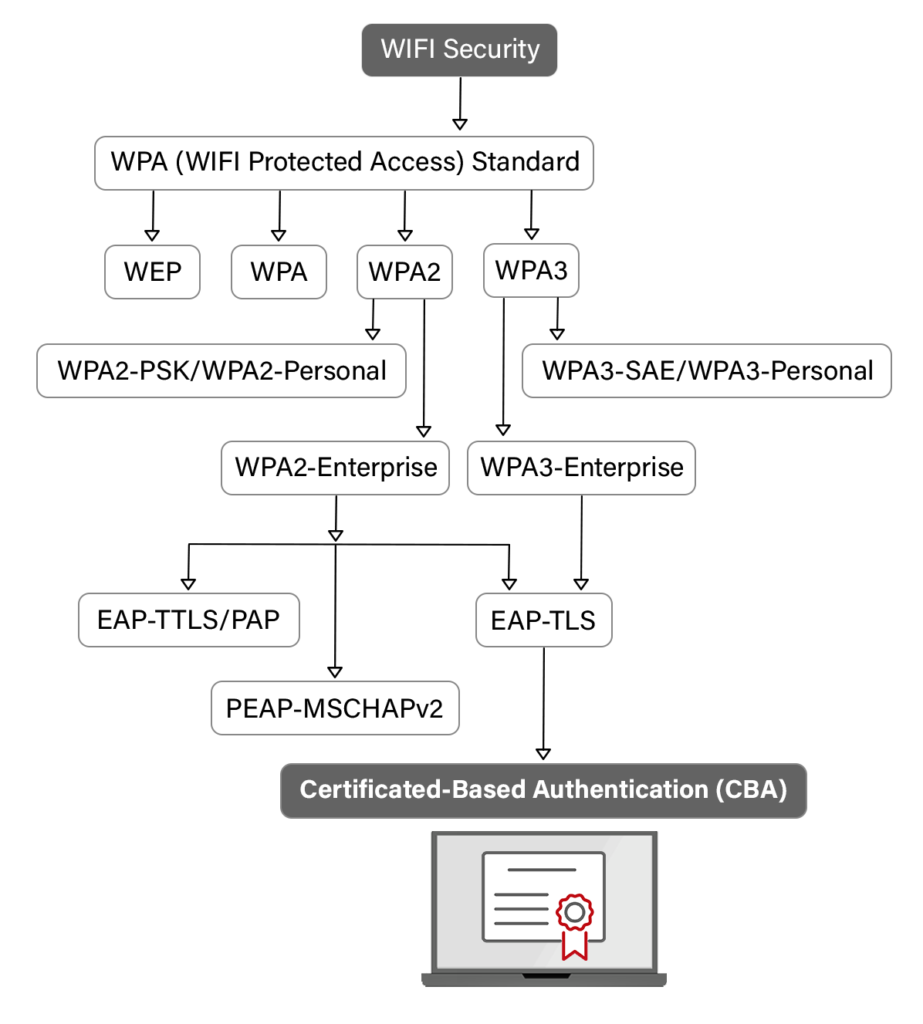
Wired Equivalent Privacy (WEP), one of the earliest Wi-Fi security protocols, is now obsolete due to its weak encryption, making it easy for attackers to crack.
Wi-Fi Protected Access (WPA) improved upon WEP by introducing stronger encryption, but it still contains vulnerabilities that can be exploited.
WPA2 has been the industry standard, offering stronger security but remaining susceptible to attacks like key reinstallation (KRACK).
Within WPA2, different configurations impact security. WPA2-PSK, or Pre-Shared Key, is the widely used approach where all users share the same Wi-Fi password, making it simple but less secure.
WPA2-Enterprise, on the other hand, requires each user to have unique login credentials, which is either a username and password or a digital certificate, significantly enhancing security.
Take a look at the video below for a breakdown on WPA2 Personal vs. WPA2 Enterprise:
However, managing individual credentials requires an Identity Provider (IdP) to verify users and a RADIUS server to authenticate each connection attempt.
Together, these components enable 802.1X authentication, ensuring only authorized users and devices can connect.
WPA3, the latest Wi-Fi security standard, introduces individualized encryption and stronger protection against brute-force attacks.
However, support for WPA3 may still be limited depending on the device’s operating system.
Want to dive in a bit deeper on the differences between WPA2 Enterprise and WPA3 Enterprise? Watch the video below:
Comparing Wi-Fi Security Protocols
Each Wi-Fi security protocol offers a different level of protection, with key differences in security, known vulnerabilities and current usage.
The table below compares the various Wi-Fi security protocols:
| Protocol | Security Level | Vulnerabilities | Status |
| WEP | Weak | Easily cracked | Deprecated |
| WPA | Moderate | Key reuse issues | Obsolete |
| WPA2 | Strong | Key reinstallation attacks (KRACK) | Standard |
| WPA3 | Very Strong | Key reinstallation attacks (KRACK) | Preferred |
The Case for Certificate-Based Wi-Fi Authentication
Password-based Wi-Fi security can leave networks vulnerable to brute-force attacks, phishing and credential theft.
Certificate-based authentication (CBA) eliminates these risks by replacing passwords with digital certificates, ensuring only authorized devices can connect. The image below shows the evolution of Wi-Fi security from WPA to CBA.
Why Certificates Are More Secure Than Passwords
Here is how certificates protect you over passwords:
- Eliminate credential theft: No passwords mean no phishing attacks or brute-force attempts.
- Stronger encryption: Certificates use public key infrastructure (PKI) to ensure airtight security.
- Device-specific access: Certificates are tied to individual devices, reducing the risk of unauthorized access.
- Easy revocation: If a device is compromised, its certificate can be revoked instantly without affecting the rest of the network.
The security plan that scales with you.
Our solutions can scale from mid-market to global enterprises. Compare options and see how our solutions protect you from costly breaches and ensure peace of mind.
How Are Certificates Generated?
Certificates can be generated by:
- Key generation: Devices generate a public-private key pair.
- Certificate issuance: A trusted Certificate Authority (CA) signs the device’s public key, embedding it in a digital certificate.
- Authentication: The device presents its certificate for verification, ensuring secure access.
How Do You Get Certificates for Wi-Fi Authentication?
Certificate-based authentication requires something to verify the certificates; otherwise, it’s just like having a photo ID you never need to show to anyone.
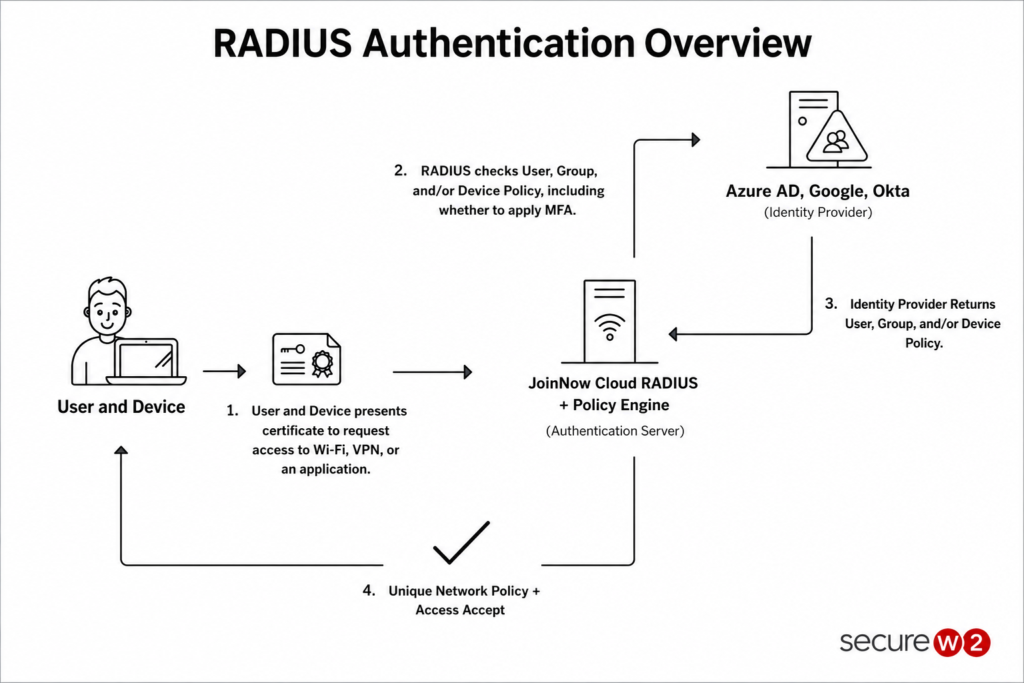
For Wi-Fi, that usually means an authentication server like a RADIUS looks at each user or device certificate.
When a user with a certificate attempts to access the Wi-Fi, it sends a request to the access point or router.
The router then forwards that request to a RADIUS server, which verifies that the certificate is unexpired.
As long as the certificate is unexpired, the user is granted access to the Wi-Fi.
Some RADIUS servers, such as Cloud RADIUS, can take this authentication even further by integrating with your cloud identity infrastructure.
At the time of authentication, Cloud RADIUS doesn’t just look at whether or not a certificate has expired, it also verifies the user account in Entra ID, Okta, OneLogin or Google.
The illustration provides an overview of the RADIUS authentication process.
How SecureW2 Guarantees Wi-Fi Security
SecureW2 provides cutting-edge solutions to eliminate Wi-Fi security risks and simplify authentication.
Our key solutions include:
- JoinNow Dynamic PKI: Automates certificate issuance, renewal and revocation to eliminate password-based vulnerabilities.
- JoinNow Cloud RADIUS: Replaces passwords with certificates for secure authentication, ensuring only authorized devices access your network.
- 1X integration: Enables seamless certificate-based authentication across all devices and platforms.
The future of Wi-Fi security is passwordless authentication. With SecureW2, organizations can eliminate password management headaches, improve security and create a seamless authentication experience for users.
Schedule a demo to see how SecureW2 secures wireless networks without passwords.
