Key Takeaways
- Older Wi-Fi protocols like WEP are outdated and easily exploited. The current industry standards for Wi-Fi protection are WPA, WPA2, and WPA3.
- Wi-Fi is secured through WPA2-PSK, which uses the PEAP-MSCHAPv2, and the EAP-TTLS/PAP, which supports credentials that can be stolen over the air to attack a network.
- The WPA-2 Enterprise supports EAP-TLS, which uses digital certificates to secure your network.
The ubiquity of Wi-Fi networks in today’s world has made them popular targets for cyberattacks, especially if they rely on vulnerable mechanisms like passwords. In a 2021 study, security researchers were able to crack the Wi-Fi passwords of about 70% of existing Wi-Fi networks. The increasing use of personal devices connected to an organizational Wi-Fi network has also seen a steady increase, posing a challenge to securing their network.
A secure Wi-Fi connection is crucial to an organization’s network. The Wi-Fi Alliance developed Wi-Fi Protected Access (WPA) as a security standard for connecting devices to wireless networks through better data encryption and user authentication.
This article takes you through the evolution of Wi-Fi Protected Access (WPA) and its various standards and levels so you can decide on the wireless protection level to deploy for secure wireless networks.
See your security gap before attackers do.
See continuous trust in action on a platform that includes RADIUS, PKI and AI security.
What is Wi-Fi Protected Access (WPA)?
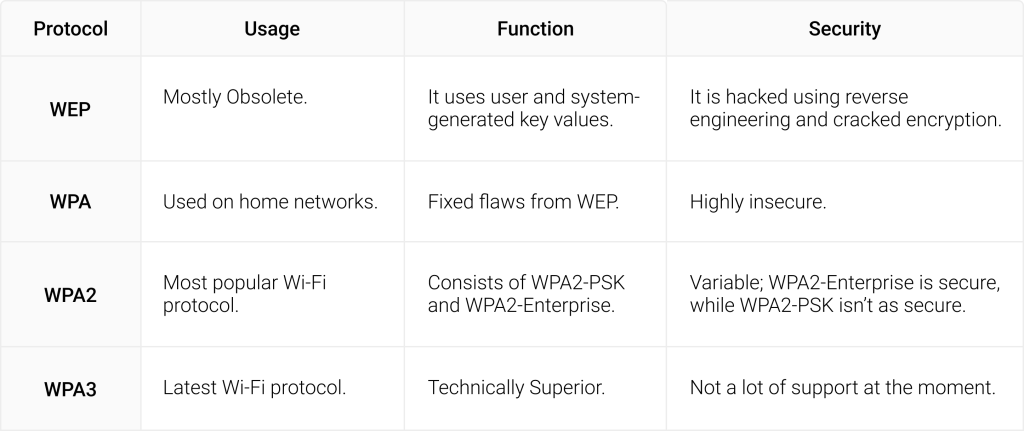
Wi-Fi Protected Access (WPA) is a wireless security protocol released in 2003, intending to address the vulnerabilities of its predecessor, WEP, the original wireless security standard.
The WPA protocol uses a 256-bit key for superior encryption compared to the 64-bit and 128-bit keys used by the WEP.
WPA also uses the Temporal Key Integrity Protocol (TKIP), which adds more security to data transmission by creating a separate encryption key for each packet, unlike WEP, which uses a fixed-key system. However, WPA is fraught with vulnerabilities as its components can be implemented into WEP systems, exposing WPA to exploits that can leave the network vulnerable.
Is WPA Secure?
The Wi-Fi Protected Access (WPA) standard was created in 2003 to fix the vulnerabilities arising out of the WEP, its predecessor. WPA is easy to configure, is still compatible with all wirelessly compatible devices and access points, and offers TKIP encryption. However, it can be easily hacked as developers discovered a flaw in its message integrity code hash function. It became obsolete in 2004 when its successor, WPA2, came into being, rendering it ineffective for protecting enterprise Wi-Fi networks.
WPA vs WPA2 and WPA3: What are the Differences?
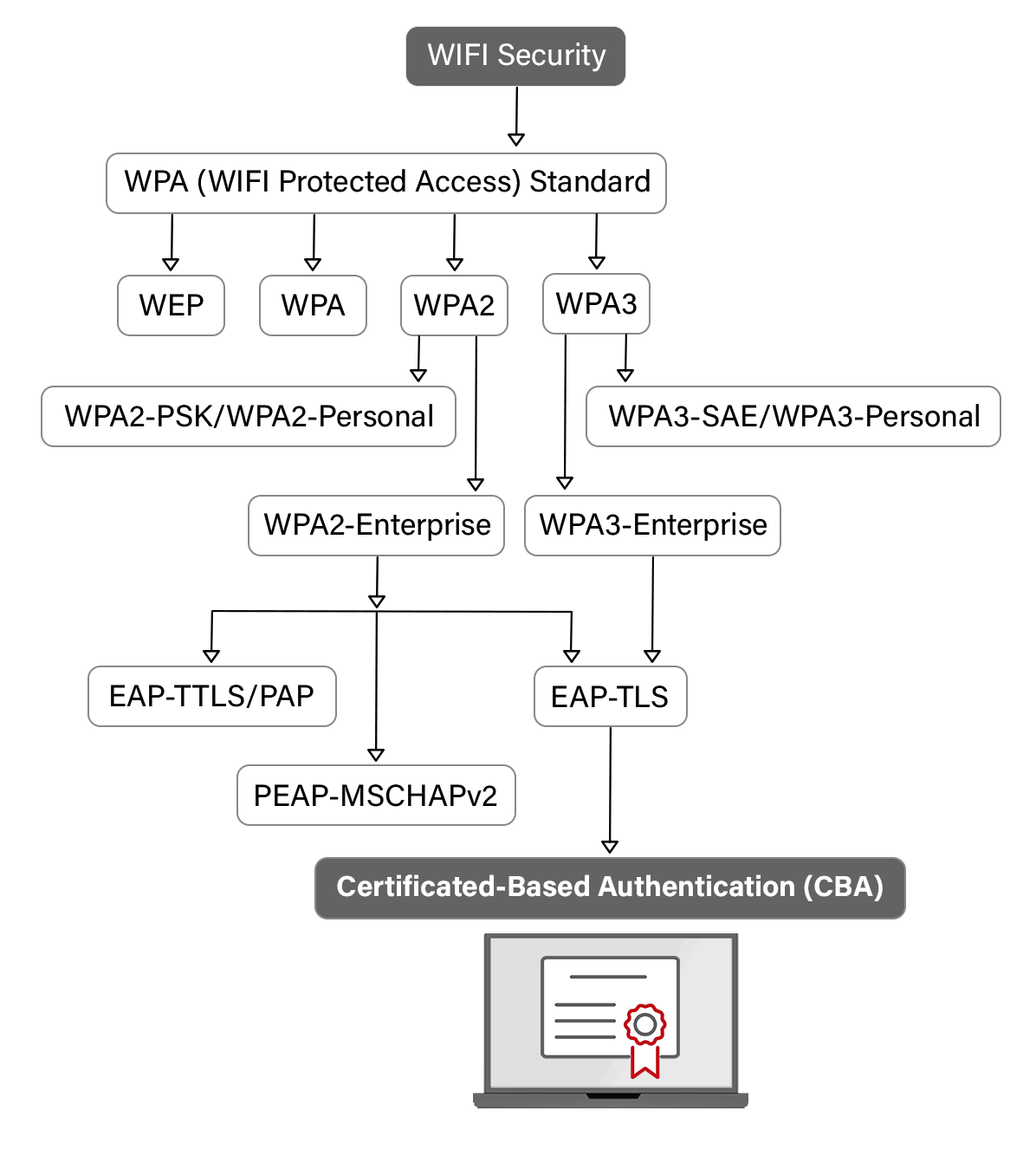
WiFi Protected Access 2 (WPA2) is the next generation of WPA. Introduced in 2004, it employs robust security measures and uses the Personal Mode (WPA2-PSK) and Enterprise Mode (WPA2-Enterprise). The WPA2-PSK mode relies on pre-sharkeysys, where a single passcode is used by all users connecting to a network, making it more suitable for home and personal use. WPA2-Enterprise supports digital certificates and is considered the gold standard of Wi-Fi protocol for enterprise use.
The WPA2 standard relies on the Block Chaining Message Authentication Code Protocol (CCMP) and uses the Advanced Encryption Standard (AES) algorithm to verify and authenticate messages. The Advanced Encryption Standard in CCMP is more robust than TKIP. However, WPA2 is vulnerable to security flaws like key installation attacks that allow a malicious actor to pose as a duplicate network and have the user connect to them.
What is the Wi-Fi Protected Access 3 (WPA3) Standard?
WPA3 is the latest iteration of the WPA standard; it was introduced in 2018 and provides individual data encryption. It uses a Wi-Fi Device Provisioning Protocol (DPP) that uses device Near Field Communication (NFC) tags or QR codes instead of shared passwords to allow users to access a network.
DPP provides more security than pre-shared keys as it offers Simultaneous Authentication Of Equals through a secure handshake, where both devices i.e., the device and access point, communicate and authenticate to connect to the network. However, WPA3 lacks technical support and is not widely used.
WPA3 Is Now Mandatory for Wi-Fi 7 Networks
For several years, organizations could choose when to migrate from WPA2 to WPA3 based on their own upgrade schedules. That is no longer the case. As Wi-Fi 7 becomes more widely deployed, WPA3 is effectively becoming the default security standard for modern enterprise wireless networks.
The reason is the continued expansion of the 6 GHz spectrum. When the Wi-Fi Alliance introduced Wi-Fi 6E, it required all devices operating in the 6 GHz band to support WPA3 security.
That requirement continues with Wi-Fi 7, which is based on the IEEE 802.11be standard. Organizations deploying Wi-Fi 7 access points cannot use WPA2 on 6 GHz networks, making WPA3 mandatory in any modern wireless deployment. More information about the standard is available in the IEEE 802.11be (Wi-Fi 7) specification.
Wi-Fi 7 also introduces one of its most significant new features: Multi-Link Operation (MLO). Instead of connecting over a single frequency band, compatible devices can simultaneously use the 2.4 GHz, 5 GHz, and 6 GHz bands to improve throughput, reduce latency, and provide more reliable wireless performance. Because the 6 GHz portion of that connection requires WPA3, organizations adopting Wi-Fi 7 are automatically expanding WPA3 use across their wireless infrastructure.
This shift has important implications for enterprise authentication. WPA3-Enterprise relies on 802.1X authentication, and the highest security profile, WPA3-Enterprise 192-bit mode, requires EAP-TLS as the only supported authentication method.
It also mandates stronger cryptographic algorithms that align with the Commercial National Security Algorithm (CNSA) Suite. Organizations still relying on password-based authentication methods, such as PEAP or shared WPA2 pre-shared keys, will not be able to fully benefit from the security capabilities Wi-Fi 7 offers.
As enterprises refresh their wireless infrastructure, upgrading access points is only part of the migration. Identity infrastructure also needs to evolve. Certificate-based authentication, automated certificate provisioning, and a modern PKI all become increasingly important as more devices connect using WPA3-Enterprise. Organizations that combine Wi-Fi 7 with EAP-TLS and automated certificate management will be better positioned to leverage stronger wireless security while reducing the risks associated with password-based authentication.
For many organizations, the move to Wi-Fi 7 is no longer just a hardware upgrade. It is an opportunity to modernize their entire wireless security architecture and align it with the authentication standards underpinning the next generation of enterprise Wi-Fi.
Commonly Used WPA2 Authentication Protocols
WPA2 is the most popular Wi-Fi protocol, and the Wi-Fi Alliance mandates that it be used on all Wi-Fi-certified products. Prescribed by the Institute of Electrical and Electronic Standards (IEEE), it uses the Extensible Authentication Protocol (EAP) to securely identify information on an encrypted network. The EAP supports authentication methods like passwords, smart cards, tokens, and digital certificates.
WPA2 has two commonly used EAP protocols, WPA2-PSK and WPA2 Enterprise, to secure a Wi-Fi connection across personal and organizational networks. WPA2-PSK protects the whole network with a single pre-shared key, leaving the network vulnerable to attacks like a dictionary attack, where a hacker enters every word in a dictionary or wordlist to hack into a network and MITM attacks.
WPA2-Enterprise is considered a gold standard in network security as it supports a range of authentication protocols, including using digital certificates and a RADIUS server. Some commonly used WPA2 enterprise authentication protocols include:
- EAP-TTLS/PAP
- PEAP-MSCHAPv2
- EAP-TLS
EAP-TTLS/PAP
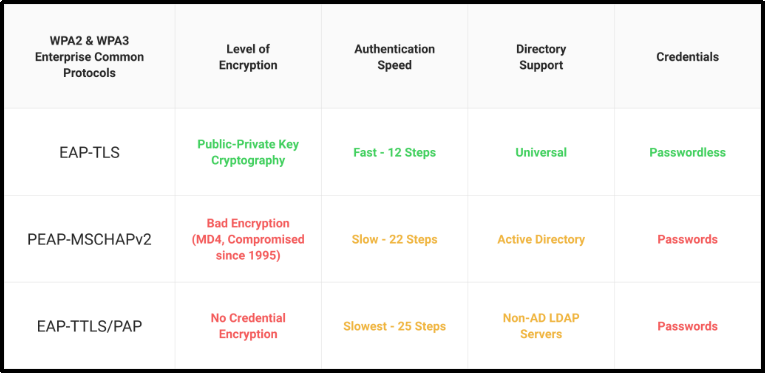
EAP-TTLS/PAP uses credentials for authentication to a Wi-Fi network and is highly vulnerable to network attacks on the devices and networks. It transmits unencrypted credentials through Cleartext via tunnels. An unencrypted data transmission through a tunnel makes the whole network susceptible to MITM and phishing attacks. The credentials can be stolen even from a secured network through credentials that can be easily decrypted.
Thus, it puts the onus of security on the users to secure their passwords and stop sharing them to avoid theft and unauthorized usage.
PEAP-MSCHAPv2
PEAP-MSCHAPv2 also authenticates users through credentials. In this protocol, a user enters his credentials to authenticate to a RADIUS server. The credentials are then sent to the server through an encrypted EAP tunnel, preventing unauthorized network access. A credentials-based network is very easy to set up, making it popular but unsafe.
Unfortunately, PEAP-MSCHAPv2 also uses the MD4 algorithm for hashing, which has been declared obsolete for its cryptographic weakness. The cryptographic weakness of PEAP-MSCHAPv2 leaves the whole algorithm weak and vulnerable to security threats. Secondly, PEAP-MSCHAPv2 relies entirely on the authentication server’s private key. If a hacker gains access to the private key, he can pose as a server to orchestrate an MITM attack.
EAP-TLS
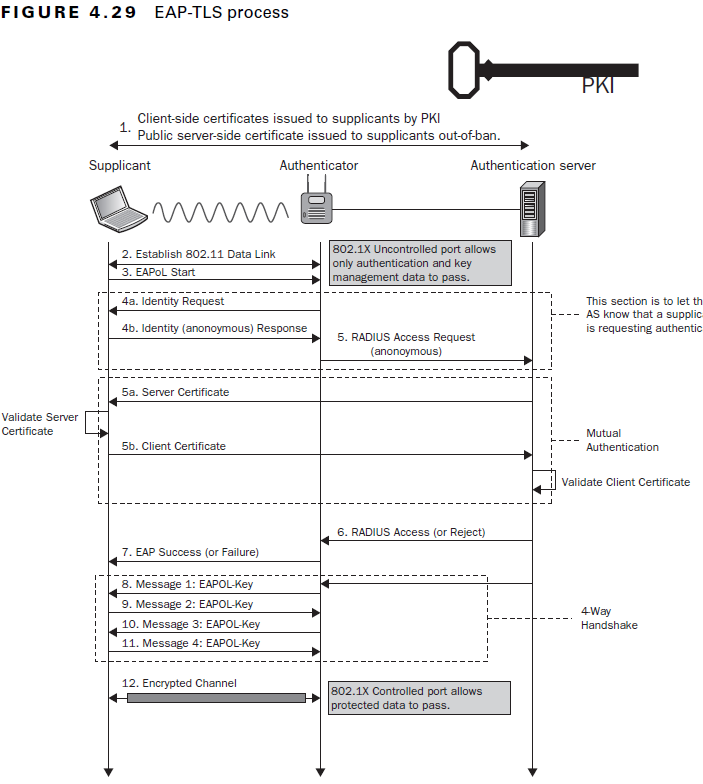
EAP-TLS uses certificate-based authentication. Unlike passwords and pre-shared keys, digital certificates are phishing-resistant and cannot be stolen or duplicated. EAP-TLS also uses client-server or mutual authentication, where the client authenticates the server and vice-versa. This makes EAP-TLS the most secure form of authentication protocol for users and devices on a network.
EAP-TLS reduces the risk of an MITM attack to almost zero due to mutual server authentication and digital certificates. They also enhance user experience as a digital certificate can be created once and stays in the system till it is revoked, unlike passwords that need periodic resets and can lead to disconnects.
WPA, WPA2, and WPA3: Which is the Most Secure for Enterprise Wi-Fi?
Firstly, you must determine the type of Wi-Fi encryption used in your network’s security settings. Some old protocols, like WEP and WPA, are obsolete and open your network to attacks. Newer authentication protocols like WPA2 and WPA3 have fixed the exploits found in the previous protocols, offering better security.
When you compare WPA to the WPA2, it is evident that the WPA2 offers better security features than the WPA protocol. The Advanced Encryption System in WPA2 provides better data protection over the WPA’s TKIP, which is now obsolete. Additionally, WPA2 has secure key management and encryption protocols, making it a choice of network for organizations that prioritize network security.
The security plan that scales with you.
Our solutions can scale from mid-market to global enterprises. Compare options and see how our solutions protect you from costly breaches and ensure peace of mind.
Leverage EAP-TLS with Digital Certificates on SecureW2’s Cloud RADIUS
A robust network connection requires you to thoroughly understand the different Wi-Fi protocols and choose the best one to secure your organization’s Wi-Fi. WEP and WPA are obsolete but are still supported by Wi-Fi networks. This could be highly detrimental to your network, leaving it vulnerable to hacking and other layer 2 attacks. Due to its advanced technical setup, WPA3 is not viable for widespread use at this point. The WPA2 protocol is widely accepted and compatible with all devices and routers.
WPA2-PSK is suited for home networks, but organizational networks should use the WPA2 Enterprise with EAP-TLS for a passwordless, zero-trust network architecture. SecureW2s Managed Gateway API helps you deploy a passwordless security solution with digital certificates. Our advanced PKI manages the digital certificates, which can be set up quickly and work with your existing infrastructure without expensive upgrades.
Our Cloud RADIUS server uses the EAP-TLS to leverage certificate-based authentication for better identity management and policy-based network segmentation. You can now automatically manage certificate distribution and revocation without spending extra time and resources.
Switch to our passwordless solution now for better network security.
