Key Takeaways
- WPA3 improves on WPA2 with stronger authentication and security features, including SAE, individualized data encryption for open networks, and a 192-bit security mode for WPA3-Enterprise.
- WPA2 remains widely supported, making it practical for legacy and mixed-device environments, while WPA3 is better suited to newer devices and networks that can support its security features.
- Organizations moving from WPA2 to WPA3 should plan for compatibility, deployment and device upgrade requirements to avoid disrupting network access during the transition.
Unsecured Wi-Fi networks are never a good idea. To protect them, most organizations choose some version of Wi-Fi Protected Access (WPA), a set of security protocols for authenticating devices and protecting data transmitted over Wi-Fi.
Two versions, WPA2 or WPA3, are in common use today.
The key difference between WPA2 and WPA3 is that WPA3 introduces stronger authentication and additional security protections, while WPA2 remains widely supported and practical for environments with older devices. For many organizations, the decision comes down to balancing improved security with device compatibility and migration requirements.
If you’re debating whether to upgrade your Wi-Fi access, this is a good place to start. We’ll break down the differences between WPA2 and WPA3, including the advantages and limitations of each, and which is right for various use cases.
WPA3 vs. WPA2: Key Differences
WPA3 is the newer and more secure successor to WPA2, with stronger authentication, better protection against password-guessing attacks, and enhanced encryption.
WPA2 still supports secure Wi-Fi, but WPA3 improves protection through features such as SAE, forward secrecy, and stronger enterprise security.
Looking more closely at WPA2 vs. WPA3, several important differences emerge. The table below offers a detailed breakdown:
| Features | WPA3 | WPA2 |
| Encryption algorithm | WPA3 employs 192-bit encryption standards in its Enterprise mode, aligning with the CNSA suite for stronger data protection. | WPA2 employs 128-bit encryption, which is less secure. |
| Protection against attacks | WPA3 offers improved defenses against offline dictionary and brute-force attacks by requiring interaction with the network for each password guess, significantly reducing such attacks’ efficacy. | WPA2 is more vulnerable to such attack techniques, especially in environments where strong passwords are not enforced. |
| Public network security | WPA3 secures open networks through individualized data encryption, providing personalized data encryption to protect users on public Wi-Fi networks. | WPA2 does not have individualized data encryption, which can make users on open networks more susceptible to interception. |
| Forward secrecy | WPA3 supports forward secrecy, ensuring that the compromise of a single session key cannot be used to decrypt past sessions. | WPA2 doesn’t support forward secrecy, meaning that if an attacker were to gain access to a network’s encryption key, past data transmissions could potentially be decrypted. |
| Ease of use and configuration | WPA3 simplifies the process of connecting devices with its Easy Connect feature (QR code scanning). | WPA2’s configuration process, particularly for WPA2-Enterprise, can be more complex and less user-friendly for non-technical users. |
See your security gap before attackers do.
See continuous trust in action on a platform that includes RADIUS, PKI and AI security.
What Is Wi-Fi Protected Access (WPA)?
Wi-Fi Protected Access (WPA) is a security protocol and security certification program developed by the Wi-Fi Alliance to secure wireless computer networks.
Introduced in 2003 to address inherent weaknesses in the prior protocol — WEP (Wired Equivalent Privacy) — WPA was designed to provide a higher level of data protection and network access control. Key advances include Temporal Key Integrity Protocol (TKIP) for dynamic encryption key generation and Message Integrity Check (MIC) for avoiding tampering.
The evolution from WEP to WPA was central to enhancing wireless network security by addressing vulnerabilities and implementing a more robust method of encrypting data.
Though WPA was an improvement, it contained vulnerabilities and was only intended as a temporary solution. The protocol was succeeded by WPA2 and WPA3, with each version introducing stronger security measures such as Advanced Encryption Standard (AES) and Simultaneous Authentication of Equals (SAE).
Here’s an overview of various Wi-Fi security protocols:
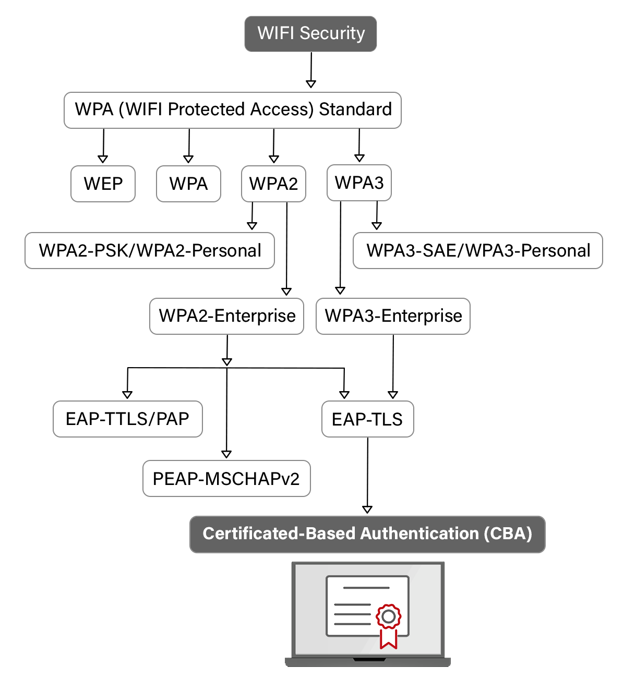
What Is WPA2?
WPA2 is the successor to the original WPA standard, introducing mandatory support for AES alongside optional use of TKIP. WPA2 was officially ratified in 2004 and quickly became the de facto security protocol for all Wi-Fi networks.
Notably, WPA2 uses Counter Mode with Cipher Block Chaining Message Authentication Code Protocol (CCMP) as the default encryption protocol, which offers a significant security advantage over WPA’s TKIP, making it resistant to numerous attack vectors that plagued its predecessor.
This shift marked a pivotal transition in wireless security protocols, providing stronger data protection via AES’s more complex encryption algorithms and longer encryption keys.
WPA2 is available in two configurations: Personal (pre-shared key, or PSK) and Enterprise (802.1X authentication), catering to different network environments and security requirements.
“The key difference is that WPA2-Personal uses one password, while with WPA2-Enterprise each unique user or device has their own set of credentials. That gives you a unique way of authenticating your different users and devices.”
Micah Spady, Director of Product Marketing at SecureW2
Advantages of WPA2
Moving from WPA to WPA2 offers organizations stronger AES-CCMP encryption and more mature enterprise support for 802.1X. WPA2 is also widely implemented on hardware and commonly found on both business and consumer networks.
Disadvantages of WPA2
WPA2’s aging design makes it vulnerable to key reinstallation attack (KRACK) style handshake attacks, and the protocol lacks many modern security fundamentals.
What Is WPA3?
WPA3 is the latest advancement in wireless security protocols, officially introduced by the Wi-Fi Alliance in 2018.
Building upon the foundation of WPA2, WPA3 introduces significant security enhancements and counters vulnerabilities that persisted in its precursor. Since 2020, WPA3 support has been mandatory for all newly developed Wi-Fi CERTIFIED devices.
A key highlight of WPA3 is the implementation of the SAE protocol, which replaces the pre-shared key (PSK) mechanism of WPA2, offering a more secure initial key exchange process and significantly improving protection against offline dictionary attacks.
Additionally, WPA3-Enterprise offers an optional 192-bit security mode for sensitive environments. It encrypts with GCMP-256, derives keys with HMAC-SHA384, and uses a 384-bit elliptic curve for key establishment and authentication, aligning the whole suite with the Commercial National Security Algorithm (CNSA) suite.
WPA3 introduces features like forward secrecy and individualized data encryption, providing robust protection against eavesdropping and ensuring backward security. These advancements mark a significant step forward in securing modern Wi-Fi networks against evolving cyber threats, offering both enhanced encryption capabilities and improved user security practices in personal and enterprise environments.
Advantages of WPA3 vs. WPA2
WPA3 uses SAE to block offline password guessing and adds forward secrecy to protect sessions against “steal now, decrypt later” attacks. It also strengthens individualized data encryption and offers better protection on public and shared networks, including defenses against KRACK attacks.
Disadvantages of WPA3
Despite the robust security enhancements WPA3 brings to the table, it is not without its challenges and limitations, especially during the transition phase from WPA2. Notable disadvantages include:
- Compatibility issues: Older hardware may not support WPA3. To maintain network security standards, you may need to make firmware updates or hardware upgrades, potentially incurring significant costs.
- Deployment complexity: Implementing WPA3, especially in enterprise environments, requires a nuanced understanding of its new security features. The transition can be complex, involving updates to network infrastructure and devices to ensure compatibility and optimal security.
- Adoption rate: As a relatively new standard, WPA3’s adoption is gradual. This slow uptake means mixed-network scenarios in which devices supporting different WPA standards must coexist are common. This situation can complicate network security management and reduce the overall security posture due to fallbacks to WPA2 in certain scenarios
WPA2 vs. WPA3: Which Is Better to Use?
The essential trade-off when considering WPA2 vs. WPA3 is robustness versus complexity.
Moving to WPA3-Enterprise or WPA3 Wi-Fi Enhanced Open gives you both stronger data encryption and device authentication but requires significantly more setup and management. Using WPA2 may make sense for smaller networks with less stringent security requirements.
Risks of Continuing to Use WPA2
There are often good reasons why organizations choose WPA2 over WPA3. But the protocol does create exposure to risks that WPA3 was designed to mitigate:
- WPA2’s four-way handshake allows attackers on personal (PSK) networks to capture a single handshake and then try passwords offline at high speed. Any weak or reused passphrases will give attackers an easy way to penetrate the network.
- KRACK attacks exploit the third message in a handshake, instructing a victim’s device to reinstall an already-in-use encryption key. This action forces nonce reuse, which can then decrypt traffic. Vendor patches do prevent these attacks, but both client and access point have to be patched.
As WPA3 continues to gain popularity, the gap between WPA2 and WPA3 will continue to widen. Hardware vendors are focusing their attention on newer protocols rather than improving WPA2, meaning the protocol will become further out of date.
How to Harden WPA2 for Stronger Security
For organizations relying on WPA2, there are configuration changes and best practices that can help to harden the network:
- Use WPA2-AES/CCMP only, disabling WEP, WPA, and TKIP fallback options and their weaker encryption.
- Turn off Wi-Fi Protected Setup (WPS), which can expose your password to attackers.
- Ideally, deployWPA2-Enterprise with 802.1Xand certificates for per-user access.
- Use a long, unique passphrase.
- Update your router and client firmware regularly, which is especially important given specific threats such as KRACK attacks and other intrusions.
- Use separate service set identifiers (SSIDs)/VLANs to manage guest and IoT devices to limit the impact of any potential breach.
Ideal WPA2 Use Cases
WPA2 isn’t obsolete. It’s still suitable for legacy or mixed-device environments in which some clients lack WPA3 support. This is especially true of small or internal networks that need strong encryption but can’t be fully modernized because of business or technology constraints.
For example, older point-of-sale terminals, barcode scanners, printers, handheld devices, and even some embedded Internet of Things (IoT) devices were designed before WPA3 was invented. Even if these devices receive firmware updates, they can’t be upgraded to support WPA3. Many organizations in this situation deploy a hardened WPA2 configuration: WPA2-Enterprise with AES-CCMP and 802.1X.
Budget-conscious smaller organizations and branch offices that have already invested in WPA2 but don’t want to use an enterprise configuration can similarly harden WPA2 by:
- Using WPA2-AES
- Disabling WPS
- Segmenting guest traffic onto a separate SSID or VLAN
- Keeping their firmware patched against KRACK and other known flaws
You likely don’t need to transition to WPA3 all at once. Organizations can use WPA2-Enterprise with certificate-based 802.1X for their corporate devices as a starting point. Then, they can introduce WPA3 gradually as older devices are replaced with new ones, with the highest value workloads transitioned to WPA3, keeping WPA2 running for low-risk and legacy segments.
Ideal WPA3 Use Cases
WPA3 is a good fit for new Wi-Fi 6/6E/7 deployments as well as for guest and public networks that require stronger password and eavesdropping protection. This protocol is also necessary for the highly regulated environments found in many industries.
Organizations that opt for WPA3 include:
- Universities, and other high-density environments: These settings typically involve modern devices with WPA3 support enabled by default, making it easy to deploy WPA3-Personal and WPA3-Enterprise.
- Finance, healthcare, defense, critical infrastructure, and other highly regulated industries: WPA3-Enterprise’s 192-bit security mode is ideal for protecting sensitive government and military communications because it’s aligned with the CNSA suite.
- Guest, hospitality, and public Wi-Fi networks: WPA3 Enhanced Open offers individualized data encryption without requiring a shared password. This feature dramatically improves privacy in settings such as hotels, airports, and coffee shops, where Wi-Fi safety concerns have lingered for years.
See how SecureW2 provided secure, scalable Wi-Fi access for a growing craft beverage company with just a single IT staffer.
The security plan that scales with you.
Our solutions can scale from mid-market to global enterprises. Compare options and see how our solutions protect you from costly breaches and ensure peace of mind.
Personal vs. Enterprise: Understanding WPA Modes
WPA2 supports two main modes: WPA2-Personal and WPA2-Enterprise. Network owners can select either shared password (PSK) or per-user authentication (802.1X/RADIUS), depending on their security needs and level of technical expertise.
WPA3 includes Personal and Enterprise modes. For open networks, the Wi-Fi Alliance certifies Wi-Fi Enhanced Open as a separate program, based on Opportunistic Wireless Encryption (OWE), which gives each user individual encryption without requiring a password.
WPA Personal Mode
WPA2-Personal uses a pre-shared key to establish authentication via a four-way handshake that confirms both sides know the password without transmitting it. WPA3-Personal replaces PSK with the much stronger SAE protocol.
WPA Enterprise Mode
Both types of WPA use 802.1X and RADIUS protocols, but WPA3-Enterprise has stronger security requirements, 192-bit encryption support, and a stronger management frame.
WPA Enhanced Open Mode
WPA3’s Wi-Fi Enhanced Open mode uses Opportunistic Wireless Encryption (OWE) to protect user data on open networks like public Wi-Fi. Not found in WPA2, this feature protects users from passive eavesdropping even on unsecured networks.
WPA Transition Mode
Mixed (or transition) mode allows both WPA2 and WPA3 devices to use the same SSID. Newer devices use WPA3 while legacy devices use WPA2. This model is frequently used during migrations.
For a comprehensive explanation of the difference between WPA2-Personal and WPA2-Enterprise, watch this video:
Why WPA3 Is the Future of Network Security
The decade between WPA2 and WPA3 implementation brought many changes to the world of data and network security. As new risks emerge today, security standards will need to keep pace.
Right now, WPA3 remains the gold standard for network security. A more pressing issue is upgrading from WPA2 environments to WPA3-only environments, a transition that is ongoing in many organizations. Tighter security configurations and moving toward universal encryption across open networks (such as OWE) are also current priorities.
The next iteration of WPA remains conceptual, even as the rise of quantum computing may necessitate another leap forward in networking safety technologies. As of 2026, security professionals and hardware makers are discussing improvements to how WPA3 is deployed, but there is no next-generation replacement on the horizon.
For a full breakdown of WPA2-Enterprise vs. WPA3 Enterprise, check out this video:
How to Set Up WPA2 on a Network
Configuring a network for WPA2 security necessitates a series of precise steps aimed at optimizing wireless network protection. Follow these guidelines to ensure your network will use WPA2’s security capabilities effectively:
- Access router settings: Log in to your wireless router’s administrative interface using its IP address. This typically involves entering the router’s IP into a web browser’s address bar.
- Select security options: Navigate to the wireless security settings section. Here, you’ll find options to choose the type of wireless security protocol you wish to implement.
- Choose WPA2: From the available security protocols, select WPA2-PSK (AES) for personal networks or WPA2-Enterprise (AES) for networks that require user authentication through a RADIUS server.
- Set a strong password: For WPA2-PSK, input a robust, complex password that includes a mix of letters, numbers, and symbols to enhance security.
- Save and apply settings: After configuring the network for WPA2, save the settings and apply them. It may require the router to reboot for changes to take effect.
- Connect devices: Ensure devices connecting to the network support WPA2 and reconnect them using the new security settings.
This configuration secures the wireless network with WPA2, leveraging AES encryption to protect data transmission against unauthorized access and eavesdropping.
WPA2-Enterprise can provide some of the most robust Wi-Fi security available today when combined with passwordless authentication such as digital certificates in place of passwords. Of course, this requires additional infrastructural elements such as a Public Key Infrastructure (PKI).
You can learn more about configuring a passwordless 802.1X network in our guide for WPA2-Enterprise certificate-based authentication.
How to Set Up a WPA3-Supported Network
Setting up a network to take full advantage of WPA3’s enhanced security features requires attention to compatibility and configuration details. To implement WPA3:
- Verify device compatibility: Ensure both the wireless access point (router) and client devices support WPA3. This may necessitate firmware updates or hardware upgrades for older devices.
- Access router configuration: Log into the router’s admin interface, typically through a web browser using the router’s IP address.
- Select WPA3 security: In the router’s wireless settings, locate the security options and select WPA3-Personal or WPA3-Enterprise, depending on your network requirements.
- Configure encryption settings: For WPA3-Enterprise, additional configuration for the RADIUS server may be required. Ensure encryption settings are aligned with WPA3 standards. Enable the optional 192-bit security mode only if every client on that SSID supports it, because a 192-bit network has no transition mode for clients that do not.
- Set a robust password: For WPA3-Personal, create a strong, complex password to maximize the protocol’s resistance to brute-force attacks.
- Save and implement changes: Apply and save the new settings. The router may need to reboot to activate WPA3 security enhancements.
- Reconnect devices: Reconnect client devices to the network, ensuring they’re configured for WPA3 security. This may involve selecting the network afresh and entering the new password.
Migrating a Network From WPA2 to WPA3
Network migrations are always complex and require careful management to minimize downtime and disruption. Best practices for migrating from WPA2 to WPA3 include:
- Enable WPA2/WPA3 transition modes on key SSIDs to detect and identify devices still connecting under WPA2.
- Prioritize upgrade resources by focusing on infrastructure, high-value endpoints, and devices that support firmware-based upgrades.
- Move sensitive SSIDs to WPA3-only architectures as clients migrate, with a time-boxed transition SSID available for WPA2 holdouts.
- Use Wi-Fi Enhanced Open with OWE for guest/public networks vs. traditional unencrypted networks.
Is My Organization Ready to Upgrade From WPA2 to WPA3?
You can determine your readiness by evaluating these aspects of your organization:
- Current technology inventory: Catalog all the systems in your wireless infrastructure to find out how many support WPA3 vs. WPA2. If devices primarily support just WPA2, you may need to implement a phased plan to refresh your hardware.
- Risk appetite and regulatory pressures: If you regularly face stringent audits or if a leak of sensitive data could cripple your business, the benefits of migrating to WPA3 may far outweigh the cost.
- Operational readiness: You’ll have a more successful upgrade if your organization already has strong monitoring policies, manages change well, and handles Wi-Fi client configurations effectively.
What to Do if Your Older Devices Don’t Support WPA3
If you decide to continue using devices that only support WPA2, don’t let these devices dictate your wireless security strategy. Instead, isolate your WPA2 risk.
Many organizations create WPA2-only SSIDs or VLANs for their legacy hardware. Tight segmentation limits these devices to the minimum services and servers they need. It’s also possible to use WPA3-capable gateways that sit between your legacy endpoints and your main Wi-Fi network to add a stronger layer of protection.
Running WPA2 and WPA3 on the Same Network
It’s possible to run WPA2 and WPA3 side by side, but to do so securely requires careful planning. WPA2/WPA3 Transition mode is a compatibility mode that lets one SSID accept WPA2 and WPA3 connections simultaneously. Although this mode gives organizations greater flexibility in the devices they use, it also means the SSID has only a WPA2 level of security.
A better approach is to operate separate SSIDs for WPA2 and WPA3. You can apply stricter policies on the WPA3 side and take separate steps to strengthen WPA2 by replacing passwords with certificates via WPA2-Enterprise and 802.1X/EAP-TLS.
Secure Your Wireless Network With WPA2-Enterprise or WPA3 Authentication
WPA2-Enterprise with certificate-based authentication closes the gaps left permanently open by pre-shared keys, while WPA3 is the right choice for certain organizations that need extra security.
With certificate-based WPA2-Enterprise there is no shared passphrase to rotate and no password for an attacker to phish, and every device has to present a certificate your PKI issued before RADIUS will let it on.
Our JoinNow platform enforces EAP-TLS across your wired and wireless infrastructure, connects RADIUS policy to live IdP and MDM data, and revokes access in seconds when a user offboards.
If your wireless security still depends on passwords or shared keys, that’s the gap worth closing first.
Schedule a demo to see how SecureW2 secures wireless networks without passwords.
Frequently Asked Questions
What is the difference between WPA2 and WPA3?
WPA3 is the newer standard and was designed to fix several weaknesses in WPA2 while improving security for both home and enterprise networks. WPA3 adds Simultaneous Authentication of Equals (SAE) for personal networks, forward secrecy so previously captured traffic cannot be decrypted, Opportunistic Wireless Encryption (OWE), and optional 192-bit encryption.
Is WPA3 backwards compatible with WPA2?
While WPA3 is not itself backwards compatible with WPA2, most Wi-Fi access points support WPA2/WPA3 Transition Mode, which allows devices using both WPA2 and WPA3 to connect to the network. WPA3 devices authenticate with SAE, while WPA2 devices authenticate with PSK. Transition mode is meant to be a bridge that allows organizations to slowly transition to full WPA3 without replacing all of their hardware at once.
Can WPA3 support Internet of Things (IoT) devices?
WPA3 can support IoT devices, but IoT devices can’t always support WPA3. Many lower-cost IoT devices were built when WPA2 was the standard. They lack the memory, CPU, or firmware upgrade path to support WPA3. Rather than keep their entire network on WPA2, organizations using legacy IoT devices often segment their networks and leave older devices on dedicated WPA2-only SSIDs. These devices can be gradually replaced with WPA3-capable platforms as budget and need allow.
Does WPA3 slow down Wi-Fi?
In most situations, WPA3 will not slow your internet connection noticeably. But in some cases, such as with older devices, mixed WPA2/WPA3 mode or with early WPA3 firmware, users may notice some performance issues.
Can Eufy connect to WPA3?
Most Eufy cameras and doorbells are designed for 2.4GHz WPA2 networks, and WPA3 compatibility isn’t officially confirmed across the product line. That said, most modern routers offer WPA2/WPA3 transition mode, which keeps Eufy devices connected without compromising your network’s security. Check your router settings as transition mode is usually the easiest fix.
Does Arlo support WPA3?
Arlo devices primarily run on 2.4GHz WPA2 networks, and WPA3 support hasn’t been broadly rolled out across the lineup. If your router is set to WPA3-only mode, connection issues during setup are common. Switching to WPA2/WPA3 mixed mode typically resolves this, since Arlo’s SmartHub acts as an intermediary between your cameras and router.
