Key Takeaways
- MFA fatigue is a social engineering attack that spams a user with MFA prompts until one gets approved by mistake. Attackers pair a stolen password with a flood of push requests, hoping frustration produces one accidental approval.
- MFA fatigue has enabled real-world breaches at organizations like Uber and Cisco, showing how push-based MFA can be compromised through social engineering.
- Phishing-resistant, certificate-based authentication removes the push prompt entirely, closing the gap MFA fatigue depends on.
A stolen password isn’t always enough to get into an account protected by multi-factor authentication (MFA). So, attackers found a workaround: bombard the victim’s phone with authentication requests until they tap “approve” just to make the notifications stop.
Security teams call this MFA fatigue, and it has bypassed MFA at major companies without a single credential guessed or a single piece of malware installed.
This guide covers:
- How MFA fatigue attacks work step by step
- What real breaches looked like
- Why the technique has become common enough for MITRE to track it
- How phishing-resistant authentication removes the push prompt attackers depend on
What Is an MFA Fatigue Attack?
An MFA fatigue attack, also known as MFA bombing or push bombing, happens when someone already holding a stolen password bombards the account owner with back-to-back authentication prompts.
The goal is to wear the person down until they tap approve just to stop the noise, whether that comes from genuine frustration, distraction or an honest mix-up.
MITRE ATT&CK catalogs this behavior as Multi-Factor Authentication Request Generation, technique T1621.
The technique works against any MFA method built around a simple accept-or-deny push, including services like Duo Push, Okta Verify and Microsoft Authenticator’s basic approval flow. It does not target a specific vendor. It exploits the human approval step built into push-based MFA.
See your security gap before attackers do.
See continuous trust in action on a platform that includes RADIUS, PKI and AI security.
How Does an MFA Fatigue Attack Work?
An MFA fatigue attack follows a predictable sequence, and every step after the first depends on human behavior rather than a technical exploit. The image below captures how an MFA fatigue attack works.
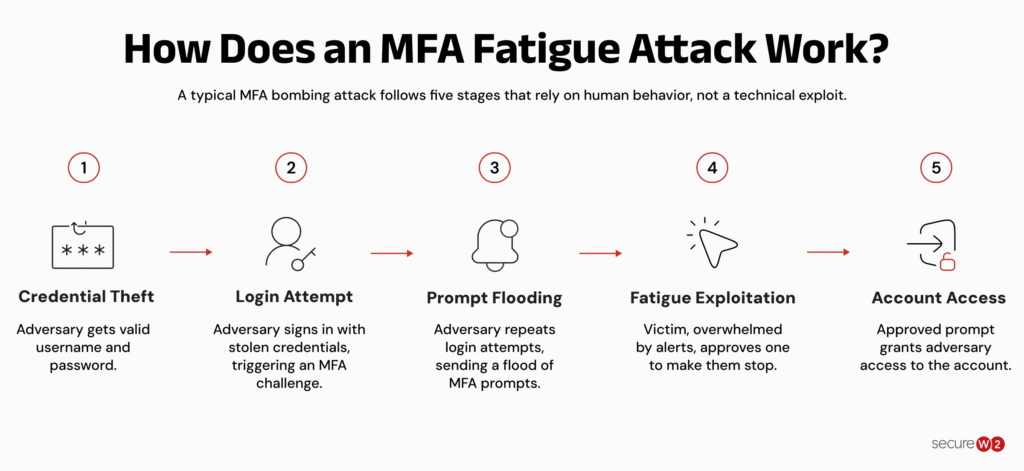
A typical MFA bombing attack progresses through five stages:
- Credential theft: The attacker acquires a valid username and password through phishing, a leaked credential database or a purchase on a dark web marketplace.
- Login attempt: The attacker signs in with the stolen credentials, which triggers the account’s MFA challenge and sends the first push notification to the victim’s device.
- Prompt flooding: The attacker repeats the login attempt in quick succession, generating a new push notification, phone call or text message with each try.
- Fatigue exploitation: The victim, buried in alerts, approves one to silence them, sometimes while also being contacted directly by the attacker posing as internal IT support.
- Account access: The approved prompt hands the attacker a valid session, with no password guessing and no malware required at any point.
Every step past the first relies on wearing down a person, not defeating a system.
Why Is MFA Fatigue a Growing Concern?
Push notification MFA became the default second factor at most organizations because it’s easier to roll out than hardware keys and less annoying than typing in a one-time code. That popularity is exactly what makes it a target: the more accounts protected by a simple tap-to-approve flow, the more accounts an attacker can try to bomb.
Microsoft previously reported observing approximately 6,000 MFA fatigue attempts per day, highlighting how frequently attackers were using this technique against push-based authentication.
MITRE didn’t add Multi-Factor Authentication Request Generation to its Enterprise ATT&CK matrix as a hypothetical. Push bombing is tracked because enough real intrusions used the technique to justify a dedicated entry.
Once a technique gets documented at that level, security teams should assume it’s already part of active attacker playbooks, not an edge case.
Real-World MFA Fatigue Attacks
Two breaches in 2022 turned MFA fatigue from a theoretical risk into a boardroom-level concern.
Uber, September 2022
A MFA fatigue attack forced Uber to temporarily disable several internal systems in September 2022.
An attacker later linked to the Lapsus$ group obtained a contractor’s Uber corporate password and then sent a stream of MFA push notifications until the contractor approved one.
The attacker used that access to compromise additional employee accounts and gain permissions to internal tools, including G Suite and Slack, before Uber contained the incident.
Cisco, May 2022
An MFA bombing attack gave an attacker access to Cisco’s corporate network in May 2022.
An initial access broker compromised an employee’s personal Google account and recovered saved Cisco VPN credentials synchronized through the employee’s browser. The attacker then combined MFA push bombing with voice phishing, impersonating trusted organizations until the employee approved a virtual private network (VPN) authentication request.
The approved request gave the attacker access to Cisco’s corporate network, where they enrolled new devices for MFA and escalated to administrative privileges, allowing them to login to multiple systems before Cisco detected and contained the intrusion.
Cisco Talos attributed the activity to an actor with ties to the Yanluowang ransomware operation.
Both breaches share the same weak point: a push notification that only requires a single tap, with no context about who is asking or why.
What Are the Signs of an Active MFA Fatigue Attack?
A string of MFA prompts you didn’t request is the clearest signal, but a few other patterns are worth watching for, such as:
- Off-hours prompts: A request arrives late at night or clearly outside your normal login pattern.
- Repeated denials followed by a lull: The attacker gets denied several times, then pauses and tries again later or from a different IP address.
- Unfamiliar sign-in details: The push notification shows a login city, device or browser you don’t recognize.
- Direct contact from “IT”: Someone calls, texts or messages you asking to approve a pending MFA request, especially while pressuring you to act fast.
Any single item on its own could be a false alarm. Two or more together are worth reporting to a security team immediately.
The security plan that scales with you.
Our solutions can scale from mid-market to global enterprises. Compare options and see how our solutions protect you from costly breaches and ensure peace of mind.
How to Prevent MFA Fatigue Attacks
Defenses against MFA fatigue fall on a spectrum, from configuration tweaks that reduce risk to methods that remove the push prompt altogether. The table below compares common MFA methods based on their resistance to MFA fatigue attacks and phishing.
| MFA Method | Vulnerable to MFA Fatigue? | Phishing-Resistant? |
| Push notification (tap to approve) | Yes | No |
| Push with number matching | Reduced risk | No |
| One-time passcode (SMS or app) | Not directly, but still phishable | No |
| Hardware security key (FIDO2/WebAuthn) | No | Yes |
| Certificate-based authentication (PKI) | No | Yes |
Reduce the Attack Surface With Number Matching and Rate Limits
Number matching forces the user to type a code shown on the login screen into the authenticator app, instead of just tapping approve on a blind prompt.
Microsoft made number matching mandatory tenant-wide for Microsoft Authenticator push notifications in 2023, specifically to cut down on this attack pattern.
Rate limiting is the other half of this fix: capping how many MFA requests an account can receive in a set window so an attacker can’t send dozens of prompts in a few minutes.
Train Users to Report, Not Just Deny
Denying a prompt only stops that one request. Reporting it tells a security team the credential behind it is already compromised. Build the report option into the same app used for MFA approvals so flagging a suspicious prompt takes one tap, not a separate email to the help desk.
Phishing-Resistant MFA Removes the Prompt Entirely
Number matching and rate limits reduce risk. They don’t remove it, because the account still depends on a shared secret, the password, plus a human decision to approve access.
The Cybersecurity and Infrastructure Security Agency (CISA) classifies FIDO/WebAuthn and certificate-based authentication built on public key infrastructure (PKI) as the two forms of phishing-resistant MFA it recognizes, with FIDO/WebAuthn the most widely available.
Certificate-based login using EAP-TLS works differently from password with push MFA.
A digital certificate on the device authenticates the connection directly through a cryptographic exchange. There’s no password to steal, no push notification to approve, and nothing for an attacker to flood.
An MFA fatigue attack has nothing to bomb, because there’s no accept-or-deny step anywhere in the login flow.
Move Beyond Push Prompts With Certificate-Based Authentication
MFA fatigue exploits one thing: a login flow that ends with a person tapping approve. Removing that step is the most direct fix, and it doesn’t require users to manage another app or memorize another code.
The SecureW2 JoinNow Dynamic PKI issues non-exportable digital certificates to managed devices and bring-your-own-device (BYOD) endpoints, so authentication happens through a cryptographic handshake instead of a password and a push notification.
Paired with JoinNow Cloud RADIUS, every Wi-Fi, VPN and application login gets verified against your identity provider in real time, with no push prompt for an attacker to bomb and no shared secret to phish.
Schedule a demo to see how certificate-based authentication closes the gap MFA fatigue depends on.
Frequently Asked Questions
What exactly is an MFA fatigue attack?
An MFA fatigue attack is a social engineering technique where someone who already has a stolen password sends repeated MFA push notifications to the account owner, hoping they approve one out of frustration or by mistake.
The attack requires no malware and no way around encryption, only patience and a working set of credentials.
How does an MFA fatigue attack bypass MFA?
It doesn’t bypass MFA technically. It exploits the human approval step that most push-based MFA depends on. Because the account owner already has a legitimate, registered device, the authentication system can’t distinguish a flood of attacker-triggered prompts from a normal login attempt. It only sees whatever the user ultimately approves.
Are push-based MFA methods still secure?
Push-based MFA is still far better than having no MFA at all, but it isn’t phishing-resistant. Number matching and rate limiting reduce the odds of an accidental approval, but the method still depends on a person making the right call under pressure. Phishing-resistant options like FIDO2/WebAuth or certificate-based authentication remove that decision point entirely.
How can organizations protect against MFA fatigue?
Start with number matching and MFA request rate limits, since both are usually a configuration change rather than a new purchase. Add monitoring for unusual volumes of MFA requests, train users to report unexpected prompts instead of just denying them and move toward phishing-resistant authentication like FIDO2 or certificates for accounts that need the strongest protection.
Can MFA fatigue attacks affect hardware-key or token-based MFA?
Hardware security keys built on FIDO2 or WebAuthn aren’t vulnerable to MFA fatigue, because there’s no push notification to approve in the first place. Authentication happens through a cryptographic challenge tied to the physical key and the specific site being accessed, so flooding a user with login attempts doesn’t produce anything for them to tap or approve.
