Key Takeaways
- Packet sniffing is the capture of data packets traveling across a network to log, inspect, and analyze that traffic.
- Sniffers work by placing a network adapter into promiscuous or monitor mode to capture every frame it sees.
- Attackers pair sniffing with ARP spoofing, DNS spoofing, and session hijacking to intercept credentials on shared networks.
- Packet sniffing is not automatically illegal; legality depends on consent, ownership, and whether traffic was reasonably protected.
- Encrypted, certificate-based authentication for Wi-Fi and VPN access removes the credentials a sniffer would otherwise be able to capture.
Anyone with the right software and access to a network segment can capture the traffic moving across it. On an unencrypted or misconfigured network, that traffic can include login credentials, session tokens, and unencrypted files.
This guide breaks down what packet sniffing is, how sniffers actually capture traffic, the attack techniques built on top of sniffing, and the legal and defensive questions IT and security teams ask most.
What Is Packet Sniffing?
Packet sniffing is the process of capturing data packets as they move across a network, then logging or analyzing that traffic to see what it contains.
The National Institute of Standards and Technology (NIST) defines a packet sniffer as software that monitors traffic on a wired or wireless network and captures the packets passing through it.
The practice of packet sniffing is also called packet analysis, packet capture, or network analysis, depending on who is doing it and why.
Packet sniffing itself is neutral. Network engineers use it every day to troubleshoot latency, verify firewall rules, and confirm that traffic is routing correctly. The same technique, aimed at someone else’s traffic without permission, becomes a packet sniffing attack.
Sniffers come in two forms:
- Software sniffers: Applications such as Wireshark and tcpdump that run on a laptop, server, or virtual machine and capture whatever traffic is visible to that machine’s network adapter
- Hardware sniffers: Dedicated appliances or inline network taps that capture traffic at full line rate, built for environments where a software agent would drop packets during sustained high-volume monitoring
How Packet Sniffing Works
Packet sniffers work by switching a device’s network adapter into promiscuous mode, which allows it to capture all traffic on a network segment — not just traffic addressed to that device. By default, every network interface card (NIC) discards frames that aren’t addressed to its own hardware address; promiscuous mode overrides that filter. On a wireless adapter, the equivalent setting is called monitor mode.
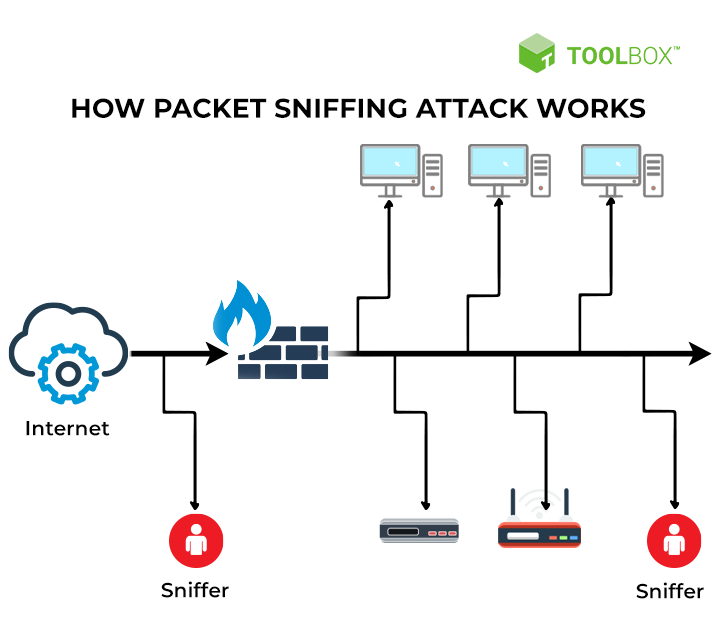
The capture process generally follows the same sequence regardless of the tool:
- Enter promiscuous or monitor mode: The sniffing tool instructs the network adapter to accept every frame on the segment or channel, not only frames addressed to that device.
- Capture raw frames: The sniffer copies each frame off the wire or airwaves as it passes, without altering or forwarding it any differently than normal.
- Decode by protocol layer: The tool parses the captured bytes against known protocol structures, Ethernet and IP headers first, then Transmission Control Protocol (TCP) or User Datagram Protocol (UDP), then whatever application-layer protocol sits on top.
- Filter and reconstruct: The analyst, or attacker, filters the capture down to traffic of interest and can reconstruct entire sessions, including files, form submissions, or login attempts, if that traffic wasn’t encrypted.
The technique itself is passive. Nothing about capturing a frame requires modifying it, which is exactly what makes packet sniffing difficult to detect from the traffic alone.
Types of Packet Sniffing Attacks
Packet sniffing on its own only captures what’s already visible on the wire. Attackers combine it with techniques that force more traffic into view or make sniffed data more useful:
- ARP spoofing: The attacker sends forged Address Resolution Protocol (ARP) messages to trick devices on a local network into routing their traffic through the attacker’s machine before it reaches its intended destination.
- DNS spoofing: The attacker corrupts Domain Name System (DNS) responses to redirect a victim’s traffic to a server the attacker controls, then captures and inspects it there.
- Session hijacking: The attacker sniffs a session cookie or authentication token from unencrypted traffic and reuses it to impersonate the victim without needing their password.
- Password and credential sniffing: The attacker captures login credentials sent in cleartext over legacy protocols or misconfigured services that don’t encrypt authentication traffic.
Wi-Fi and Public Network Packet Sniffing
Open Wi-Fi networks are the easiest place to sniff traffic because every device on the same access point shares a broadcast medium. NIST’s guidance on securing wireless local area networks (WLANs) warns that attackers can passively eavesdrop on WLAN connections to collect information about the parties involved and the content of their messages.
Coffee shops, airports, and conference Wi-Fi are common targets precisely because dozens of strangers share the same segment with no expectation that their traffic is isolated from each other. Wi-Fi packet sniffing is especially effective in these settings because there’s no switch isolating traffic between users, just a shared radio channel that every nearby device can listen to.
Security and Privacy Risks of Packet Sniffing
The core risk of packet sniffing is exposure of anything sent without encryption: usernames and passwords, session tokens, unencrypted emails, and file transfers. Stolen credentials remain one of the most common ways attackers gain initial access to a network, according to Verizon’s Data Breach Investigations Report. A sniffer sitting on the right segment, or the right open Wi-Fi network, gives an attacker a low-effort way to harvest exactly that kind of credential.
Legacy Wi-Fi authentication methods make this worse. Protocols that transmit a hashed or reusable password during authentication give an attacker on the same network something to capture and attack offline, long after the original session ends. Networks that still rely on shared passwords, rather than per-device certificates, keep that exposure open.
A captured password stays valid until someone manually changes it. On shared-password networks, a single sniffed credential can grant an attacker access indefinitely.
Is Packet Sniffing Legal?
Is packet sniffing illegal? Not automatically, and it isn’t automatically legal either. In the United States, the practice is governed primarily by the Electronic Communications Privacy Act (ECPA), which broadly prohibits intentionally intercepting wire, oral, or electronic communications, and by the Computer Fraud and Abuse Act (CFAA), which criminalizes unauthorized access to computer systems and data.
Violating these statutes can carry criminal penalties, including up to five years in prison and fines as high as $250,000 for individuals or $500,000 for organizations.
Sniffing is generally permitted when one of the following takes place:
- The network owner monitors their own infrastructure
- All parties give informed consent
- A security professional has a signed authorization to test a network
What counts as “public” traffic isn’t as settled as it might seem. Google’s Street View vehicles captured payload data from unencrypted Wi-Fi networks between 2007 and 2010, prompting a legal battle over whether that traffic was fair game. In 2013, the 9th U.S. Circuit Court of Appeals ruled in Joffe v. Google that the Wiretap Act’s exemption for “readily accessible” radio communications didn’t cover Wi-Fi data. Unencrypted traffic isn’t free to intercept simply because it travels over radio waves.
Sniffing traffic that isn’t yours, on a network you don’t administer and haven’t been authorized to test, is a legal risk regardless of whether the network happened to be unencrypted.
| See your security gap before attackers do. |
| Get a live walkthrough of the SecureW2 JoinNow Platform to see how we keep networks protected with secure certificates. |
| Schedule a Demo → |
How to Detect Packet Sniffing on Your Network
Passive sniffing doesn’t modify traffic, so it rarely shows up in application logs. A few signals are worth monitoring instead:
- Duplicate or unexpected ARP entries: A sudden change in the Media Access Control (MAC) address associated with your gateway’s IP address can indicate ARP spoofing set up to redirect traffic toward a sniffer.
- NICs running in promiscuous mode: Endpoint monitoring tools and some switches can flag network adapters that have switched into promiscuous or monitor mode outside of approved troubleshooting windows.
- Unusual latency or duplicate packets: Mirroring or rerouting traffic through an extra hop, as with an ARP spoofing setup, often introduces measurable latency or duplicate frames that weren’t there before.
- Unfamiliar devices on switch ports: Reviewing which MAC addresses are actually connected to managed switch ports can surface a device that shouldn’t be there, including one plugged in specifically to tap traffic.
None of these signals are conclusive on their own, but consistent baseline monitoring of ARP tables, switch port assignments, and NIC modes makes it far easier to notice when something changes.
How to Protect Against Packet Sniffing
The most effective defense against packet sniffing is encryption: a sniffer can still capture encrypted traffic, but the contents are unreadable without the decryption key. In other words, you can’t stop packets from being captured, but you can make sure there’s nothing worth capturing.
- Encrypt traffic end to end: Transport Layer Security (TLS) protects data in transit for web and application traffic, so a sniffer only sees ciphertext, not credentials or content.
- Move off shared, unencrypted Wi-Fi: Public and open networks put every connected device on the same broadcast segment, which is exactly the condition packet sniffing exploits.
- Segment network traffic: Virtual local area networks (VLANs) and switch-level access controls limit how much traffic is even visible from any single point on the network, shrinking what a sniffer positioned anywhere can see.
- Replace password-based Wi-Fi authentication with certificates: Credential sniffing depends on there being a password to capture in the first place. Certificate-based authentication removes that target entirely.
That last point is where most legacy Wi-Fi deployments remain exposed. Networks secured with WPA2-Enterprise or WPA3-Enterprise and the Extensible Authentication Protocol-Transport Layer Security (EAP-TLS) method authenticate users and devices with X.509 certificates instead of a shared secret, so there is no reusable password for a sniffer to capture.
This authentication happens through the IEEE 802.1X port-based access control standard, which governs how a device authenticates before a network port grants it access. Learn more about how this authentication flow works in our guide to 802.1X authentication configuration.
Secure Your Network Against Packet Sniffing Attacks
Packet sniffing is unavoidable on a technical level. Anyone on the right network segment can capture traffic. What determines whether that capture is a non-event or a breach is whether there was anything readable, and stealable, in that traffic to begin with.
JoinNow Dynamic PKI issues and manages the digital certificates that replace shared Wi-Fi passwords and VPN credentials, so devices authenticate with a cryptographic identity a sniffer can’t reuse. Paired with JoinNow Cloud RADIUS, which validates every authentication request against your identity provider in real time, organizations can move users off password-based Wi-Fi authentication without standing up new on-premises infrastructure. See how Dynamic PKI and Cloud RADIUS work together to close the credential-sniffing gap that legacy Wi-Fi authentication leaves open.
Schedule a demo to see how certificate-based authentication removes the credentials packet sniffers are built to capture.
Frequently Asked Questions
Is packet sniffing legal or illegal?
It depends on ownership, consent, and authorization. Monitoring your own network, sniffing with informed consent from everyone involved, or running an authorized penetration test are generally lawful. Intercepting someone else’s traffic without permission can violate the Electronic Communications Privacy Act or the Computer Fraud and Abuse Act, even if the network was unencrypted.
How can I detect if someone is sniffing my network?
Watch for unexpected changes in ARP tables, network adapters running in promiscuous or monitor mode outside approved windows, unusual latency or duplicate packets, and unfamiliar devices connected to managed switch ports. None of these signals is definitive alone, but consistent baseline monitoring makes deviations easier to spot.
What’s the difference between packet sniffing and packet spoofing or injection?
Packet sniffing is passive. It captures and reads traffic without altering it. Packet spoofing and injection are active techniques where an attacker crafts and sends forged packets, such as spoofed ARP replies or injected traffic, to manipulate how a network behaves. Attackers frequently combine the two: spoofing to redirect traffic, then sniffing to read it once it arrives.
