Key Takeaways
- A rogue access point (AP) is a wireless access point connected to a network without authorization from IT or security teams.
- Rogue APs range from forgotten hardware to attacker-planted devices, and evil twins spoof a trusted network name to trick users.
- Left undetected, a rogue AP lets attackers intercept traffic and harvest credentials, so PCI DSS mandates quarterly wireless scans.
- WIDS/WIPS and periodic physical scans are the standard methods for finding rogue APs before attackers exploit them.
- Certificate-based 802.1X authentication blocks rogue and evil twin connections by requiring devices to validate the network’s identity first.
Every access point on your network is a potential front door. Most of them are points that IT installed and secured on purpose. A rogue access point is one nobody approved, and it can sit on a network for months before anyone notices.
That gap between installation and discovery is where the damage happens. Attackers use rogue APs to intercept traffic, harvest login credentials, and move laterally into systems that were never meant to be reachable from Wi-Fi.
This guide breaks down what a rogue access point actually is, how it differs from an evil twin, why it’s dangerous, and how to detect and prevent one before it costs you.
What Is a Rogue Access Point?
A rogue access point is a wireless access point that connects to a network without explicit authorization from a network administrator. It can broadcast its own network, or it can plug directly into a wired port and bridge the wireless world to the internal network behind your firewall.
The device doesn’t have to be sophisticated. A consumer-grade router tucked under a desk, a mobile hotspot left in access point mode, or an old wireless printer nobody decommissioned can all function as a rogue AP.
What matters is authorization, not capability. If IT didn’t approve it and doesn’t manage it, it’s rogue.
Rogue APs differ from ordinary shadow IT in one key way: they extend network access over the air. Anyone within radio range becomes a potential entry point, not just someone with physical access to a cable.
Types of Rogue Access Points
Not every rogue AP is planted by an attacker. In practice, they fall into a few recurring categories:
- Employee-installed devices: A well-meaning employee adds a personal router or Wi-Fi extender to fix a dead zone, without realizing that it creates an unsecured bridge to the corporate network.
- Misconfigured or forgotten hardware: Old access points, test equipment, or vendor-installed devices that were never fully decommissioned or hardened.
- Malicious attacker-planted APs: A device an attacker physically installs, or hides, specifically to capture traffic or credentials.
- Software-based rogue APs: A laptop or phone configured to share its connection, effectively turning an endpoint into an access point.
Each category carries the same core risk: an unmanaged wireless bridge that bypasses the access controls applied to sanctioned network infrastructure.
Rogue Access Point vs. Evil Twin: What’s the Difference?
An evil twin attack is a more deliberate form of rogue access point compromise. Where a rogue AP might exist simply because IT didn’t know about it, an evil twin is built to impersonate a real network on purpose.
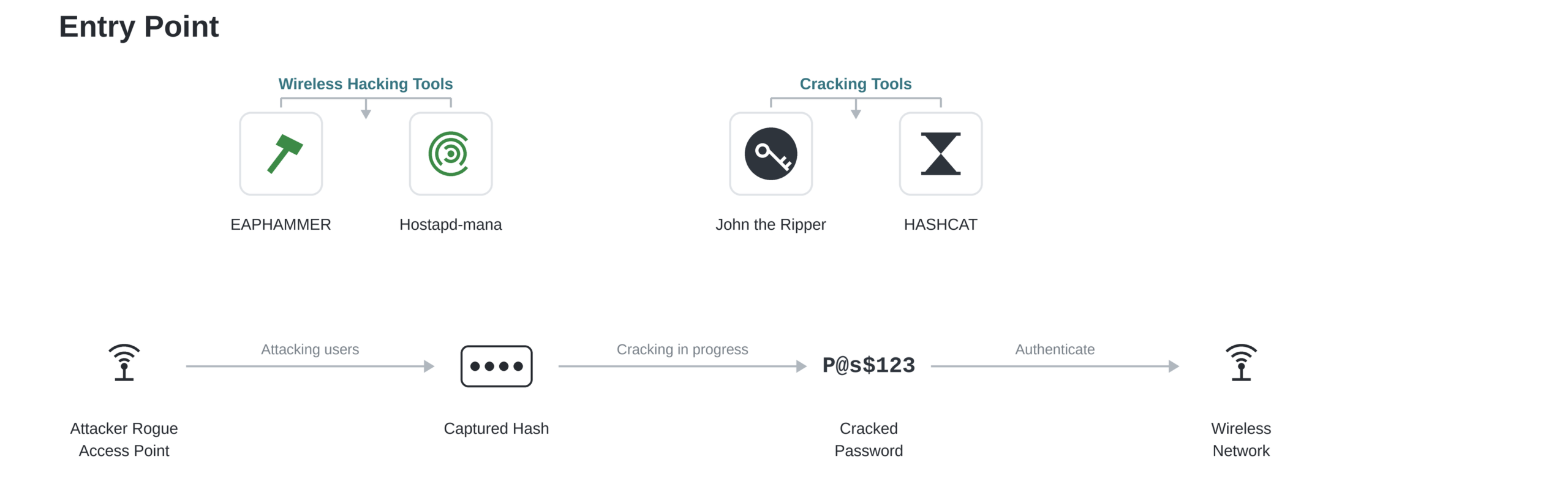
MITRE ATT&CK classifies an evil twin attack as an adversary-in-the-middle technique in which an attacker sets up a wireless access point using the same service set identifier (SSID) as a legitimate network to trick victims into connecting.
The distinction matters because the defenses differ slightly. Every evil twin is a rogue AP, but not every rogue AP is trying to look like something it isn’t.
| Attribute | Rogue Access Point | Evil Twin |
| Network name | Its own SSID, or none | Spoofs a legitimate SSID |
| Intent | Ranges from accidental to malicious | Always malicious |
| Installed by | Employees, vendors, or attackers | Attackers, deliberately |
| Primary goal | Varies; often unintentional exposure | Credential theft, traffic interception |
| Detection difficulty | Moderate; unfamiliar SSID stands out | High; looks identical to the real network |
Evil twins are common in public spaces where users expect to see a familiar network name. In 2024, Australian Federal Police charged a man who allegedly built evil twin Wi-Fi networks at airports in Perth, Melbourne, and Adelaide, as well as on domestic flights, redirecting anyone who connected to a fake login page that harvested email and social media credentials. The same technique works just as well against a corporate guest network.
Why Are Rogue Access Points Dangerous?
A rogue AP doesn’t need to be exotic to cause damage. It just needs to be there long enough for someone to connect; and once they do, here’s what’s at risk:
- Man-in-the-middle (MITM) interception: Once a device connects through a rogue AP, the attacker sits between the user and the internet, able to read, modify, or redirect traffic. NIST specifically flags public, unsecured access points as a common vector adversaries use to conduct MITM attacks against connected devices.
- Credential harvesting: Fake captive portals capture usernames and passwords the moment a user tries to log in.
- Network pivoting: A rogue AP bridged to a wired port can give an attacker a foothold to scan for and move toward more sensitive systems, entirely bypassing perimeter firewalls.
- Malware delivery: Traffic passing through an attacker-controlled AP can be injected with malicious payloads before it ever reaches its destination.
- Compliance violations: The Payment Card Industry Data Security Standard (PCI DSS) requires organizations handling card data to detect unauthorized wireless access points, since an unmonitored AP undermines every other control protecting that data.
- Performance degradation: Even a non-malicious rogue AP can cause channel interference and congestion, degrading the performance of the legitimate network.
How to Detect Rogue Access Points
Rogue access point detection comes down to knowing what should be broadcasting on your network and flagging everything that isn’t.
- Deploy a wireless intrusion detection and prevention system (WIDS/WIPS). NIST Special Publication 800-153 recommends WIDS/WIPS sensors to continuously monitor the radio frequency (RF) environment and flag unauthorized or anomalous wireless devices in real time.
- Run authenticated wireless scans on a fixed schedule. Compare every detected SSID and media access control (MAC) address against an inventory of approved access points.
- Cross-reference switch port activity. A wired port suddenly showing traffic from an unrecognized device is a strong rogue AP indicator, especially if that device is also broadcasting Wi-Fi.
- Conduct periodic physical inspections. In smaller environments, walking server rooms, wiring closets, and common areas to visually confirm hardware still catches devices that automated scans miss.
- Watch for duplicate or near-duplicate SSIDs. A second network broadcasting your organization’s SSID, or a close variant, is a signal worth investigating immediately, especially in evil twin scenarios.
Organizations in scope for PCI DSS should treat this as a compliance floor, not a ceiling: Requirement 11.1 calls for testing for the presence of wireless access points and identifying all authorized and unauthorized APs at least quarterly. Continuous WIDS/WIPS monitoring closes the gap between those quarterly checks.
What to Do if You Find a Rogue Access Point
Finding a rogue AP is only useful if the response is immediate and structured.
- Isolate it. Disable the switch port it’s connected to, or block its MAC address at the wireless controller, without waiting for a full investigation.
- Confirm it is actually unauthorized. Check the device against your asset inventory before removing anything. A legitimate device that simply wasn’t logged correctly doesn’t need an incident response.
- Preserve evidence. Photograph the physical device, log its MAC address, SSID, and switch port, and capture any traffic logs before disconnecting it if forensic review is warranted.
- Investigate scope. Determine how long the device was active and what it had access to, including whether any credentials or sensitive data may have passed through it.
- Remove and remediate. Physically remove the hardware, rotate any credentials that may have been exposed, and close the gap that allowed the device to connect, whether that’s an open switch port, a weak Wi-Fi password, or a missing physical control.
- Update your baseline. Add the incident to your asset inventory review process so the same gap doesn’t produce a repeat finding next quarter.
| Find the network security plan built for your environment. |
| SecureW2 certificate-based authentication scales from mid-market teams to global enterprise deployments. Compare options and see how our solution can protect you from costly breaches. |
| Compare Plans → |
How to Prevent Rogue Access Points
Detection tells you a rogue AP is there. Prevention is about making sure devices can’t connect to begin with, and that’s where the network’s authentication method matters more than any scanning tool.
Take these actions to prevent rogue APs:
- Lock down physical access and switch ports. Disable unused ports and require 1X port-based authentication on wired connections so an unrecognized device can’t simply plug in.
- Pair wireless intrusion prevention with network access control (NAC). Detection and enforcement work best together: WIDS/WIPS flags anomalies, and NAC can automatically quarantine unrecognized devices.
- Train staff not to add their own hardware. Most employee-installed rogue APs come from a genuine attempt to solve a coverage problem. A clear escalation path for reporting dead zones removes the incentive.
- Move to certificate-based 802.1X authentication. This is the control most rogue AP guides skip, and it’s the one that structurally prevents the biggest category of rogue AP risk: silent, automatic connections.
Most devices are configured to auto-connect to any network broadcasting a familiar SSID, which is exactly what makes rogue APs and evil twins effective.
WPA2-Enterprise and WPA3-Enterprise networks using Extensible Authentication Protocol-Transport Layer Security (EAP-TLS) close that gap through mutual authentication: the client validates the network’s server certificate before it ever transmits a credential or completes a connection, and the network validates the client’s certificate before granting access.
The Wi-Fi Alliance made this non-negotiable in WPA3-Enterprise, which mandates server certificate validation for EAP-TLS, EAP-TTLS, and PEAP connections, specifically because unvalidated connections are what let evil twins steal credentials over the air.
A device running EAP-TLS with a properly configured certificate simply won’t complete a handshake with a rogue AP or evil twin impersonating your SSID, no matter how convincing the spoofed network name looks.
Pre-shared keys and password-based EAP methods offer no equivalent protection, because any device holding the shared secret, or a phished password, can complete the connection.
Stop Rogue Access Points With Certificate-Based Network Access
Scanning for rogue APs after the fact treats a symptom. The more durable fix is removing the reason unauthorized devices can connect in the first place.
JoinNow Cloud RADIUS enforces certificate-based 802.1X authentication for WPA2-Enterprise and WPA3-Enterprise networks, validating both the device and the server on every connection attempt so devices never silently associate with an unrecognized or spoofed access point. Paired with JoinNow Dynamic PKI, which issues and manages the digital certificates that make that mutual authentication possible, your network stops trusting connections by SSID alone and starts trusting them by verified identity.
If your organization is still relying on pre-shared keys or password-based Wi-Fi authentication, schedule a demo to see how certificate-based access closes the door that rogue APs and evil twins depend on.
Frequently Asked Questions
What is a rogue access point?
A rogue access point is any wireless access point connected to a network without authorization from IT or security teams. It can be a forgotten piece of hardware, an employee’s personal router, or a device an attacker deliberately installs to intercept traffic.
What is the difference between a rogue access point and an evil twin?
A rogue access point is any unauthorized device connected to the network, regardless of intent. An evil twin is a specific type of rogue access point deliberately configured to spoof a legitimate network’s SSID, so it looks identical to a trusted connection and tricks users into connecting on purpose.
Can a rogue access point work without being plugged into the network?
Yes. A rogue AP only needs a wired connection if the goal is bridging into the internal network. An evil twin built to harvest credentials can run entirely over the air using a laptop, phone, or portable router broadcasting a spoofed SSID from a parking lot or an airport lounge, with no physical access to your infrastructure at all.
How do attackers trick devices into connecting to an evil twin?
Mostly, they don't have to. Devices remember known SSIDs and auto-connect to any network broadcasting a matching name, so an evil twin with a stronger signal often wins by default. When a victim is already connected to the legitimate network, attackers can send deauthentication frames to force the device off, then let auto-connect steer it to the spoofed AP.
Is setting up a rogue access point illegal?
It depends on intent and authorization. An employee's unauthorized router is a policy violation, not a crime. Deliberately impersonating a network to intercept traffic or harvest credentials is prosecutable — in the 2024 Australian evil twin case, the man charged over fake airport Wi-Fi networks faced charges carrying penalties of up to 10 years in prison. Authorized penetration testers deploy rogue APs legally under a signed scope of engagement.
Does WPA3 prevent evil twin attacks?
Partially. WPA3-Enterprise mandates server certificate validation for EAP-TLS, EAP-TTLS, and PEAP, which blocks the credential theft evil twins rely on; a spoofed AP can't present a valid certificate. WPA3-Personal still uses a shared passphrase, though, so any attacker who knows it can stand up a convincing twin. The protection comes from certificate validation, not the WPA3 label alone.
