Key Takeaways
- In an evil twin attack, hackers develop fake Wi-Fi networks that appear genuine and deceive users into connecting and collecting critical data. These attacks typically target public areas, such as cafés and airports.
- Users can avoid falling prey to an evil twin attack by not using public Wi-Fi for important work, creating strong passwords, keeping electronic devices up to date, and using a VPN to encrypt the connection.
- The most effective technique to prevent evil twin attacks is to use Server Certificate Validation (SCV) and EAP-TLS authentication, which ensure that devices only connect to trustworthy networks. A complete EAP-TLS solution, such as our RADIUS and PKI services, facilitates setup and management.
Free Wi-Fi has made it easier than ever to stay connected on the go, but it has also opened the door to a range of Wi-Fi hacks.
By creating fake Wi-Fi networks that closely resemble legitimate ones, attackers can trick people into connecting and expose their online activity and sensitive information. These evil twin attacks require little more than convincing network names and unsuspecting users.
Understanding how evil twin attacks work is the first step toward avoiding them and staying secure wherever you connect.
See your security gap before attackers do.
See continuous trust in action on a platform that includes RADIUS, PKI and AI security.
What Is an Evil Twin Attack?
An evil twin attack is when an attacker sets up a fake Wi-Fi access point that looks identical to a legitimate one and tricks users into connecting. Once connected, all the data they send and receive passes through a server controlled by the attacker. This allows the attacker to intercept sensitive information like login credentials and personal data.
Attackers can create an evil twin using readily available software and devices, including smartphones. These attacks are especially prevalent on public Wi-Fi because users have no reliable way to verify that the access point they’re connecting to is legitimate.
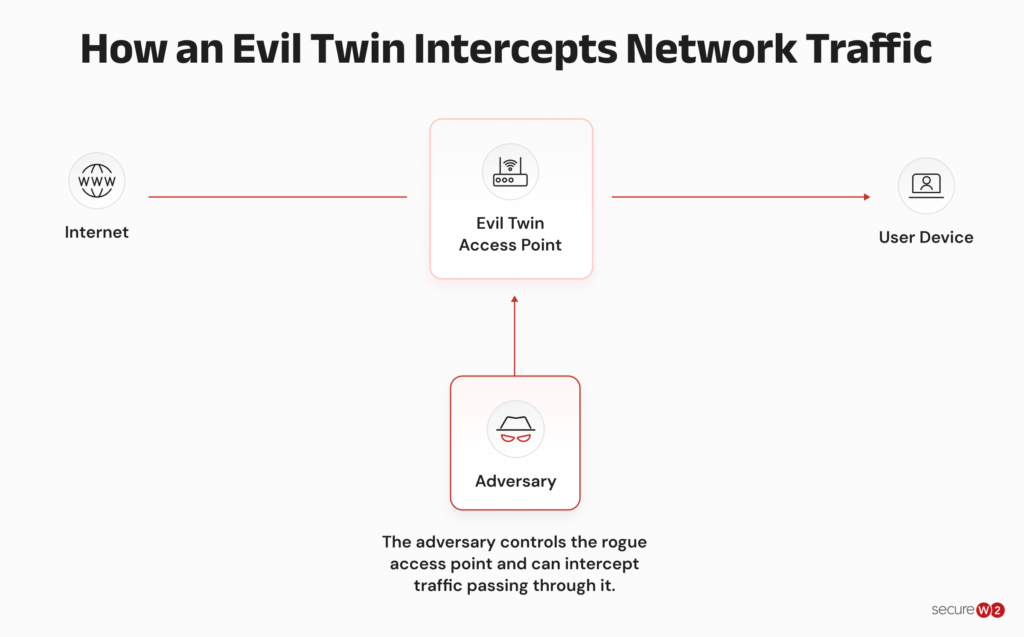
Evil twin attacks are dangerous because, if they are successful, they give hackers direct access to your device and your data. And when that data includes company logins, hackers may be able to access company networks, resources and other data. Once attackers gain access to a device or corporate credentials, stealing sensitive information often becomes their primary objective. According to Microsoft, data exfiltration was seen in 80% of reactive incident response engagements in 2025.
The risks go far beyond the initial attack. Attackers can use the connection to install malware on your device, granting them long-term access to steal more data or even move onto corporate networks. They can also add keyloggers that capture every password you type to remote access trojans (RATs) that give attackers control over your device.
Once infected, your device could also be used to spread malware, mine cryptocurrency or even launch more extensive cyberattacks, without you realizing it.
How Do Evil Twin Attacks Work?
Having a password or pre-shared key on your Wi-Fi network doesn’t offer as much protection as you may think it does.
A lot of people don’t know that it’s really easy to steal Wi-Fi passwords. Because of the way the Wi-Fi protocol was designed, your device is automatically going to send your password to any sort of Wi-Fi network it remembers the name of and that has a strong signal.
Micah Spady, Director of Product Marketing at SecureW2.
The image below shows how attackers can use an evil twin along with wireless hacking and cracking tools to collect passwords.
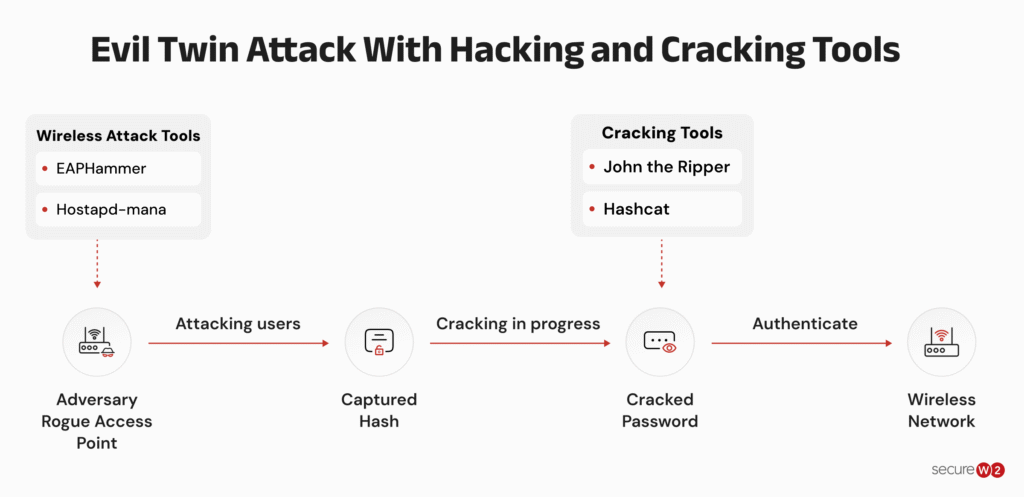
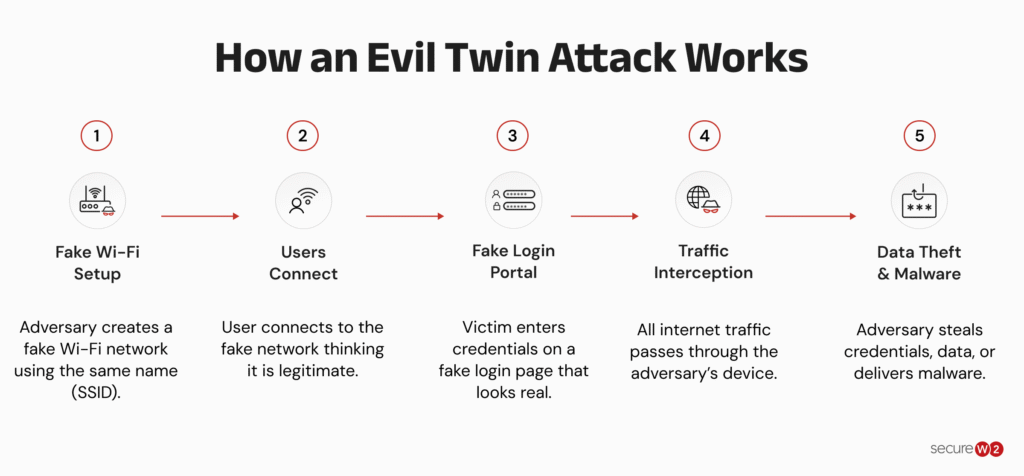
Here’s how an evil twin attack typically works:
- Target high-traffic areas: Evil twin attacks are frequently carried out in popular public spaces such as cafés, libraries, and airports, where Wi-Fi networks might have identical names. This makes it easier for a fake network to blend in and avoid detection.
- Imitate a Wi-Fi network: Attackers copy the name (SSID) of a valid Wi-Fi network, making it virtually impossible for users to distinguish between genuine or fraudulent connections. These networks can be created using easily accessible technology, including cell phones, laptops, and portable routers.
- Lure users to join the network: The fake network might show a stronger Wi-Fi signal than the real network, making it a favored option for unsuspecting consumers.
- Mimic the login page: Many public Wi-Fi networks require users to sign in via a captive portal. Attackers can easily recreate these login screens to deceive users into entering their credentials, which can then be stolen.
- Intercept sensitive information: Once connected, the data transferred over the network is routed through the attacker’s machine. This allows them to track behavior, steal login information, and even implant malware on the victim’s device. If a user connects to a sensitive account, the attacker may get access to personal or financial information.
Best Practices to Keep Yourself Safe From an Evil Twin Attack
While public Wi-Fi is convenient, it is critical to be careful and take precautions to reduce the risk of falling victim to an evil twin attack. Here are some tips to protect yourself and your devices:
1. Network Awareness and Assessment
Most evil twin attacks rely on users connecting to a rogue network without realizing it. These practices help you identify legitimate Wi-Fi networks before you connect.
- Disable automatic Wi-Fi connections: Configure your devices to not automatically connect to accessible Wi-Fi networks. This allows you to carefully evaluate and select the correct network name before connecting.
- Examine network names: Be aware of Wi-Fi network names that closely resemble legitimate ones, particularly those that include mistakes or additional letters. Hackers sometimes utilize slight differences to deceive users. Look for continuity in the establishment’s name or signage.
- Verify network security (if applicable): Even if a public network requires a password, you should proceed with care. While a password may not provide total protection, it might dissuade casual efforts by intruders. Specific devices allow you to see details about linked networks. Look for discrepancies in network encryption (WPA2 is preferred over WEP) or unusual network addresses that do not correspond to the establishment’s location. While not infallible, this information should raise red flags.
- Use server certificate validation (for 802.1x Networks): If you are utilizing a credential-based 802.1x network, make sure server certificate validation is enabled. This keeps attackers from mimicking genuine access points.
- Use EAP-TLS: The most secure way to guard against evil twin attacks is to use EAP-TLS authentication, which eliminates credential-based vulnerabilities in favor of certificate-based authentication.
2. Mitigating Damage If You Connect to a Malicious Network
If you accidentally connect to a fake hotspot, the goal shifts from prevention to limiting what an attacker can access or exploit on your device.
- Software updates: Make sure you regularly complete software updates on all your devices, including operating systems, browsers and security apps. Updates often address vulnerabilities that hackers use to gain access to your device or network.
- Strong passwords and password managers: Create strong, unique passwords for your online accounts. A password manager allows you to generate and maintain complicated passwords across several platforms. Avoid using the same password on several accounts.
- Antivirus and anti-malware software: Consider installing a reliable antivirus and anti-malware package on your devices. These tools assist in detecting and blocking malicious software that may be inserted as part of an evil twin assault.
3. Securing Your Data on Public Networks
Some protections continue to safeguard your information even if you’re using an untrusted or compromised network, reducing the impact of an evil twin attack.
- Enable multi-factor authentication: Even if your login information is compromised, MFA provides an extra layer of security by requiring a second verification step, such as a number delivered to your phone or biometric authentication. This might help you avoid unauthorized access to your accounts.
- Use a virtual private network (VPN): Consider using a trusted VPN provider, particularly on public Wi-Fi. A VPN encrypts your internet traffic, making it more difficult for attackers to intercept your information, even if they fool you into connecting to a false network. Select a VPN service with a solid reputation for security and privacy.
How to Keep Your Organization Safe from an Evil Twin Attack
It only takes one employee falling prey to an evil twin attack to expose an organization to cyberthreats like malware or data exfiltration, potentially causing hundreds of thousands of dollars in damages. These steps can help eliminate the threat and harden your network without making Wi-Fi access more complicated for your employees.
Trade Passwords for Certificates
No one can harvest your employees’ credentials if they’re not using them in the first place. Replace password-based authentication with digital certificates using 802.1x and EAP-TLS. Each device gets a unique certificate for authentication, removing the risk of credential theft over the air.
With certificates, your IT team gains full visibility into who is on the network while dramatically reducing unauthorized access risks.
Move Your Network to WPA2-Enterprise or WPA3-Enterprise
Upgrade from less secure personal modes (WPA2/WPA3-Personal) to Enterprise mode.
Combined with 802.1x authentication and certificate-based security, this provides strong encryption and protects against evil twin attacks by validating both the network and the client. This shift prevents attackers from easily impersonating your legitimate access points.
Segment Your Network
Proper network segmentation limits the blast radius of a potential breach. Use dynamic VLAN assignment to separate guest, employee, IoT and sensitive internal resources so that even if an employee accidentally connects to a malicious twin, attackers cannot easily move laterally to critical systems or data.
Simplify Secure Onboarding for All Devices
Streamline certificate deployment and 802.1x configuration with user-friendly onboarding tools that support both managed devices and bring your own device (BYOD). This ensures consistent security settings (including server certificate validation) across the organization while minimizing IT workload and user friction.
Gain Visibility and Control with RADIUS
Deploy a cloud-native RADIUS solution for real-time policy enforcement, dynamic access decisions and comprehensive logging. This provides centralized visibility into every connection attempt and makes it easier to detect and respond to suspicious activity, including potential evil twin attempts.
The security plan that scales with you.
Our solutions can scale from mid-market to global enterprises. Compare options and see how our solutions protect you from costly breaches and ensure peace of mind.
Secure Your Wireless Network With WPA2-Enterprise Authentication
If an employee accidentally connects to an evil twin and enters their company credentials, attackers can potentially access your network and everything on it. Switching to WPA2-Enterprise with certificate-based authentication closes the gaps left permanently open by pre-shared keys.
There are no shared secrets to rotate or credentials exposed to evil twin attacks. There is also no opportunity for rogue devices to bypass a misconfigured RADIUS policy.
The SecureW2 JoinNow platform enforces EAP-TLS across your wired and wireless infrastructure, connects RADIUS policy to live IdP and MDM data and revokes access in seconds when a user offboards.
If your wireless security still depends on passwords or shared keys, that’s the gap worth closing first.
See how SecureW2 secures wireless networks without passwords.
Frequently Asked Questions
How can you detect an evil twin attack?
An evil twin attack can be difficult to detect because the fake Wi-Fi network often uses the same name (SSID) as the legitimate one.
Warning signs include duplicate network names, unexpected login pages, browser certificate warnings, unusually strong signals from public hotspots, or frequent disconnections after connecting. Organizations using WPA2-Enterprise or WPA3-Enterprise with server certificate validation can automatically reject rogue access points.
What is an example of an evil twin?
A common example is an attacker sitting near a corporate office and broadcasting a Wi-Fi network with the same name as the legitimate company network. The fake network appears identical to the legitimate network, encouraging employees to connect.
Victims may be redirected to a counterfeit login page where they unknowingly enter usernames, passwords or payment information that is sent directly to the attacker.
What is the main goal of an evil twin attack?
The primary goal of an evil twin attack is to trick users into connecting to a malicious wireless network so attackers can steal credentials, intercept sensitive information, distribute malware or gain access to corporate resources.
In enterprise environments, stolen credentials may allow attackers to move deeper into the organization's network.
Can WPA3 prevent evil twin attacks?
WPA3 improves wireless security, but WPA3-Personal alone does not prevent evil twin attacks because attackers can still create a fake network with the same SSID.
Organizations that use WPA3-Personal (also known as WPA3-SAE) often use transition mode, which still allows WPA2-PSK connections using the same password. This leaves Wi-Fi vulnerable to evil twin downgrade attacks.
WPA3-Enterprise combined with 802.1X authentication, EAP-TLS, and server certificate validation provides strong protection by allowing devices to verify that they are connecting to a legitimate network.
Can a VPN stop an evil twin attack?
A VPN encrypts internet traffic after a connection is established, making it more difficult for attackers to read intercepted data.
However, a VPN cannot prevent users from connecting to a fake Wi-Fi network or protect them from phishing pages designed to steal credentials. It should be used alongside other security measures such as server certificate validation and multi-factor authentication.
