Key Takeaways
- Internal public key infrastructure (PKI) is a PKI whose root certificate authority (CA) is trusted only inside the organization.
- An internal PKI hierarchy keeps the root CA offline while issuing CAs sign the certificates devices need every day.
- Organizations can run the CAs themselves with Active Directory Certificate Services, or have a provider host them while the organization keeps policy control.
IT and security teams issue certificates for Wi-Fi, VPN, devices and internal services. Public CAs have historically handled some of that work, but that path is closing.
Chrome Root Program Policy version 1.8 requires subscriber certificates issued on or after March 15, 2027, under hierarchies in the Chrome Root Store to assert only the server authentication (id-kp-serverAuth) extended key usage (EKU). From that date on, client authentication certificates must come from a hierarchy outside the Chrome Root Store, such as a private CA.
This guide covers internal PKI vs. public PKI, how an internal PKI hierarchy works, certificate issuance and revocation, Active Directory Certificate Services and what changes when you are moving from a public CA to a private CA.
What Is Internal PKI?
Internal PKI is a public key infrastructure an organization runs itself, or has run for it, whose root certificate authority (CA) is trusted only inside that organization. This framework relies on certificate authorities trusted exclusively within specific boundaries rather than globally recognized entities.
A PKI is a framework established to issue, maintain and revoke public key certificates. A certificate authority (CA) is a trusted entity that issues and revokes public key certificates.
Internal PKI applies both definitions behind a private root. That root is not trusted anywhere by default.
A device accepts a certificate from your internal certificate authority only after the private root lands in its trust store, typically through Group Policy or a mobile device management (MDM) platform. Skip that step and every certificate the CA issues looks untrusted to the endpoint.
The split between internal vs. external CAs comes down to who can vouch for a name.
Under Certification Authority Browser Forum (CA/Browser Forum) rules, issuance of publicly trusted certificates containing a reserved Internet Protocol (IP) address or an internal server name has been prohibited since November 11, 2015. Internal hostnames and reserved IP addresses need a private CA for certificate issuance.
You will also see this called private PKI or an internal certificate authority.
See your security gap before attackers do.
See continuous trust in action on a platform that includes RADIUS, PKI and AI security.
Internal PKI vs. Public PKI
The two models differ in who trusts the root, which names a CA may issue for and how long certificates stay valid.
|
Factor |
Internal PKI |
Public PKI |
|---|---|---|
|
Root Trust |
Only devices you add the root to |
Browsers and operating systems trust it by default |
|
Names Allowed |
Internal hostnames and private IP addresses |
Public domain names and public IP addresses, per CA/Browser Forum rules |
|
Maximum Certificate Lifetime |
Set by your own policy |
200 days, then 100 days from March 15, 2027 |
|
Later Lifetime Limit |
No external limit |
47 days from March 15, 2029 |
|
Client Authentication |
Supported |
Server authentication only from March 15, 2027 |
|
Typical Uses |
Wi-Fi, VPN, device and user identity |
Public websites and TLS server certificates |
Most organizations run both: a private CA for internal identities and a public CA for anything the outside world connects to.
What Is Internal PKI Used For?
An internal PKI issues certificates for any identity that needs cryptographic proof, and most organizations start with network access:
- Wi-Fi and wired 802.1X: Certificate-based EAP-TLS, an Extensible Authentication Protocol (EAP) method, gives clients and servers mutual authentication and key derivation.
- VPN: Remote access concentrators check a device or user certificate before establishing a tunnel.
- Smart card sign-in: Windows logon maps a certificate on the card to an Active Directory account.
- Secure/Multipurpose Internet Mail Extensions (S/MIME) email: Certificates sign and encrypt messages so recipients can verify the sender and protect content.
- Internal TLS: Intranet sites and service-to-service traffic use certificates from the private CA instead of a public one.
- Device identity: Managed laptops and phones hold certificates that prove the device, not just the user, is authorized.
These use cases are also supported by Microsoft’s Active Directory Certificate Services (AD CS), which provides certificate-based authentication and digital security for applications including S/MIME, secure wireless networks, VPNs, IPsec, smart card sign-in, TLS and digital signatures.
How an Internal PKI Hierarchy Works
A two-tier internal PKI hierarchy separates the trust anchor from the CA that does the daily work:
- The root CA sits at the top and is the start of every trust path. In a hierarchical PKI, its public key is the most trusted datum for the security domain, so every certificate chain terminates there. This is the root vs. intermediate CAs split that defines the model.
- The root stays offline. The root CA is kept offline except when needed to perform tasks such as signing a certificate for a subordinate CA. This limits its exposure to network-based attacks.
- Issuing CAs, also called subordinate or intermediate CAs, handle daily certificate requests. They sign end-entity certificates for users, devices and services while the root remains powered down.
- CA private keys belong in a hardware security module (HSM), a dedicated device managed separately from the operating system that provides a secure hardware store for CA keys.
- A certificate is only trusted as long as its issuing CA remains valid, so renew the CA certificate once half its validity window has passed.
While most internal deployments use a two-tier model with root and issuing CAs, some organizations add another CA level to create a three-tier hierarchy and further separate the root from certificate issuance. Some cloud-native services simplify deployment by providing a two-tier hierarchy with a root CA and an issuing CA in the cloud.
How Devices Get Certificates From an Internal CA
Manual certificate requests do not scale past a handful of devices, so clients enroll and renew automatically through one of three protocols:
- Simple Certificate Enrollment Protocol (SCEP): RFC 8894 specifies SCEP and publishes it for informational purposes rather than as an Internet Standards Track specification. MDM platforms use it widely, and Microsoft Cloud PKI issues end-entity certificates through SCEP to Intune-enrolled devices, with a tenant able to create up to three CAs.
- Enrollment over Secure Transport (EST): RFC 7030 profiles certificate enrollment for clients using Certificate Management over Cryptographic Message Syntax (CMC) messages over a secure transport.
- Automatic Certificate Management Environment (ACME): RFC 8555 describes a protocol a CA and an applicant use to automate verification and certificate issuance.
Each protocol handles the same job: the device proves its identity, the internal CA signs a certificate and the client stores it for later renewal.
Dive deeper into the difference between ACME and SCEP with the video below:
SCEP remains popular because it integrates directly with standard mobile management platforms without requiring custom client software installations. EST, on the other hand, offers stronger security by running enrollment over an authenticated TLS session.
ACME provides a standardized framework for automated lifecycle management when organizations operate self-hosted or cloud-based certificate authorities.
Organizations can select the protocol based on their device fleet composition and existing infrastructure constraints.
How Revocation Works in an Internal PKI
Revocation is how an internal PKI stops trusting a certificate before it expires. When a laptop goes missing or an employee leaves, the private CA needs a way to publish that decision so the rest of the network acts on it.
Two mechanisms handle that job: certificate revocation lists (CRLs) and the Online Certificate Status Protocol (OCSP).
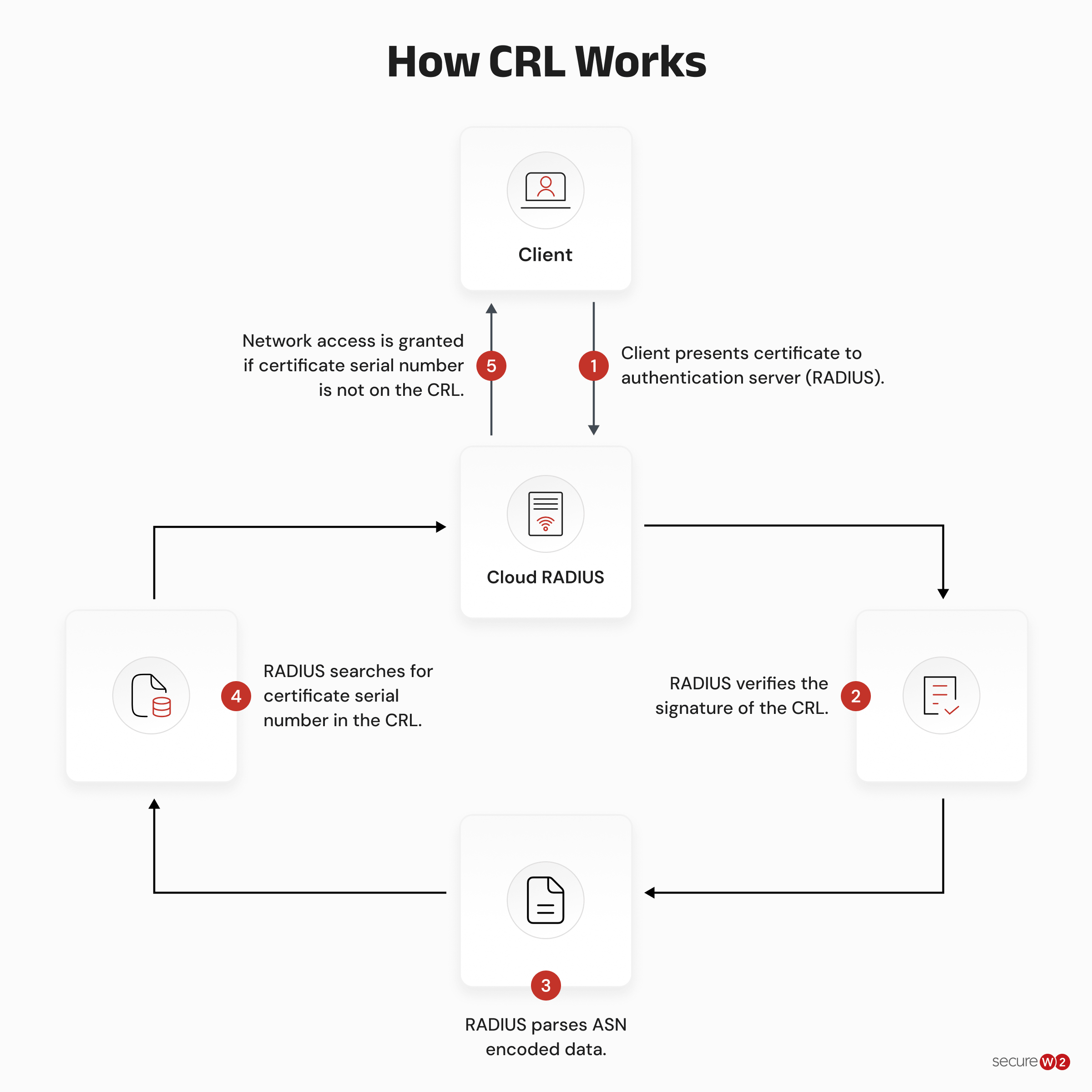
A CRL is a list of revoked public key certificates created and digitally signed by a certification authority. RFC 5280 describes it as a time-stamped list identifying revoked certificates, signed by the CA or a CRL issuer and published in a public repository. Clients download the whole list and check it locally. The diagram below illustrates how RADIUS uses a CRL to determine whether a certificate should be trusted:
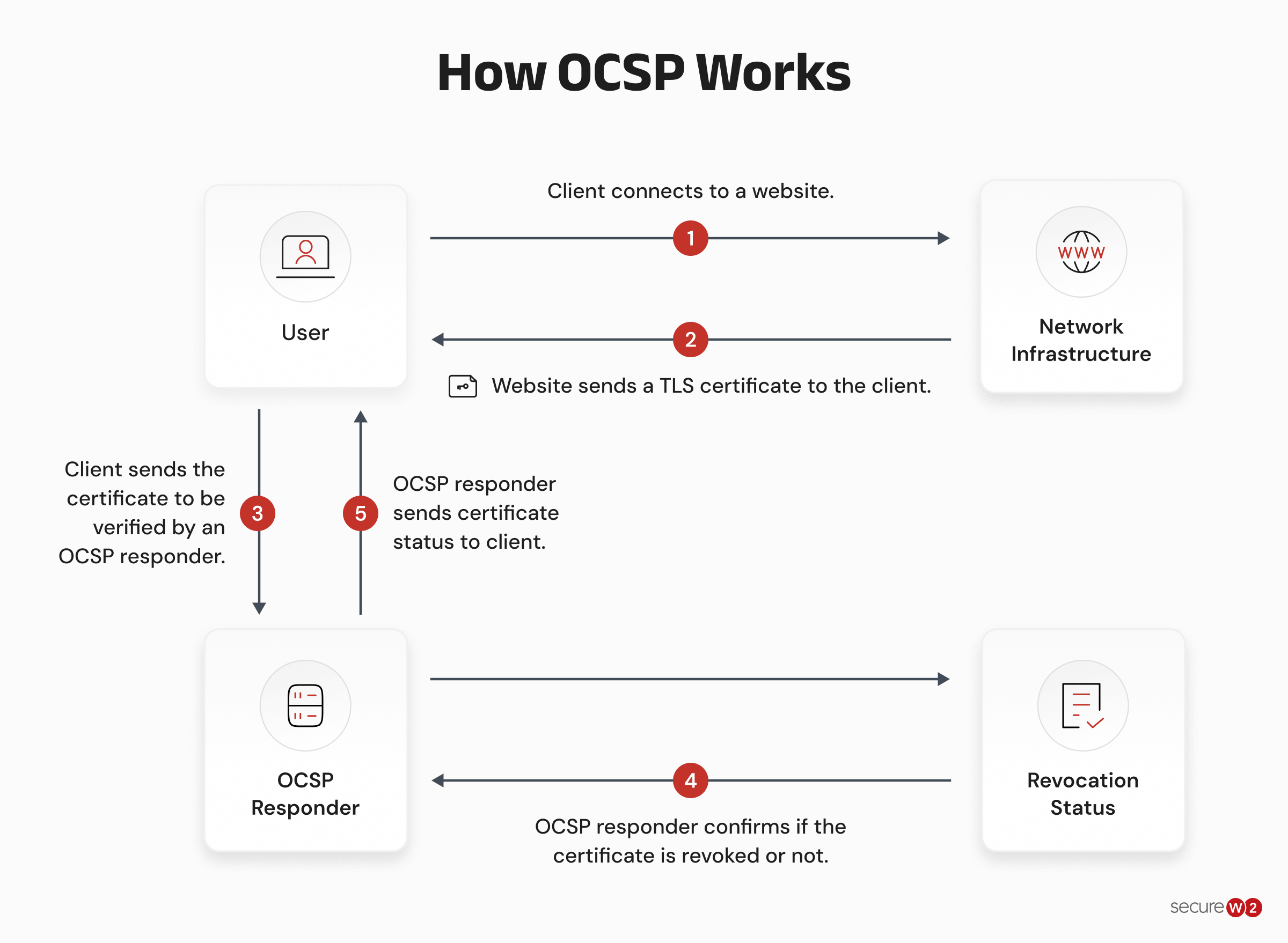
OCSP works differently. It is an online protocol used to determine the status of a public key certificate.
RFC 6960 specifies it as a way to check a certificate’s current status without requiring CRLs. The client queries the responder about one certificate and gets an answer back. That difference is the heart of OCSP vs. CRL: a published list versus a live query. The diagram below shows how an OCSP responder communicates a certificate's revocation status to a client.
Both approaches share a common failure point. If the CRL is stale or the OCSP responder is unreachable, some clients fall back to cached data or fail open, and a revoked certificate can keep working.
Internal PKI operators watch revocation freshness and responder availability for that reason.
Revocation also depends on how quickly someone acts on it. One data and AI platform company with about 6,000 employees replaced pre-shared keys with certificate-based Wi-Fi and VPN authentication across more than 17,000 devices, with its PKI and RADIUS running entirely in the cloud.
It automated revocation with two triggers: moving a device into a designated Jamf group revokes its certificate immediately, and deactivating a user in Okta does the same. This reduces reliance on administrators to revoke certificates manually.
For a closer look at how certificate revocation works, watch the video below explaining the differences between CRLs and OCSP, how each method verifies certificate status and what those differences mean for network security.
Building an Internal PKI With Active Directory Certificate Services
Active Directory Certificate Services (AD CS) is a Windows Server role for issuing and managing PKI certificates used in secure communication and authentication protocols. It is a common starting point for organizations that build an internal certificate authority on their own hardware.
An enterprise CA requires access to Active Directory Domain Services (AD DS) and issues certificates based on certificate templates. A stand-alone CA does not need AD DS, so it can serve as the offline trusted root in a CA hierarchy.
Both run on premises, on Windows Server machines your team owns and patches. Microsoft Cloud PKI is a separate Intune service, not part of AD CS.
The operational load adds up. You patch the servers, design and maintain templates, publish CRLs, manage HSMs and track renewals before they lapse. Managing PKI certificates can be challenging, costly and complex, especially for organizations with a large number of devices and users.
“Cloud PKI services exist because PKI is just really hard to do in a safe, secure way,” says Micah Spady, Director of Product Marketing at SecureW2. “There are hundreds of pages of documentation showing how you might set up a legacy PKI like Active Directory Certificate Services in an insecure way just by using the default settings. There are tons of vulnerabilities that can happen if you don’t set it up right.”
Managed internal PKI offers an alternative by shifting much of the infrastructure maintenance and certificate management to a service provider.
Self-Hosted vs. Managed Internal PKI
The build vs. buy decision comes down to who carries the operational load, and the answer depends on your team’s PKI skills and where your devices live.
|
Option |
Who Runs the CAs |
Best Fit |
|---|---|---|
|
Self-Hosted AD CS |
Your team runs the servers, HSMs, and CRLs |
Organizations with Windows PKI expertise and on-premises requirements |
|
Microsoft Cloud PKI |
Microsoft hosts it, with no on-premises servers |
Intune-managed devices; SCEP only; needs an add-on subscription beyond Intune Plan 1 or 2 |
|
Managed PKI From a Provider |
The provider runs CA operations; you keep control |
Teams that want certificate profiles, issuance policies, and access in their hands |
The difference between managed PKI vs. private PKI often comes down to staffing. A provider or cloud service absorbs the patching, CRL publishing and renewal tracking that otherwise land on your administrators.
What managed PKI looks like in practice can be seen when a global retail brand with more than 7,000 employees needed certificate-based Wi-Fi across offices, distribution centers and retail locations on multiple continents, plus an internal CA for private PKI use cases.
Its device fleet included Windows and Apple endpoints managed through Microsoft Intune and Jamf, so the retailer chose a cloud-hosted platform that supported both.
The result was certificate-based authentication for more than 4,000 devices and an internal CA that extends beyond Wi-Fi to internal services, without on-premises RADIUS hardware at every site.
The security plan that scales with you.
Our solutions can scale from mid-market to global enterprises. Compare options and see how our solutions protect you from costly breaches and ensure peace of mind.
Internal PKI Best Practices
A handful of operational habits separate an internal PKI that runs quietly for a decade from one that fails an audit or an outage:
- Keep the root offline: Power it on only when needed, such as to process a subordinate CA request or publish a new root CRL.
- Protect CA keys in an HSM: Store CA private keys in a device managed separately from the operating system.
- Plan CA lifetimes around half-life renewal: Renew each CA certificate at half its validity period.
- Automate enrollment and renewal: Manual requests do not scale, so connect the CA to Group Policy or an MDM.
- Publish revocation data everywhere clients look: Every client that validates a certificate needs network reach to the CRL distribution point or OCSP responder.
- Track what each CA issues: An inventory ties every certificate to a CA, a profile, and an owner.
- Set lifetimes by policy: Internal CAs are not bound by the 47-day public rule, so choose validity per use case.
Managing an internal CA long-term depends on consistent maintenance and clear operational policies.
Run Internal PKI Without the Servers With SecureW2
Running an internal certificate authority means patching servers, watching CRLs and renewing certificates before they expire.
JoinNow Dynamic PKI moves that work to a managed service backed by an HSM. It automates issuance, renewal and revocation from identity, MDM, and security signals, and supports EST, ACME and SCEP enrollment.
Native integration with Jamf and Microsoft Intune means your existing device management drives enrollment. Certificates bind to verified hardware through Trusted Platform Module (TPM) 2.0 or Secure Enclave verification.
JoinNow Cloud RADIUS then puts those certificates to work, enforcing passwordless EAP-TLS across Wi-Fi, wired and VPN access. Schedule a demo to see the full flow.
Frequently Asked Questions
Can a small business run its own internal PKI?
Yes, but the operational load is real. Someone has to run the CA, publish revocation data and watch certificate expiry. Cloud and managed options remove the servers from your office.
What happens if an internal root CA is compromised?
Every certificate chaining to that root becomes untrustworthy, so you rebuild the hierarchy and redistribute a new root to every device trust store. That is why many organizations keep the root offline except when strictly necessary, as when signing a subordinate CA certificate.
Is a private CA the same as a self-signed certificate?
No. A private CA signs many certificates that chain to one root, and you distribute that root once to each device trust store. A self-signed certificate signs only itself, so every device must trust it individually. The two are not interchangeable, and a self-signed certificate gives you no revocation path.
Do internal certificates follow the 47-day validity rule?
No. The CA/Browser Forum Baseline Requirements cap publicly trusted Transport Layer Security (TLS) server certificates at 47 days starting March 15, 2029. That limit governs public certificates only. An internal certificate authority sets its own validity periods, and many internal certificates last a year or longer.
Does Microsoft Cloud PKI replace AD CS?
It can for Intune-managed devices. Microsoft Cloud PKI is a cloud service that provides a dedicated PKI without on-premises servers, connectors or hardware. It issues end-entity certificates through SCEP to Intune-enrolled devices, and a tenant can create up to three CAs. It also requires a subscription beyond Microsoft Intune Plan 1 or Plan 2.
