Key Takeaways
- A passkey acts as a FIDO sign-in credential, while a certificate serves as a CA-signed binding of identity to a public key.
- Passkeys authenticate users for web and app logins, whereas certificates validate devices on 802.1X networks via EAP-TLS.
- Organizations can deploy both solutions, using passkeys for application access and certificates for network trust.
Projects to eliminate passwords typically begin at the web application level before expanding to include network access. Most teams start by deploying passkeys for app logins; later, they address network trust via Public Key Infrastructure (PKI) certificates for Wi-Fi and VPNs.
This article explores the benefits and challenges of passkeys vs. certificates. It explains:
- How both protocols function within your infrastructure
- Where each solution fits best in the security stack
- How to combine the two protocols to secure every connection point effectively
What Is a Passkey?
A passkey is an authentication credential based on FIDO standards that can reside on a phone or computer. This method replaces traditional passwords with cryptographic key pairs for phishing-resistant logins.
Instead of relying on static passwords, your device generates a cryptographic key pair locally. The user approves sign-in using a process like biometrics or a PIN — whatever process they use to sign in to their device.
Biometric information and processing stay on the device, while the server only sees cryptographic proof of successful authentication.
Adoption is growing quickly. A 2026 FIDO Alliance survey of 11,000 consumers found that 75% have enabled a passkey on at least one account. Teams often deploy this technology first because it secures web applications before addressing network access points.
Synced vs. Device-Bound Passkeys
Synced passkeys travel across multiple devices via a cloud backend.
A user creates an account on mobile first and then replicates that credential to desktop or laptop systems without manual entry. This approach simplifies management when organizations enforce bring your own device (BYOD) policies alongside enterprise applications.
Device-bound passkeys, in contrast, remain locked to the original hardware platform where they were generated.
These credentials never migrate between distinct machines, regardless of user location or remote work arrangements. FIDO security keys often implement this binding model for maximum isolation and control.
Which passkey is right for your organization? The choice depends entirely on your deployment strategy regarding mobile integration versus physical key usage.
- Synced passkeys suit environments prioritizing cross-device convenience across consumer applications.
- Device-bound options protect high-value assets by keeping the credential on one device, never in a cloud sync service.
- Both methods satisfy WebAuthn standards while addressing unique security requirements for specific user groups within the network.
See your security gap before attackers do.
See continuous trust in action on a platform that includes RADIUS, PKI and AI security.
How Does a Passkey Work?
Passkey authentication follows strict cryptographic steps defined by WebAuthn Level 3:
- During initial setup, an authenticator generates a key pair scoped to a specific Relying Party and stores the private key in that authenticator. The site records only the public key while the secret remains inaccessible outside its own environment.
- At sign-in time, the server sends a random challenge, and the user verifies locally on the authenticator before it signs with the private key stored within their trusted device or secure element. Only the signature goes back to the server; the private key never leaves the authenticator.
- The resulting signature proves identity without transmitting biometric details like fingerprints to any remote server, while the server verifies it with the stored public key.
What Is a PKI Certificate?
A PKI certificate binds an identity to a public key signed by a trusted issuer.
The Internet X.509 PKI standard defines this binding as the core of digital trust infrastructure. Each entry includes a validity period and references mechanisms for certificate revocation before expiration. Organizations rely on these profiles to manage access control automatically.
WebAuthn attestation often uses certificates during registration. The W3C WebAuthn Level 3 specification defines attestation as verifiable evidence of an authenticator’s origin, which a Relying Party checks via the public key in an attestation certificate.
Passkey vs. Certificate: Key Differences
Passkeys represent a shift toward user-centric identity management, while PKI certificates remain foundational for network access control. The distinction lies in their design goals and operational contexts rather than cryptographic principles alone.
The following table explains where the two protocols differ.
|
Factor |
Passkey |
PKI Certificate |
|---|---|---|
|
Standard |
FIDO2 / WebAuthn Level 3 |
X.509 per RFC 5280 |
|
Authentication Target |
User to a website or app |
Users and devices to networks, apps, and VPNs |
|
Vouching Authority |
The site stores your public key |
A certificate authority signs it |
|
Lifecycle Management |
User manages; synced or device-bound |
Validity period and revocation lists |
|
Network Access Use |
Not used for 802.1X authentication |
Supports EAP-TLS mutual auth |
Network access control often requires the deterministic verification that PKI provides, whereas passkeys excel at web identity assurance.
Why Network Access Still Needs Certificates
The IEEE 802.1X standard controls port-based network access by authenticating devices before granting connectivity.
Certificate-based deployments use the Extensible Authentication Protocol-Transport Layer Security (EAP-TLS) method for mutual authentication and key derivation.
EAP-TLS requires a certificate by design, and passkeys are not a standardized EAP method. WebAuthn protocols were designed specifically for web and app sign-in, not for authenticating devices against Wi-Fi or VPN gateways.
Network administrators must distinguish between user authentication for websites and device authentication for networks. CISA identifies both FIDO/WebAuthn and PKI-based MFA as phishing-resistant options, yet their deployment targets differ significantly in this environment. A passkey pairs possession of the device with a local check such as a biometric or PIN, whereas an EAP-TLS certificate is one possession factor presented by the device itself.
To configure 802.1X correctly on enterprise networks, review an official 802.1X configuration guide rather than relying on unstandardized methods. Attempting to substitute certificates with passkeys for network access creates security gaps that bypass established trust models.
Certificate-based EAP-TLS remains the standardized passwordless method for 802.1X network access today.
The security plan that scales with you.
Our solutions can scale from mid-market to global enterprises. Compare options and see how our solutions protect you from costly breaches and ensure peace of mind.
Passkey vs. Certificate: When to Use Each or Both
Successful teams adopt a layered strategy that matches authentication mechanisms to their specific security boundaries. The following graphic illustrates what that layered strategy looks like:
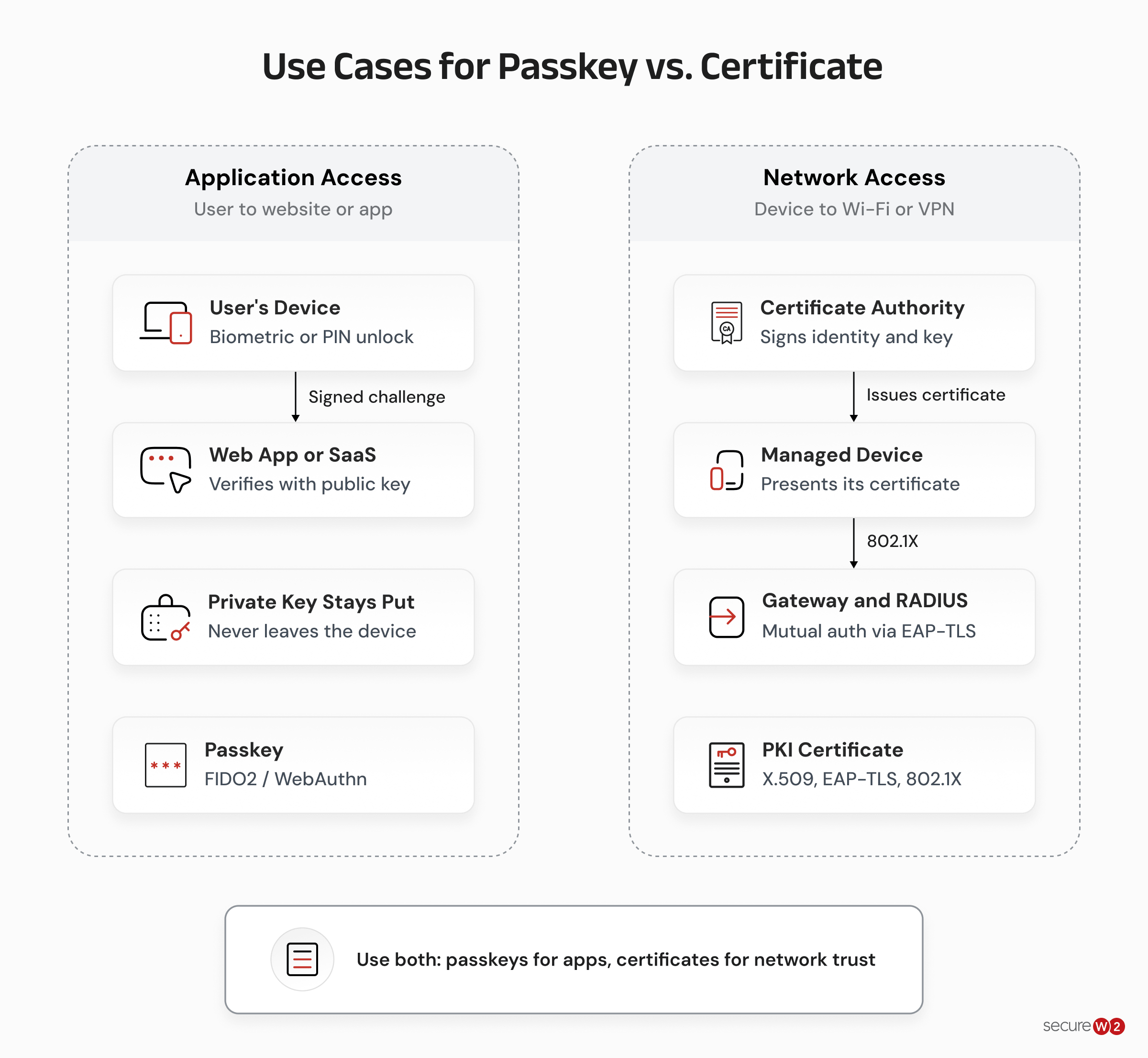
- Passkey sign-in: Use passkeys for user access to web applications and SaaS platforms where phishing resistance matters most. This approach eliminates weak passwords while preserving the usability required by modern cloud services.
- Certificate identity: Deploy X.509 certificates for Wi-Fi, VPN tunnels, and device-to-device verification because they offer deterministic trust models. Network access protocols like EAP-TLS rely on cryptographic proof that passkeys currently do not provide in a standardized way.
- Complementary coverage: Implement both technologies simultaneously to close the gaps left by relying solely on one method. Passkeys handle identity for applications, while certificates secure network connections and device communication.
This hybrid model maximizes security without forcing organizations to abandon existing infrastructure or adopt untested protocols.
Secure Every Network Connection With SecureW2
Network access protocols like EAP-TLS require cryptographic proof that passkeys do not provide through standardized 802.1X methods.
To bridge this gap, organizations need a secure, reliable strategy for device-to-device verification and identity assertions, separate from application authentication layers.
JoinNow Dynamic PKI automates certificate issuance, renewal, and revocation while supporting Enrollment over Secure Transport (EST), Automated Certificate Management Environment (ACME), and Simple Certificate Enrollment Protocol (SCEP) enrollment protocols.
This system integrates with mobile device management (MDM), endpoint detection and response (EDR), and identity providers to drive automated issuance decisions.
JoinNow Cloud RADIUS functions as a fully managed service that enforces passwordless EAP-TLS tied to identity posture. It ingests live signals from the identity provider (IdP), MDM, and EDR so access decisions adjust based on risk indicators or device health changes.
Ready to secure every network connection with automated certificate management? Contact SecureW2 to schedule a demo.
Frequently Asked Questions
Is a passkey the same thing as a certificate?
No. Both use public key cryptography, but a passkey is a FIDO credential that sites trust directly, while a certificate requires a CA signature. A site verifies each sign-in with the public key it stored, without a CA-issued certificate.
Do passkeys use a certificate authority?
Not for sign-in itself. Authenticator attestation can involve certificates to verify the origin of the hardware or software generating credentials. Passkeys are key pairs scoped directly to each site, with no CA involved in the actual authentication flow. Relying Parties verify each login signature with the public key they stored at registration instead of validating X.509 chains for every login attempt.
Can passkeys and PKI certificates be used together?
Yes. Organizations deploy passkeys for app sign-in while using certificates to secure network access through EAP-TLS. Passkey authentication handles user identity whereas certificate-based 802.1X authenticates devices on Wi-Fi or wired LANs. JoinNow Cloud RADIUS enforces passwordless EAP-TLS tied to identity and device posture for network access, while passkeys cover applications.
Is a passkey safer than a password?
Yes. Key pairs replace shared secrets and resist phishing attacks by eliminating credential harvesting risks. Passkeys eliminate the need for users to memorize complex strings while maintaining strong cryptographic standards under FIDO specifications. MFA schemes using passwords remain vulnerable to brute force or social engineering compared to passkey credentials.
