
Certificate-Based Authentication for Managed Devices via Iru Blueprints
SecureW2 auto-enrolls and manages certificates for network access control by leveraging Iru’s robust device management capabilities. The combined power of the platforms enforces real-time network policy based on device attributes and user context, enabling granular network segmentation and dynamic VLAN assignment.
Overview
Automated Certificate Enrollment for Every Managed Device in Your Fleet
SecureW2 seamlessly integrates with Iru to provide certificate-based authentication for managed device fleets. This authentication process eliminates the need for user interaction, shared secrets, and manual provisioning steps. Iru Blueprints automatically issue certificates across a wide range of devices, including Apple, Windows, Android, ChromeOS, and Linux. As a result, a fully automated enrollment pipeline is established, ensuring that only genuine, Iru-managed devices receive certificates. Moreover, network access remains synchronized with the device’s compliance state throughout the entire certificate lifecycle.
Use Cases
Compliance-Driven Certificate Revocation
Dynamic VLAN by Device Posture
How It Works
Automate Identity-Bound Access with Iru
ACME Enrollment with Apple Device Attestation
Iru delivers the ACME profile to managed devices via Blueprint. The device then proves it is genuine Apple hardware through Apple’s Managed Device Attestation infrastructure. SecureW2’s Policy Engine validates both the attestation result and Iru enrollment status before a certificate is issued. Only devices that pass both checks receive a certificate, bound to the Secure Enclave and never exportable.



Policy Enforced SCEP Enrollment Flow
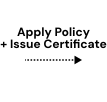
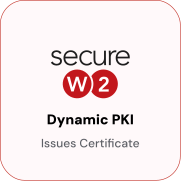
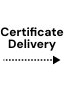
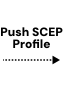
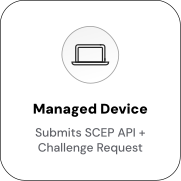
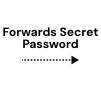
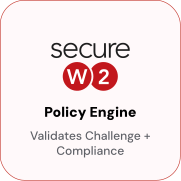
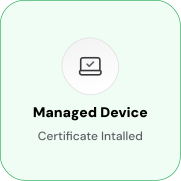
Iru pushes a SCEP profile to managed devices via Blueprint. When the device submits a certificate request, the Policy Engine evaluates it against a configured rule set, verifying the user’s identity against the directory and confirming the device is enrolled and compliant in Iru before a certificate is issued. Only devices that clear both checks receive a certificate.
Use Cases
Deployment & Architecture Detail
Compliance-Driven Certificate Revocation
SecureW2 can automatically revoke certificates when a device's compliance status changes in Iru. An Iru API token is configured in JoinNow to allow SecureW2 to query Iru at revocation evaluation time. SecureW2 looks up the device against Iru's device list and compliance attributes. If a device has been unenrolled from Iru or flagged as non-compliant, SecureW2 triggers the revocation workflow and the device's certificate is revoked. The token needs only read-only access to device records and compliance data; no write access is required.
Once the certificate is revoked, the device will fail EAP-TLS authentication at the next network connection attempt. Cloud RADIUS checks certificate validity including CRL status at authentication time, so a revoked certificate produces an access denial immediately. This means that the moment a device is unenrolled from Iru, wiped, or flagged non-compliant, its network access ends without waiting for the certificate's natural expiration. Compliance posture and network access stay in sync.
Dynamic VLAN by Device Posture
Iru device compliance status and enrollment state can drive VLAN assignment at authentication time through Cloud RADIUS. A managed, compliant device enrolled in Iru receives full corporate network access (VLAN 10). A managed device flagged non-compliant receives restricted access (VLAN 20, internet only). A device not found in Iru at all is denied outright.
Because VLAN assignment is evaluated at every authentication, changes in Iru compliance state take effect at the next connection attempt, no certificate reissuance or Blueprint update required. An Iru API token with read-only access to device records and compliance data is all that is required; no write access is needed.
Frequently Asked Questions
Iru Integration — Common Questions
How long does it take to set up the Iru integration?
SecureW2's integration with Iru can be configured in 10-15 minutes using our guided setup wizard. The complete setup includes configuring necessary applications, enabling provisioning, and establishing initial certificate policies.
Can I customize which attributes are included in certificates with Iru?
Yes, SecureW2 allows full customization of attribute mapping with Iru. You can include standard attributes (such as department, title, groups) and custom attributes through the SecureW2 platform.
How do I add SecureW2 certificate enrollment to an existing Iru Blueprint?
In JoinNow, generate an ACME API Token with the vendor set to Iru. This creates a .mobileconfig profile. Add the profile as a configuration payload to the target Iru Blueprint. Iru will push it to all devices in the Blueprint's device assignment the next time those devices check in. For Dynamic SCEP, configure SecureW2 as the External CA in Iru's certificate settings, and add the SCEP profile to the Blueprint the same way. No changes to existing Blueprint assignments are required, other than adding the new profile payload.
Should I use ACME or Dynamic SCEP for my Iru environment?
Use ACME if your fleet primarily consists of Apple devices running iOS 16+, iPadOS 16+, macOS, or tvOS. ACME integrates with Apple Managed Device Attestation to cryptographically verify that the device is genuine Apple hardware before issuing a certificate it is the stronger option and the one Apple recommends for MDM-managed device certificate enrollment. Use Dynamic SCEP for older OS versions that do not support ACME, or if your Iru environment manages a mix of device types, not all of which support the ACME protocol. Both paths eliminate the static shared secret vulnerability present in traditional SCEP.
What Iru API credentials does SecureW2 need, and what access level do they require?
SecureW2 requires an Iru API token with read-only access to device records and compliance data. No write access is required. Enter the token in JoinNow when configuring the Iru Identity Lookup Provider. The token is used at certificate issuance to verify that the requesting device is enrolled in Iru, and at RADIUS authentication if you configure the Iru IDP for runtime compliance lookups. Instructions for generating an Iru API token are available in the Iru admin portal under Settings > Access.
What happens when a device falls out of compliance in Iru?
SecureW2 addresses this through two mechanisms. First, the Iru Identity Lookup Provider can be configured to run during RADIUS authentication. If the device's compliance state in Iru has changed since the certificate was issued, Cloud RADIUS detects this during the authentication lookup and applies the matching policy, either denying access or placing the device in a restricted VLAN. Second, the auto-revocation workflow runs on a schedule and revokes certificates for devices flagged as non-compliant in Iru, so the next authentication attempt will fail CRL validation regardless of the runtime lookup result. In both cases, the device loses access without any manual action by an administrator.
Does this integration support BYOD devices that are not enrolled in Iru?
The Iru integration is designed for Iru-managed devices. Unmanaged or personally owned devices not enrolled in Iru will not pass the Iru identity validation step and will not receive a certificate via this enrollment path. For BYOD devices outside Iru management, SecureW2's JoinNow MultiOS self-service onboarding enables user-initiated certificate enrollment on Windows, macOS, Android, iOS, ChromeOS, and Linux without MDM enrollment. The two paths can coexist: managed devices enroll through Iru Blueprints; unmanaged devices enroll through the JoinNow self-service portal.
How does certificate renewal work for devices managed in Iru?
Certificate renewal follows the same ACME or Dynamic SCEP enrollment flow used for initial issuance. JoinNow can be configured to issue new certificates before expiration via automatic renewal policies. For ACME, the device re-runs attestation during renewal, refreshing the hardware identity check with each new certificate. For Dynamic SCEP, the device re-enrolls using the Iru External CA configuration. In both cases, renewal is transparent to the end user, and no user interaction or Blueprint changes are required.
Ready to Connect SecureW2 with Iru?
Connect with our integration specialists to implement this solution in your environment and transform your security posture.