Key Takeaways
- Renewing a Sectigo RADIUS server certificate after the 2025 cutovers moves it onto the new R46 hierarchy. Older clients that still pin only the USERTrust root will fail server-certificate validation.
- The failure happens before the client certificate is ever sent, so it looks like a network or profile problem rather than a certificate problem.
- Fix it by presenting the complete chain (leaf + R36 intermediate + cross-signed R46) on the RADIUS server and trusting both the USERTrust RSA root and the self-signed Sectigo Public Server Authentication Root R46 on every client profile.
You renewed your RADIUS server certificate, and now a subset of devices running certain operating systems can’t join the network. Nothing changed on the Wi-Fi, so why aren’t the devices connecting?
The problem is that the root server certificate has changed, and server certificate validation can no longer be completed because the root certificate authority (CA) has changed. Some operating systems will still try to chain to the old CA.
The easiest way to fix it is by trusting both anchors. This article explains what changed, why authentication is suddenly failing, and how to get your devices back online.
How to Know if You’re Affected
First, if you’re a SecureW2 customer, you should know that this problem doesn’t impact customers using SecureW2 JoinNow Cloud RADIUS.
But if that doesn’t describe you, here’s where you might see problems:
- Possibly impacted: You’re running your own RADIUS server, such as NPS, FreeRADIUS, ClearPass, ISE, etc.
- Likely impacted: You’re running a RADIUS server certificate from Sectigo, Comodo or a reseller.
- Most likely impacted: You renewed or reissued the RADIUS server certificate after mid-2025.
- Most likely impacted: Your Wi-Fi profiles pin a specific trusted root.
The root of the problem is the server certificates and how operating systems validate them.
What Actually Changed About Server Certificates (and What Didn’t)
There are several moving parts at play here:
- Sectigo moved public TLS issuance to new single-purpose roots
Sectigo shifted new public server certificates to the dedicated roots Sectigo Public Server Authentication Root R46 (RSA) and E46 (ECC), with matching R36/E36 intermediates (DV/OV/EV variants).
On January 1, 2026, Sectigo stopped re-issuing under the old multi-purpose/legacy chains. Existing leaf certificates remain valid until they expire; new issuance and re-issues use the R46/E46 hierarchy (with cross-signs still available for older clients that lack the new roots).
- The old roots themselves are on a distrust clock
USERTrust RSA Certification Authority (and the related COMODO/USERTrust ECC roots) lose the websites trust bit in Chrome and Mozilla on April 15, 2027. This is a browser root-store action. Certificates that still chain only through those legacy roots will no longer be trusted in updated Chrome/Firefox once the date hits. Profile-embedded or application-pinned anchors remain unaffected until those stores are also updated. The behavior is not universal.
- Public CAs are dropping the clientAuth EKU
This is a separate issue happening through rolling changes. Public TLS certificates will no longer carry the clientAuth Extended Key Usage (EKU). That change is about mTLS/client authentication; our article about when to switch from a public CA to a private CA explains this situation in depth.
These changes have been rolling out in stages since early 2025, and the most consequential deadline is still ahead. The timeline below shows what has already taken effect and what’s still coming; the April 15, 2027 root distrust is the date most organizations still need to plan around.
| Date | Status | What Happens |
| April 15, 2025 | Complete | Sectigo EV TLS → R46/E46 |
| May 15, 2025 | Complete | Sectigo OV TLS → R46/E46 |
| June 2, 2025 | Complete | Sectigo DV TLS → R46/E46 |
| January 1, 2026 | Complete | No more Sectigo re-issues on legacy chains |
| April 15, 2027 | Upcoming | USERTrust RSA (and related legacy roots) lose websites trust bit in Chrome & Mozilla |
Why Cross-Signing Breaks Server Certificate Validation
There are two different certificates that share the exact same subject name: Sectigo Public Server Authentication Root R46.
Both certificates in the screenshot below share a subject name in the “Issued to” field, with a different authority under “Issued by.” However, in the certificate on the left, the “Issued to” and “Issued by” are the same.
![Screenshot of two different Sectigo Public Server Authentication Root R46 certificates side by side. Both have different “issued by” authorities.]](https://securew2.com/wp-content/uploads/2026/09/left.png)
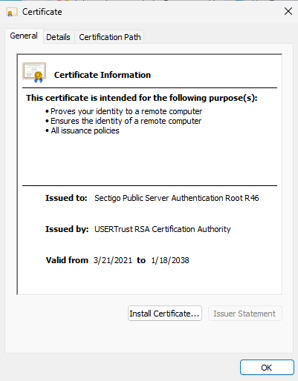
When “Issued to” is the same as “Issued by,” you have a root. When the issuer is different, you have an intermediate CA, even if the common name still says “Root.”
Path building is decided by the operating system, so older stacks that only know USERTrust will terminate the chain there. Newer stacks that already contain the real R46 root prefer to stop at R46. Both paths are cryptographically valid; they just end at different anchors.
Server certificate validation in 802.1X is strict about the expected trust anchor because the supplicant was configured to accept one specific root. If the path the operating system (OS) builds terminates at a different one, validation fails. The Extensible Authentication Protocol (EAP) tunnel never comes up, so the client certificate is never even offered. That’s why the failure looks nothing like a client-certificate problem: the client never gets a chance to say what the problem is.
During 802.1X authentication, the client has no network yet. It cannot chase an authority information access (AIA) URL to fetch a missing intermediate. The RADIUS server has to push the complete chain in the TLS handshake. If that chain is incomplete or points at the “wrong” version of R46 for the client’s configured anchor, the tunnel dies before any client certificate is ever sent.
How to Fix It
The problem exists on two sides of the network, and both need correcting: the RADIUS server must present a complete chain, and every client profile must trust both anchors. Fix only one side and a subset of your fleet will still fail.
Server Side: Present a Complete Chain
Configure your RADIUS server to present the full chain, in order:
- Your leaf (server) certificate
- The Sectigo Public Server Authentication CA {DV|OV|EV} R36 intermediate that matches your certificate’s validation level
- The cross-signed R46 certificate (issuer: USERTrust RSA Certification Authority), for legacy-client compatibility
Modern clients that already trust the R46 root ignore the cross-signed certificate; older clients that only know USERTrust use it to complete the path. It costs nothing and prevents failures on the older stacks.
Where the chain is configured varies by platform. Microsoft NPS builds it from the Local Computer certificate store (ensure the R36 intermediate and cross-signed R46 are in Intermediate Certification Authorities); FreeRADIUS references a concatenated chain file via ca_file; Aruba ClearPass and Cisco ISE bind the chain in the server-certificate configuration.
Warning: Present the cross-signed R46 in the server’s chain, but never install that same cross-signed certificate as a trust anchor on a client. The cross-signed R46 is technically an intermediate (its issuer is USERTrust, not itself), and trust anchors must be self-signed roots. This is the single most common way admins break the fix.
Client Side: Trust Both Anchors
Add both USERTrust RSA Certification Authority and the self-signed Sectigo Public Server Authentication Root R46 to the trusted-server list in every 802.1X profile. Trusting both means the client validates successfully no matter which path its operating system builds. Here’s how, by platform:
- Windows: The supplicant’s trusted-root picker reads the Trusted Root Certification Authorities store. Import the self-signed R46 there, not the cross-signed one.
- macOS/iOS (.mobileconfig): Include both root payloads and reference both in the EAP trust section.
- Android 11 and later: Install the root only. Do not add the cross-signed R46; Android 12 fails authentication if an intermediate is included and trusted for server certificate validation, and the cross-signed R46 is an intermediate. See our guide on configuring Server Certificate Validation with Android 12 devices.
- ChromeOS: For managed Chromebooks, push the self-signed R46 root through the Google Admin console as part of the Wi-Fi configuration, rather than importing per device. Consult Google’s documentation for pushing certificates to managed devices.
On Android 11 and later, the Wi-Fi profile must specify a root CA certificate plus either a domain suffix match or an alternate subject match. The Domain value is matched label-by-label as a suffix of a dNSName entry in the certificate’s Subject Alternative Name (SAN), so corp.example.com in the profile validates a certificate whose SAN is radius1.corp.example.com. The two do not have to be character-for-character identical.
How to Verify the Fixes Worked
Before rolling the renewed certificate to production, validate the fix against each OS generation you support:
- In a lab SSID using the new certificate, connect one device from each OS family: Windows, macOS/iOS, Android 11 or later and any others in your fleet.
- Confirm each authenticates successfully, since older and newer stacks build the chain to different anchors.
- On a device that previously failed, verify it now connects. This confirms the cross-signed R46 in the server chain is doing its job.
- Only after every OS generation passes should you renew certificates across production.
Automate Certificate Trust With a Managed PKI
Digital certificates are the foundation of modern network trust, but only if they’re deployed, managed and revoked properly.
SecureW2 JoinNow Dynamic PKI actively monitors certificate health after issuance, detecting digital certificates shared simultaneously across multiple devices, flagging enrollment requests with modified CSRs, and revoking certificate-based access the moment a device falls out of compliance or a user offboards.
CertIQ ML Anomaly Detection, a native SecureW2 JoinNow feature, identifies the risk patterns that static CAs and manual audits miss entirely. More than 1,000 organizations globally trust the SecureW2 platform to manage certificates across mixed-OS, multi-MDM environments.
See certificate management in action and reach out to us for a free demo.
Frequently Asked Questions
Do I need both the USERTrust and R46 roots?
Yes. Trust both until your entire fleet is off the legacy path. Trusting both anchors means a client validates successfully regardless of which chain its operating system builds. Older devices that terminate at USERTrust and newer ones that terminate at R46 both succeed.
Is USERTrust RSA CA expiring?
No. USERTrust RSA Certification Authority is valid until January 18, 2038. It is, however, scheduled to lose the websites trust bit in Chrome and Mozilla on April 15, 2027; a browser distrust action, separate from expiration. Profile-embedded 802.1X trust anchors aren't automatically affected by the browser change.
Which R46 do I install?
Install the self-signed R46 as the trust anchor on clients and present the cross-signed R46 (issuer: USERTrust) in the chain your RADIUS server sends. Installing the cross-signed version as a client trust anchor is the most common way admins break the fix, since it's technically an intermediate, not a root.
Does this affect SecureW2 Cloud RADIUS?
No. SecureW2 manages the RADIUS server certificate and its chain for Cloud RADIUS customers, so the R46 migration doesn't require any action on your part. The issue affects organizations running their own RADIUS server with a public Sectigo certificate.
What's the difference between a cross-signed root and an intermediate?
Functionally, there is no difference. A cross-signed root is an intermediate certificate whose subject happens to be a root's name. What makes a certificate a true root is that it's self-signed; its "Issued to" and "Issued by" match. If the issuer is a different authority (like USERTrust), it's an intermediate, no matter what the common name says.
Why does the failure look like a Wi-Fi or network problem instead of a certificate problem?
Because server-certificate validation fails before the client ever sends its certificate. When the chain doesn't validate against the client's trusted anchor, the EAP tunnel never establishes, so authentication dies at the server-validation step. The symptom, a subset of devices suddenly unable to join right after a certificate renewal, looks like a network or profile issue, which is why it's so often misdiagnosed.
Does the clientAuth EKU change affect my RADIUS server certificate?
No. A RADIUS server certificate only needs the serverAuth EKU, which public CAs continue to issue. The clientAuth EKU removal is a separate change affecting client certificates used for mTLS, RadSec and systems like Cisco ISE, not your RADIUS server certificate.
