Key Points
- A certificate revocation list (CRL) is a signed file published by a certificate authority that lists the serial numbers of certificates revoked before their scheduled expiration.
- CRLs are used to revoke a certificate before it naturally expires, protecting networks from compromised keys, offboarded users or certificates issued in error.
- A CRL works by having the CA publish revoked serial numbers to a public list, which systems like RADIUS servers and browsers check before granting access to anything presenting that certificate.
We’ve spent years helping IT teams troubleshoot certificate-based Wi-Fi and VPN deployments, and CRL issues come up more often than most people expect. A certificate revocation list (CRL) is a signed list published by a certificate authority (CA) that identifies certificates that have been revoked before their expiration date.
We’ve seen revoked certificates that still authenticate because a cached CRL hadn’t updated yet, RADIUS servers that slow down under a bloated CRL, and distribution points that go offline at the worst possible time. Understanding how CRLs work, how systems check them and where they fall short can help IT teams avoid these problems.
This guide breaks down how CRLs actually work in practice, the reason codes defined in RFC 5280 and where CRLs fall short compared to Online Certificate Status Protocol (OCSP) and OCSP stapling.
What Is a Certificate Revocation List?
A certificate revocation list (CRL) is a digitally signed log of every certificate the publishing certificate authority (CA) has revoked before its scheduled expiration date. CAs may revoke certificates and place them on a CRL due to wrongful issuing, compromised data (such as its private key) or other scenarios where client/server trust is lost.
CRLs are managed entirely within the Publick Key Infrastructure (PKI) trust hierarchy, where authority flows from the CA. Only the CA that originally issued a certificate, or an authority explicitly delegated by that CA, has the authority to revoke it.
Once a certificate’s serial number appears on the CRL, any system that checks the list, such as a RADIUS server, a web browser or a VPN gateway, will reject authentication attempts that present that certificate.
Each CRL entry includes:
- Serial number of the revoked certificate
- Revocation date — when the CA declared it invalid
- Reason code (optional) — a standardized code from RFC 5280 explaining why (see the full list below)
The CRL itself also carries metadata, such as the issuing CA’s distinguished name, the date the list was published, the date the next update is expected and the CA’s digital signature to prevent tampering.
Notably, CRLs do not include expired certificates. In the next section, we’ll check out the difference between expired and revoked certificates.
Certificate Revocation vs. Certificate Expiration
These two concepts get confused often, but they serve different purposes in the certificate lifecycle. The table below highlights the key differences.
| Aspect | Certificate Expiration | Certificate Revocation |
| When It Happens | Automatically, at the end of the certificate’s validity period | Deliberately, before the certificate’s scheduled expiration |
| Typical Trigger | The validity period (often 1 to 3 years for enterprise certs) runs out | Private key compromise, employee departure, device decommissioning or an issuance error |
| Who Checks It | The OS or RADIUS server checks the expiration date directly | The OS or RADIUS server checks the CRL, or OCSP, for the certificate’s serial number |
| Appears On a CRL? | No. An expired certificate does not need to be revoked | Yes. A revoked certificate can appear on a CRL until its original expiration date passes |
| What Happens Over Time | Nothing further, the certificate is simply no longer valid | The certificate is automatically pruned from the CRL once it expires, which keeps the list from growing indefinitely |
Why Are CRLs Important?
CRLs are important because they warn users that a site, application or network may be unsafe. Verifying the validity of certificates protects organizations, devices and end-users from man-in-the-middle (MITM) attacks that can compromise credentials and private data.
When untrustworthy connections occur, they can lead to data breaches, identity theft, loss of data and lost revenue.
How CRL and PKI Work Together
Public Key Infrastructure (PKI) uses digital certificates and advanced encryption to protect virtual communications and data exchanges. CRLs allow PKI tools to determine the validity and trustworthiness of every certificate, protecting the PKI and the organization.
As part of a healthy PKI framework, a dependable CRL minimizes security risks and builds trust with certificate-verifying entities.
Certificate revocation sounds simple in theory, but managing it in a real PKI environment is harder
The video below explains the challenges IT and security teams face when deciding when to revoke a certificate and how those decisions can affect access to Wi-Fi, VPNs and applications.
How Certificate Revocation Lists Work
A CA issues a certificate with an expiration date, but things can happen before that date arrives, such as a private key gets stolen, an employee leaves or a certificate gets issued in error.
The CA needs a way to say “stop trusting this” before the certificate naturally expires. A CRL is that mechanism, a published list of certificates that the CA has revoked early.
Here’s how it plays out:
- The CA can revoke a certificate when it is no longer trustworthy due to a key compromise, offboarding, an issuance error or another reason.
- The CA adds the revoked certificate’s serial number to its CRL and publishes the updated list.
- A device later tries to use that certificate, for example, when connecting to corporate Wi-Fi.
- The verifying system, usually a RADIUS server, checks the CRL for that certificate’s serial number.
- The system finds the certificate’s serial number on the CRL and determines that the certificate has been revoked.
- Access is denied, even though the certificate has not expired.
For certificates that have not been revoked, their serial numbers do not appear on the CRL, so the authentication process can continue.
The flowchart below illustrates the process.
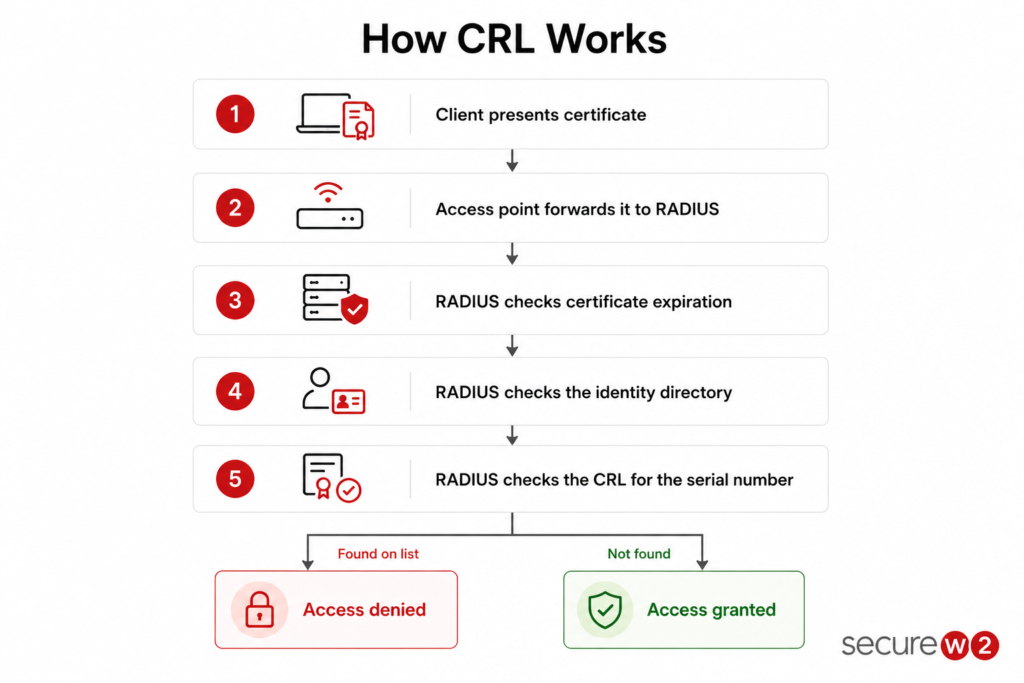
One distinction worth remembering is that revocation happens once, when the CA updates the list. Rejection happens every time someone tries to use that revoked certificate because the check runs fresh each time. The CRL is what makes that repeated rejection possible without the CA stepping in manually on every attempt.
CRL Structure and Contents
Per RFC 5280, a CRL contains several fields that provide information about the issuer, publication timing and revoked certificates. Key fields are included in the table below.
| Field | Description |
| Issuer Name | The CA that issued the CRL |
| This Update | When the CRL was published |
| Next Update | When the next CRL is expected to be issued |
| Revoked Certificates List | Each entry has a serial number, revocation date and optional reason code |
| CA’s Digital Signature | Authenticates the file |
Expired certificates drop off the list once their validity period ends, since they’d be rejected for expiration anyway. This is configurable by the CA.
CRL Entries and Revocation Reason Codes
When a CA revokes an X.509 certificate, it assigns a reason code defined in RFC 5280, the core specification governing digital certificates and CRLs.
These codes provide crucial context during audits, help determine if signatures created prior to revocation remain trustworthy and guide administrators on whether a certificate should be reissued or permanently retired.
| Code | Name | Meaning |
| 0 | unspecified | No specific reason given, the default (not recommended since it won’t give clarity into why a certificate was revoked) |
| 1 | keyCompromise | Private key was stolen or exposed |
| 2 | cACompromise | The CA’s own key was compromised, casting doubt on everything it issued |
| 3 | affiliationChanged | Certificate holder’s relationship with organization changed, often due to leaving the company |
| 4 | superseded | Replaced by a newer certificate |
| 5 | cessationOfOperation | The associated service or system was decommissioned |
| 6 | certificateHold | Temporarily suspended, reversible |
| 8 | removeFromCRL | Clears a certificate off hold status. May only appear in delta CRLs and also covers removal after expiry |
| 9 | privilegeWithdrawn | Access was revoked, common during offboarding |
| 10 | aACompromise | The attribute authority was compromised |
Understanding these specific reason codes helps security teams distinguish between routine operational updates (like a role change or planned decommission) and severe security events (such as key exposure), ensuring swift and appropriate remediation actions.
How to Check a Certificate Revocation List
Checking a CRL manually is straightforward. The process involves locating the CRL, verifying its authenticity and checking whether the certificate’s serial number appears on the list.
Here’s how to check a CRL:
- Find the CRL Distribution Point (CDP) URL listed in the certificate’s extensions.
- Download the CRL file from that URL, usually over HTTP or LDAP.
- Verify the CA’s digital signature on the CRL to confirm it hasn’t been altered.
- Search the list for the certificate’s serial number.
- If the serial number appears, treat the certificate as revoked and stop trusting it.
- If it doesn’t appear, and the certificate hasn’t expired, it’s still valid.
- Most systems, browsers, RADIUS servers, VPN clients, do all this automatically. A manual check is mainly useful for troubleshooting or audits.
Types of Certificate Revocation Lists
There are several types of CRLs, each designed for a different revocation scenario:
| Type | Description | Example |
| Base CRL | The full list of every certificate a CA has revoked, published on a set schedule | A CA publishing its complete revoked-certificate list once every 24 hours |
| Delta CRL | A short list containing only the changes since the last base CRL | A CA publishing an hourly update with just the newly revoked certificates |
| Indirect CRL | A CRL that covers certificates issued by a CA other than the one that signed the list | A dedicated CRL-issuing authority publishing revocation data for several subordinate CAs |
| Partitioned CRL | A CRL split into segments, often by certificate type or serial number range, to keep individual files smaller | A large enterprise splitting its CRL by department or certificate template |
What Is the CRL Lifecycle?
A CRL isn’t a static file. It goes through its own cycle of publication, updates and eventual replacement.
- Updates: Each time a CA revokes a certificate, that revocation needs to make it into a published CRL before relying parties can act on it. Some CAs update the base CRL directly. Others publish delta CRLs between base updates, so changes propagate faster without a full re-download.
- Expiration: Every CRL carries a “next update” field telling relying parties when to expect a fresh version. Once that time passes, cached copies are considered stale, and clients are expected to fetch a new one before trusting it further.
- Frequency: Commonly, CAs publish a new CRL every few hours to a few days, though this varies by CA policy and how often revocations happen. High-security environments often publish more frequently, while lower-risk environments can get away with a longer refresh window.
CRL Distribution Points: How Clients Retrieve Revocation Data
Most X.509 certificates contain a field called the CRL Distribution Point (CDP): an HTTP or LDAP server location holding one or more URLs where the CA publishes its current CRL.
When a relying party, such as a RADIUS server, a browser or a VPN concentrator, needs to verify a certificate, it reads the CDP from the certificate and downloads the corresponding CA’s CRL from that location.
Here’s how distribution works in practice:
- HTTP-based CDPs: These CDPs are the most common. The CA publishes the CRL to a web server, and clients fetch it over plain HTTP.
- LDAP-based CDPs: These are used in Microsoft Active Directory environments. The CRL is published to a directory service accessible within the corporate network.
- Caching: Most clients cache the CRL locally and refresh it based on the “Next Update” field in the CRL itself. A typical refresh interval is every few hours to a few days.
If the CDP is unreachable due to a downed server, network segmentation or a blocking firewall rule, some clients will “soft fail” (accept the certificate anyway) while others will “hard fail” (deny access). This inconsistency is one of the operational headaches that CRL-dependent systems create.
CRL vs. OCSP vs. OCSP Stapling
CRLs are not the only way to check certificate revocation status. Two alternatives, Online Certificate Status Protocol (OCSP) and OCSP stapling, address different limitations of the CRL model.
The basic difference between OCSP vs CRL is that CRLs are periodically updated lists of all revoked certificates, while OCSP requests check the real-time status of specific certificates on demand. OCSP stapling improves latency for high volumes of individual OCSP requests.
But there’s more to it than that, including privacy concerns with OCSP. Let’s compare:
| CRL | OCSP | OCSP Stapling | |
| How it Works | Client downloads the full revocation list from the CDP | Client queries an OCSP responder for a single certificate’s status | Server pre-fetches the OCSP response and delivers it during the TLS handshake |
| Response Size | Large (grows with every revocation) | Small (one certificate per query) | Small (one certificate per query) |
| Latency | Higher for large lists | Lower per-query | Lowest — no extra round trip for the client |
| Privacy | No CA involvement at validation time | CA sees every query (knows which sites you visit) | CA only sees queries from the server, not end users |
| Freshness | Updated on a schedule (hours to days) | Near real-time | Depends on server’s refresh interval |
| Failure Mode | Stale if cache expires and CDP unreachable | Soft-fail risk if responder is down | Soft-fail risk if server does not staple |
How Does OCSP Work?
OCSP (defined in RFC 6960) lets a client ask a single question — “Is this certificate revoked?” — and receive a signed “good,” “revoked” or “unknown” response.
It is faster per-query than downloading an entire CRL but introduces a privacy issue: the OCSP responder (usually operated by the CA) sees every certificate check, which means it can track which sites a user visits.
How Does OCSP Stapling Work?
OCSP stapling solves the privacy problem introduced by OCSP. The server periodically fetches its own OCSP response from the CA and “staples” it to the TLS handshake. The client gets the revocation status without ever contacting the CA directly.
For enterprise Wi-Fi and VPN networks that use private PKI and EAP-TLS, CRL certificate checks through the RADIUS server remain the most common method. OCSP and OCSP stapling are more prevalent in web TLS (browser-to-server) scenarios.
See our video for more information on OCSP vs. CRL.
Benefits of CRL
The following are some of the benefits of CRLs:
- CRLs work without needing a live connection to the CA at the moment of validation.
- They give administrators a documented, auditable record of every certificate revoked and why.
- CRLs are supported by nearly every system that handles X.509 certificates, including RADIUS, VPNs and OS trust stores, making them broadly compatible across these environments.
- Once downloaded, a CRL can be cached and reused for multiple checks, which cuts down on network overhead.
- The signed format makes tampering easy to detect.
- Reason codes give context for each revocation, which helps with audits and incident reviews.
CRL Limitations in Enterprise Networks
CRLs work, but they have operational gaps and drawbacks that compound at enterprise scale:
- A revoked certificate can still authenticate if the updated CRL hasn’t been published yet, since updates only happen on a schedule.
- Large organizations with frequent revocations end up with bloated CRLs, and a list with 100,000 entries runs to several megabytes.
- Delta CRLs cut download size, but the RADIUS server still has to hold a current base CRL and merge the latest delta against it, and a stale or unreachable delta leaves it validating against out-of-date revocation data.
- If the CRL distribution point goes offline, some clients deny access outright while others let the certificate through unchecked, and neither outcome is good.
- A CRL only confirms certificate status. It says nothing about whether the user was just disabled in the identity provider or whether the device fell out of compliance.
CRLs Are Replacing OCSP for Certificate Revocation
For many years, OCSP was often considered the better option because it could check a certificate’s status in real time without downloading an entire revocation list.
That approach has now changed. In July 2023, the CA/Browser Forum approved Ballot SC-063, making OCSP optional for publicly trusted CAs while making CRLs mandatory.
The new requirements took effect in March 2024, marking a major shift in how certificate revocation is expected to work going forward.
The decision was driven by several long-standing issues with OCSP. Every OCSP request reveals which certificate a client is checking, creating privacy concerns. OCSP also depends on highly available responder servers, increasing operational costs for CAs.
More importantly, many applications use soft-fail behavior. If the OCSP responder cannot be reached, the certificate is often treated as valid instead of being rejected. This can allow revoked certificates to continue to be trusted.
Info: The industry has already started adopting this new approach. Let’s Encrypt stopped providing OCSP services in August 2025. Certificates issued after that point rely on CRLs for revocation information instead of OCSP.
For organizations running an internal PKI, these public CA requirements do not apply directly. However, the same operational lessons are relevant.
In certificate-based EAP-TLS deployments, RADIUS servers can download and cache CRLs locally. This allows them to continue checking revoked certificates even if the issuing CA is temporarily unavailable.
By comparison, an OCSP-based deployment may accept revoked certificates if the responder cannot be contacted and soft-fail behavior is enabled.
As more public CAs move away from OCSP, CRLs are becoming the primary revocation mechanism for modern PKI deployments.
Note: Organizations designing or updating certificate-based authentication should treat CRL distribution and management as a core part of their PKI strategy, rather than relying solely on OCSP for certificate validation.
How SecureW2 Handles Certificate Revocation
SecureW2 JoinNow Cloud RADIUS does not rely solely on CRL checks to determine whether a certificate should be trusted.
At every authentication event, Cloud RADIUS performs a real-time identity lookup against the organization’s identity provider to verify the user is still active and the device is still compliant.
All major identity providers are supported, including Entra ID, Okta and Google Workspace.
The effect is immediate. If an administrator disables a user in Entra ID at 2:00 PM, that user’s certificate stops working at 2:00 PM, not at the next CRL refresh cycle.
JoinNow Dynamic PKI also includes CertIQ ML Anomaly Detection, which monitors certificate usage patterns across the network. CertIQ flags certificates that appear in unexpected locations, authenticate at unusual times, or exhibit behavior inconsistent with the enrolled identity. This is a layer of defense that static CRLs cannot provide: it catches misuse that no one thought to revoke.
The result is a revocation model that combines traditional CRL support (for compatibility with third-party systems) with real-time identity checks and behavioral anomaly detection.
Move Beyond Static Revocation Lists
CRLs are a foundational part of PKI, but they were designed for a slower era, where hourly or daily revocation updates were acceptable.
Modern enterprise networks need to know whether a certificate, a user and a device are all trustworthy at the moment of connection, not based on a cached list from this morning.
Cloud RADIUS and Dynamic PKI give you both: full CRL compatibility for interoperability with existing systems, plus real-time identity lookups and CertIQ ML anomaly detection that close the gaps CRLs leave open.
Schedule a demo to see how real-time certificate validation works in your environment.
Frequently Asked Questions
What does CRL stand for in certificates?
CRL stands for certificate revocation list. It is a signed file published by a certificate authority (CA) that lists the serial numbers of digital certificates revoked before their scheduled expiration date. Any system that checks the CRL, whether a RADIUS server, browser, or VPN gateway, will reject a certificate whose serial number appears on the list.
How do I find the CRL of a certificate?
To find the CRL for a specific certificate, view the certificate details and look for its CRL Distribution Point (CDP): a URL indicating where to access the issuing CA's CRL files. However, certificate management tools such as the SecureW2 Management Portal can automate the lookup process, confirming certificate status with a valid CRL.
How often is a CRL updated?
CRL update frequency depends on the CA's configuration. Most CAs publish a new CRL every 1 to 24 hours. The "Next Update" field in the CRL tells clients when to expect a fresh version. Some CAs also publish delta CRLs between base CRL updates to distribute changes faster.
What is the difference between CRL and OCSP?
A CRL is a downloadable file containing every revoked certificate's serial number. OCSP is a protocol that lets a client query the CA for the status of a single certificate. CRLs are larger, but validation happens entirely on the client side, with no outbound request to the CA. OCSP responses are smaller and closer to real-time, but introduce privacy concerns because the CA sees every query.
What is the difference between CRL and certificate transparency logs?
Both CRLs and certificate transparency logs (CT logs) store X.509 certificate information, but they store different certificate details for different purposes. CT logs store details of all certificates issued for a specific domain, whether or not they've been revoked. Conversely, CRLs only store the details of revoked certificates; they don't include active or expired certificates.
What happens if the CRL is unavailable during authentication?
Behavior varies by implementation. Some systems "hard fail" and deny access when they cannot reach the CRL distribution point. Others "soft fail" and accept the certificate without a revocation check. Hard-fail is more secure but can cause outages if the CDP goes down. Cloud-based RADIUS services with built-in identity lookups reduce dependency on CRL availability.
Can a revoked certificate be reinstated?
Only certificates revoked with reason code 6 (certificateHold) can be reinstated. A certificate on hold is temporarily suspended, and the CA can remove it from the CRL on the next update using reason code 8 (removeFromCRL). Certificates revoked for any other reason, such as key compromise or affiliation change, are permanently revoked.
How to find a certificate revocation list?
Most X.509 certificates include a CRL Distribution Point (CDP) extension, but it isn't universal — X.509 treats it as optional, and root CA and OCSP responder certificates omit it. This field holds a URL, usually HTTP or LDAP, pointing to where the issuing CA publishes its current CRL. To find the list, open the certificate's details and look for the CDP extension, then fetch the file from that address. Most systems, browsers, RADIUS servers, VPN clients, do this automatically without any manual lookup. You'd only need to find it yourself for troubleshooting, auditing or verifying a CA's revocation practices directly.
How to check if a certificate has been revoked?
Locate the CRL Distribution Point in the certificate, download the CRL from that URL, and search the list for the certificate's serial number. If the serial number appears, the certificate has been revoked and shouldn't be trusted, regardless of its expiration date. If it doesn't appear and the certificate hasn't expired, it's still valid. You can also use OCSP instead, which queries the CA directly for a single certificate's status rather than downloading the full list. Most authentication systems perform this check automatically during every connection attempt.
What contains a list of revoked certificates?
A certificate revocation list (CRL) contains a list of revoked certificates. It's a signed file published by a certificate authority, listing the serial numbers of every certificate it revoked before their scheduled expiration. Each entry includes the serial number, the revocation date and often a reason code explaining why. The file also carries the issuing CA's name, a publish date, a next-update date and the CA's digital signature, which proves the list hasn't been altered. Anything checking a certificate's trust status references this file to confirm it isn't on the list.
