Key Takeaways
- Simple Certificate Enrollment Protocol (SCEP) automates the process of requesting and installing digital certificates on devices.
- SCEP allows devices to securely request certificates from a certificate authority (CA) using a standardized protocol.
- SCEP is widely used by mobile device management (MDM) systems, network infrastructure and enterprise PKI environments to deploy certificates at scale.
SCEP has been used for years to automate certificate enrollment across enterprise devices, making it a trusted choice for many IT teams. While it is still widely supported, it also has limitations that organizations need to understand. This guide explains how SCEP works, where it is used, and what to consider before deploying it.
What Is SCEP?
SCEP (Simple Certificate Enrollment Protocol) enables secure, automated certificate issuing without requiring manual administrative intervention. Below is a snapshot of its key details, history, and standards.
| Full form | Simple Certificate Enrollment Protocol |
| Developed by | Cisco |
| Purpose | Automated certificate enrollment |
| Used by | MDMs, CAs, enterprise devices |
| Introduced in | Early 2000s |
| Standardized by | Internet Engineering Task Force (IETF) |
| Formalized as RFC | 2020 |
| RFC | RFC 8894 |
| Also known as | SCEP protocol, SCEP certificate enrollment |
| Alternative protocols | EST, ACME |
The SCEP protocol allows devices to easily enroll for a certificate by using a URL and a shared secret to communicate with a Public Key Infrastructure (PKI). SCEP does not replace PKI; rather, it automates the certificate enrollment step within an existing PKI infrastructure.
Mobile device management (MDM) software commonly uses SCEP for devices by pushing a payload containing the SCEP URL and shared secret to managed devices. This can save an administrator a lot of time and effort compared to manually enrolling their managed devices for certificates.
Despite staying in draft form for two decades, SCEP saw widespread enterprise adoption early on, largely because of how deeply Internet Engineering Task Force support and vendor backing embedded it into MDM and network device ecosystems before the specification was ever formally finalized.
See our video below for a detailed lesson on SCEP:
SCEP vs. Dynamic SCEP
SCEP’s biggest weak point is the static challenge password. Every device in a deployment typically shares the same one, so if it’s ever intercepted, cached, or leaked, an attacker can use it to request certificates just like a legitimate device would. This is the gap Dynamic SCEP was built to close.
- What stays the same: Dynamic SCEP is still SCEP at the protocol level. The enrollment flow, the CSR, the SCEP server, the CA, none of it changes.
- What changes: Instead of every device sharing one static password, Dynamic SCEP generates a new, one-time password for each individual enrollment request, usually issued by the MDM at the moment a device enrolls.
- Why it matters: If that password gets intercepted, it’s already useless for any future request. This removes most of the replay and credential-reuse risk that comes with a static secret.
- Who it’s for: Any organization already running SCEP through an MDM like Intune or Jamf. You keep your existing infrastructure and integrations, you just stop relying on one password that never changes.
Info: For the full comparison, see our guide on SCEP vs Dynamic SCEP.
Where ACME Fits Into This
Dynamic SCEP fixes how SCEP authenticates devices, but it’s still working within SCEP’s original design. ACME (Automated Certificate Management Environment) is built to solve the same core problem, getting certificates onto devices automatically, but it does it without a shared secret at all.
- Authentication: Instead of a password proving a device is authorized, ACME uses cryptographic domain validation, and increasingly, device attestation, to confirm identity before issuing a certificate.
- Renewal: Automated and revocation-aware as a native part of the protocol, not a bolt-on.
- Where it’s used: Built for cloud-native and web-facing infrastructure, it’s the standard behind services like Let’s Encrypt, and it’s increasingly showing up in device and MDM-based enrollment too.
Info: For a deeper look, see our guide to ACME protocol..
SCEP vs. Dynamic SCEP vs. ACME
Choosing the right certificate enrollment approach depends on your device fleet and security requirements. The table below compares traditional SCEP, Dynamic SCEP, and ACME across key operational and security features.
| Feature | SCEP | Dynamic SCEP | ACME |
| Authentication method | Static shared secret | Per-device, one-time secret | Cryptographic domain validation or attestation |
| Credential reuse risk | High | Low | Very low |
| Renewal | Manual or limited automation | Automated, tied to MDM | Fully automated, built into protocol |
| Transport | HTTP or HTTPS | HTTP or HTTPS | HTTPS only |
| Protocol change required | None (baseline) | None, same protocol, different secret handling | Yes, different protocol entirely |
| Best suited for | Legacy and network devices | MDM-managed enterprise fleets already on SCEP | Cloud-native, web-facing, and modern device fleets |
What Is a SCEP Server?
A SCEP server is the network accessible component that sits between a managed device and the Certificate Authority (CA), handling the enrollment conversation on the CA’s behalf. It’s sometimes called a SCEP certificate server or a SCEP gateway, depending on the vendor.
- What it does: When a device, or the MDM acting on its behalf, needs a certificate, it doesn’t talk to the CA directly. It sends its enrollment request, along with its shared secret, to the SCEP server.
- How it connects to the CA: The SCEP server checks the request, forwards the CSR to the CA for signing, and returns the finished certificate to the device once it’s issued.
- Real world examples: Microsoft’s Network Device Enrollment Service (NDES) for Active Directory environments, and cloud based gateways like SecureW2’s SCEP Gateway API, which connects directly to MDMs such as Intune and Jamf without the overhead of running on-prem infrastructure.
Components of a SCEP Deployment
A working SCEP deployment is made up of a handful of moving parts. Knowing what each one does, and where the SCEP server ends and the CA begins, makes troubleshooting enrollment issues a lot easier.
- SCEP Server (or gateway): Receives enrollment requests from devices, validates the shared secret or challenge password, and passes the CSR to the CA.
- Certificate Authority (CA): The actual signer of certificates. The CA trusts the SCEP server to forward only legitimate, authorized requests, but the CA is the one that issues the signed certificate, not the SCEP server itself.
- SCEP URL: The endpoint address devices are pointed to, usually pushed through an MDM configuration profile.
- Shared Secret or Challenge Password: The credential a device presents to prove it’s authorized to enroll.
- Certificate Template: Defines what the issued certificate can be used for, such as Wi-Fi authentication, VPN access, or email signing.
- Signing Certificate: The certificate chain (root, intermediate, and end entity) that gets installed on the device.
CA vs. SCEP Server: What’s the Difference?
To understand certificate management, it helps to distinguish the entity that issues the credentials from the system that handles the requests. Here is the core difference between the two:
- Certificate Authority (CA): The trust anchor. The only party that actually signs certificates.
- SCEP server: The automated intermediary. Makes requesting and picking up that certificate simple for a device, without needing an admin to manually operate the CA every time.
What Is a SCEP Certificate?
A SCEP certificate is the digital ID the protocol provides to devices. SCEP manages certain enterprise X.509 certificates a client device uses to prove its identity to a network or server.
SCEP certificates serve different purposes depending on an organization’s needs:
- Device authentication: Laptops, phones and other devices use SCEP to connect securely to company Wi-Fi, VPNs and internal apps.
- User authentication: Certificates can be linked to specific employee devices, allowing them to securely access resources such as email or other applications for the workplace.
- Server or application authentication: SCEP certificates secure internal communications between servers or between apps and clients.
- EAP-TLS: SCEP uses X.509 certificates for passwordless Wi-Fi authentication, enabling mutual authentication so devices and the network can verify each other.
SCEP certificates are multifunctional security measures organizations can use for a variety of applications, as we’ll explore next.
How Does SCEP Certificate Enrollment Work?
SCEP enrollment breaks down into three phases: the device requesting a certificate, the SCEP server validating and passing that request to the CA, and the finished certificate getting deployed and kept current.
Phase 1: Request
- Device connects to the gateway. The managed device reaches out to the SCEP gateway using its pre-configured SCEP URL.
- CSR gets generated. The device creates a Certificate Signing Request containing the details needed to build its certificate.
Phase 2: Validate and Issue
- Authorization check. The SCEP gateway verifies the device using its shared secret or challenge password.
- CA signs the certificate. Once authorized, the gateway forwards the CSR to the CA, which signs it according to policy.
Phase 3: Deploy and Renew
- Certificate lands on the device. The signed certificate is sent back and installed, enabling secure authentication.
- Renewals run on autopilot. Future renewals and re-enrollments follow this same process without needing manual intervention.
This phased handoff, request, validate, deploy, is what lets SCEP eliminate the manual effort traditionally required for certificate issuance, turning something that used to be error-prone and time-consuming into a process that just runs in the background.
How the SCEP Protocol Works
SCEP uses a few specific message formats to move data securely between the device and the CA, as the following table shows:
| Component | Role |
| PKCS#10 | Format used for the Certificate Signing Request itself. Packages the device’s public key and identifying details into a structured request. |
| PKCS#7 (CMS) | Wraps and encrypts the CSR, along with the challenge password, before it’s sent over the wire. Also the format the CA uses to send the signed certificate back. |
| HTTP or HTTPS transport | Carries these messages between the device, the SCEP server, and the CA. SCEP was built to work over plain HTTP, which is part of why the challenge password mechanism matters so much for authentication, though most modern deployments run it over HTTPS. |
| Challenge password | The shared secret embedded inside the encrypted PKCS#7 request. The main way SCEP verifies that a request is coming from an authorized device rather than an unknown source. |
Note: This is also where SCEP’s main weakness comes from, since the challenge password is doing most of the authentication work.
SCEP Certificate Renewal and Lifecycle Management
For seamless certificate lifecycle management, re-enrollment before certificate validity expires is a necessity. When a certificate is due to expire, or the expiry date is approaching, there are two likely scenarios:
- Renewal (if the client certificate expiration date is earlier than the CA certificate validity date)
- Rollover (if the CA certificate is due to expire before the expiration of the client certificate)
In case of renewal, when the certificate expiration date is approaching, before the expiry date (the date can be defined in settings), the client generates a CSR and will follow the enrollment process using the current certificate to authenticate to the CA. Once a new certificate is issued, the current certificate is deleted and replaced with the new certificate.
Rollover occurs when the CA certificate is due to expire. The CA generates a “Shadow CA” certificate that becomes valid once the current certificate expires. The SCEP client requests the CA to create the “Shadow CA” certificate as it is required to generate a “Shadow ID” certificate for clients.
What Is SCEP Used For?
SCEP remains popular with IT teams managing large device fleets because it delivers on a few fronts at once:
- Automation: No manual certificate installs, and access is easy to revoke when a device or employee leaves.
- Security: Certificate-based trust is much harder to breach than a shared password.
- Scalability: Works across hundreds or thousands of devices without individual admin attention.
- Legacy support: Runs on older or mixed-device environments that don’t support newer protocols.
- Cross-platform: Supported across Windows, Active Directory, Linux, iOS, and macOS.
Where SCEP shows up in practice:
- Intune, Jamf, Kandji, Workspace ONE: Automated certificate delivery for managed devices
- Cisco ISE: Network device and endpoint certificates for access control
- Enterprise Wi-Fi (EAP-TLS): Certificate-based, passwordless network authentication
- VPN access: Certificate-based device authentication instead of shared credentials
Advantages of SCEP
- Broad compatibility: Works across Windows, Linux, Apple iOS, and macOS, and is supported by nearly every major MDM.
- Automation at scale: Removes the need to manually configure certificates on every device.
- Lower operational cost: Fewer manual errors and less IT time spent on certificate management.
- Legacy support: Still works with older network equipment that hasn’t moved to newer enrollment protocols.
Limitations of SCEP
- No real identity validation: SCEP checks a shared secret, not the actual identity of the device making the request.
- Shared challenge password: The same challenge password is often reused across every device in a deployment, so one leak compromises the whole batch.
- Weak authentication overall: Compared to protocols that use TLS client authentication or attestation, a static password is a much easier target.
- Replay attacks: Because the challenge password doesn’t always expire after a single use, a captured request can potentially be reused.
- Limited proof of possession: SCEP confirms a device holds a private key, but during renewal it doesn’t always confirm the device holds a new one, which can allow key reuse.
Most SCEP deployments don’t fail because the protocol is broken. They fail because the same static password is still sitting in an MDM config two years after everyone forgot it was there. SecureW2’s Managed PKI replaces that static secret with unique, per-device credentials issued automatically, so no single leaked password puts your whole fleet at risk. See how per-device credentials work
SCEP vs EST
The following table illustrates some of the key differences between SCEP and EST:
| Feature | SCEP | EST |
| Authentication | Shared secret (challenge password) | TLS client certificate authentication |
| Transport | HTTP or HTTPS | HTTPS only |
| Renewal support | Manual or limited automation | Built-in automated renewal |
| Extensibility | Limited, fixed message set | Broader, supports more attributes |
| Adoption | Very broad, especially legacy and network devices | Growing, preferred for newer deployments |
Info: One thing worth separating out here is Dynamic SCEP, which isn’t a different protocol so much as a more secure way of running SCEP itself. Instead of one static challenge password shared across every device, Dynamic SCEP generates a new, per-device challenge for every enrollment request, closing off a lot of the replay and credential-reuse risk covered above. If you’re choosing between sticking with traditional SCEP or moving to a dynamic model, our breakdown of SCEP vs Dynamic SCEP walks through the tradeoffs in more detail.
SCEP Deployment Best Practices
Because SCEP relies so heavily on the challenge password for authentication, how you manage that password matters more than almost anything else in the deployment. A few practices go a long way:
- Rotate challenge passwords regularly instead of leaving one static secret in place indefinitely.
- Isolate the SCEP server so only known MDMs and enrollment clients can reach it.
- Audit enrollment activity so unauthorized requests don’t go unnoticed.
- Use a separate intermediate CA per device group to contain the blast radius if a secret is ever compromised.
Note: For a deeper walkthrough of these controls and how they map to NIST and Microsoft guidance, see our full guide to SCEP security best practices.
SCEP Device Enrollment Process
The process of device enrollment with SCEP can be broadly divided into the following steps:
- Request the certificate authority (CA) for its root certificate to validate the authenticity of the CA that is issuing the certificate to the client.
- Send the Certificate Signing Request (CSR) to the CA to request a certificate for the client device.
- Perform server certificate validation to ensure the authenticity of the server.
The SCEP device enrollment process is based on the HTTP for the request and response function and supports RSA cryptography. This protocol often includes a challenge password embedded in the CSR, which the SCEP server validates before forwarding the request to the CA.
Info: MDM systems such as Intune, Jamf and Workspace use SCEP to automate the process of PKI certificate enrollment for both managed devices and unmanaged BYOD..
How to Configure SCEP
Setting up SCEP doesn’t have to mean stitching together a CA, a gateway, and an MDM integration from scratch. The SecureW2 JoinNow Platform handles the whole chain from one Management Portal, and most deployments are running in under 30 minutes.
Configuring Your PKI and Building the SCEP Gateway
In one setup pass, the Management Portal creates everything the gateway needs, as the following table illustrates:
| Component | What it does |
| Custom Intermediate CA | Private CA scoped to your organization |
| Signing CA | Signed by the Intermediate CA, issues your device certificates |
| SCEP Gateway API URL and shared secret | The endpoint and credential devices use to enroll |
| Certificate templates and enrollment policies | Define what each issued certificate can be used for |
Configuring SCEP in Your MDM
Most MDMs have a dedicated SCEP section, and pointing one at SecureW2’s gateway follows the same basic sequence regardless of vendor:
- Add the SCEP Gateway API URL
- Add the SCEP Shared Secret
- Upload the SCEP Signing Certificate
- Configure the SCEP Payload sent to devices
- Specify which devices receive the payload
- Optionally, configure payloads for Wi-Fi, VPN, or application access
Jamf is one of our favorite technology partners, with excellent SCEP support and wide adoption across the industry. Here’s where SCEP settings get configured on their end, as the graphic illustrates:
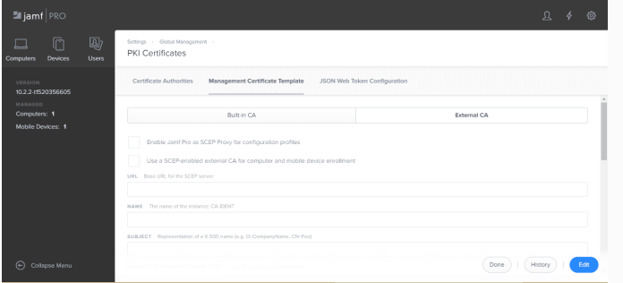
Info: To see the full walkthrough of connecting a SCEP Gateway to Jamf, click here. For how this works across other MDMs, our Managed Device Solutions page covers the broader integration options..
Configuring SCEP With SecureW2
On SecureW2’s side specifically, the process is four steps:
- Configure the SCEP Gateway API in SecureW2. The Getting Started Wizard generates a shared secret key and access token.
- Create a new SCEP URL using that shared secret and token. This is what gets pushed to devices for auto-enrollment.
- Create Enrollment Policies matching your organization’s requirements.
- Configure the Certificate Template with the SCEP URL from step two, so MDMs know how to route CSRs to SecureW2.
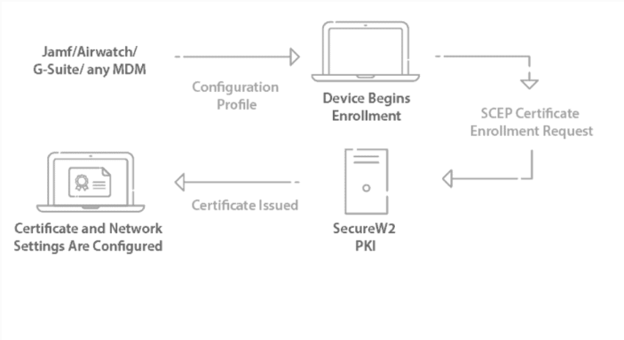
Info: Secure configuration for WPA2-Enterprise shouldn’t require touching every device by hand. SecureW2’s Gateway APIs enroll certificates to an unlimited number of managed devices in roughly the same time it takes to configure just one, with full visibility into enrollment success from a single Management Portal for fast, remote troubleshooting.
The JoinNow Platform gives you that visibility, control, and automation over every certificate issued on your network, built to work directly with your existing cloud identities like Azure, Okta, Jamf, or Intune, so PKI stays aligned with your IAM policies. If you’d like to learn more, check out our pricing and schedule a demo today.
Making SCEP Work for Your Certificate Strategy
SCEP remains the fastest way to automate certificate enrollment across MDMs, network devices, and enterprise PKI, but its reliance on shared secrets means how you deploy it matters as much as the protocol itself. Whether you’re running traditional SCEP, moving to Dynamic SCEP, or evaluating EST, the goal stays the same: certificates issued automatically, without static passwords sitting exposed. SecureW2’s Managed PKI handles that automation with per-device credentials built in.
Frequently Asked Questions
Why does SCEP matter for enterprise security?
SCEP matters because it removes the risks of manual certificate management. Forgotten certificates cause outages, misconfigurations leave systems vulnerable, and unmanaged devices become entry points for breaches or man-in-the-middle attacks. SCEP ensures certificates are issued correctly and deployed consistently across every device, helping IT teams control costs while maintaining a strong security posture.
What is the difference between SCEP and CSR?
A CSR is a document, SCEP is the protocol that delivers it. A CSR (Certificate Signing Request) is a structured cryptographic request in PKCS#10 format. SCEP securely carries that request from a device to a Certificate Authority and returns the resulting certificate.
What is a SCEP server?
A SCEP server is the network accessible service between endpoint devices and a Certificate Authority, automating certificate issuance and renewal at scale. When a device like a laptop or router needs a certificate, it connects to the SCEP server, which validates the request, forwards the CSR to the CA for signing, and returns the issued certificate.
What are the common applications of SCEP?
SCEP is most common in MDM platforms like Microsoft Intune and Apple MDM, securing mobile devices connecting to corporate VPNs, Wi-Fi, and internal apps. It's also standard for enrolling network devices such as routers, switches, firewalls, and VPN appliances, and for IoT deployments where thousands of devices need unique digital identities without bottlenecking IT.
How do SCEP certificates automate device Wi-Fi authentication?
SCEP certificates automate Wi-Fi authentication through EAP-TLS, the industry standard for certificate-based Wi-Fi access. Enrolled devices authenticate without credentials or end user interaction. The device checks the RADIUS server's certificate before presenting its own, so both sides verify each other, making EAP-TLS one of the most secure authentication methods available.
How does SCEP work with Windows?
SCEP works with Windows through Microsoft Intune, but doesn't natively support Microsoft GPO. For GPO and Active Directory managed devices, Microsoft built WSTEP (WS-Trust X.509v3 Token Enrollment Extensions Protocol) to handle auto-enrollment instead. Intune can still be configured to distribute certificates through SCEP via the gateway. See our integration guide for enrolling SCEP certificates on Intune.
What’s the difference between SCEP vs. EST?
The key difference is authentication. EST uses TLS client side device authentication, while SCEP relies on a shared secret and CSR. EST is considered an evolution of SCEP and has gained strong traction with IoT devices. SecureW2 supports manufacturers whose devices don't natively support either protocol.
What’s the difference? SCEP vs. CMP and CMC
SCEP handles certificate enrollment and issuance, while CMP and CMC handle broader certificate management. Certificate Management Protocol (CMP) and Certificate Management over CMS (CMC) are structurally similar to SCEP but cover revocation, status checks, and requests instead. SecureW2's JoinNow Platform uses the SCEP gateway to distribute certificates, with the Management Portal managing the full certificate lifecycle in one place.
