March 15, 2027 marks an important deadline for organizations using publicly trusted certificates.
From that date, newly issued certificates chaining to roots in the Chrome Root Store must contain only the server authentication Extended Key Usage (EKU). Certificates that include both server andclient authentication EKU will no longer meet Chrome’s requirements for new issuances.
What this means for your organization depends on several factors, including:
- Whether your current certificate authorities (CAs) are public or private
- What your organization uses certificates for
- Whether you have the expertise (and funds) to set up and manage a private certificate authority in-house
This article will discuss the differences between a public CA and a private CA, when to move to a private CA, and what to do if managing a private CA isn’t feasible for your organization.
How Certificate Authorities Work
Certificate authorities are trusted organizations that issue, sign, and revoke the digital certificates that secure applications such as Wi-Fi, virtual private networks (VPNs), single sign-on (SSO), and more. These certificates are then used to authenticate the identity of websites or other entities on the internet or a private network.
For a certificate to be trusted, clients must be able to trace it through a chain of trust to a root CA they already trust. The certificate trust chain is a sequence linking device or server certificates back to a trusted root certificate authority.
The image below captures how a certificate chain is structured.
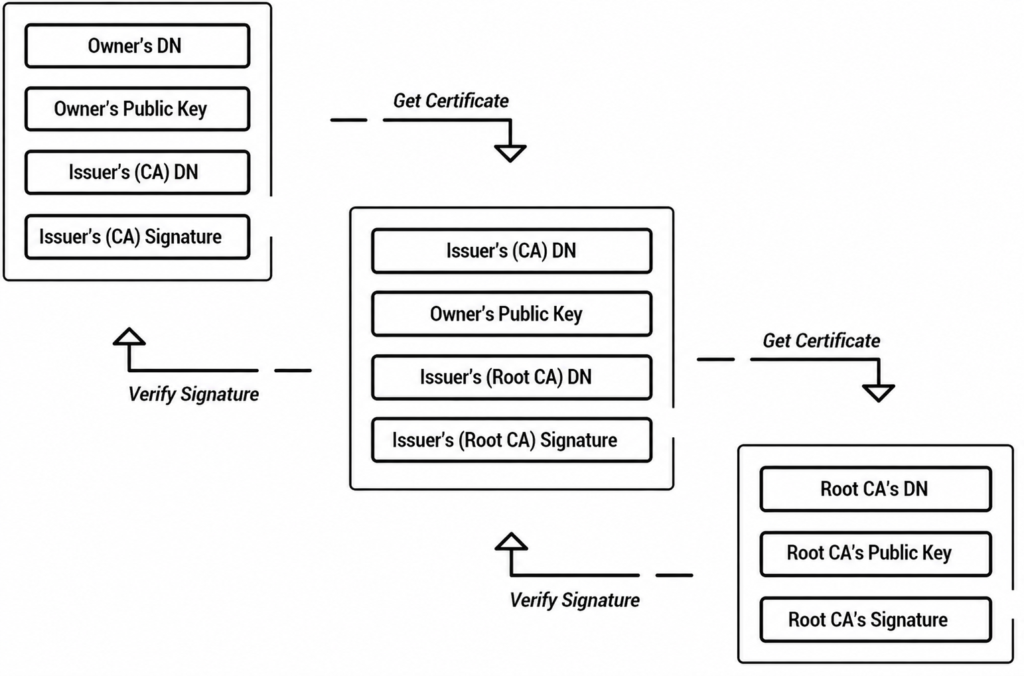
Each certificate is only as trustworthy as the certificate authority that issued it. If the root CA is ever compromised, every certificate it or its intermediate CAs issued can no longer be trusted.
Private vs. Public CA: What’s the Difference?
Differentiating private vs. public CAs comes down to who trusts the certificates they issue and where those certificates are used.
Public certificate authorities issue certificates that are trusted broadly across browsers and operating systems, making them suitable for public-facing websites, services and externally accessible endpoints.
Info: Root certificates from known public CAs such as Let’s Encrypt are pre-installed in browsers and operating system trust stores. End-entity digital certificates are typically paid for on a per-certificate basis, while CAs like Let’s Encrypt provide certificates at no cost.
Private certificate authorities are controlled by an organization and are mainly used for internal applications and devices. This could be for use cases such as authenticating to the internal network, VPN client authentication, mutual TLS (mTLS) and 802.1X authentication.
Private CAs require a private public key infrastructure (PKI) and can be very challenging for organizations to set up and manage on their own.
Take a look at the video below for an explanation about how CAs power PKI for secure authentication for users and devices.
Why Is the Shift From Public to Private CAs Happening and Key Dates
The public to private shift is part of a broader move by Chrome toward dedicated TLS-server authentication PKI hierarchies.
The Chrome Root Program is phasing out multipurpose hierarchies. Beginning March 15, 2027, it requires subscriber certificates issued by affected hierarchies to assert only the serverAuth EKU.
Organizations will need an alternative PKI for client-authentication use cases such as:
- Mutual TLS/server-to-server authentication
- VPN client authentication
- Wi-Fi / 802.1X certificate-based authentication
- Device, user or application identity
- Other client-auth use cases
Organizations currently using dual-purpose certificates from an affected public CA for any of the above purposes should expect that new or renewed certificates issued after the applicable CA or Chrome Root Program cutoff will no longer include the clientAuth EKU.
Existing certificates remain valid until they expire or are revoked, but once they need to be renewed, the dual-use option will no longer be available from public CAs that chain to Chrome-trusted roots.
Warning: Chrome’s policy also includes a June 15, 2026 milestone for affected multipurpose root CAs; root CAs that do not meet the replacement-root submission requirement by that date may be subject to an SCTNotAfter constraint, potentially affecting newly issued certificates before the March 15, 2027 deadline.
The table below outlines some of the most common dates public CA users should be aware of:
| Certificate Authority | Default / by-default removal | Hard / full removal deadline | Notes |
| Sectigo | October 2025 (no longer included by default) | February 10, 2027 | Hard deadline with no exceptions. Existing certificates remain valid until expiry. |
| DigiCert (incl. GeoTrust, Thawte, RapidSSL, etc.) | October 1, 2025 (serverAuth only by default; opt-in still possible) | March 1, 2027 | Full removal of the option for new, renewed, or reissued certificates. |
| Let’s Encrypt | February 11, 2026 (classic/default profile) | July 8, 2026 | Temporary tlsclient ACME profile was available until July 8, 2026, for existing users. After that, no further clientAuth certificates are issued. |
| Chrome Root Program (industry enforcement) | June 15, 2026 | March 15, 2027 | New leaf certificates chaining to Chrome-trusted public roots must contain only the serverAuth EKU. This is the overarching deadline driving the CA changes. |
The cutoff for your organization is whichever comes first: your CA’s policy change or Chrome’s March 15, 2027, enforcement date.
What Happens to Existing Certificates?
Existing certificates generally remain usable until they expire or are revoked.
However, affected certificates cannot necessarily be renewed or reissued with clientAuth after the CA’s cutoff date. So, organizations should identify affected certificates well before their expiration dates and migrate those workloads to an appropriate private PKI.
See your security gap before attackers do.
See continuous trust in action on a platform that includes RADIUS, PKI and AI security.
Moving to a Private CA: Self-Hosted vs. Managed CA
When it’s time to move to a private CA, you have the option of either managing the CA in-house or using a managed CA.
Standing up your own private certificate authority is technically possible, but it is rarely simple. A self-hosted CA requires:
- Careful design of the PKI hierarchy
- Secure key generation and storage (ideally with hardware security modules)
- Well-defined certificate policies and practices
- Robust revocation infrastructure and certificate lifecycle management
- Compliance with internal and external requirements
- Continuous monitoring
For many teams, this combination makes a fully self-managed private CA impractical and risky.
It’s very easy to build something like this out in an insecure way, and your team probably wouldn’t even be aware of the security risks until they got exploited. Then you have a real problem on your hands.
Micah Spady, Director of Product Marketing at SecureW2.
A managed private PKI (or managed CA) service removes most of these obstacles. The table below shows what the provider handles versus what the organization still controls:
| What a Managed PKI Provider Handles | What the Organization Still Controls |
| CA infrastructure | Certificate profiles |
| CA key protection | Certificate issuance policies |
| Certificate issuance and renewal automation | Who can request certificates |
| CA operations and maintenance | Certificate deployment |
| Platform-level monitoring | Access controls |
| Revocation infrastructure | Internal security/compliance requirements |
Your organization will still control certificate profiles, issuance policies and access, but offload the heavy operational and security responsibilities to the managed PKI provider. The benefits of this include:
- Faster deployment
- Lower ongoing risk
- More predictable costs than building and staffing an in-house CA
The video below gives insight into how PKI and certificate management work behind-the-scenes.
Automate Your PKI Without the Overhead of On-Premises Infrastructure
Running your own PKI means managing certificate lifecycle, intermediate CAs, revocation infrastructure and renewal workflows, often with tools that weren’t built for the speed modern environments demand.
Our JoinNow Dynamic PKI platform eliminates the need for an on-premises CA, revokes certificates in seconds, and deploys a full-stack platform designed to scale across diverse device ecosystems, not just a single mobile device management (MDM) vendor.
Dynamic PKI continuously evaluates device posture using real-time API integrations during certificate issuance, renewal, authentication, and whenever security signals change. This allows certificate trust to reflect the device’s current security state, not a point-in-time assessment made months earlier.
Our PKI handles the infrastructure so you can focus on strategy. Reach out to us for a free demo.
Key Takeaways
- Starting March 15, 2027 (or earlier depending on your CA), newly issued public certificates chaining to Chrome-trusted roots can no longer include the clientAuth EKU, ending dual-purpose certificates for mTLS, VPN, 802.1X, and other client-authentication use cases.
- Organizations currently relying on dual-EKU certificates from public CAs will need to migrate those workloads to a private CA before existing certificates expire and can no longer be renewed with clientAuth.
- Building and operating a self-hosted private CA is complex and high-risk. A managed private PKI removes the operational burden while still giving organizations full control over certificate profiles and access, enabling faster, lower-risk deployment for internal authentication needs.
