
Enterprise-Grade Certificate Authentication for Apple Fleets via SimpleMDM
Deploy X.509 certificates to Apple devices via SimpleMDM Assignment Groups. Use ACME with Apple hardware attestation for iOS 16+ and macOS Ventura or later, and Dynamic SCEP for older OS versions. Cloud RADIUS enforces live SimpleMDM enrollment status at every connection, ensuring access decisions reflect your current device inventory.
Overview
Enterprise Certificate Enrollment Across iOS, Android, macOS, and Windows
SecureW2 integrates with SimpleMDM to automate certificate enrollment for Apple device fleets without shared secrets, manual provisioning, or enterprise-scale MDM infrastructure. Certificates are issued through SimpleMDM configuration profiles using SCEP or ACME payloads and pushed to devices via SimpleMDM Assignment Groups, enabling smaller IT teams to access the same certificate-based authentication capabilities as large enterprises. JoinNow Dynamic PKI handles certificate issuance and lifecycle management, while JoinNow Cloud RADIUS enforces access policy at authentication time using SimpleMDM’s identity and device data.
The integration supports two enrollment protocols: ACME and Dynamic SCEP. ACME is preferred for Apple devices running iOS 16+ or macOS Ventura and later, using Apple device attestation to verify genuine hardware before issuing a certificate. Dynamic SCEP replaces the traditional static shared secret with a unique per-device challenge for devices that cannot use ACME, eliminating the primary vulnerability in standard SCEP deployments. Both paths are available through SimpleMDM’s standard configuration profile workflow.
Use Cases
Assignment Group-Driven Network Access Policy
Automated Lifecycle - Revocation and VLAN Segmentation
How It Works
Automate Certificate Enrollment via SimpleMDM
ACME Enrollment with Apple Device Attestation
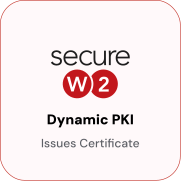
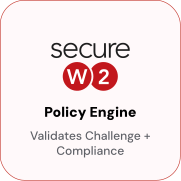
SecureW2 validates Apple hardware attestation and SimpleMDM device enrollment as synchronized gates before issuing a certificate. Only devices passing both checks receive a certificate. Its private key is generated in the device’s Secure Enclave and cannot be exported, copied, or used elsewhere.



Dynamic SCEP via Assignment Groups
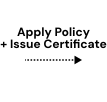
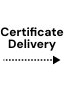
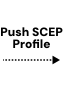
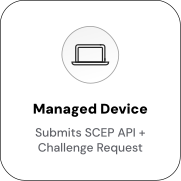
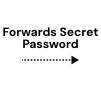
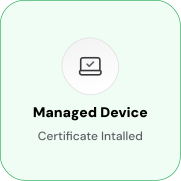
SimpleMDM uses its Assignment Group system to push a unique SCEP profile with a challenge for each device. No static shared secret is used; each challenge is generated and validated before issuance. Once validated, the certificate is automatically delivered to the device keychain, ready for 802.1X EAP-TLS Wi-Fi and VPN authentication without user action.
Use Cases
Deployment & Architecture Detail
Assignment Group-Driven Network Access Policy
SimpleMDM’s Assignment Groups control app, profile, and configuration deployment to devices. SecureW2 extends this model to network access, mapping Assignment Groups to network segments at authentication. Devices in the “Executive” group receive different access than those in the “General Staff” or “Contractors” groups.
Cloud RADIUS reads Assignment Group membership through SimpleMDM’s Identity Lookup at authentication, mapping it to RADIUS policy attributes, including VLAN assignments. Changes in Assignment Groups take effect at the next authentication without certificate reissuance, profile updates, or manual RADIUS policy changes.
This model suits Apple-first SMBs managing a single fleet in SimpleMDM with multiple network segments, employees, contractors, and managed guest devices, each landing in the correct VLAN automatically, driven by the group structure in SimpleMDM.
Automated Lifecycle — Revocation and VLAN Segmentation
SecureW2 automatically revokes certificates when a device’s status changes in SimpleMDM. The SimpleMDM Identity Lookup Provider queries device status using API credentials at revocation time. If a device is unenrolled or removed, SecureW2 triggers the revocation workflow. The revoked certificate fails EAP-TLS authentication at the next network connection. Cloud RADIUS checks certificate validity, including CRL status, at authentication time. The device loses network access without manual intervention.
SimpleMDM device enrollment state and group membership also drive VLAN assignment at authentication time through Cloud RADIUS. The Identity Lookup Provider retrieves the authenticating device’s enrollment status and attributes, and Cloud RADIUS evaluates those against policy rules to return a RADIUS Access-Accept with the appropriate VLAN tag and access level. A managed, enrolled device in the Corporate Devices Assignment Group receives full network access, a device flagged for review receives a restricted internet-only VLAN, and a device not found in SimpleMDM is denied entirely. VLAN assignment is evaluated at every authentication, so changes in SimpleMDM device state take effect at the next connection attempt.
Frequently Asked Questions
SimpleMDM Integration — Common Questions
How do I set up an Assignment Group in SimpleMDM to distribute certificate profiles?
In SimpleMDM, go to Assignment Groups and create or select a group targeting the devices that should receive the certificate profile. Once SecureW2 generates the .mobileconfig profile (ACME) or you configure the SCEP payload profile, upload it to SimpleMDM under Apps & Books or Configuration Profiles and assign it to the group. Devices in the group receive the profile automatically. For SCEP profiles, the SCEP payload fields point to SecureW2 as the external CA, and the challenge URL points to JoinNow CloudConnector. For ACME, the profile is pre-configured when you generate the ACME API Token in JoinNow.
What are the steps to configure a SCEP profile in SimpleMDM for SecureW2?
The configuration profile in SimpleMDM needs a SCEP payload with the following fields set: the CA URL pointing to your SecureW2 SCEP endpoint, the challenge URL pointing to JoinNow CloudConnector (which handles per-device challenge generation), and the subject field configured to encode the device identity. The certificate template in JoinNow controls the Subject and SAN encoding. SecureW2's setup guide provides the exact endpoint URLs and payload field values for your tenant. After saving the profile, assign it to the relevant Assignment Group.
Does SimpleMDM support ACME, or only SCEP?
SimpleMDM supports ACME through the standard Apple MDM ACME certificate payload, which Apple introduced in iOS 16 and macOS Ventura. If your device fleet is running supported OS versions, ACME is available and is the preferred path it adds Apple hardware attestation to the enrollment process. If you have older devices that do not support ACME, configure Dynamic SCEP for those devices. Both paths can coexist; you can have separate Assignment Groups and profiles for ACME-capable and SCEP-only devices.
What happens to a device's certificate when it is unenrolled from SimpleMDM?
When a device is unenrolled from SimpleMDM, the SecureW2 auto-revocation process detects that the device is no longer in its managed group during the next revocation evaluation. The device's certificate is revoked automatically. At the next network authentication attempt, Cloud RADIUS checks the certificate against the CRL and denies access. The device loses network access without any manual administrator action. The timing of revocation detection depends on how frequently SecureW2 polls the SimpleMDM API typically configurable to run every few minutes.
How long does it take to deploy SecureW2 certificate authentication for a small Apple fleet?
For a fleet of 25–100 Apple devices in SimpleMDM, most organizations complete initial configuration in a single working day. The SecureW2 side creating the Intermediate CA, certificate template, ACME or SCEP enrollment token, and RADIUS policies takes two to four hours if you follow the setup guide. Configuring the SimpleMDM profile and Assignment Group adds an hour. Testing on a subset of devices before pushing to the full fleet adds another few hours. SecureW2's implementation team can walk through the configuration if needed. Once configured, future device onboarding is automatic.
We're currently using Jamf. Can we switch to SimpleMDM without rebuilding the SecureW2 integration from scratch?
The SecureW2 configuration objects the Intermediate CA, certificate template, and Cloud RADIUS policies are not tied to a specific MDM. If you move devices from Jamf to SimpleMDM, you configure a new SimpleMDM Identity Lookup Provider in JoinNow and generate new enrollment profiles for SimpleMDM. Your existing CA hierarchy, certificate templates, and RADIUS policies carry over. Existing certificates issued via Jamf remain valid until expiration; new devices enrolled through SimpleMDM receive certificates through the SimpleMDM flow. The main transition work is in SimpleMDM profile configuration, not in rebuilding SecureW2 from the ground up.
Ready to Connect SecureW2 with SimpleMDM?
Connect with our integration specialists to implement this solution in your environment and transform your security posture.