
Enable PIV Smart Card Access with YubiKeys
The SecureW2 JoinNow platform seamlessly integrates with Yubico to provision non-exportable digital certificates directly onto YubiKeys. These certificates are validated by hardware attestation prior to issuance. By ensuring that private keys remain within the YubiKey PIV applet, the platform enforces robust network access that necessitates both a physical key and a PIN. This comprehensive approach effectively mitigates the risk of credential theft and remote account takeover.
Overview
Certificates Bound to Physical Hardware – Not a Keychain
The SecureW2 JoinNow platform integrates with Yubico to provision non-exportable digital certificates directly onto YubiKey hardware, ensuring private keys never leave the YubiKey PIV applet. During enrollment, the platform utilizes Yubico hardware attestation to cryptographically verify that the key was generated on a genuine token before issuance, preventing credentials from being copied or compromised. By requiring both the physical YubiKey and a user-defined PIN for every Cloud RADIUS authentication, the platform enforces high-assurance, phishing-resistant access that protects privileged accounts and high-security network segments from remote attacks and credential theft.
Use Cases
YubiKey Attestation Validation in JoinNow
Certificate Lifecycle & Renewal on YubiKey
How It Works
Provision Once. Authenticate with Hardware Every Time.
Secure Shared Workstations
The YubiKey provides portable, hardware-bound identity for shared workstation environments. A user inserts their YubiKey into any shared machine, enters their PIN, and the OS invokes the PIV applet. The private key signs the authentication challenge internally and never enters the workstation’s memory or storage. The OS validates the resulting certificate against the SecureW2 PKI trust chain, and the desktop session is established under the user’s certificate identity, not the machine’s local account, the same identity the user carries to every shared machine.


Verified Remote Access
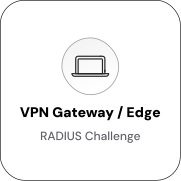
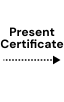
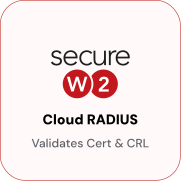
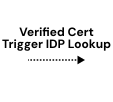
Require YubiKey certificates for all remote and contractor connections to secure the VPN edge. At VPN connect time, the EAP-TLS handshake prompts the YubiKey for PIN and touch, then signs the RADIUS challenge from within the hardware. Cloud RADIUS validates the certificate and checks CRL status before returning a RADIUS Accept, blocking access even if the physical key is present.


Use Cases
Deployment & Architecture Detail
YubiKey Attestation Validation in JoinNow
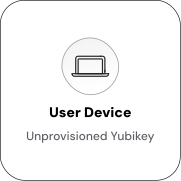
YubiKey hardware attestation verifies a private key’s origin within a genuine YubiKey device, not a software PKCS#11 implementation or imported key. When a key pair is generated in a PIV slot, the YubiKey signs an attestation certificate for that key using a device-specific intermediate certificate signed by Yubico’s attestation root CA. SecureW2 receives the attestation certificate during enrollment. The JoinNow Policy Engine validates the attestation chain: leaf certificate, device-specific intermediate, and root CA. It also checks the key generation mode field to confirm on-device generation.
SecureW2’s attestation checks include validating against Yubico’s root CA, confirming the key generation mode (on-device only), checking YubiKey firmware version (with a configurable minimum policy), and restricting enrollment to specific PIV slots. A device presenting a software-generated key, imported key, or forged attestation certificate fails the attestation check and receives no certificate. This distinguishes SecureW2 from standard certificate enrollment, as it confirms the credential’s hardware-bound nature before issuance.
Certificate Lifecycle & Renewal on YubiKey
YubiKey certificates follow the lifecycle of JoinNow Dynamic PKI certificates. They have a configured validity period, are tracked in the SecureW2 certificate store, and can be revoked from the JoinNow management console. JoinNow can trigger a renewal enrollment flow when a certificate approaches expiration. Renewal with the existing key pair: If the private key on the YubiKey is valid, the user re-enrolls through JoinNow using the existing key. No new key generation or re-attestation is required; the certificate is renewed against the existing private key. Renewal with a new key pair: For high-security deployments, administrators can require new key generation on renewal. In this case, the enrollment flow generates a new key pair in the YubiKey PIV slot and runs the full attestation check before issuing a new certificate. The old certificate and key are overwritten.
Time-limited certificates support contractor and vendor access. Certificates can be issued with short validity periods (days or weeks) so that contractors lose network access without administrative action when the certificate expires. Re-enrollment requires passing the configured enrollment policy conditions again. Revocation is immediate. When a certificate is revoked in JoinNow, the CRL is updated, and Cloud RADIUS will deny access at the next authentication attempt. The physical YubiKey is not impacted; it still holds the private key and certificate, but authentication will fail once the revoked certificate reaches the RADIUS validator.
Frequently Asked Questions
Yubico Integration — Common Questions
What is the YubiKey PIV applet, and why does it matter for certificate authentication?
The Personal Identity Verification (PIV) applet is a firmware module on every YubiKey that implements the NIST PIV standard for smart card authentication. It provides dedicated cryptographic slots for storing certificates and private keys. When an application requests a cryptographic operation such as signing an EAP-TLS challenge, the YubiKey operates internally and returns only the result. The private key never leaves the hardware, which is the property that distinguishes YubiKey certificate storage from a software keychain.
How does YubiKey attestation work, and what does it prove?
When a key pair is generated in a YubiKey PIV slot, the YubiKey signs an attestation certificate for that key using a device-specific intermediate certificate signed by Yubico's attestation root CA. SecureW2 validates this chain before issuing a certificate. The attestation proves the key was generated on a genuine YubiKey (not a software PKCS#11 implementation) and that the private key cannot be exported from the device. Keys that were imported rather than generated on-device will fail attestation and will not receive a SecureW2 certificate.
Can YubiKeys be used with both Windows and macOS endpoints?
Yes. YubiKeys communicate with the operating system through the CCID smart card interface, which is natively supported on Windows, macOS, and Linux without additional drivers. EAP-TLS supplicant configuration varies by OS, but the YubiKey itself is platform-neutral. The PKCS#11 library (ykcs11) is available for all three platforms and is what the supplicant uses to access the certificate and request signing operations from the YubiKey.
What happens if a user loses their YubiKey?
The certificate provisioned to the lost YubiKey can be revoked immediately from the JoinNow management console — no user action or physical possession of the YubiKey is required. Once revoked and the CRL is updated, Cloud RADIUS will deny access at the next authentication attempt. The private key on the lost YubiKey cannot be used to obtain a new certificate, a replacement YubiKey must go through enrollment again and pass the configured enrollment policy conditions.
Can the same YubiKey certificate be used for both Wi-Fi and VPN?
Yes. A certificate provisioned to a YubiKey PIV slot can be used for any EAP-TLS or mutual TLS (mTLS) authentication flow. Configuring both Wi-Fi (802.1X) and VPN (IKEv2 or any mTLS-capable VPN client) requires each client to reference the YubiKey PKCS#11 interface as the credential source. The certificate does not need to be duplicated, the same physical key can authenticate across multiple access methods simultaneously.
How do we enroll contractors who do not have corporate-managed endpoints?
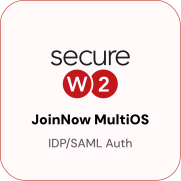
The JoinNow enrollment portal supports browser-based enrollment from any device. A contractor can plug a YubiKey into any machine, open the enrollment URL, authenticate through the configured identity provider, and complete key generation and certificate provisioning without a managed endpoint. Certificate validity and access policy including time-limited certificates and restricted VLAN assignment are enforced at the RADIUS policy level, not at the endpoint level. This makes YubiKey enrollment a practical path for contractor access in environments where issuing managed devices is not feasible.
How does PIN enforcement work? Can users bypass the PIN?
PIN enforcement is controlled by the PIV slot policy set on the YubiKey at enrollment time. Slots can be configured to require PIN entry on every use, once per session, or never. For high-security deployments, the always-require-PIN policy ensures every cryptographic operation on that slot including EAP-TLS handshakes requires PIN entry. With this policy in place, possession of the physical YubiKey is not sufficient alone; the PIN must also be known. An attacker who steals a YubiKey without the PIN cannot authenticate.
What YubiKey models support PIV certificate provisioning with attestation?
YubiKey 5 Series devices (YubiKey 5 NFC, YubiKey 5C NFC, YubiKey 5Ci, YubiKey 5 Nano, YubiKey 5C Nano) and YubiKey Bio Series devices all support the PIV applet and hardware attestation. YubiKey 5 Series firmware 5.2.3 or later is required for attestation support. YubiKey 4 Series devices support PIV but do not support hardware attestation they can be enrolled with SecureW2 without the attestation requirement, but the Key Attestation Provider check must be disabled for those devices.
Can a certificate be revoked without the user's involvement?
Yes. Certificate revocation is an administrative action performed in the JoinNow management console. The user does not need to take any action, and the YubiKey does not need to be present. Once the certificate is revoked and the CRL or OCSP responder is updated, Cloud RADIUS will deny access at the next authentication attempt. The physical YubiKey remains functional for other uses only the specific certificate issued by SecureW2 becomes invalid for network authentication.
Does this integration require Yubico Enterprise licensing?
No. Hardware attestation and PIV certificate provisioning are standard features on all YubiKey 5 Series devices and do not require a Yubico enterprise account. The attestation CA root certificate is publicly available from Yubico. YubiEnterprise Subscription (Yubico's enterprise management offering for bulk ordering and key lifecycle management) pairs well with larger deployments but is not required for the SecureW2 integration to function.
Ready to Activate Yubico Integration with SecureW2?
Connect with our integration specialists to implement this solution in your environment and transform your security posture.