
Automate Certificate-Based Authentication for OneLogin
The SecureW2 JoinNow platform integrates with OneLogin to transform cloud directory credentials into phishing-resistant network certificates automating enrollment, enforcing real-time identity-aware access, and eliminating shared secrets across Wi-Fi, VPN, and application access.
Overview
OneLogin: Cloud Identity as the Foundation for Network Trust
The SecureW2 JoinNow platform integrates with OneLogin to replace vulnerable password-based authentication with phishing resistant, certificate-based identities. As a SAML 2.0 service provider, JoinNow authenticates users via OneLogin SSO and encodes identity attributes like department, role, and group membership into X.509 certificates.
JoinNow Cloud RADIUS performs live OneLogin identity lookups at every authentication event, ensuring real-time network access. When an administrator suspends or deprovisions a OneLogin account, the associated certificate is automatically revoked, ending access at the next connection attempt without manual intervention.
Use Cases
Compliance-Driven Certificate Revocation
Enforce Real-Time Access via OneLogin Identity
How It Works
Two Flows. One Authoritative Identity Source.
Validate Identity and Issue Certificates via OneLogin
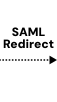
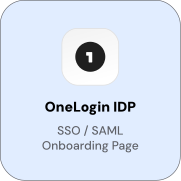
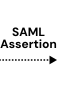
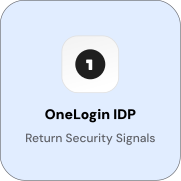
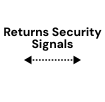
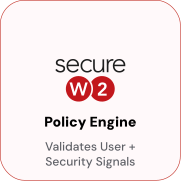
When a user opens the JoinNow enrollment portal, they authenticate via OneLogin SSO. OneLogin returns a SAML 2.0 assertion containing the user’s identity attributes. JoinNow validates the assertion, evaluates the enrollment policy, and issues a certificate with those attributes encoded, with no IT helpdesk involvement at any step.
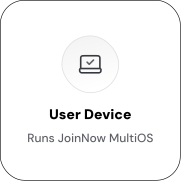
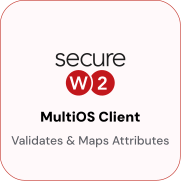
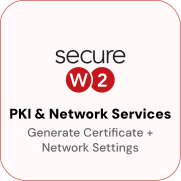

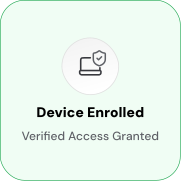
Enforce Real-Time Access via OneLogin Identity
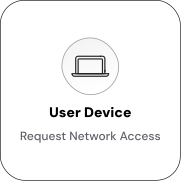
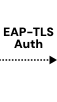
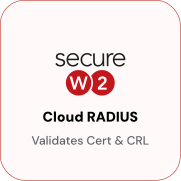
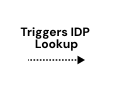
At every authentication event, Cloud RADIUS queries OneLogin to confirm the identity is active and to retrieve current role and group attributes. If the account has been suspended or the user’s role has changed, Cloud RADIUS applies the updated policy at the network layer. No certificate reissuance is required.
Use Cases
Deployment & Architecture Detail
Compliance-Driven Certificate Revocation
When an administrator suspends or deprovisions a OneLogin account, SecureW2 detects the change and automatically revokes the associated certificate. SecureW2 polls the OneLogin API on a configurable schedule to check the account status of issued certificates. It uses a OneLogin API credential with read access to user records and account status, without write permissions. If an account is suspended or deleted, the associated certificate is added to the Certificate Revocation List (CRL). Cloud RADIUS checks CRL status at every EAP-TLS authentication attempt, so a revoked certificate denies access immediately. When HR or IT suspends a OneLogin account for a terminated employee, contractor engagement, or account flagged for review, the associated network certificates are revoked, preventing authentication to Wi-Fi, VPN, or resources protected by Cloud RADIUS. No manual administrator action is required.
Zero-Touch VLAN Segmentation
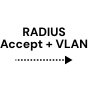
OneLogin user roles, departments, and group memberships determine VLAN assignments at authentication time via Cloud RADIUS. Devices are automatically placed in the correct network segment based on authenticated user attributes, eliminating manual VLAN assignment. For example, an Engineering department employee receives full corporate access, while a contractor is placed in a restricted segment with internet and approved SaaS access. Suspended or unmatched accounts are denied at the CRL check.
VLAN assignments are evaluated at every authentication, so changes in OneLogin roles or groups take effect at the next connection attempt. Users moved to new roles receive updated access levels without certificate reissuance or profile updates.
Frequently Asked Questions
OneLogin Integration — Common Questions
How does JoinNow authenticate users through OneLogin during enrollment?
JoinNow acts as a SAML 2.0 service provider. When a user opens the JoinNow enrollment portal, they are redirected to OneLogin for authentication. After a successful OneLogin login, OneLogin returns a signed SAML assertion with the user's identity attributes. JoinNow validates the assertion, evaluates enrollment policy, and issues a certificate encoding those attributes. The user never creates a separate JoinNow account.
What OneLogin attributes are encoded in the issued certificate?
The attributes encoded depend on how the JoinNow certificate template is configured. At minimum, email is required for enrollment. JoinNow can also consume first name, last name, department, role, and group membership from the SAML assertion, encoding them selectively in the Subject CN and SAN fields. These attributes drive access policy decisions in Cloud RADIUS at every authentication event.
Can enrollment be restricted to specific OneLogin roles or groups?
Yes. JoinNow enrollment policies support attribute-based conditions tied to values from the OneLogin SAML assertion. For example, only users with the "Employees" role receive a full-access certificate. Users with the "Contractors" role can receive a separate certificate with a VLAN tag that limits their network access. Users not assigned the JoinNow SAML application in OneLogin cannot initiate enrollment at all.
What happens when a OneLogin account is suspended?
SecureW2 polls the OneLogin API to check the account status of all active certificates on a configurable schedule. When an account is suspended, the associated certificate is revoked and added to the CRL. At the next EAP-TLS authentication attempt, whether to Wi-Fi, VPN, or another protected resource, Cloud RADIUS checks the CRL and denies access. Access is denied without any manual step from IT.
How does this integration handle employees who change roles or departments in OneLogin?
Because Cloud RADIUS performs live OneLogin identity lookups at authentication time, changes in role or department take effect at the next connection attempt. A user moved to a new role in OneLogin will receive the access level matching their new attributes when they next connect to the network. Certificate reissuance is not required for policy to update.
Does this require installing an agent on user devices?
No. The SecureW2 JoinNow platform is agentless. For self-service enrollment, users authenticate via OneLogin SSO in a browser, and the JoinNow enrollment portal handles certificate delivery. For managed devices, certificates can be pushed via SCEP profiles through an MDM without any agent on the device. Cloud RADIUS operates at the network layer, and no endpoint software is required.
Is this integration compatible with OneLogin MFA?
Yes. Because enrollment authenticates via OneLogin SSO, any MFA policies applied to the OneLogin SAML application are enforced during enrollment. If a user's OneLogin account requires MFA, they complete MFA as part of the enrollment flow before JoinNow issues a certificate. Post-enrollment, Wi-Fi and VPN authentication uses EAP-TLS with the issued certificate no repeated MFA prompts required at each connection.
Can certificates be pushed to managed devices without user interaction?
Yes. For MDM-managed devices, JoinNow supports zero-touch certificate delivery via SCEP profiles. The device receives a SCEP profile from the MDM, initiates a certificate request to JoinNow, and receives a certificate no user portal visit required. JoinNow uses the device's MDM-provided identity, supplemented by an optional OneLogin identity lookup, to populate certificate attributes.
What network resources can be protected with this integration?
Any resource that supports EAP-TLS or certificate-based authentication. This includes WPA2-Enterprise Wi-Fi, VPN gateways, web applications using mutual TLS, and network access control systems. A single certificate issued by JoinNow can authenticate the user across all of these surfaces simultaneously one identity for the full network stack.
How long does it take to configure the integration?
The core configuration creating the OneLogin SAML application, uploading metadata to JoinNow, configuring attribute mappings, and creating a basic enrollment policy typically takes under two hours for an administrator familiar with both platforms. SecureW2 provides step-by-step configuration guides, and the implementation team is available to walk through the setup for your specific environment.
Ready to Connect SecureW2 to OneLogin?
Connect with our integration specialists to implement this solution in your environment and transform your security posture.