Key Takeaways
- A PKI certificate is a digital credential that verifies the identity of a user, device, or service and is issued by a certificate authority (CA) to enable secure, encrypted communication.
- You can get a PKI certificate by purchasing one from a CA, building a self-managed PKI, or using a managed PKI service.
- Certificates left unrevoked or unmonitored create security gaps, since compromised or unrevoked certificates can give attackers a way in, and expired ones take services offline.
Imagine conducting important business online without identifying the person you’re interacting with. It would be like handing sensitive documents to a stranger on the street; every login would be risky. Fortunately, internet protocols exist to build trust in the digital world, with one of the most important being the public key infrastructure (PKI) certificate.
In this blog post, we’ll take a closer look at PKI certificates, explaining what digital certificates are, why they matter, and how you can obtain them easily to safeguard your online activities.
What Is a Public Key Infrastructure Certificate?
A PKI certificate, also called a public key infrastructure certificate or digital certificate, is a digital file that verifies the identity of a person, device, or service online, much like a passport verifies identity in person. Organizations use them in place of traditional credentials to secure networks, emails, digital signatures, and more.
PKI certificates rely on a complex cryptographic system known as asymmetric cryptography. The basic concept is relatively straightforward. Consider a specialized lock featuring two distinct keys: public keys and private keys.
Anyone can access a public key. It’s used to encrypt data, and there’s no risk in sharing it because you can’t decrypt data without your own private key. Only you know the private key, and it’s never transmitted during verification. That’s why this approach is called asymmetric cryptography, because you can’t use the same key to both encrypt and decrypt the data.
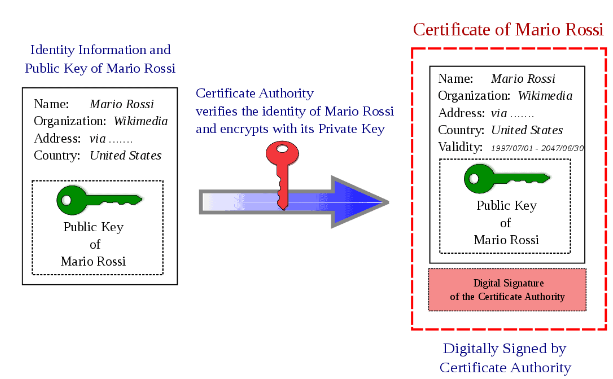
A trusted certificate authority issues the certificate, and it binds the holder’s identity to a public key using asymmetric cryptography. PKI certificates typically list the holder’s name, organization, and validity period.
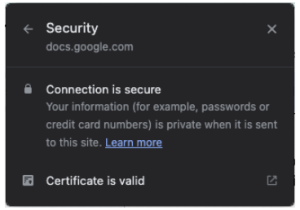
See the following screenshot for an example of what browser security status and certificate validity look like:
PKI certificates are increasingly popular and widely used, especially as SSL certificates for secure online browsing. According to BuiltWith, there are more than 118 million SSL certificates on the internet as of September 2026, and that number continues to grow.
How Does a PKI Certificate Work? Symmetric Encryption and Asymmetric Encryption
To understand how PKI certificates work, let’s dive a little deeper into how symmetric and asymmetric encryption work:
- PKI certificates work through asymmetric encryption, which means you use cryptographic keys with different access levels to encrypt (public key) and decrypt (private key) your message. This is also known as public key encryption.
- The alternative is symmetric encryption, where you use the same key to encrypt and decrypt. Symmetric algorithms such as Advanced Encryption Standard (AES) still carry most of the work: TLS uses asymmetric cryptography to authenticate the parties and agree on a shared key, then switches to symmetric encryption to protect the actual data, because asymmetric algorithms are much slower.
The classic Bob-Alice example is a helpful analogy.
In symmetric encryption, Bob and Alice use a locked trunk to exchange private messages. They share the same key to unlock the trunk, and the trunk can be in one of two possible states: locked or unlocked. That’s symmetric encryption.
In asymmetric encryption, the lock requires two distinct keys: a public key and a private key. The public key can be shared, while the private key remains a secret.
- Bob uses Alice’s public key to lock the trunk (encrypt the message).
- Alice uses her private key to unlock the trunk (decrypt the message).
Alice can then use her private key for a different purpose: creating a digital signature. Bob can use Alice’s public key to verify that signature and confirm that the message came from Alice and was not altered.
How to Get a PKI Certificate
There are three ways to get a PKI certificate, each suited to different needs and levels of control:
- Purchase from a certificate authority (CA)
- Build your own PKI
- Issue certificates with a managed PKI solution
The table below breaks down these methods:
|
Method |
How It Works |
Best For |
Pros |
Cons |
|
Purchase from a Certificate Authority |
Buy a certificate directly from a public or private CA |
Standard website encryption, quick setup |
Easy, fast, wide range of certificate types, cost-effective |
Limited control over issuance, ongoing renewal costs |
|
Construct a Self-Built PKI |
Build and run your own PKI in-house, e.g. with Microsoft AD CS |
Organizations with in-house expertise that need full control |
Maximum control over policy and issuance |
High cost, complex management, scalability and location limits |
|
Issue Certificates With a Managed PKI Service |
Use a cloud-based managed PKI to automate issuance and lifecycle management |
Organizations that want automation without building infrastructure |
Centralized control, scales easily, simplified deployment |
Some technical setup required, higher upfront cost than basic CA certs |
Each method is suitable for different situations. Purchasing from a CA is fastest for standard web encryption. Building your own PKI with AD CS gives maximum control but demands hardware and expertise. Managed PKI services automate issuance and lifecycle management without the infrastructure.
The image below shows an example of a user getting a PKI certificate through a certificate authority:
PKI Certificate Requirements
Regardless of the method you choose for obtaining a PKI certificate, the issuance process generally has the same requirements:
- A key pair: A public and private key generated by the subscriber
- A certificate signing request (CSR): A CSR submitted to the CA with the public key
- Proof of identity: Domain control for basic certificates, business documents for OV/EV, or internal validation for private PKI
- A defined validity period: Determines the length of time the certificate is valid
- CA or managed PKI enrollment: Receives the signed certificate
See your security gap before attackers do.
See continuous trust in action on a platform that includes RADIUS, PKI and AI security.
Different Types of PKI Certificates
Based on where they sit in the chain of trust, digital certificates fall into three categories:
- Trusted root certificates: Self-signed certificates that establish the root of trust
- Intermediate/issuing certificates: Certificates signed by a root CA and used to issue end-entity certificates
- End-entity/leaf certificates: Issued to users, devices, servers, and services; typically signed by an intermediate or issuing CA
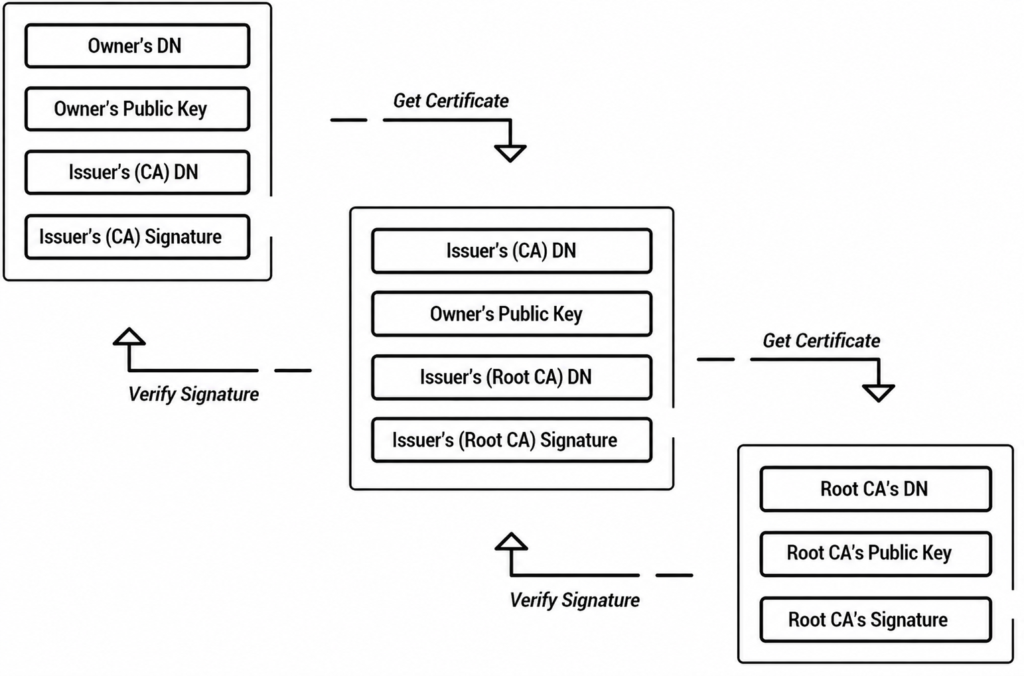
The order in which CAs issue these digital certificates is called a trust chain or certificate chain. This chain of trust verifies signatures against the issuing CA’s public key, linking entities to a trusted root CA.
See the following diagram for an example of how the PKI certificate trust chain works.
Common categories of PKI certificates include:
- Client certificates to identify users or devices
- Document signing certificates to support non-repudiation for digital signatures
- Code signing certificates for developers to sign software for integrity
- Email certificates to encrypt and sign emails using the Secure/Multipurpose Internet Mail Extensions (S/MIME) standard
- SSL/TLS certificates to secure communications between web servers and clients
There are other highly specific types of certificates for domains and browsers, too. You can choose which certificate types to issue based on how many domains you need to cover, how you want them certified (individually or in groups), and what level of trust you require.
PKI Certificate vs. SSL/TLS Certificate
An SSL/TLS certificate is a type of PKI certificate. All SSL/TLS certificates are PKI certificates, but not all PKI certificates are SSL/TLS certificates.
The table below helps explain the differences between the two:
|
Aspect |
PKI Certificate |
SSL/TLS Certificate |
|
What it is |
A broad category of digital certificates that bind a public key to an identity |
A specific type of PKI certificate used to secure website connections |
|
Scope |
Websites, email, documents, code, devices, VPNs, IoT, and more |
Encrypting traffic between browsers and web servers |
|
Issued by |
Any certificate authority, public or private |
A CA that follows CA/Browser Forum baseline requirements for the web (for publicly trusted certificates) |
|
Common use |
Client authentication, code signing, S/MIME email, document signing, network access |
HTTPS website encryption |
Advantages of PKI Certificates
PKI certificates offer the following benefits:
- Secure communication: PKI certificates help establish secure, encrypted connections by authenticating identities and providing the public keys needed for encryption.
- User and device authentication: Certificates confirm identity before granting network access, blocking unauthorized entry.
- Data integrity: Digital signatures show that a document or message hasn’t been altered and make it hard for the signer to repudiate it later.
- Simplified identity management: Automated lifecycle management cuts manual issuance and renewal work, and skips password rotation entirely.
- Brand trust: SSL/TLS certificates signal legitimacy to visitors, which matters most for e-commerce, finance, and healthcare.
- Interoperability and scalability: PKI certificates work across most modern platforms and scale easily with managed cloud PKI.
Challenges and Risks of PKI Certificates
Public key infrastructure comes with some challenges to be aware of.
- Certificate lifecycle gaps: Issuing certificates without proper verification, missing renewals, or tracking them manually opens the door to infiltration.
- Untrustworthy CAs: Not every certificate authority is equally reliable. A poorly vetted CA can let attackers in, so choose your CAs carefully and enforce certificate policy management.
These risks are exactly why certificate lifecycle management (CLM), the process of issuing, monitoring, renewing, and revoking certificates through their full life, exists as its own discipline.
Common Use Cases and Industries for PKI Certificates
Here are several common reasons organizations use digital certificates, including some of the challenges PKI solves:
- Secure web browsing with SSL/TLS certificates: SSL/TLS certificates provide HTTPS connections that show users they have a certified connection to a legitimate website, not a spoofed site.
- Verified digital signatures on documents and software:PKI certificates provide a verifiable record that supports non-repudiation. This is important because certificate signing can be cumbersome, and bad actors can forge handwritten signatures.
- Secure connections to private networks:Organizations use PKI certificates to protect wired and wireless networks, including intranets and virtual private networks (VPNs), by replacing user credentials with PKI certificates and secure network access protocols such as 1X authentication.
- Sensitive data encryption and communication:PKI certificates help transmit data via email or secure networks without fear of unverified users gaining access.
- Unmanaged devices and IoT:Organizations with bring-your-own-device (BYOD) policies and internet of things (IoT) devices need reliable security controls. PKI authentication helps protect against hackers and other unauthorized access.
- Avoiding MITM attacks:Man-in-the-middle (MITM) attacks occur when hackers intercept data during transmissions between client and server. During a TLS handshake, the server’s certificate helps the client verify that it is connecting to the legitimate server. If an attacker cannot provide a certificate that chains to a trusted CA, the client rejects the connection before application data is exchanged.
PKI certificates are ideal for industries with strict regulatory requirements governing user authentication and secure communication. That includes:
- Large or dispersed organizations (intranets, VPNs, email encryption)
- Financial institutions (online banking)
- Physical and online retail (IoT devices and e-commerce software)
- Local and federal government agencies (identity verification and digital signatures)
- Healthcare (electronic health records and HIPAA compliance)
The security plan that scales with you.
Our solutions can scale from mid-market to global enterprises. Compare options and see how our solutions protect you from costly breaches and ensure peace of mind.
Why PKI Certificate Lifespans Are Shrinking in 2026
At their core, PKI certificates are digital credentials that verify the identity of users, devices, servers, and applications. They are based on the X.509 standard, defined in RFC 5280, which specifies how certificates are structured, validated, and trusted across different systems.
Whether a certificate is used for HTTPS websites, Wi-Fi authentication, email security or code signing, it contains validity dates that determine when it becomes active and when it expires.
For many years, certificate validity periods were relatively long, giving IT teams plenty of time to manage renewals.
The CA/Browser Forum has begun reducing the maximum lifespan of publicly trusted TLS certificates. Since March 2026, certificates have been valid for up to 200 days, with future reductions planned to 100 days in 2027 and 47 days in 2029. As a result, organizations must renew certificates much more frequently than before.
This shift has significant operational implications. Manual processes that once worked for annual renewals are becoming difficult to sustain as certificate lifecycles shorten. Organizations now need greater visibility into certificate inventories and more reliable renewal processes to avoid service disruptions caused by expired certificates.
While these requirements currently apply to publicly trusted TLS certificates, they are influencing certificate management practices across the entire PKI ecosystem.
Many organizations are adopting automated certificate lifecycle management for both public and private PKI environments.
Automation not only simplifies renewals but also helps organizations prepare for future changes, including the eventual transition to post-quantum cryptography and other evolving security requirements.
Preparing PKI for Post-Quantum Cryptography
Today’s PKI certificates rely on RSA and ECC, algorithms secure only because breaking them takes classical computers an impractical amount of time. A powerful quantum computer changes that math, using Shor’s algorithm to solve those problems quickly.
This isn’t urgent yet, but it’s a “start now” problem: Adversaries can capture encrypted data today and decrypt it later once quantum computers mature, and migrating an entire PKI ecosystem takes years, not months.
In 2024, NIST finalized post-quantum algorithms like ML-KEM and ML-DSA, built on mathematical problems designed to resist quantum attacks. Some certificate authorities and PKI providers have begun testing or offering hybrid certificate approaches that combine classical and post-quantum cryptography (PQC) algorithms, primarily in private PKI and pilot environments. These approaches can help organizations prepare for post-quantum security while maintaining compatibility with systems that still rely on classical cryptography.
To prepare, organizations should:
- Inventory existing certificates, keys, and algorithms.
- Prioritize long-lived, sensitive data first.
- Choose a PKI with algorithm agility that supports hybrid or PQC certificates.
- Automate renewals; shorter certificate lifespans make gradual PQC adoption easier than a one-time migration.
How SecureW2 Simplifies Certificate Issuance With Managed PKI
Manually managing certificates becomes difficult as organizations add more users, devices, and applications. SecureW2 JoinNow Dynamic PKI automates certificate enrollment, renewal, and revocation, reducing administrative effort while strengthening security.
- For managed devices: SecureW2 integrates with mobile device management (MDM) platforms such as Intune and Jamf Pro to automatically issue certificates using the Simple Certificate Enrollment Protocol (SCEP). Certificates can also be revoked automatically based on device or user groups.
- For BYOD: JoinNow MultiOS provides a guided onboarding experience, allowing users to securely enroll their own devices and receive certificates in minutes without manual IT support.
By automating workflows and offering user-friendly onboarding solutions, SecureW2 removes the complexity associated with traditional PKI management. This allows your IT team to focus on more strategic initiatives.
Watch our video below for a comparison of PKI as a Service vs. legacy PKI.
Dynamic PKI gives IT teams a centralized way to oversee certificate issuance and lifecycle management as their users, devices, and applications grow.
Schedule a free demo to learn more!
Frequently Asked Questions
What Is a PKI Certificate?
A PKI certificate is a digital document that verifies the identity of a user, device, or service and secures communication between them. It contains the owner's identity, a public key, and a digital signature, all signed by a trusted certificate authority. This binding lets other parties confirm who they're communicating with and encrypt data meant only for that recipient. PKI certificates are the foundation of secure web browsing, email encryption, digital signatures, and network authentication across most modern IT environments.
What happens when a PKI certificate expires?
When a PKI certificate expires, systems that rely on it may stop trusting the associated user, device, service, or connection. Depending on how the certificate is used, expiration can prevent network authentication, disrupt secure communications, or cause applications and services to fail. Organizations should monitor certificate lifecycles and renew certificates before they expire to avoid service interruptions.
How do you create a PKI certificate?
Creating a PKI certificate starts with generating a public and private key pair, then submitting a certificate signing request containing the public key to a CA. The CA verifies your identity and, once validated, issues a certificate linking your public key to that verified identity. Private PKI setups follow the same basic steps, but validation happens internally rather than through a public authority. Managed PKI services streamline this entire process compared to building and running it yourself.
How much does a PKI certificate cost?
PKI certificate costs vary widely depending on the certificate type, the CA you choose, and whether you're using a managed PKI plan. Basic domain-validated SSL certificates can cost very little or even be free through providers like Let's Encrypt, while organization-validated or extended-validation certificates cost more due to stricter identity checks. Managed PKI services typically price by subscription or certificate volume rather than per certificate, which often works out cheaper at scale.
Who issues PKI certificates?
Certificate authorities issue the vast majority of PKI certificates. A CA is a trusted third party that verifies an applicant's identity before signing and issuing their certificate. Organizations can also run their own internal PKI, issuing certificates privately, often through a managed PKI service rather than building the infrastructure from scratch. Every certificate traces back through a chain of trust to a root CA, which is what ultimately makes the certificate trustworthy to others.
Why do I need a PKI certificate?
You need a PKI certificate to secure communication, confirm identity, and protect data integrity online. It encrypts information in transit, verifies that you're connecting to the legitimate person, device, or website you intend to, and proves that a message or document hasn't been altered since it was signed. Without PKI certificates, there's no reliable way to trust that the party on the other end of a digital connection is who they claim to be.
What is PKI and certificate management?
PKI and certificate management is the ongoing process of issuing, monitoring, renewing, and revoking digital certificates throughout their lifecycle. It keeps certificates from expiring unexpectedly and makes sure they get replaced when they are compromised. Manual certificate management is time-consuming and error-prone, which is why most organizations move toward automated certificate lifecycle management.
What is PKI certificate authentication?
PKI certificate authentication is the process of verifying a certificate's validity to confirm the identity of the entity it belongs to. The verifying party checks the certificate's signature against the issuing CA, confirms it hasn't expired or been revoked, and validates the chain of trust back to a root CA. If every check passes, the certificate holder's identity is confirmed, allowing secure access to a network, application, or encrypted communication channel.
What is a PKCS certificate?
PKCS isn't a type of certificate itself; it's a set of standards, called Public Key Cryptography Standards, that define how certificates, keys, and related data are formatted and packaged. For example, PKCS#12 files bundle a certificate with its private key, while PKCS#7 files can hold a full certificate chain. So when people ask about a "PKCS certificate," they usually mean a certificate stored or transmitted in one of these standardized formats.
