Key Takeaways
- Traditional MFA relies on passwords and one-time codes, which are phishable, inconvenient, and add friction for users.
- Azure AD Certificate-Based Authentication replaces passwords and OTPs with strong, phishing-resistant X.509 certificates.
- SecureW2 delivers seamless Azure AD CBA with Dynamic PKI and Cloud RADIUS, automating certificate lifecycle management and ensuring only trusted, compliant devices connect.
Hackers acquired the personal data of over 37 million T-Mobile users, including names, dates of birth, Social Security numbers, and driver’s license information, in a recent incident that featured a password breach. The breach is regarded as one of the largest in US history, illustrating the persistent vulnerabilities of password-based security measures in the face of more sophisticated cyber attackers.
Password-based authentication paired with multi-factor authentication (MFA) has long been regarded as the gold standard for safe login in cybersecurity. However, the emergence of MFA fatigue attacks and other security flaws has encouraged many to seek other options.
Azure AD CBA is one potential approach that allows enterprises to reduce MFA while simultaneously increasing user experience and security securely.
In this article, we will understand how we can easily eliminate these flaws of MFA using Azure AD CBA.
Security Concerns With Passwords Along With MFA
The biggest concern with passwords, along with MFA, is that this combination can be really tiresome and frustrating for users.
Having to enter a password and a one-time code every time you log in can be time-consuming and frustrating, leading to MFA fatigue, where users get frustrated with the process and are more likely to try to find ways around it.
Additionally, password-based authentication is inherently vulnerable to a variety of attacks, including:
- Brute force attacks
- Dictionary attacks
- Credential stuffing attacks
While MFA can help mitigate these attacks, it is not foolproof, and attackers can still use phishing and social engineering techniques to trick people into handing over their passwords.
That’s where Azure AD certificate-based authentication (CBA) comes in, but before we discuss that, let’s dive deeper into MFA fatigue attacks and ways to mitigate them.
See your security gap before attackers do.
See continuous trust in action on a platform that includes RADIUS, PKI and AI security.
MFA Fatigue Attacks
As we know, MFA is a security mechanism that adds an extra layer of protection to user accounts by requiring two or more forms of authentication, such as a password and a verification code sent to a user’s mobile device.
While MFA is a powerful tool for securing accounts, it is not immune to attacks. One such attack is MFA fatigue.
MFA fatigue refers to a user’s tendency to lose faith in the security provided by MFA and become less vigilant in verifying their identity, resulting in a weakened security posture.
Attackers can take advantage of this complacency by duping users into providing their MFA credentials, such as a verification code, via phishing, social engineering, or other means. This is really harmful because MFA is frequently seen as an impregnable security mechanism, causing users to relax their guard.
There are a few ways to avoid MFA fatigue attacks:
- Users must be educated on the dangers of complacency and the importance of remaining alert when verifying their identity. Regular security awareness training can help users stay informed about the latest risks and best practices.
- Users should employ more tricky MFA methods, such as hardware tokens as well as biometric authentication. These methods provide an additional layer of protection that is more difficult for attackers to bypass.
- Companies should build fraud detection methods to identify and avoid MFA fatigue attacks. Monitoring user behavior and account activity to detect anomalies that may indicate a compromised account is one of these mechanisms.
- Users should avoid duplicating passwords across numerous accounts and constantly change their passwords to lessen the possibility of their accounts being hijacked. A compromised account can be the first step toward a successful MFA fatigue attack.
Azure AD CBA
Azure AD certificate-based authentication (CBA) is a security feature provided by Microsoft in the Azure Active Directory (AD) that uses real-time authentication and access policies to protect your organization’s resources.
Azure AD CBA provides a powerful alternative to passwords along with MFA.
With CBA, users are issued a digital certificate that is used to authenticate them to the network or application. This eliminates the need for passwords and one-time codes, streamlining the authentication process and making it more user-friendly.
The image below shows how Azure AD can work with Cloud RADIUS to authenticate users and devices and apply network access policies based on identity.
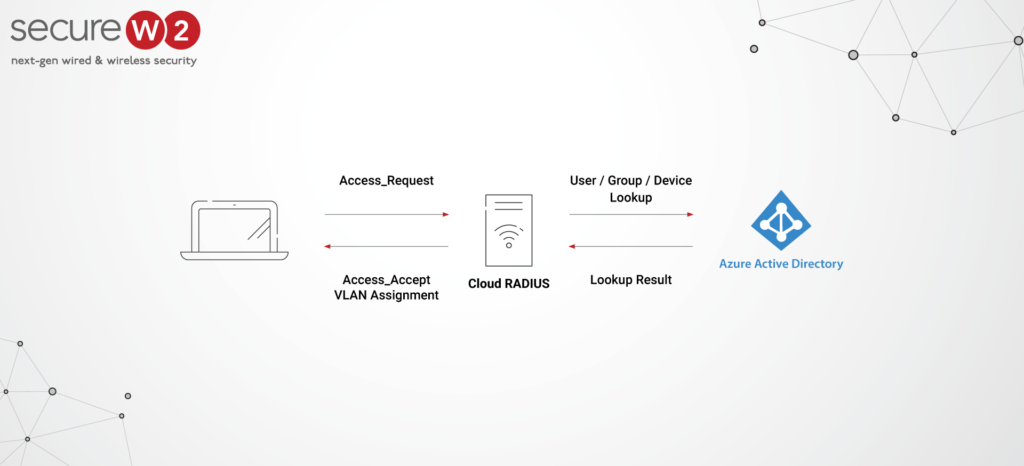
But the benefits of CBA go beyond user experience. Because CBA relies on digital certificates, it is inherently more secure than password-based authentication.
Certificates are much harder to steal or compromise than passwords and can be easily revoked if lost or stolen. This eliminates the risk of credential stuffing attacks and other types of password-based attacks.
Organizations are also getting on board and shifting from passwords to certificates.
In fact, one global healthcare technology company replaced password-based Wi-Fi authentication with certificate-based authentication to protect sensitive healthcare data. This change took place across three continents and 1,800 devices.
CBA also eliminates the risk of MFA fatigue attacks.
Users are significantly less likely to try to circumvent the authentication procedure now that a one-time code is no longer required. This means that the network or application is more secure overall.
Want to understand the differences between Wi-Fi- passwords and digital certificates? Our video breaks it down:
Advantages of Azure AD CBA
Azure AD CBA contributes to passwordless authentication by letting users sign in to their personal Microsoft account without entering a password by utilizing safe means such as biometrics or security keys.
CBA monitors the user’s authentication status continuously and imposes access controls depending on their risk profile and the sensitivity of the resource they’re attempting to access.
Here are some added advantages an Azure AD CBA brings to the table while ensuring a smooth shift from MFA:
Stronger Security
Stronger security is one of the key advantages of certificate-based authentication. The use of digital certificates strengthens authentication in several ways:
- Certificates are significantly more difficult to stealor compromise than passwords, making them a more secure authentication alternative.
- Certificates are also harder to guess or brute force, lowering the danger of credential-stuffing attacks and other types of password-based attacks.
- Certificates can be easily revoked if they are lost or stolen, ensuring that unauthorized users cannot use them. This eliminates the risk of attackers gaining access to sensitive data or systems through stolen credentials.
Dive deeper into certificate revocation below:
Greater Convenience
Another key benefit of certificate-based authentication is greater convenience.
The authentication process is streamlined and made more user-friendly with certificates because users do not need to remember complicated passwords or enter one-time codes. This reduces the likelihood of MFA fatigue attacks and other forms of user mistakes that harm security.
Improved User Experience
Certificate-based authentication also provides a better user experience.
Users may use certificates to authenticate to systems and apps without memorizing complex passwords or going through time-consuming MFA processes. This can increase productivity and decrease frustration, resulting in a better work environment.
The security plan that scales with you.
Our solutions can scale from mid-market to global enterprises. Compare options and see how our solutions protect you from costly breaches and ensure peace of mind.
Using Azure Identities With Azure AD CBA
Fortunately, it is easy to use your Azure identities with Azure AD CBA.
Azure AD CBA supports several types of certificates, including user, device and service certificates. You can generate these certificates in Azure or import them from your existing certificate authority.
Once you set up your certificates, you can roll out Azure AD CBA to your users. They will be able to authenticate to your network or application seamlessly without the need for passwords or MFA. This can improve security, reduce frustration and increase productivity, making it a smart choice for any organization.
Native Integration of SecureW2 With Azure AD CBA
SecureW2 can integrate natively with Microsoft to give secure and simplified access to Microsoft services such as Office 365 and Azure Active Directory, as illustrated below.

Users may access Microsoft services through a single sign-on (SSO) experience, eliminating the need for numerous identities and passwords.
The native integration between SecureW2 and Microsoft allows organizations to take advantage of Microsoft services while ensuring the security of their network and data. This can help organizations reduce the risk of security breaches and minimize the impact of potential security threats.
Admins can configure SecureW2 to use multiple authentication techniques such as PEAP-MSCHAPv2, EAP-TLS and EAP-TTLS/PAP to enable secure access to Microsoft services.
The SecureW2 JoinNow platform delivers passwordless access across Wi-Fi, VPN web applications and desktop logins from a single cloud-native stack, with automatic issuance, real-time identity validation and instant suspension or revocation.
By leveraging our certificate-based authentication and access policies, organizations can significantly reduce the risk of password-related security incidents, such as phishing, credential stuffing and MFA fatigue attacks.
Set up a free demo with our team to experience how simple passwordless can be.
