Key Takeaways
- MITM attacks intercept network communications by impersonating trusted networks or services, allowing attackers to steal credentials and sensitive data.
- Common MITM techniques, including ARP spoofing, DNS spoofing, rogue Wi-Fi, and session hijacking, can be simulated with penetration-testing tools to identify and fix security weaknesses.
- The most effective defense against credential theft is certificate-based authentication (PKI with 802.1X/EAP-TLS), supported by layered security controls such as MFA, network segmentation and regular security testing.
A man-in-the-middle (MITM) attack is a highly effective type of cyberattack that involves a hacker infiltrating a private network by impersonating a rogue access point and acquiring login credentials.
MITM attacks can happen anywhere, as many devices automatically connect to the network with the strongest signal, or will connect to a SSID name they remember.
To defend your network against MITM attacks, it’s important to understand the different techniques attackers use and the methods you have at your disposal.
In this article, we will outline examples of the tools you can use to better understand and test for MITM attacks.
See your security gap before attackers do.
See continuous trust in action on a platform that includes RADIUS, PKI and AI security.
What Is a Man-in-the-Middle Attack and How Does It Work?
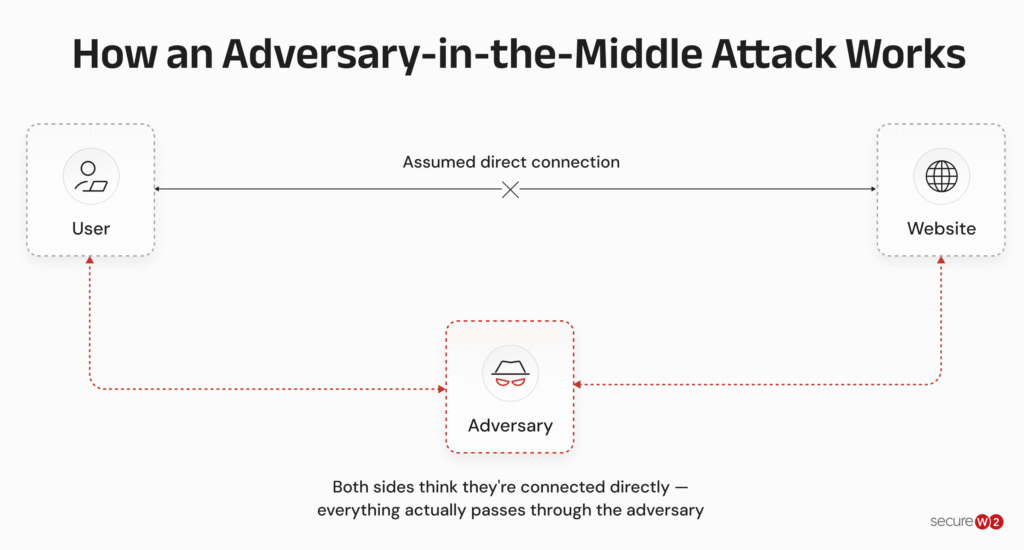
A man-in-the-middle (MITM) attack is a cyberthreat in which an attacker secretly intercepts communication between two parties to steal credentials or sensitive data or inject malicious code.
Anyone can be a victim of an MITM attack. For example, connecting to a rogue public Wi-Fi network can expose login credentials or payment information, while businesses may suffer compromised email accounts, intercepted communications, and data breaches.
Most MITM attacks rely on spoofing, where attackers impersonate trusted Wi-Fi networks, IP addresses, DNS records, or websites to trick users into connecting.
Once victims connect and enter sensitive information, attackers can intercept or steal that data, even bypassing security controls such as network access control (NAC) and Intrusion Detection Systems (IDS).
The image below shows how a MITM attacker intercepts communication for malicious purposes.
Impact of MITM Attacks
MITM attacks are particularly dangerous because they:
- Are difficult to detect: Most devices connect to the strongest signal and accept basic redirects, so victims may never notice MITM attacks.
- Intercept private data: An MITM attack can be as innocent as changing the contents of a text message or email. But most attackers look for sensitive data, including credentials for personal accounts and financial data.
- Put businesses at risk: It takes an average of 101 days for businesses to detect active digital threats. Consequences include exposed data, lawsuits, loss of consumer trust, lost revenue and even bankruptcy.
Best MITM Tools for Attack and Detection
MITM tools are physical devices, software, or techniques used to conduct, detect or prevent MITM attacks. That may seem confusing, but it’s true: many of the tools attackers use during MITM attacks can also be used to test network security and counter those attacks.
Let’s explore these common MITM tools.
Hardware-Based Attack Tools
Some MITM attacks rely on physical proximity, requiring the right hardware to carry out the attack.
Wi-Fi Pineapple
The Wi-Fi Pineapple is a device used to perform targeted MITM attacks. It was originally invented to allow IT professionals to find weaknesses in their wireless networks.
The Wi-Fi Pineapple works by acting as an access point with the same SSID as a public wireless network. A user will connect to the Pineapple instead of the real wireless network, which allows the pineapple user to infiltrate the user’s data.
For a hacker, a Pineapple can be used to collect sensitive personal information from unsuspecting users on public Wi-Fi networks.
However, security professionals can also use the Pineapple to conduct controlled, sophisticated attacks on Wi-Fi networks, learning how the attacks work and how to protect their network.
Packet Squirrel
The Hak5 Packet Squirrel is a switch that sits between a user’s device and local network equipment. Flip the switch to select your payload (attack) and deploy instantly.
Designed for penetration testing (or pen testing), attackers can exploit the Packet Squirrel for direct attacks, too.
LAN Turtle
Another MITM tool from Hak5, the LAN Turtle is a pen-testing device disguised as an ethernet-to-USB adapter. The covert design adds complexity to the detection process, perfect for network security testing exercises and MITM attacks.
Password Stealing Software
As with MITM hardware, many of these MITM software tools can be used by hackers and network security teams alike.
- Kali Linux: Most password-stealing tools are available through an operating system known as Kali Linux. Kali Linux was created for distribution aimed at advanced penetration testing (pen testing) and security auditing. It comes with hundreds of different tools and is completely free to use.
- MITMf: Itcomes with Kali Linux and is designed to test against man-in-the-middle attacks. MITMf aims to provide a one-stop-shop for MITM and network penetration tests, consistently updating and improving existing attacks and techniques, allowing you to always be up to date on what the latest threats are.
- Wireshark: This is an award-winning network analyzer with 600 authors. It allows you to see what’s happening on your network at a micro level. Wireshark intercepts traffic and converts that binary traffic into human-readable format. This makes it easy to identify what traffic is crossing your network.
- Cain and Abel: The tool is ideal for procurement of network keys and passwords through penetration methods. Cain and Abel makes use of network sniffing, dictionary attacks, brute force and cryptanalysis attacks to find susceptibilities in your network.
- Ettercap: The Ettercapsuite is designed to prevent man in the middle attacks. This tool is ideal for deep packet sniffing, monitoring and testing LAN, and filtering content in real time.
Dictionaries / Decryption Software
Passwords are one of the most prominent vulnerabilities for a network. Bad actors have an assortment of tools to obtain passwords and access secure networks and systems.
One of the most effective attacks is a dictionary attack. This kind of attack uses dictionaries which are large lists of data, often cleartext strings, that can be used to crack passwords. These lists can include words in the form of dictionary words, common passwords, iterations of common passwords and exposed passwords.
Combined with decryption software, which substantially expedites the process, these tools allow hackers to essentially reveal your passwords through trial and error.
- John The Ripper: This pen testing tool is the essential tool for password cracking and provides a range of systems for this purpose. John the Ripper is a free, open-source software that can be used to automatically identify different password hashes, discover passwords weaknesses and explore and customize a password cracker.
- Nessus: This tool has been used as a security pen testing tool for over 25 years. 44,000 companies utilize the application worldwide. Nessusscans your network for open ports, weak passwords, and misconfiguration errors.
- Hydra: It is a password cracking software from Kali Linux. This tool makes it possible for researchers and security consultants to find potential vulnerabilities that could allow threats to gain unauthorized access to a system remotely. Hydra is very fast and flexible, with new modules being very easy to add.
How to Detect Man-in-the-Middle Attacks
Most MITM attacks require you to either connect to a network or website or input credentials. Because of this, MITM attacks can be relatively easy to detect by:
- Checking network names every time you connect to a Wi-Fi network (including automatic connections)
- Checking website URLs for unusual misspellings or HTTP when it should be HTTPS
- Checking website design for unfamiliar layout or formatting, misspellings and outdated or incorrect logos
- Analyzing captive portals, pop-ups, software updates and error messages before clicking or entering information
- Disconnecting when you notice unusually slow connections or repeated disconnections as it may indicate an intercepted connection
If you are unsure, deploy more advanced detection techniques, such as packet inspections to uncover unusual traffic or network events and MITM tools.
Best Practices to Prevent MITM Attacks
Detection helps identify and mitigate active threats, but what can you do to prevent MITM attacks before they occur?
The following table contains a comprehensive list of best practices for organizations.
| Best Practice | How It Helps Prevent MITM Attacks |
| Implement PKI with certificate-based authentication | Replaces passwords with digital certificates, eliminating the credentials many MITM attacks target |
| Enable 802.1X with EAP-TLS | Authenticates users and devices before granting network access, preventing unauthorized connections |
| Use identity and access management (IAM) and privilege access management (PAM) | Restricts access to sensitive systems and limits the impact of compromised accounts |
| Deploy managed switches (e.g., DHCP snooping) | Blocks rogue DHCP servers and other network spoofing attacks |
| Segment your network | Limits lateral movement and contains breaches if an attacker gains access |
| Implement S/MIME | Encrypts and digitally signs emails to prevent interception and spoofing |
| Enable HTTP Strict Transport Security (HSTS) | Forces secure HTTPS connections and helps prevent SSL stripping attacks |
| Deploy secure device onboarding for managed and bring your own device (BYOD) devices | Ensures devices are securely configured before joining the network |
| Conduct regular penetration testing | Identifies vulnerabilities before attackers can exploit them |
| Require multi-factor authentication (MFA) | Adds an extra verification layer even if credentials are compromised |
| Keep software and firmware up to date | Closes known security vulnerabilities that attackers may exploit |
Best practices that individuals (consumers and employees) can follow are:
1. Avoid public Wi-Fi whenever possible, as these networks are easier to spoof and exploit.
2. Use a virtual private network (VPN) to encrypt your traffic, especially on public networks.
3. Keep devices, browsers and software up to date with the latest security patches.
4. Verify Wi-Fi network names and website URLs before entering sensitive information.
The security plan that scales with you.
Our solutions can scale from mid-market to global enterprises. Compare options and see how our solutions protect you from costly breaches and ensure peace of mind.
What Is the Best Tool to Prevent MITM Attacks
An often-overlooked tool to preventing MITM attacks is the use of certificates to remove the risks of passwords. Digital certificates eliminate human error and cannot be decrypted because of public key cryptography.
In order to deploy certificates, enterprises need to implement a Public Key Infrastructure (PKI), which can be costly and require a lot of manpower. Luckily, the SecureW2 JoinNow Dynamic PKI runs with no on-premises servers required.
The Dynamic PKI is a set-and-forget turnkey solution. It eases the workload for IT admins and doesn’t require a team to manage.
Try a demo of our platform and see how easy it is to eliminate credential theft via MITM attacks.
