Key Takeaways
- Knowing and using the correct AD CS certificate template subject types and key usages is necessary for strong network security.
- Be mindful of common weaknesses in certificate templates, such as incorrect EKU settings and ACL permissions, which could jeopardize network security.
- Best practices for managing certificate templates, include enforcing strict issuance rules and properly monitoring the certificate lifetime.
Microsoft AD CS allows administrators to use their domain’s certificate authority (CA) to deploy a digital certificate with Microsoft’s PKI. To properly run their public key infrastructure (PKI), and after establishing their hierarchy, administrators configure certificate templates and enrollment permissions so that the appropriate users, computers and services can request or automatically enroll for certificates.. But certificate templates can be easily misconfigured and can lead to an organization’s domain being compromised through certificate theft, privilege escalation, and account and domain persistence attacks.
The first four sections of this article cover certificate properties, default certificates, their functions, and the subcategories and key usages of different the digital certificates. Following that, we’ll cover the templates with the most use cases, the most vulnerable certificate properties, and the best security practices for certificate templates
Certificate Template Properties
Certificate properties determine how a certificate will function, and many are essential for both usability and security. Below is a review of these properties and why they are crucial.
General
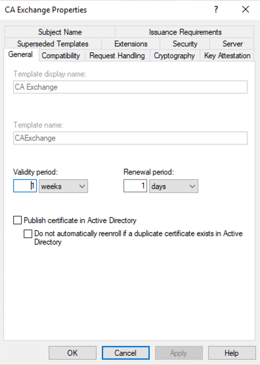
This section provides an overview of the template, including its display name, template name, and description.
Compatibility
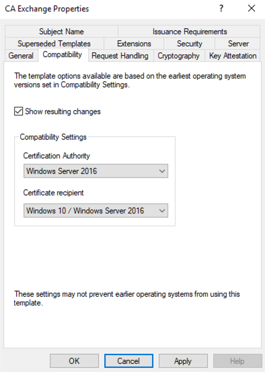
This section outlines the compatibility settings for the template, indicating the operating system or application versions that can work with this template.
Request Handling
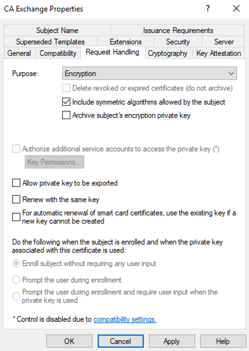
This section specifies how certificate requests are handled, including options such as whether the private key can be exported, if requesters can provide their Subject Name, and whether certificates can be renewed with the same key.
Subject Name
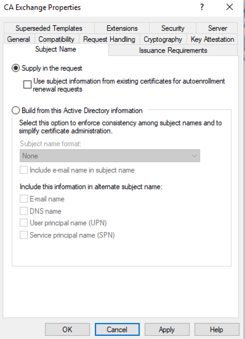
This section determines how the subject name (which contains identity information for the certified entity) is constructed. This determines how subject information is constructed and can also control SAN-related information, and includes settings for attributes like common name, organization, locality, and other relevant details.
Superseded Templates
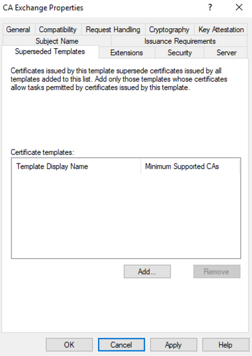
The Superseded Templates setting identifies older certificate templates that a new template is intended to replace, which can affect certificate autoenrollment and template migration.
Extensions
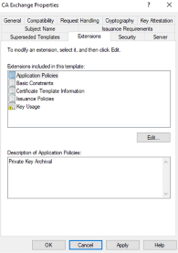
Extensions in the certificate can be added if necessary. Extensions can include Key Usage, Application Policies (Extended Key Usage), Basic Constraints, certificate policies and other certificate extensions.They provide details regarding how the certificate should be used.
Cryptography
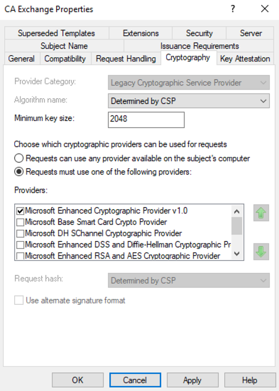
This tab defines the cryptographic properties of the template It includes specifying length, algorithm selection, minimum key size, and request hash.
Key Attestation
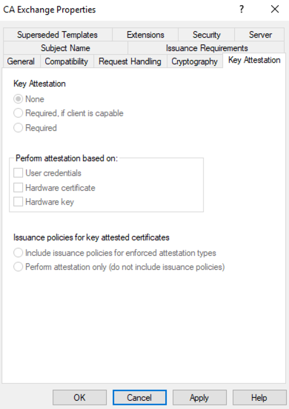
This section lets the CA require or prefer that a key was generated in a trusted hardware-backed environment, such as a TPM.
Learn more about how certificate authorities work:
Issuance Requirements
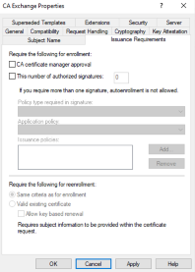
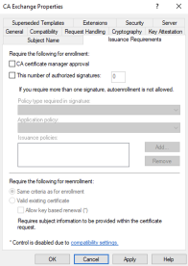
This section defines the requirements that must be fulfilled before a certificate can be issued. This might include things like CA certificate-manager approval and authorized signatures/application policies or specific conditions that need to be met.
Security
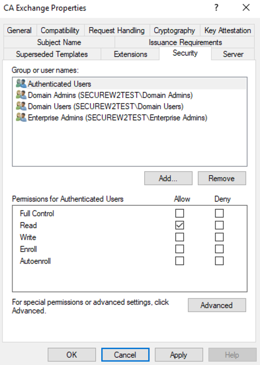
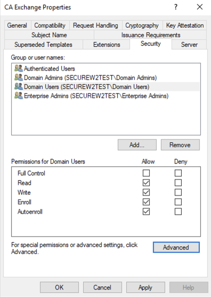
This section controls access permissions to the template, such as Read, Enroll, Autoenroll and related permissions. It lets an administrator choose who can manage the CA or request certificates from it.
Server
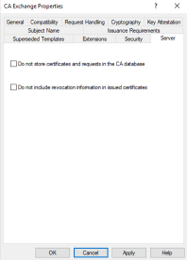
This section includes settings designed explicitly for server certificates indicating if the template is intended for server authentication.
See your security gap before attackers do.
See continuous trust in action on a platform that includes RADIUS, PKI and AI security.
All AD CS Certificate Templates
Certificate templates are an essential part of the PKI environment. The CA directs what type of certificate a client or user receives and includes a set of rules based upon its purpose.
There are 32 default certificate templates:
| Certificate Template | Description |
| Administrator | Allows trust list signing and user authentication. This certificate template offers signature and encryption services for administrator accounts, facilitating account identification and certificate trust list (CTL) management within the domain. |
| Authenticated Session | Enables users to authenticate to a web server, providing user credentials for site login without storing information insecurely in a cookie. It is beneficial for remote users to validate their identity without frequent logins. |
| Basic EFS | Used by encrypting file system (EFS) to encrypt data. Certificates derived from this template are used to encrypt data using the EFS. The basic EFS certificate is used for EFS operations exclusively. |
| CA Exchange | Used to store keys configured for private key archival. |
| CEP Encryption | Allows the certificate holder to act as a registration authority for Simple Certificate Enrollment Protocol (SCEP) requests. |
| Code Signing | Used to sign software digitally. These templates allow developers to create certificates for signing application code, ensuring that code management systems and end users can verify the trustworthiness of the software origin. |
| Computer | Allows a computer to authenticate itself on the network. The Computer template can be used for both workstations and servers. |
| Cross Certification Authority | Used for cross-certification and qualified subordination. |
| Directory Email Replication | Used to replicate email within AD DS. |
| Domain Controller | Used by domain controllers as all-purpose certificates. The Domain Controller template is suitable for both client and server authentication, as well as the use of smart card logon support. |
| Domain Controller Authentication | Used to authenticate Active Directory computers and users. |
| EFS Recovery Agent | Certificates of this type permit the decryption of files encrypted with EFS, which is crucial for disaster recovery planning in EFS implementations. an Example is when someone leaves the company or is terminated. |
| Enrollment Agent | Certificates from this template are used to request and issue other certificates from the enterprise CA on behalf of another entity. For example, web enrollment applications use these certificates to manage certificate requests with the CA. |
| Enrollment Agent (Computer) | Used to request certificates on behalf of another computer subject. |
| Exchange Enrollment Agent (Offline Request) | Used to request certificates on behalf of another subject and supply the subject name in the request. These certificates today are mostly used to support the Network Device Enrollment Service (NDES) for mobile device management (MDM) platforms. |
| Exchange Signature Only | Used by the Microsoft Exchange Key Management Service to issue certificates to Exchange users for digitally signing email. Certificates derived from this template are user certificates used to sign email messages sent from within the Exchange system. |
| Exchange User | Used by the Microsoft Exchange Key Management Service to issue certificates to Exchange users for encrypting email. User certificates are stored in the Active Directory and are specifically used to encrypt email messages within the Exchange system. |
| IPsec | Used by Internet Protocol security (IPsec) to digitally sign, encrypt, and decrypt network communication. |
| IPsec (Offline Request) | Used by IPsec to digitally sign, encrypt, and decrypt network communication when the Subject Name is supplied in the request. |
| Kerberos Authentication | Used to authenticate Active Directory computers and users. |
| Key Recovery Agent | Used by an authorized administrator to decrypt private keys. It can be used to recover archived private keys, assuming that the CA has been configured to archive and allow recovery of the private key associated with the public key it was given when a certificate was requested. |
| OCSP Response Signing | Used by an Online Responder to sign responses to certificate status requests. |
| RAS and IAS Server | Enables remote access servers and Internet Authentication Service (IAS) servers to authenticate their identity to other computers. |
| Root Certification Authority | Used to prove the identity of the root CA. |
| Router (Offline Request) | Used by a router when requested through a SCEP request from a CA with a CEP Encryption certificate. |
| Smart Card Logon | These certificates enable smart card holders to authenticate to Active Directory, providing identity and encryption capabilities as part of a two-factor security system using smart cards. |
| Smart Card User | Unlike the Smart Card Logon template, these certificates are stored in Active Directory and restrict identity and encryption to email systems. |
| Subordinate Certification Authority | This is the template used by a root or issuing certificate authority to issue certificates to subordinate certificate authorities. |
| Trust List Signing | Allows the signing of a trust list to manage certificate security and affirm the signer’s identity. |
| User | Generates User Certificates, which are responsible for user activities in the Active Directory, such as authentication, EFS encryption, and interaction with Exchange. This certificate template is used for traditional authentication. |
| User Signature Only | Allows users to sign data digitally, providing identification of the origin of the signed data. |
| Web Server | Proves the identity of a web server. The Web Server template is used for supporting HTTPS on internal websites. This template is typically used to ask for the common name and any subject alternative names (SAN) to help prevent users from getting certificate untrusted messages. |
| Workstation Authentication | Enables client computers to authenticate their identity to servers. |
Subject Type
The subject type determines the type of identity, object, or attribute to which the certificate would be directed. These are the default certificate templates AD CS offers:
- User
- Computer
- CA
- Key Recovery Agent.
User
Certificates issued with the User subject type are designed to verify and protect the identity of users within the network. These certificates are used for tasks such as email communication, digital signatures, and user authentication.
Certificates that include the User subject type:
- Administrator
- Authenticated Session
- Basic EFS
- Code Signing
- EFS Recovery Agent
- Enrollment Agent
- Exchange Enrollment Agent (Offline request)
- Exchange Signature Only
- Exchange User
- Smart Card Logon
- Smartcard User
- Trust List Signing
- User
- User Signature Only
Computer
The Computer subject type in AD CS templates addresses the security requirements of machines and devices. Certificates generated from the Computer template validate the identity of computers within the network, bolstering the security posture of IT infrastructure. This subject type is important in scenarios involving secure server communications, ensuring that participating computers are legitimate.
Certificates that include the Computer subject type:
- CA Exchange
- CEP Encryption
- Computer
- Directory Email Replication
- Domain Controller
- Domain Controller Authentication
- Enrollment Agent (Computer)
- IPSEC
- IPSEC (Offline Request)
- Kerberos Authentication
- OCSP Response Signing
- RAS and IAS Server
- Router (Offline Request)
- Web Server
- Workstation Authentication
Certificate Authority (CA)
Certificates issued with the CA subject type are used to authenticate and verify the identity of CAs within the PKI infrastructure. These certificates are crucial for ensuring trust and maintaining the integrity of the certificate issuance process. They establish a foundation for generating and managing certificates across the network.
Certificates that include the CA subject type:
- Cross-Certification Authority
- Root Certification Authority
- Subordinate Certificate Authority
Key Recovery Agent
Certificates issued with the Key Recovery Agent subject type enable designated individuals or entities to recover private keys that have been lost or compromised. This subject type ensures that access to encrypted data remains secure and controlled, allowing only authorized parties to recover Keys when required.
Certificates that include the Key Recovery Agent subject type:
- Key Recovery Agent
Key Usage
Key Usage specifies the permitted uses of the public/private key to ensure the security of a given certificate. Options for this include Signature, Encryption, and Signature with Encryption.
Signature
This configuration empowers entities to generate signatures, which validate the origin and unaltered state of content. Applications like code signing and document authentication benefit from certificates created using this template, assuring users that the signed materials are genuine and unaltered.
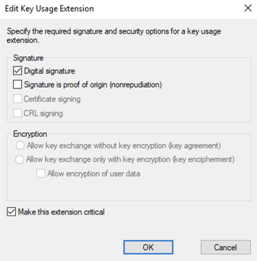
Certificate templates that include the option to use a signature:
- Authenticated Session
- Code Signing
- Cross-Certification Authority
- Enrollment Agent
- Enrollment Agent (Computer)
- Exchange Enrollment Agent (Offline Request)
- Exchange Signature Only
- OCSP Response Signing
- Root Certification Authority
- Subordinate Certification Authority
- Trust List Signing
- User Signature Only
Encryption
This Key Usage extension specifies what the associated key can be used for, including key encipherment, data encipherment and key agreement. Users have the option to allow key exchange both with and without key encryption.
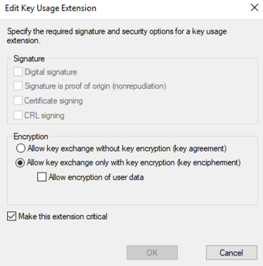
Certificate templates that include the option to use encryption:
- Basic EFS
- CA Exchange
- CEP Encryption
- EFS Recovery Agent
- Exchange User
- Key Recovery Agent
Signature and Encryption
Certificates derived from this template can be used to generate signatures and contain the public key used for cryptographic operations. This versatile template is ideal for situations where a certificate is needed to prove content is legitimate and as a means to protect communication channels by encrypting data.
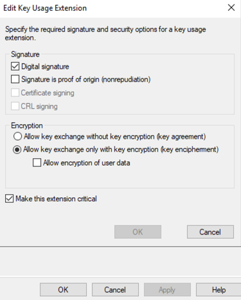
Certificate templates that include the option to use both encryption and a signature:
- Administrator
- Computer
- Directory Email Replication
- Domain Controller
- Domain Controller Authentication
- IPsec
- IPSec (Offline Request)
- Kerberos Authentication
- RAS and IAS
- Router (Offline Request)
- Smart Card Logon
- Smartcard User
- User
- Web Server
- Workstation Authentication
Administrators should select the best templates for their needs and then configure settings to match their organization’s needs.
Learn about how X.509 certificates work:
Most Common Use Cases for AD CS Certificate Templates
AD CS certificates are used in a wide variety of situations. These are some of the most common places you may encounter them.
Code Signing
A Code Signing certificate is used to sign digital signatures for software, scripts, or executables. This signature is created using a private key held by the software developer or organization and is attached to the code before its distribution. When receiving the software, users can verify the signature using the corresponding public key. This allows users and applications to verify that the signature corresponds to the signing identity associated with the certificate.
Code Signing certificate templates play a role in safeguarding software supply chains by allowing developers to sign their code before distributing it. This enables users to verify the authenticity of the software before installing it. Additionally, these templates facilitate code signing at various stages of development, allowing seamless collaboration without compromising security.
Computer
This is often used for VPNs to determine whether a system is authorized, but it can also be used for encryption. By default, the system’s name is pulled from Active Directory, though it can be done manually. Checking the template on the issuing CA will tell you what purposes it is approved for.
Kerberos Authentication
The Kerberos authentication certificate template is designed explicitly for issuing certificates used in authentication within a Windows environment. This certificate template is used in enterprise environments to provide certificate-based authentication for AD computers and users, particularly domain controllers and Windows authentication scenarios.
User
The User template can be used for certificate-based user authentication, including VPN and other network-access scenarios. Depending on the deployment, certificate authentication can complement passwords or serve as a passwordless authentication method.
Web Server
This template is typically used to ask for the common name and any storage area networks (SANs) being used so that users don’t get certificate untrusted messages. For example, an internal SharePoint server can use a certificate issued from an AD CS Web Server template to authenticate the server during an HTTPS/TLS connection. The certificate should contain the appropriate Server Authentication EKU and a SAN matching the hostname users access.
These use cases are those most common in enterprise applications. Hackers are aware of this and will look for vulnerabilities in the certificate template that might allow them to gain access and compromise the network.
Certificate Templates Most Likely To Be Targeted
Hackers often target misconfigured templates and CAs gain administrative privileges to access the network and control domain data fully. Administrators should consider should consider auditing these certificates regularly to ensure their configurations are secure and properly managed:
- Administrator
- Computer
- Enrollment Agent (Computer)
- Key Recovery Agent
- User
- Workstation Authentication
Vulnerable Certificate Template Properties
Some template configurations can cause issues within your set templates. These configurations can lead to domain escalation, account persistence, and certificate theft attacks. Ensure these certificate settings are correct before deploying them to end-user accounts or clients.
Authentication Based EKU
Extended Key Usage (EKU) is an X.509 certificate extension that designates the purpose of the public key within the certificate. This helps specify the application or service for which a certificate is valid. A misconfiguration could result in a certificate meant for server authentication being used for client authentication. This vulnerability can be exploited by attackers who detect this misconfiguration before the administrator does, giving them an advantage.
If a template allows enrollment by unprivileged users and issues certificates containing an authentication EKU while allowing the requester to supply another identity, an attacker may be able to obtain a certificate usable to authenticate as another account.
Issuance Requirements
Issuance requirements outline the conditions that must be met for the CA to issue a certificate based on that template. If the configuration of issuance requirements is inappropriate or lenient, certificates might be issued without authentication or authorization. Making use of the Manager approval function and requiring authorized signatures can help reduce risks here.
ACL Permissions
Access Control Lists (ACLs) determine who can perform actions on a certificate template, such as Read, Enroll, and AutoEnroll.Improperly configuring ACL permissions may grant users access to certificate templates, or give them excessive permissions over specific templates, potentially leading to the issuance of unauthorized certificates.
Enrollment Agents
Enrollment agents are accounts with the authority to enroll certificates on behalf of users. If compromised, the enrollment agent may allow an attacker to request certificates on behalf of other identities., potentially giving them access. This can build into a significant problem if routine monitoring or auditing is not implemented by making it challenging to identify and respond promptly to malicious certificate enrollments.
Subject Name
The Subject Name settings determine how information about the subject (user, device, etc.) is filled out in the issued certificate. The security risk comes from the potential for an attacker to control the identity placed in the Subject or SAN of an authentication-capable certificate.
Note: Microsoft’s ESC1 guidance specifically notes having “Supply in the request” turned on, combined with authentication capability and insufficient mitigation, could lead to intrusions.
The security plan that scales with you.
Our solutions can scale from mid-market to global enterprises. Compare options and see how our solutions protect you from costly breaches and ensure peace of mind.
Best Practices for Managing Certificate Templates
Best practice management policies for certificate templates include issuance requirements, implementing certificate life cycle, ensuring the private key is not exportable, extension key usages, digital signature encryptions, validity period renewal, and third party management.
Issuance Requirements
When issuing a certificate, administrators should include certificate management approval, validation requirements, require multiple people to sign off on a CA, and consider disabling the “Supply in the request” option.
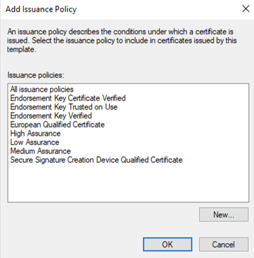
Certificate Management Approval
Certificate management approval is a crucial step in ensuring the integrity and security of the certificate issuance process. This involves obtaining explicit approval from authorized personnel before a certificate is issued.
This access control policy can be implemented in three separate ways: Establishing an authorization workflow, role-based access control, and establishing an approval hierarchy.
To practice workflow authorization within a domain, administrators must define a straightforward workflow that outlines the steps and individuals responsible for approving certificate requests and specify the roles and responsibilities of each approving entity within the organization.
Meanwhile, role-based access control restricts access to the certificate issuance process to just authorized personnel. To this end, administrators should assign roles such as certificate manager or approver to individuals based on their responsibilities.
Finally, administrators should implement an approval hierarchy, defining the sequence in, and conditions under, which approvals must be obtained. [h3]Ensure Validation Requirements
Another layer of best practice involves an organization’s public web PKI certificate-validation policies. These should include domain ownership verification, organizational or extended validation, and identity verification.
One form this takes is domain ownership verification, which confirms that the entity requesting the certificate owns or has control over the domain for which it is being issued. This involves domain validation methods like DNS record verification or email-based validation.
Another facet of validation is organizational validation or extended validation. This can be performed by specifying documentation or verification steps for certificates requiring levels of assurance, such as organization validation or extended validation certificates. Finally, identity validation, the process by which a CA verifies the real-world identity of an individual or organization before issuing a digital certificate, is also recommended.
Multiple Sign-Offs for Certificate Requests
Consider implementing a tiered approval system to enhance security measures and minimize risks. This makes dual/multiple authorization processes mandatory for certificate requests. This will clearly define the roles and responsibilities of each approver, ensuring that no single individual possesses unilateral authority.
You can also implement threshold-based approvals to enact a system where specific types of certificates or requests exceeding a defined threshold require additional approval.
Subject Names in CSRs
Some organizations opt to exclude the Subject Name in CSRs, which reduces exposure to sensitive information. The Subject Name can be added during the certificate issuance process later on. Finally, implementing dynamic binding of the Subject Name during issuance will reduce risks associated with exposing the Subject Name.
You can also improve security by separating the generation of keys from certificate requests, enhancing the privacy and security of certificate issuance.
Certificate Lifecycle Management
The certificate lifecycle includes the creation, deployment, and maintenance of certificates issued by AD CS. This process plays a role in establishing and maintaining the trustworthiness of identities within an organization.
These are the steps of the certificate lifecycle:
- Enrollment: Devices initiate obtaining a certificate from the CA.
- Issuance: Once the CA receives a valid enrollment request, it processes the request according to the applicable enrollment policy, template and authentication mechanism and generates a certificate. The certificate is then signed using the CA key to establish a chain of trust between the entity and the CA.
- Distribution: Once issued, the certificate must be distributed to its intended recipient, user, or device. This can be achieved through email and automated distribution mechanisms such as auto-enrollment or manual distribution.
- Renewal: Certificates have an expiration date, after which they become invalid. Renewal involves extending the validity period of a certificate or issuing a new certificate entirely so devices don’t lose access. Automated renewal processes help prevent expiration and potential disruptions.
- Revocation: In cases where keys are compromised or other security incidents occur certificates may need revoked. A Certificate Revocation List (CRL) maintained by the CA lists certificates that are no longer valid.
Learn more about how certificate revocation works:
Minimize Private Key Exportability
Allowing private keys to be exported increases flexibility by allowing the same certificate and private key to be used across devices to access network and domain resources. This can be necessary in or certain multi-device or multi-application scenarios, but it also increases the risk of key duplication For this reason, it’s always best to prefer non-exportable keys when practical and to use hardware-backed key protection when appropriate.
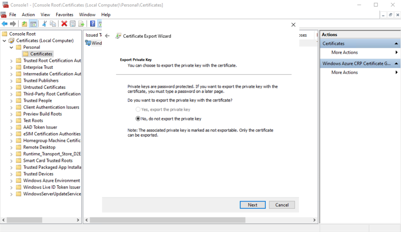
Adding Extension Key Usages
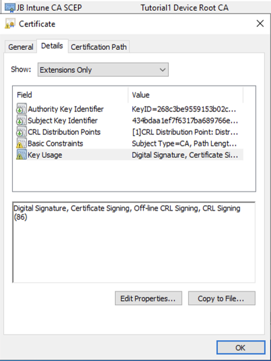
Enabling the following key usages will help you manage digital certificates and the cryptographic operations for the key pair associated with the corresponding digital certificate. Importantly, key usage should always be least privilege and only enable the purposes required for a given certificate.
- Digital Signature Extension Key Usage should be enabled to ensure the trustworthiness and authenticity of domain communications while validating digital signatures.
- Key Encipherment allows the public key to encrypt/transport a symmetric key or other key material or perform a key exchange.
- Non-Repudiation Key Usage ensures that the signature on a message can only be generated using the private key linked to the public key within the certificate. This indicates that the key is intended for services that provide evidence against repudiation, but does not by itself guarantee legal or technical non-repudiation.
Digital Signature Encryption Options
Including multiple encryption options for digital keys helps increase versatility. The most commonly-used options are RSA, ECDSA, and SHA. RSA, ECDSA are signature algorithms, while SHA is a cryptographic hash function.
- RSA: This encryption algorithm relies on the properties of prime numbers and is renowned for its security and versatility.
- ECDSA (Elliptic Curve Digital Signature Algorithm): An alternative to RSA that offers security but with shorter key lengths. This can be advantageous in environments with resources where smaller keys are preferred.
- SHA: Secure Hash Algorithms such as SHA 256 or SHA 384 are used to hash data. The resulting digest is then signed using the private key. The choice of which version of the SHA algorithm to use affects the strength of the operation.
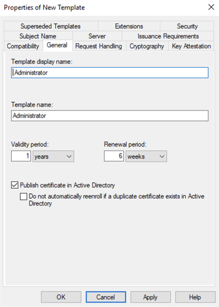
Validity Period Renewal
Various validity period lengths offer ways to compromise between security and operational convenience.
Shorter validity periods can increase security by minimizing the window for compromise, but they require more frequent renewal efforts. On the other hand, longer validity periods increase convenience but increase the risk of a private key being compromised.
No matter the choice of validity period, automated renewal processes are the best practice, as they reduce the risk of certificate expiration. Automated systems can proactively handle certificate renewals, ensuring users and devices maintain access.
Third-Party Certificate Management
Third-party management is one way to help ensure network security and availability Managed PKIs can be more cost-efficient as they mitigate security risk and (if using an on-premises RADIUS server) the cost of maintenance and upfront hardware costs. Managed PKIs also open the door to IEEE 802.1X port-based access control as well as passwordless, certificate-based authentication.
Disadvantages of AD CS Certificate Templates
AD CS certificate templates bring some additional complexity and entail the risk of configuration vulnerabilities. These and other disadvantages should be taken into account when implementing defensive and operational strategies for an enterprise.
Non-Windows Device and BYOD
Implementing AD CS in a Bring Your Device (BYOD) environment can be difficult due to the wide range of devices accessing the network. While AD CS is highly effective in managing Windows-based devices, it encounters difficulties when integrating seamlessly with other platforms and operating systems. Supporting macOS, Linux, mobile devices, network appliances and BYOD devices may require additional enrollment services, MDM integration or third-party tooling. This lack of compatibility can result make management more difficult and increases the risk of misconfigurations and security oversights.
Remote Workers
AD CS can struggle to accommodate off-site employees and their diverse array of devices. Remote certificate enrollment can require additional infrastructure such as CES/CEP, VPN connectivity or MDM integration.
Maintaining On-Prem Servers
Deploying and maintaining AD CS involves both initial costs and ongoing maintenance. Setup requires hardware, software licenses, and skilled personnel. Moreover, effectively managing a certificate infrastructure requires both attention and expertise. The expenses and maintenance obligations associated with AD CS can present significant obstacles for companies working with resource limitations or without dedicated IT staff.
Manage Your Certificate Lifecycle From a Managed PKI
Digital certificates are the foundation of modern network trust, but only if they’re deployed, managed and revoked properly.
The SecureW2 managed PKI actively monitors certificate health after issuance, detecting digital certificates shared simultaneously across multiple devices, flagging enrollment requests with modified CSRs, and revoking certificate-based access the moment a device falls out of compliance or a user offboards.
CertIQ ML Anomaly Detection, a native SecureW2 JoinNow feature, identifies the risk patterns that static CAs and manual audits miss entirely. More than 1,000 organizations globally trust the SecureW2 platform to manage certificates across mixed-OS, multi-MDM environments.
See certificate management in action when you reach out to us for a free demo.
Frequently Asked Questions
What is Microsoft AD CS?
Microsoft Active Directory Certificate Services (AD CS) is a Windows Server role that provides an organization with a public key infrastructure (PKI). It allows organizations to issue, manage, renew, and revoke digital certificates for users, computers, and other devices. These certificates can be used for authentication, encryption, digital signatures, secure wireless access, VPNs, TLS, and other security functions. Enterprise AD CS integrates with Active Directory, making it possible to automate certificate enrollment and manage certificates based on users, computers, and security groups.
What is a Microsoft AD CS certificate?
An AD CS certificate is a digital credential issued by a certificate authority (CA) running within an AD CS environment. It binds an identity — such as a user, computer, or device — to a public key and can be used to prove that identity or enable encryption and digital signatures. For example, certificates can provide authentication for Wi-Fi or VPN access, secure communications, smart-card sign-in, or TLS connections. The certificate's properties, including its intended uses, are determined by the certificate template used to issue it.
What is a Microsoft AD CS certificate template?
An AD CS certificate template is a predefined set of rules that tells a certificate authority (CA) how to issue a particular type of certificate. Templates specify settings such as the certificate's intended purpose, key usage, subject information, validity period, and who is allowed to enroll. Administrators can use templates to standardize certificate issuance and automate enrollment. Only enterprise CAs use certificate templates. Templates are stored in Active Directory and can be made available to enterprise CAs in that particular AD configuration.
Do I need Active Directory Certificate Services?
Not necessarily. You can operate your own PKI without using AD CS. However, AD CS is one common choice for PKI services which comes with its own pros and cons. Common uses include certificate-based Wi-Fi or VPN authentication, smart-card sign-in, device authentication, EFS, and internal TLS.
If you don't need an internal PKI or can meet your certificate requirements through another certificate provider or service, you may not need it. Microsoft also supports standalone CAs that do not require Active Directory.
Where are certificate templates stored in Active Directory?
Certificate templates are stored in Active Directory Domain Services (AD DS), within the Configuration partition. Specifically, the Certificate Templates container is located under CN=Public Key Services, CN=Services, CN=Configuration, DC=....
Each template is represented as a pKICertificateTemplate object. Enterprise CAs access these templates through Active Directory, and newly created templates are automatically replicated to domain controllers throughout the enterprise.
