Key Takeaways
- Server certificates protect private data from cyberattacks and unauthorized access by ensuring that connections between users and servers are safe and encrypted.
- Depending on the level of security needed, there are different types of server certificates, such as Organization Validated, Extended Validation, Wildcard, and Multi-Domain certificates.
- Server certificates maintain trust and prevent security risks such as hacking and man-in-the-middle attacks. Validation facilitates safe and reliable online exchanges. server certificates maintains trust and prevents security risks such as hacking and man-in-the-middle attacks. Validation facilitates safe and reliable online exchanges.
Every time you visit a website using HTTPS, a server certificate is working in the background. It confirms the server is legitimate, kicks off encryption, and keeps data private in transit.
The stakes are real. 43% of cyberattacks target small businesses, and an unverified server connection is one of the easiest entry points. Whether you’re running a web server, a RADIUS authentication server, or a VPN gateway, server certificates are what clients rely on to know they’re connecting to the right place.
This guide covers how server certificates work, what’s inside them, and what it takes to keep them secure.
See your security gap before attackers do.
See continuous trust in action on a platform that includes RADIUS, PKI and AI security.
What Is a Server Certificate?
A server certificate is a digital file that verifies a server’s identity, making secure online communications possible. It sits on a server and converts the HTTP security protocol to HTTPS. As a result, the web browser visually indicates the website’s legitimacy, usually with a padlock icon, although it may vary depending on the browser.
Server certificates, sometimes called SSL certificates, are also essential for safeguarding other types of servers, such as Remote Authentication Dial-In User Service (RADIUS) servers and mail servers. RADIUS server certificates authenticate and encrypt communication between network devices and the RADIUS server to protect critical authentication data in remote access scenarios.
Server certificates offer encryption for data transfers between the browser and the server. This indicates that every data transfer across a website is protected against cyberattacks.
A server certificate includes a pair of public and private keys. The public key is provided to the client during the Secure Sockets Layer (SSL) handshake and is packaged with the certificate, while the private key is kept on the server. The website displays the secure padlock icon and changes the protocol to HTTPS as soon as the certificate is deployed on the web server. Using web server certificates helps maintain data integrity and confidentiality.
“A public key is like a mailbox. This is where anyone can drop mail in. Anyone knows what your public key is. The private key is what’s needed to open the mailbox.”
Micah Spady, Director of Product Marketing, SecureW2
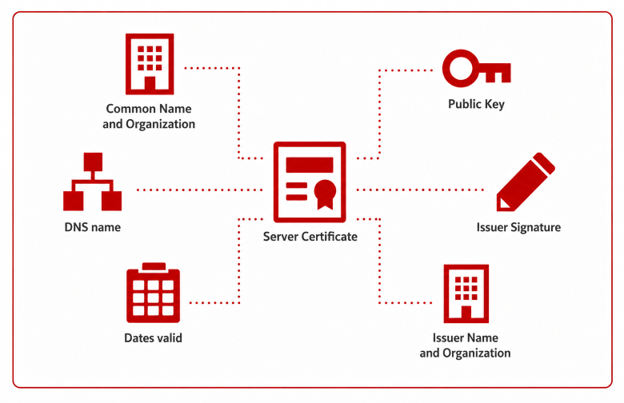
This diagram helps show how server certificates work:
What Does a Server Certificate Contain?
Every server certificate is an X.509 file that contains a standard set of fields. Here’s what you’ll find when you inspect one:
| Field | What It Contains |
| Common Name (CN) | The domain the certificate is issued for (e.g., securew2.com) |
| Subject Alternative Names (SANs) | Additional domains or IPs the certificate covers |
| Issuer | The certificate authority that signed and issued it |
| Validity Dates | The “not before” and “not after” window when the certificate is valid |
| Public Key | The key clients use to encrypt data and verify signatures |
| Fingerprint | A hash of the certificate used to verify it hasn’t been tampered with |
SANs have largely replaced Common Name as the authoritative field for domain matching. Most modern server certificates list every covered domain under SANs rather than relying solely on CN.
This video explains the larger concept of certificate authentication:
What Do Server Certificates Do?
Server certificates make it possible to employ SSL/TLS encryption protocols to safeguard user privacy when they exchange sensitive information — such as credit card numbers, login passwords, and personal information — with websites. They enable browsers to authenticate the server, which prevents impersonation, phishing attempts, and other harmful behaviors.
Aside from their uses on the web, server certificates are also used to ensure that clients connect to the right servers and to secure communications between servers. As mentioned above, server certificates can be assigned to authentication servers (such as RADIUS servers) to make sure users are connecting and authenticating to the correct server. To further help protect data integrity, server certificates also enable digital signatures and cryptographic hash algorithms.
How Does a Server Certificate Work?
SSL/TLS encryption security relies on asymmetric encryption, often known as public key cryptography or encryption.
Asymmetric encryption uses a public key for data encryption and a private key for data decryption. This helps reassure customers about the security of their transactions and foster trust in the business.
When a client connects to a web server:
- The browser makes an attempt to establish a connection with an SSL-certified web server or website.
- A copy of the SSL certificate is sent to the browser by the web server.
- After confirming the certificate’s legitimacy, the browser notifies the web server.
- To begin an SSL-encrypted session, the web server or website sends back a digitally signed approval.
- The browser and web server begin encrypted communication.
Server certificates are one part of a larger Public Key Infrastructure (PKI). Learn more about how PKI works:
Learn more about PKI in this video from SecureW2:
The Different Types of Server Certificates
You can use several types of web server certificates to fulfill different security and operational needs. Common types of server certificates include:
- Domain Validated (DV) certificates: Enable basic encryption and domain ownership verification to safeguard client-server data transfers and privacy.
- Organization Validated (OV) certificates: To increase trust, provide a more robust identity validation than DV, and include the organization’s verified data in the certificate.
- Extended Validation (EV) certificates: Ensure the utmost security for e-commerce, finance, and government websites through strong encryption and validation.
- Wildcard certificates: Simplify the process of protecting cloud-based services or several subdomains under one main domain.
- Multi-domain certificates: Streamline certificate administration by using a single certificate to secure numerous domain names and subdomains on one server.
Common Server Certificate Use Cases
Organizations across industries rely on server certificates to provide validation and encryption in a wide range of infrastructure types. The most common use cases include:
- HTTPS web servers: Any website using HTTPS uses a server certificate to authenticate its identity and encrypt all traffic between browsers and the web server. The server certificate protects sensitive data from being intercepted by cybercriminals.
- RADIUS authentication servers: Server certificates on RADIUS servers verify the server’s identity to clients as they try to connect. Without the certificates, attackers could stand up rogue servers that appeared to be legitimate and then capture client credentials for unauthorized reuse.
- VPN gateways: Before remote clients can establish a secure tunnel on a VPN gateway, they need to authenticate the VPN server using a server certificate. In this deployment, server certificates are far more secure than pre-shared keys.
- Email servers: To ensure that messages can travel securely over SMTP, IMAP, and POP3 connections, mail servers use server certificates for encryption.
- Internet of Things (IoT) and device networks: Server certificates secure machine-to-machine communication for the increasing number of network-connected devices in virtually every industry. To ensure they don’t send sensitive data to a spoofed endpoint, IoT devices use certificates to authenticate servers before transmission.
See how a global healthcare company moved from passwords to certificate-based authentication using SecureW2, delivering on their promise of safeguarding healthcare data.
How Does Server Certificate Validation Protect Web Transactions?
Server certificate validation is a crucial first line of defense against cyberattacks.
Without appropriate authentication, cybercriminals may carry out man-in-the-middle (MITM) attacks, snooping on confidential information sent between the client and the server, or perform phishing intrusions. These attacks can lead to data breaches, identity theft, and unauthorized access to sensitive information. The lack of validation also leaves systems vulnerable to spoofing attacks, in which attackers pose as genuine services to trick unwary users into providing important information.
Server Certificates and RADIUS Servers
Certificate validation is essential for guaranteeing the security and integrity of remote authentication procedures involving RADIUS servers. By confirming the RADIUS server’s legitimacy, server certificates reduce the possibility of MITM attacks and illegal access attempts. Validation thwarts phishing attempts by creating trust in the server’s authenticity and strengthening defenses against fraudulent operations that target authentication methods.
Learn more about how RADIUS works:
Are Server Certificates Secure?
No method of digital security is impenetrable, but server certificates provide a highly secure foundation for encrypted communications. Certificate authorities (CAs) or certificate servers verify the requester’s identity prior to issuing a certificate using asymmetric cryptography, a tried-and-true method of network security
But be aware that running a poorly managed certificate program can reduce or even negate the benefits of server certificates. Organizations may face these common pitfalls:
- Expired certificates: Can cause outages of mission-critical systems.
- Misconfigured certificates: Contain incorrect information that can leave organizations vulnerable to cyberattacks.
- Weak key lengths: Lower the barriers for certain types of cyberattacks.
- Certificates issued by untrusted or compromised CAs: Create a weak link in the digital security chain.
By being diligent about certificate maintenance, and by using Certificate Transparency to monitor whether any rogue certificates have been listed for their domains, domain owners can avoid these serious threats to digital security.
What Makes a Server Certificate Actually Secure?
Not all server certificates offer the same level of protection. These are the technical factors that matter:
Key Size:
- 2048-bit RSA: Current baseline
- 4096-bit RSA: Stronger, higher overhead
- ECC (256-bit): Fastest, recommended for high-traffic servers
MD5 and SHA-1 are both deprecated and flagged as insecure. Use SHA-256 or higher.
Private Key Storage: Store private keys in a Hardware Security Module (HSM) to prevent extraction if the server is compromised.
Revocation:
- CRL: periodic list of revoked certificates; can be stale
- OCSP: real-time status check; more current
Use OCSP Stapling to reduce client-side latency.
Server Certificate vs. Client Certificate: What’s the Difference?
Both server certificate and client certificate are issued by a CA and are essential to secure digital communication. The difference is in direction: one proves who the server is, the other proves who the client is.
| Server Certificate | Client Certificate | |
| Authenticates | Server to the client | User or device to the server |
| Primary use | HTTPS, VPN gateways, RADIUS servers | 802.1X Wi-Fi, VPNs, enterprise SSO |
| Verified by | Client against trusted root certificates | Server against trusted root certificates |
| Encrypts traffic | Yes, after authentication | No |
| OID | 1.3.6.1.5.5.7.3.1 | 1.3.6.1.5.5.7.3.2 |
| Example | TLS/SSL certificate on a web server | Certificate on a managed employee device |
Together, server and client certificates enable mutual TLS authentication, where both sides verify each other before any data is exchanged.
What Is SSL?
SSL (Secure Sockets Layer) is an encryption-based security protocol. Netscape developed SSL in the mid-1990s to:
- Ensure data privacy on the web: Before SSL, data was transmitted in plaintext. SSL-encrypted data traveling between a client and server.
- Authenticate web users: SSL verified that the parties exchanging information were who they claimed to be.
- Preserve data integrity: SSL also verified that data hadn’t been forged or tampered with while traveling.
Whenever a client connected to an SSL-secured server, SSL would initiate a handshake in which the server proved its identity and a session key was created to encrypt communications. All of this happened quickly enough to avoid disrupting the user experience.
When Did SSL Become Obsolete?
Although SSL represented a leap forward in internet security for its time, all versions of SSL were eventually deprecated due to security vulnerabilities. The successor to SSL, published in 1999, is Transport Layer Security (TLS). The current standard is TLS 1.3, which was finalized in 2018.
Server Certificates for Business Websites
Server certificates help organizations maintain data integrity and privacy in a rapidly evolving threat landscape. They safeguard information sent between clients and servers. They’re especially important for enterprises that gather sensitive customer information.
These are some reasons your organization may want to use server certificates.
- Secure Web Transactions: Server certificates improve e-commerce transaction security by guaranteeing that data such as client information and payment details will be delivered securely without theft or tampering. In addition to lowering fraud risk, server certificates help organizations adhere to security regulations such as the Payment Card Industry Data Security Standard (PCI DSS).
- Gain Customer Trust: The well-known padlock icon in the address bar and the “HTTPS” in your web URL combined present a trustworthy image of your site that can help you attract and retain new clients. Clients who feel secure will be more inclined to make additional purchases from a website they trust.
Learn everything you need to know about PKI and certificate management in this video:
Where to Get a Server Certificate
Depending on your use case, there are several ways to get a server certificate from a CA or certificate server. If you’re running a public-facing website or service, you’ll need external users to trust your server. Look for a certificate issued by a publicly trusted CA — one whose root certificate is included in the trust stores of major browsers and operating systems. These CAs offer DV, OV, and EV certificates.
If you’re managing hundreds or thousands of certificates in a sophisticated enterprise environment, a managed PKI service will be your most scalable option. You’ll be able to log into a console to issue, manage, and revoke certificates for all your internal servers, RADIUS authentication, VPN gateways, and device authentication.
At the other end of the spectrum, many web hosting platforms include SSL/TLS certificates in their hosting plans designed for personal projects and small businesses. They are often powered by Let’s Encrypt and feature automatic renewal.
How Much Do Server Certificates Cost?
Server certificate costs vary depending on the CA, certificate type, and validation level. The DV certificates appropriate for most websites and blogs are available at no cost from Let’s Encrypt and many hosting providers.
Paid DV certificates often include a site seal and warranty for a price under $100 per year. OV and EV certificates provide more stringent identity verification and can cost several hundred dollars per year.
Enterprises that manage many certificates often find that managed PKI platforms make more sense economically.
The Shrinking Validity of Server Certificates
One of the most important questions organizations must ask is how long a server certificate remains valid before it needs to be replaced. Thanks to new regulations, the answer has changed dramatically, and it is reshaping how enterprises manage their certificate infrastructure.
In April 2025, the CA/Browser Forum approved Ballot SC-081v3, which introduced a phased reduction in the maximum validity period for publicly trusted TLS certificates. The first milestone took effect on March 15, 2026, reducing the maximum certificate lifetime from 398 days to 200 days. The schedule continues with another reduction to 100 days in 2027, followed by a final reduction to just 47 days in March 2029.
At the same time, the Domain Control Validation (DCV) reuse period is also shrinking, eventually reaching only 10 days. This means certificate authorities will need to verify domain ownership much more frequently during the renewal process.
What Shorter Validity Periods Mean for Organizations
For organizations that manage server certificates, these changes pose a significant operational challenge. A certificate used by a web server, API gateway, VPN concentrator, or RADIUS server that previously required annual maintenance now requires renewal at least twice per year, and by 2027, that frequency will increase even further.
Unlike many IT problems that cause issues gradually, expired server certificates cause immediate outages. Browsers reject websites with expired certificates, VPN clients fail to establish secure tunnels, and EAP-TLS clients refuse to authenticate to RADIUS servers presenting invalid certificates.
The reasoning behind shorter certificate lifetimes is straightforward. If a private key is compromised or a certificate is issued incorrectly, shorter validity periods reduce the amount of time an attacker can exploit that certificate. By reducing certificate lifetimes to just 47 days, the industry aims to significantly limit the value of stolen or misissued certificates. While these requirements currently apply only to publicly trusted certificates, their impact extends far beyond public websites.
The tools, operational practices, and automation frameworks being developed to support shorter certificate lifecycles, particularly protocols such as ACME, are rapidly becoming standard practice across both public and private PKI environments. The National Institute of Standards and Technology (NIST) has also emphasized the importance of proactive certificate lifecycle management and automation in its guidance on TLS certificate management.
The security plan that scales with you.
Our solutions can scale from mid-market to global enterprises. Compare options and see how our solutions protect you from costly breaches and ensure peace of mind.
How To Implement a Server Certificate
No matter which CA or type of server you’re using, server certificate implementation will most likely involve these steps:
- Generate a key pair and Certificate Signing Request (CSR): Once you’ve generated a public and private key on the server where you’ll install the certificate, you can generate the CSR that you’ll submit to the CA.
- Submit the CSR to a CA: Include any required validation documentation. If you’re requesting a DV certificate, the CA will simply verify that you control the domain, which is typically done automatically. For OV and EV certificates, the CA will also verify your organization’s legal existence and details.
- Install the issued certificate on your server: You’ll download the certificate file from the CA and put it on your server. To ensure the full certificate chain is trusted, you must also install any intermediate CA certificates your CA or certificate server provided.
- Configure your server to use the certificate: Your server will use the certificate for HTTPS (port 443) or another appropriate protocol. To ensure all users connect securely, you should also configure your server to redirect HTTP traffic to HTTPS.
- Plan for renewal: If you’re using a commercially issued certificate, it will probably be valid for one year. Let’s Encrypt certificates are valid for 90 days. Set calendar reminders or use automated certificate management tools to prevent expired certificates from eroding customer trust and causing outages.
Strengthen Your Network Security With the SecureW2 JoinNow Platform
Validating server certificates is a critical part of 802.1X authentication, which strengthens network security and prevents cyberattacks. SecureW2 eliminates many risks across your Wi-Fi and internal services by providing:
- JoinNow Cloud RADIUS with validated certificates: Our managed RADIUS service includes server certificates that clients can trust. It helps prevent evil twin RADIUS attacks during EAP-TLS, PEAP, and EAP-TTLS authentication.
- Automated internal certificate management: SecureW2 solutions integrate with Ansible, Puppet, and other configuration tools, making it easier for you to deploy and renew SSL certificates for private web servers and internal services.
- Zero-touch PKI lifecycle: JoinNow Dynamic PKI handles issuance, distribution, renewal, and revocation of client certificates for passwordless authentication across all devices and identity providers.
See how SecureW2 can provide your organization with seamless server certificate validation and strong safety measures. Schedule your demo today.
Frequently Asked Questions
What is better, TLS or SSL?
TLS is better. SSL is fully deprecated and no longer considered secure. TLS 1.3, the current standard, is faster and more secure than any version of SSL. When people say "SSL certificate" today, they're almost always referring to a TLS certificate. If your server still supports SSL, disable it immediately.
What certificates do I need as a server?
Most servers need at least one server security certificate to encrypt traffic and prove identity to clients. A public-facing web server needs a certificate from a trusted CA. Authentication servers like RADIUS need their own server certificate to prevent rogue server attacks. If you require mutual authentication, you'll also need a PKI setup that issues client certificates.
What is SSL vs SSO?
SSL (now replaced by TLS) is a security protocol that encrypts data in transit between a client and a server. SSO (Single Sign-On) is an authentication method that lets users log in once and access multiple applications. They solve different problems but often work together: SSO handles identity, while server certificates secure the connection that SSO runs over.
How to get a server certificate?
SSL (now replaced by TLS) is a security protocol that encrypts data in transit between a client and a server. SSO (Single Sign-On) is an authentication method that lets users log in once and access multiple applications. They solve different problems but often work together: SSO handles identity, while server certificates secure the connection that SSO runs over.
What are the 7 types of servers?
The most common server types are web servers, mail servers, DNS servers, FTP servers, database servers, authentication servers (like RADIUS), and proxy servers. Each can require a server security certificate depending on how it handles data and who connects to it. Web and authentication servers in particular should always have certificates in place to encrypt traffic and verify identity.
Are a server certificate and an SSL certificate the same thing?
Because SSL certificates have been deprecated for many years, few organizations use them anymore. But even today, longtime IT professionals sometimes say “SSL certificate” when they’re referring to a TLS certificate, which is the current standard server certificate.
