Key Takeaways
- PKI management is the process of managing digital certificates throughout their lifecycle to maintain secure authentication, communications, and access.
- The blog compares five PKI tools: SecureW2, Keyfactor, DigiCert, Microsoft AD CS, and Portnox, highlighting their key capabilities and use cases.
- To choose the right PKI solution, evaluate certificate lifecycle automation, integrations, deployment model, authentication capabilities, security alignment, and customer feedback
Managing certificates across a growing IT environment can quickly become a hurdle, especially when renewals, integrations, and security requirements start piling up. That’s where PKI certificate management tools can take much of the manual work off your team’s plate. But with so many options available, finding the right solution isn’t always straightforward. This blog will help you compare the best PKI management tools in 2026, looking at their features, use cases, and customer feedback to help you narrow down the right fit for your organization.
See your security gap before attackers do.
See continuous trust in action on a platform that includes RADIUS, PKI and AI security.
What is PKI Management?
PKI management is the process of managing digital certificates, encryption keys, and their lifecycles to ensure secure authentication, communication, and access across an organization. It covers tasks such as certificate issuance, deployment, renewal, monitoring, and revocation.
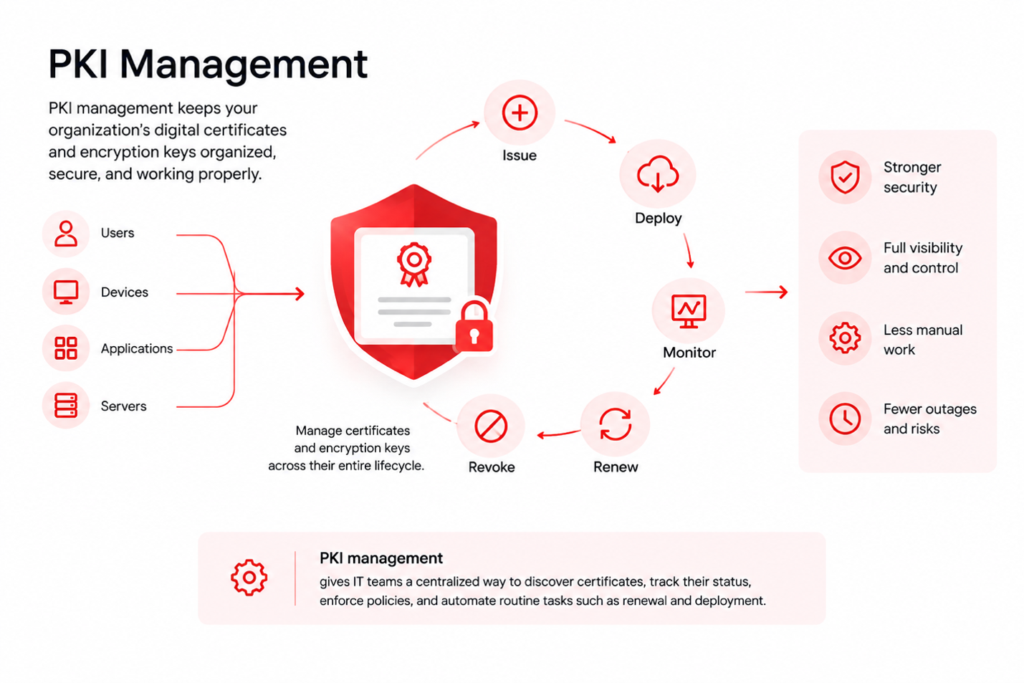
Think of PKI management as keeping track of the digital certificates and encryption keys your organization relies on to secure identities and connections. Every certificate has a lifecycle. It needs to be issued, deployed, monitored, renewed before it expires, and revoked when it is no longer trusted. As organizations add more users, devices, applications, and services, keeping up with these tasks manually can become difficult and error-prone.
PKI certificate management brings these tasks into one place. With PKI management software, IT teams can discover certificates, track their status, enforce policies, and automate routine lifecycle tasks such as renewal and deployment.
Top PKI Providers: Comparison Table
| Company | Standout Features | Best for | G2 Rating | Number of Reviews |
| SecureW2 | Managed PKI + Automation + Identity-Based Policies | Zero Trust and Certificate-Based Authentication | 4.7/5 | 96 |
| Keyfactor | Lifecycle Automation + Certificate Visibility | Enterprise PKI Governance | 4.5/5 | 121 |
| DigiCert | SSL + Certificate Lifecycle Tools | Public Certificates and Compliance | 4.3/5 | 81 |
| Microsoft AD CS | Native Windows PKI | On-Prem Microsoft Environments | 3.4/5 | 12 |
| Portnox | PKI + NAC Integration | Device Access Control Environments | 4.4/5 | 118 |
What is PKI Certificate Management Used For?
PKI management secures and simplifies the management of digital certificates and encryption keys throughout their lifecycle.
Organizations use PKI management software to:
- Issue and deploy certificates: Automate certificate issuance and deployment for users, devices, applications, and servers.
- Renew certificates: Monitor expiration dates and automatically renew certificates before they become invalid.
- Revoke certificates: Quickly revoke certificates that are compromised, expired, or no longer trusted.
- Monitor certificates: Maintain visibility into certificates across the organization and identify potential issues before they cause disruptions.
- Enforce security policies: Apply consistent certificate policies across different users, devices, and applications.
- Automate PKI tasks: Use PKI automation to reduce manual work and simplify repetitive certificate lifecycle tasks.
- Enable self-service: With PKI self-service, authorized users or administrators can request or manage certificates without relying on IT for every task.
- Secure AI agent authentication: Use certificates to authenticate AI agents accessing applications, APIs, data, and other resources.
- Manage non-human identities: Issue, renew, monitor, and revoke certificates for applications, services, workloads, APIs, and other machine identities.
What are the Elements of PKI Management?
PKI management has several elements because managing certificates at scale involves more than simply issuing them. These elements cover the different tasks, controls, and processes needed to keep certificates and keys secure and properly managed throughout their lifecycle.
| Element | What it is | What it does |
| Certificate lifecycle management | Managing certificates from issuance to expiration or revocation. | Handles certificate discovery, issuance, deployment, renewal, and revocation. |
| PKI key management | Managing the cryptographic keys associated with certificates. | Protects keys and controls how they are stored, accessed, and used. |
| Certificate monitoring | Tracking certificates across the organization. | Provides visibility into certificate status, expiration dates, ownership, and potential issues. |
| PKI automation | Automating repetitive certificate management tasks. | Reduces manual work by automating enrollment, renewal, deployment, and other processes. |
| Policy and compliance management | Defining and enforcing rules for certificate use. | Helps maintain consistent security practices and meet compliance requirements. |
| Governance documents (CP/CPS) | Documenting the policies and practices that govern how a PKI operates. | Defines certificate policies, issuance requirements, roles, responsibilities, and operational procedures. |
| Identity and system integration | Connecting PKI with identity systems and enterprise infrastructure. | Enables certificates to work with directories, identity providers, networks, devices, and applications. |
| PKI self-service | Giving authorized users or administrators access to certificate-related tasks. | Reduces IT workload by allowing users to request or manage certificates within defined permissions. |
Certificate Discovery Methodology
Certificate discovery is the starting point for effective PKI management because you cannot manage certificates you cannot see. Discovery can use:
- Network scanning to identify certificates on accessible systems
- Certificate Transparency (CT) log querying to find publicly trusted certificates
- Agent-based inventory to collect certificate data directly from endpoints and servers.
Using the right combination helps organizations build a more complete view of their certificate environment.
Why PKI Management Solutions Are a Must for Passwordless Authentication
Digital certificates are the backbone of secure user, device, and application authentication. A PKI enables trust across distributed environments through identity verification and encrypted communication. Without a reliable PKI certificate management system in place, organizations risk losing visibility into which certificates are active, expired, or at risk of causing an outage.
As organizations move to cloud-first and hybrid infrastructures, PKI plays a critical role in:
- Securing Wi-Fi and network authentication
- Enabling passwordless access
- Protecting applications and APIs
- Managing device identity at scale
Manual certificate management is no longer sustainable. Automating the lifecycle from issuance to revocation is essential for maintaining security and operational efficiency.
Review Methodology
To identify the best PKI solutions, we evaluated each platform based on real-world enterprise requirements. Our analysis focused on:
- Certificate lifecycle automation– Ability to automate issuance, renewal, and revocation without manual intervention
- Integration ecosystem– Compatibility with identity providers, Mobile Device Management (MDM) platforms, and authentication systems
- Deployment model– Cloud-native vs. on-premise infrastructure, scalability, and operational overhead
- Authentication capabilities– Support for certificate-based authentication and real-world access control use cases
- Customer feedback– Insights from verified reviews on platforms like G2
- Security alignment– Ability to support Zero Trust and passwordless authentication
This approach ensures that each solution is evaluated on its ability to deliver secure, scalable, and practical certificate management in modern environments.
Best PKI Vendors in 2026
1. SecureW2: Best PKI Solution for Automation and Authentication
G2 Rating: 4.7/5 (96 Reviews)
As a unified PKI management platform, SecureW2 combines certificate lifecycle automation with real-time authentication policies. SecureW2 provides a fully managed PKI platform that automates certificate lifecycle management and directly integrates with authentication workflows. Unlike traditional PKI solutions that solely focus on certificate issuance, SecureW2 connects PKI with real-world access control through Cloud RADIUS and identity-driven policy enforcement.
Organizations can build a complete PKI hierarchy with root and intermediate certificate authorities while automating certificate issuance across users and devices. The platform allows you to efficiently manage an internal CA customized for any environment. By establishing a root CA and creating intermediate CAs as needed for regions or groups, issuing end-user certificates becomes effortless, ensuring a secure and scalable certificate-based environment.
As an organization, you can automate certificate lifecycle management based on the real-time status of devices managed by an MDM. Gateway APIs can integrate with Intune and other MDMs to provide zero-touch certificate issuance for managed devices. This kind of automated PKI management removes the manual work that typically falls on IT when a device changes status or leaves the network.
For unmanaged devices and BYODs, SecureW2 offers an easy self-service onboarding technology or SAML-based Wi-Fi login. Through integrations with identity providers and MDM platforms, SecureW2 enables zero-touch certificate deployment for managed devices and secure onboarding for BYOD environments.
SecureW2 leadership is reinforced by multiple cybersecurity awards and strong G2 customer satisfaction ratings, highlighting ease of use and deployment speed.
Best Cybersecurity Industry Solution Awards
In addition to individual product awards, the SecureW2 JoinNow Platform won first place in four industry categories at the Cybersecurity Excellence Awards.
- Best Government Cybersecurity Industry Solution: Recognized for excellence in government cybersecurity.
- Best Technology Sector Cybersecurity Industry Solution: SecureW2 was named best technology sector cybersecurity solution.
- Best Retail Cybersecurity Industry Solution: The JoinNow Platform was awarded in the retail cybersecurity category for providing seamless certificate-driven access control and automation.
- Best Financial Services Cybersecurity Industry Solution: The JoinNow Platform was recognized as a leading cybersecurity solution in financial services for its robust cloud PKI.
G2 Recognition
SecureW2 earned 14 G2 Spring 2026 badges, driven entirely by verified customer feedback
- Leader in Network Access Control and Certificate Lifecycle Management
- Recognized for:
- Easiest Setup
- Ease of Administration
- Product Performance
- Best Relationship
G2 rankings come directly from users who implemented the product and shared their experience. SecureW2 makes certificate-based authentication something a lean IT team can deploy and manage. Every badge reflects what customers experience in real-world deployments.
SecureW2 Pros and Cons
| SecureW2 Pros | SecureW2 Cons |
| Implementation “Best Support & Implementation Experience In my Career” ⭐⭐⭐⭐⭐ (5/5) – Josh H., Senior Systems Administrator | PDF Documentation “documentation is in PDF format” ⭐⭐⭐⭐⭐ (5/5) – Darin P., Cyber Security Manager |
| Ease of Management “Certificate lifecycle automation saves us hours every week” ⭐⭐⭐⭐⭐ (5/5) – Abu Ra R., Intune Administrator | Admin UI“Admin UI could use a refresh update” ⭐⭐⭐⭐☆ (4/5) – Eric T., Director, IT |
| Support & Reliability“Quick and Easy Access to the Wi-Fi with Secure Architecture” ⭐⭐⭐⭐⭐ (5/5) – Shamyog T., IT Engineer | Integration Support“Integration with MDM and PKI services can require the use of SecureW2 support” ⭐⭐⭐⭐⭐ (5/5) – Verified User |
Why SecureW2 Stands Out
- Fully automated certificate lifecycle management
- Direct integration with authentication (RADIUS + PKI)
- Zero-touch onboarding for users and devices
- Strong alignment with Zero Trust security
Considerations
- Pricing is customized
2. Keyfactor: Enterprise PKI Lifecycle and Governance
G2 Rating: 4.5/5 (121 Reviews)
Keyfactor is a well-established PKI platform that manages certificates at scale across enterprise environments.
It provides strong capabilities for certificate discovery, lifecycle automation, and governance, making it suitable for organizations with large, complex certificate inventories. As PKI management software, it is built to handle thousands of certificates across distributed infrastructure without losing track of any of them.
Keyfactor excels at providing visibility into certificate usage and ensuring compliance across infrastructure and applications.
However, it primarily focuses on PKI management rather than direct integration with authentication systems, meaning additional tools are required for access enforcement.
Keyfactor Pros and Cons
| Keyfactor Pros | Keyfactor Cons |
| Effortless Certificate Management“Strong certificate lifecycle visibility and governance” ⭐⭐⭐⭐☆ (4/5) – Verified User | Certificate Mangement“lot of room for improvement” ⭐⭐⭐☆☆ (3/5) – Richard Paolo M. |
| Support“Effortless Certificate Mangement with Stellar Support” ⭐⭐⭐⭐⭐ (5/5) – Khalid A. | Complex Integration“not out of the box integration” ⭐⭐⭐☆☆ (3/5) –Daniela P. |
| SSL Discovery“effective at locating and cataloging all of our certificates” ⭐⭐⭐⭐☆ (4/5) – Verified User | Hard to Find Features“Some features are buried quite deep in the software” ⭐⭐⭐⭐☆ (4/5) – Verified User |
Strengths
- Advanced lifecycle management
- Strong governance and compliance
Limitations
- Loosely integrated with authentication workflows
Enterprise PKI management gets more complex as certificate volume grows across cloud, on-prem, and hybrid environments, which is the exact gap platforms like Keyfactor are built to close. To see how organizations manage PKI at enterprise scale, from certificate discovery to policy enforcement, read our guide on enterprise PKI management in the cloud.
3. DigiCert: Public Certificate and SSL Leader
G2 Rating: 4.3/5 (81 Reviews)
DigiCert is one of the most recognized PKI vendors, offering a wide range of SSL/TLS certificates and enterprise certificate management solutions. DigiCert offers a range of SSL certificates to accommodate any organizational structure and its specific needs. They provide a detailed configuration for every Platform/OS combination, equipping organizations with the necessary visibility and security. Based on an organization’s requirements, DigiCert can also accommodate a range of encryption bit lengths.
DigiCert developed the CT Log Monitoring service to monitor and track its certificates. It is a cloud-based software service that requires no setup or maintenance. Network admins can monitor public CT logs provided by SSL certificates. The cloud service reduces the time spent monitoring certificate logs by providing email alerts for issued SSL certificates.
DigiCert is particularly strong for organizations managing public certificates and compliance requirements. However, it is less focused on the broader enterprise PKI management needs that come with internal, private certificate authorities.
DigiCert Pros and Cons
| DigiCert Pros | DigiCert Cons |
| Security“One of best tools that comes with RapidSSL” ⭐⭐⭐☆ ☆ (3.5/5) – Amr Y., Web Developer | Customer Support“their support is so weak.” ⭐☆☆☆☆ (0.5/5) – Atiqullah A., Chief Technology Officer |
| SSL Certificates“Good SSL Certificates to deploy for public apps” ⭐⭐⭐⭐☆ (4/5) – Shanker R., Chief Information Security Officer & Head Business Continuity | Implementation Timeframe“Implementation is taking much time” ⭐⭐⭐☆☆ (3.5/5) – Srinath P., System Admin |
| Customer Support“Great Customer Support” ⭐⭐⭐⭐☆ (4/5) – Verified User | Support Response Time“support, is slow” ⭐⭐⭐⭐☆ (4/5) – Verified User |
Strengths
- Strong SSL and public certificate offerings
- Good monitoring and visibility tools
Limitations
- Less focused on internal PKI automation and authentication
4. Microsoft AD CS: Traditional PKI for Windows Environments
G2 Rating: 3.4/5 (12 Reviews)
Microsoft Active Directory Certificate Services (AD CS) is a widely used on-prem PKI solution integrated with Windows environments.
It allows organizations to issue and manage certificates through Group Policy and Active Directory. Teams that manage PKI through AD CS typically rely on Group Policy scripting rather than a centralized dashboard.
While AD CS is familiar and widely deployed, it requires significant manual configuration and lacks native support for modern cloud-based environments and BYOD scenarios. Managing a Microsoft CA requires a level of manual labor that is incompatible with modern DevOps and cloud automation speeds. IT administrators frequently encounter time constraints when performing routine maintenance that modern platforms have long since automated. Compared to newer PKI management tools, AD CS was not designed with cloud automation or BYOD in mind.
Furthermore, AD CS lacks a dynamic way to double-check incoming requests against a live cloud directory. It trusts the CSR too implicitly. In a 2026 threat landscape, “trust but verify” has been replaced by “never trust, always verify,” a philosophy that AD CS simply wasn’t built to support.
Microsoft AD CS Pros and Cons
| Microsoft AD CS Pros | Microsoft AD CS Cons |
| Active Directory Integration“Best tool to authenticate and secure data in IT infrastructure” ⭐⭐⭐⭐☆ (4/5) – Siddhant R., Senior Consultant | Compatibility Concerns and Performance Pains “Its compatibility with non Microsoft platforms and performance issues in larger networks” ⭐☆☆☆☆ (0.5/5) – Emanuela P., Principal Research |
| User Authentication“Great User Authentication Service” ⭐⭐⭐⭐⭐ (5/5) – Akash M., Consultant and Support | Complex Integration“Configuration steps are bit complex” ⭐⭐☆☆☆ (2.5/5) – Sanjay D., Technical Manager |
| AD Connect“Gives you feature to manage all of our domain and users” ⭐⭐⭐⭐☆ (4/5) – Verified User | Lack of Resources”lack of troubleshooting resources and advanced features” ⭐☆☆☆☆ (1/5) – Luan G., Architect Design |
Strengths
- Native integration with Active Directory
- Familiar for enterprise IT teams
Limitations
- On-prem only
- Limited automation
- Not suited for modern cloud-first environments
5. Portnox: PKI With Network Access Control
G2 Rating: 4.4/5 (118 Reviews)
Portnox combines PKI capabilities with Network Access Control (NAC), focusing on device visibility and access enforcement.
It provides certificate-based authentication options alongside device compliance and policy enforcement features.
While Portnox offers flexibility, its PKI capabilities often rely on integrations and are not as deeply integrated into a unified lifecycle automation platform.
Portnox Pros and Cons
| Portnox Pros | Portnox Cons |
| NAC Capabilities“Intuitive, Cloud-Native NAC Controls” ⭐⭐⭐⭐☆ (4/5) – Rick S., AVP of Cybersecurity | Cloud Support“Cloud-Based Convenience Undermined by Misrepresentation” ⭐☆☆☆☆ (1/5) – Todd S., Director of IT |
| Port Visibility“Useful but has a few flaws” ⭐⭐⭐☆☆ (3/5) – Hillel G., Information Technology System Administrator | Scalability Challenges“Cost-Effective with Scalability Challenges” ⭐⭐⭐☆☆ (3/5) – Mike H., Adjunct Professor |
| Interface“security features and easy interface” ⭐⭐⭐⭐☆ (4/5) – Verified User | (H4) Complex Setup“One thing I’ve found challenging with Portnox is the initial setup” ⭐⭐☆☆☆ (2.5/5) – Verified User |
Strengths
- Strong NAC capabilities
- Device visibility and control
Limitations
- PKI is not the primary focus
- Requires integration for full lifecycle automation
The security plan that scales with you.
Our solutions can scale from mid-market to global enterprises. Compare options and see how our solutions protect you from costly breaches and ensure peace of mind.
PKI certificates carry the identity, validity period, and authority information that make secure authentication possible, but the way they are structured and validated often gets overlooked. For a closer look at certificate fields, validation chains, and how issuance actually works, read our guide on understanding PKI certificates.
How to Choose the Best PKI Management Tools?
- Prioritize certificate lifecycle automation to automate certificate discovery, issuance, deployment, renewal, and revocation while reducing manual work.
- Evaluate integrations to ensure the tool works with your existing identity providers, directories, networks, devices, and applications.
- Consider scalability so the PKI management platform can support growing numbers of users, devices, applications, and certificates without adding administrative overhead.
- Look for strong security and visibility with centralized certificate monitoring, policy enforcement, key protection, and clear visibility into potential issues.
“Security teams need the highest level of assurance, which requires verifying every user and device, not just once, but continuously. SecureW2 delivers this through a dynamic, ecosystem-based approach that enforces access decisions as risk levels change.”
SecureW2 CEO and co-founder, Bert Kashyap
SecureW2 is a cloud-based PKI management platform that combines automated certificate lifecycle management, authentication, and policy enforcement to secure users, devices, and applications. Explore SecureW2 to modernize your network authentication and simplify PKI management.
Frequently Asked Questions
What are PKI solutions?
PKI solutions are platforms that automate how organizations issue, renew, and revoke digital certificates. Instead of managing this manually, most enterprise teams rely on PKI management tools to handle certificate lifecycle tasks, enforce security policies, and integrate with identity systems. Leading PKI solutions, like SecureW2, also connect certificate issuance to real-time authentication, so IT teams can manage PKI at scale without added manual work or risk of outages.
Who are the top certificate authorities?
Top certificate authorities include SecureW2, Keyfactor, DigiCert, Microsoft AD CS, and Portnox, each offering different strengths as PKI vendors. SecureW2 leads for automated, identity-driven PKI management, while DigiCert is known for public SSL certificates. Keyfactor and Portnox round out the list of trusted PKI providers, focusing on enterprise governance and network access control alongside certificate issuance.
Who issues PKI certificates?
Certificate authorities, either public or private, issue PKI certificates after verifying the identity of the requesting user, device, or server. Public providers like DigiCert issue certificates for external websites, while a PKI management platform such as SecureW2 lets organizations run their own internal certificate authority. This allows businesses to handle PKI certificate management in-house, issuing certificates for employees, devices, and applications directly.
What is the best certificate management software?
SecureW2 is widely considered the best certificate management software for organizations seeking automation and strong authentication integration. As a full PKI management platform, it combines certificate lifecycle automation with real-time policy enforcement. Compared to other PKI management software and PKI management tools on the market, SecureW2 stands out among the best PKI solutions for ease of setup and administration, according to G2 reviews.
How to manage PKI?
To manage PKI effectively, start by discovering and inventorying every certificate across your environment, since you cannot manage what you cannot see. From there, automate certificate issuance, renewal, and revocation instead of relying on manual tracking or spreadsheets. Strong PKI management also means enforcing consistent policies across certificate authorities, monitoring for upcoming expirations, and integrating with your MDM and identity systems. A dedicated PKI management platform, like SecureW2, handles these steps automatically, reducing the risk of outages caused by expired or misconfigured certificates.
