Key Points
- PKI enables certificate-based authentication mechanisms that can replace passwords in specific implementations such as EAP-TLS or mutual TLS.
- Implementing a PKI infrastructure is crucial for a modern security framework, but it's an incredibly complex and time-consuming process.
- SecureW2 offers a fully managed cloud PKI solution that eliminates the complexity of traditional PKIs.
Public key infrastructure (PKI) is critical for modern network security. A PKI enables passwordless authentication and encrypted communication, and it has been listed by organizations such as CISA, NSA, and NIST as a foundational piece of a modern, zero-trust security framework.
PKI certificates are complicated, and even very senior security admins may find them difficult to understand. This guide was written with the help of over 10 of our most trusted engineers who have decades of experience. It covers what PKI is, how it works, why it’s so important, and why it can be so difficult to manage on your own.
What is a PKI (Public Key Infrastructure)?
Public key infrastructure (PKI) is the set of processes and technology that manage digital certificates and public-key encryption. A digital certificate, or PKI certificate, enables secure digital communication by acting as digital passports to bind a public key to an entity such as a device, person, or server.
At a very high level, the purpose of a PKI infrastructure is to allow organizations to use encryption for their various security needs. It allows phishing-resistant authentication for applications or Wi-Fi, and enables your web servers to communicate in encrypted tunnels. It’s even used to encrypt credit cards and car keys. But a PKI is a complete infrastructure that contains many incredibly complex components. Properly generated private keys (e.g., 2048-bit RSA or 256-bit ECC) are computationally infeasible to brute force using current technology. Compare that to most common passwords which can be brute forced in minutes!
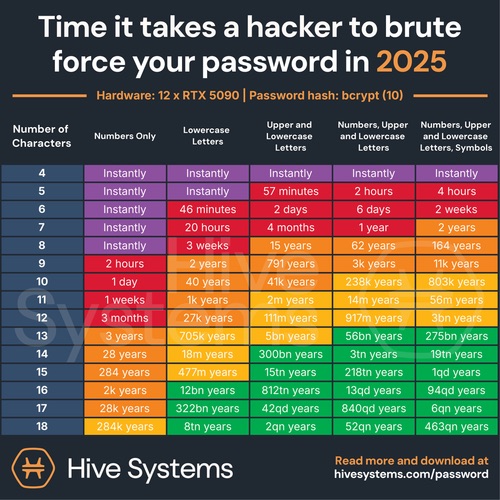
The most common way PKI certificates are used in the real world is through public-private key cryptography. Anyone can use a public key to encrypt a message and send it to someone else. This is great, because passwords are easily stolen over the air or internet. But when a hacker steals an encrypted message, they can’t do anything about it, even if they knew the public key, because they need the private key to decrypt the information.. Private keys can be protected in hardware-backed stores such as TPMs or Secure Enclaves, significantly reducing the risk of key exfiltration
PKI infrastructure and digital certificates are incredibly important and technologically advanced facets of cybersecurity. We’ll break down how they work in the following sections.
How Does Public Key Infrastructure (PKI) Work?
A PKI certificate system enables organizations to generate cryptographic key pairs based on mathematically hard problems (such as integer factorization or elliptic curve discrete logarithms).
There are two types of encryption: symmetric and asymmetric. PKI uses asymmetric encryption. Here’s a quick explanation of both types of encryption, and why asymmetric is the more secure option:
Symmetric Encryption
Symmetric encryption uses a single key to encode a message. The message can only be decoded by someone who has their own copy of the key. This works great in theory, but the moment that single key is compromised, every packet is easily decoded. Anyone with a copy of the key can decode everything encrypted with the key.
Asymmetric Encryption
Asymmetric encryption is a more secure method of encryption, and it’s used in public key infrastructure. It uses two keys, a private key and a public key. Messages are encoded with a public key, which is shared and available to anyone, but only the person with the private key can decode the message.
The classic way of explaining asymmetric encryption is the Alice and Bob diagram.

Alice wants to send a private encrypted message to Bob. She also doesn’t want anyone else to read it. So she uses Bob’s public cryptographic key to create an encrypted cyphertext. Because she used Bob’s public PKI key, only his private key can decrypt the message. If Bob wants to send a message back, he will use Alice’s public key just like she used his. Just like that, we have a way to pass encrypted data to each other!

The core of how a PKI infrastructure is able to achieve strong asymmetric encryption is simply brilliant mathematics. It revolves around taking two huge prime numbers (on the order of 2^512!) and factoring them, but trying to explain the process in just one sentence is almost impossible. Luckily, there’s an awesome channel called Computerphile, and is one of the main ways we train new employees at SecureW2 how cryptographic keys and asymmetric encryption work. We recommend watching these two videos if you get a little confused reading this section.
- Public Key Cryptography ← how public key infrastructure works at a high level
- Diffie Hellman – The Mathematics ← the math behind asymmetric encryption
How Cryptography Works: Public and Private Keys
Cryptography is key to the secure transfer of information in the modern world, from logins to ecommerce, email exchanges, and IoT communication.
Cybersecurity specialists depend on data encryption to protect information moving across vulnerable networks, scrambling readable data into an unrecognizable format. Decryption reverses that process, restoring the original content for authorized recipients. Together, they form the foundation of trustworthy digital communication.
Two primary models define how encryption works in practice: public key cryptography and private key cryptography.
What Is Public Key Cryptography?
Public key cryptography, also called asymmetric encryption, uses two mathematically linked keys rather than one.
Each party holds a private key that never leaves their possession, while a corresponding public key is distributed openly across users and systems. The public key handles encryption; the private key handles decryption. Because each user’s private key is unique, no two key pairs are identical, even as public keys circulate freely across a network.
This asymmetry makes the system well-suited for environments where parties have never previously communicated.
What Is Private Key Cryptography?
Private key cryptography, often called symmetric or secret key encryption, takes a different approach.
A single key performs both encryption and decryption, meaning every authorized party must possess that same key before any secure exchange can occur. Distributing that key securely is the central challenge. Traditionally, this happened through trusted physical channels like a secured courier line. Modern implementations solve this problem mathematically.
Proper key management is not an ancillary concern within these systems. It is a core requirement, and it sits at the heart of any well-implemented cryptographic framework, ensuring that as networks scale, the underlying data stays protected against unauthorized access.
Why Is PKI Infrastructure Important For Cybersecurity?
PKI infrastructure matters for cybersecurity because it binds identities to public keys using certificates issued by a trusted certificate authority (CA) as a source of truth. When integrated with authentication systems such as 802.1X, VPN gateways, or mutual TLS, PKI enables strong identity validation before access is granted.. This added security ensures that only the identities who are authorized to access resources are able to do so.
Here’s how PKI encryption enhances network security in an organization:
Trustworthy Validation for Users & Devices
A PKI uses digital certificates and cryptographic keys to provide trustworthy validation for users and devices. Each user or device is issued a PKI certificate by a trusted CA, which confirms their identity. When they attempt to access the network, they prove their identity by confirming possession of the private key without needing to reveal it. This process ensures that access is granted only to verified, trusted users and devices, making it much harder for attackers to impersonate someone or use stolen credentials.
Leverages EAP-TLS In WPA2-Enterprise Network
Digital certificates provide enhanced security for mutual EAP-TLS 802.1X authentication on a WPA2-Enterprise network. They provide the framework for the EAP-TLS protocol, which enables faster and more secure authentication through mutual authentication between clients and servers.
Protecting Remote Cloud Environment
With certificate-based 802.1X authentication, users and devices can connect to a remote server without the risk of stolen or leaked passwords that could compromise the entire network.
A certificate management system tied to a PKI automates the certificate lifecycle for managed, BYOD, and guest devices. This allows administrators to continuously monitor who has access to the network, whether it is wired or wireless. This ensures only authorized personnel can access specific data and applications, preventing unauthorized access to confidential information.
Here’s why a PKI-based network is better than a password-based one.
| Features | Password-Based Network | PKI-Based Network |
| Security Risk | Shared keys come with a high risk of phishing, brute force, and MITM attacks. | Lower risks as there are no pre-shared keys. |
| Authentication Factor | Weaker trust since passwords can be stolen or duplicated. | Stronger continuous device trust with certificate-based authentication |
| User Experience | Clunky and needs multiple resets, reset-based disconnects. | Certificates can be used until they are revoked or expire. |
| Context-Based Trust | Limited, static device trust. | Identity and access-based granular trust model. |
The Risks of Poor PKI Management
A PKI can significantly strengthen cybersecurity, but poorly managed PKI certificates can introduce vulnerabilities. And since certificates are implicitly trusted after issuance, these vulnerabilities are even greater than those with password-based security.
Here are the most common risks:
- Certificate expirations: Many certificate authorities issue certificates with an expiration date (often one year or less). If the certificate isn’t renewed before the expiration date, users or identities may be unable to access critical services, disrupting operations and frustrating users.
- Unrevoked certificates: Certificates are recognized indefinitely until they’re explicitly revoked. Lost devices and employees who leave or change roles can lead to unauthorized access, data leaks, or lateral movement by insiders or attackers.
- Compromised keys: If a private key is exposed through poor storage, exfiltration via malware, or insider theft, attackers can impersonate the legitimate owner.
Simply having a PKI infrastructure doesn’t automatically ensure improved security. The purpose of a PKI is to issue and manage digital certificates, but how the certificates are issued and managed is important, too.
But what even is a digital certificate? Is it the same as the public and private keys that Alice and Bob were using? In some ways yes, and in other ways no – we’ll explain in the next section!
What are Digital Certificates?
A PKI certificate should be thought of as a passport. It’s a phishing resistant form of verifying your identity with a trusted third party, and one of the most surefire ways organizations can ensure their authentication mechanisms are phishing-resistant.
This digital certificate lives on your device and is presented to systems during authentication. One common way digital certificates are used is to show an Identity Provider like Azure or Okta that you are a particular user using a specific device. The below video shows what it looks like using a digital certificate with Okta.
Is a Digital Certificate the Same as a Private Key or Public Key?
No, a digital certificate is not the same as a private or public PKI key. However, it does contain your public key. A digital certificate, which can also be referred to as a PKI certificate, should be thought of as a digital passport, or a driver’s license. Your digital passport should contain information about you, right? A PKI certificate contains a customizable amount of information. Common attributes encoded in a PKI certificate are email addresses, first and last names, the groups a user is associated with in the Identity Provider, the serial number of the device, an Azure Device ID, and other bits of identifiable information.
PKI keys are also on PKI certificates and are public for all to see. This is necessary, or a third party wouldn’t know how to ensure that the certificate was really you. The private key, however, is not on your PKI certificate. While your device understands the two are linked to each other, the private cryptographic key never leaves the device, should never be seen by anything other than your computer, and is stored securely in a special part of your device, commonly a TPM or Secure Enclave.
How the Certificate Trust Chain Makes PKI Work
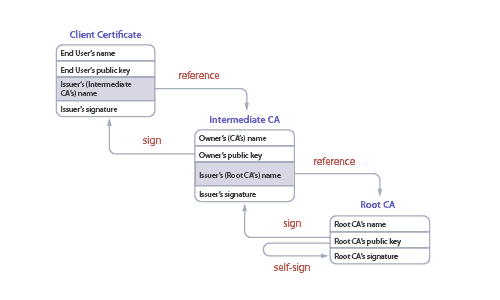
At the heart of PKI security is the certificate trust chain, a multi-leveled hierarchy of trust. You can trace the chain from the client’s certificate all the way back to a single root CA. Every chain ends with a person (or company) from which all the trust is ultimately derived.
In practice, these chains tend to interlink with other chains – often from other CAs. And those CAs often choose to implicitly trust each other, accepting a signed certificate from another CA without validating it themselves. That’s called federation, and while it makes things easier, it means the trust store is only as secure as the weakest link.
More than one CA can sign a certificate. This is called cross-signing, and it expands trust within your network. When a certificate is signed by two CAs, it allows the certificate to verify trust by more than one CA without the need to distribute a separate certificate for each CA. Cross-signing is still effective when one CA’s private key is leaked, as you can issue a revocation for all the public keys for that CA, but the certificates that were cross-signed can still maintain a level of trust with the other CA without the need of reissuing certificates for the CA that was revoked.
What Are Public Key Infrastructure (PKI) Components?
The components of a public key infrastructure are sometimes debated, as there have been a lot of recent developments in the field of PKI certificates. In our opinion, the components of a public key infrastructure comprise everything your organization needs to manage the entire certificate lifecycle. The below components are what we consider to be critical parts of a modern Public Key Infrastructure.
- Certificate Authority (CA)
- Root Certificate Authority
- Intermediate Certificate Authority
- Certificate Templates
- Certificate Lifecycle Management
- Certificate Policies
- Method of Certificate Revocation
- Certificate Revocation List (CRL)
- Online Certificate Status Protocol (OCSP)
- Hardware designed for cryptographic functions
However, to truly understand all the components of PKI security, and how to configure them properly can take a lifetime. In the following sections, we’ll summarize each PKI component.
Certificate Authority (CA)
A certificate authority (CA) is trusted to issue digital certificates that confirm the subject imprinted on the certificate is the owner of the public key. The CA generally handles all aspects of the certificate management for PKI encryption, but can only do so much on its own.
In PKI management, the client generates a public-private key pair. The public key and information to be imprinted on the certificate are sent to the CA. The CA then creates a digital certificate consisting of the user’s public key and certificate attributes. The CA signs the certificate with its private key.

Certificate authorities are all around us. Click on the lock near the URL of your web browsers, and you can see the certificate authority that is used to create encrypted web traffic between the web server and your web browsers. Certificates used for internet encryption are often referred to as SSL certificates. SSL certificates are an incredibly important part of internet security. Without them, online banking would be pretty dangerous, as anyone could see all the data you were transacting with your bank!
Root Certificate Authority
A root certificate authority (root CA) is a trusted CA that is entitled to verify the identity of a person and signs the certificate that is distributed to a user. Your trusted root certificate authority needs to be handled delicately, because if it’s compromised, then all the trust in your PKI key fails. These trusted root certificates are not issuing your end user’s digital certificates directly, but instead issuing intermediate CAs that subsequently issue the client certificates. Since Root CAs are sensitive, they are almost always stored in a very secure manner, away from the public internet.
Intermediate Certificate Authority
An intermediate certificate authority (intermediate CA) is also a trusted CA and is used as a chain between the root CA and the client certificate that the user enrolls for. Since the root CA has signed and trusts the intermediate CA, certificates that are generated from the intermediate CA are trusted as if they were signed by the root CA. As a best practice, always issue certificates from an intermediate CA.
Certificate Templates
Certificate templates are used to determine how a certificate is structured and what it will be used for. For Public Key Infrastructures like Active Directory Certificate Services (AD CS), Certificate Templates are enormously important and dictate much of the permissions required for receiving a certificate and what it will be used for. Exploiting a misconfigured certificate template in AD CS is one of the most common compromises.
Below is an example of a Default Certificate Template in the SecureW2 PKI. You can see things like Validity Period, Signature Algorithm, Extended Key Usage (EKU, or what the certificate will be used for), and much more!

Certificate Lifecycle Management
A certificate management system is a very important part of PKI management. Lifecycle management encompasses all phases of the certificate lifecycle, which can be broken down into the following phases.
- Certificate Enrollment – An entity submits a request for a certificate to the certificate authority. An entity can be a person, a device, or even just a few lines of code.
- Certificate Issuance – The CA needs to validate the identity of the applicant, which is typically done through credentials or by trusting another CA that has already validated the applicant.
- Certificate Validation – During authentication, the RADIUS server validates the certificate against its trust store and checks revocation status using CRL or OCSP to confirm that the certificate is still valid and hasn’t expired or been revoked.
- Certificate Revocation – Certificates contain an expiration date that’s specified when they are first issued. When that date is reached, the certificate will automatically be considered invalid for any authentication attempt.
- Certificate Renewal – Instead of automatically being shunted to a CRL, some CAs have settings that renew certificates upon expiration date, though typically they re-verify identity. At this time, you can choose whether or not to generate a new key pair – effectively making it a totally new certificate.
Effectively managing certificates can be simple if you have a proper automation tool, a well-secured certificate database, and methods of synchronization between your certificate database and your Identity Providers. A common way organizations automate certificate management is using the Intune CA Partner API, which is implemented with the SecureW2 PKI.
Certificate Policies
This enables organizations to create automated certificate policies. For example, a policy could revoke certificates when Intune says a device is not compliant or issue a certificate that is given lower levels of authorization.
Certificate Policies in general should be aligned closely with existing policies in your Identity Provider or MDM. This is what makes APIs like the Intune CA Partner API so great, because it’s just an extension of all the policies that exist in Intune.
Methods of Certificate Revocation
How you revoke digital certificates is a critical piece of how you manage public key encryption. Large organizations are issuing certificates for thousands of their employees, and it’s a big liability if they are in the hands of users or devices that shouldn’t otherwise have them. Certificate lifecycle management and automation solutions have quickly gained popularity as legacy PKIs often required a lot of manual work to ensure certificates were revoked in a timely fashion.
Here are a few ways certificates can be revoked.
Certificate Revocation List (CRL)
A CRL is a list of the serial numbers of certificates revoked before their expiration date. Certificate revocation lists are downloaded and cached into a service authenticating certificates, allowing the service to efficiently check for revoked certificates. This is one of the reasons why CRLs are preferred over Online Certificate Status Protocol (OCSP) which has to check a server for every authentication request.

Base CRL vs Delta CRL
Certificate Revocation Lists are incredibly resilient by design. They are able to be downloaded and cached efficiently because they are broken down into Base and Delta CRLs. A Base CRL contains a list of all the revoked certificates from all-time, and is typically updated weekly. A Delta CRL is usually updated daily and contains only up to a week’s worth of certificates.

Online Certificate Status Protocol (OCSP)
OCSP is a longstanding protocol that is mostly used by web servers. Every time the authentication process happens, a request is made to the OCSP server to check to see if the certificate requesting authentication is still valid. The OCSP server then looks up the certificate within its list of certificates and returns a yes or no response.
Hardware Security Module (HSM)
A Hardware Security Module isn’t a mandatory component of PKI security, but it improves the security of the PKI as a whole when implemented. This device protects and manages digital keys and serves as the groundwork for building a secure enterprise PKI infrastructure. The HSM contributes to managing the complete lifecycle of cryptographic keys, which includes creation, rotation, deletion, auditing, and support for APIs to integrate with various applications.
What Is PKI Used For?
A PKI can be used for multiple applications, including Wi-Fi authentication, web application authentication, email security, and VPN. How your organization designs and uses the PKI depends largely on what your security needs are, which vendor you choose, or if you decide to construct your own. Below we’ll demonstrate how each use case is tied to the PKI.
Wi-Fi Authentication
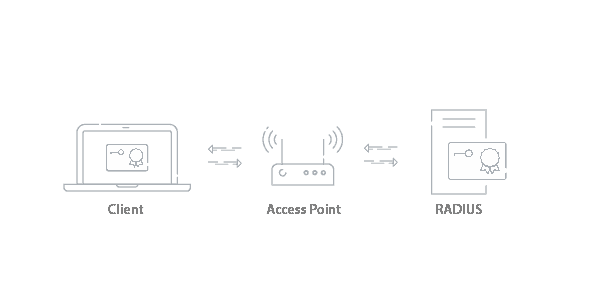
PKI management allows users and systems to verify the legitimacy of certificate-holding entities and securely exchange information between them over the air. The introduction of a PKI enables stronger, certificate-based security, as well as identity services and management tools to maximize network efficiency and security.
Certificate-based Wi-Fi authentication uses the EAP-TLS protocol. EAP stands for Extensible Authentication Protocol, a standardized authentication framework often used in network connections. TLS (Transport Layer Security) is a protocol that uses certificates for secure key exchange and mutual authentication in implementations such as EAP-TLS.
With EAP-TLS, the connecting device validates the RADIUS server’s certificate before presenting its certificate, a process known as mutual authentication or server certificate validation. Mutual server authentication enhances Wi-Fi security by verifying the identities of both the client and the server and preventing unauthorized access through attacks.
At its core, the authentication process is the same as any asymmetric authentication, where the client presents its certificate, and the server verifies its signature using the issuing CA’s public key.
Wired Security
A PKI secures wired connections for 802.1X port-based authentication via digital certificates. When a device tries to connect to a port, the network switch blocks the connection till the authentication. To connect to a wired network, the device must be connected to Ethernet and authenticated via an 802.1X switch.
The device certificate is forwarded to the server via an 802.1X-enabled switch. The server checks the certificates’ validity against a trusted CA. A PKI prevents devices from accessing rogue networks by preventing unauthorized access to LAN ports in a network.
Web Application Authentication:
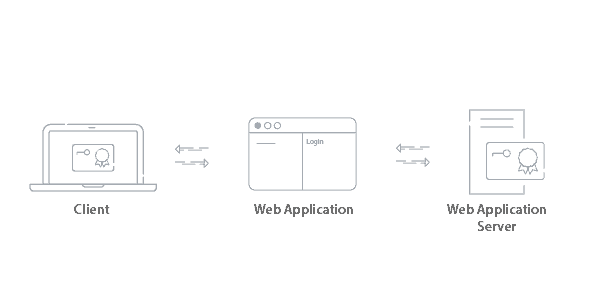
Similar to Wi-Fi authentication, a user connecting to a web application will have their identity confirmed by the web application server. Since the certificate is signed by the trusted CA, they are able to gain access to the application.
VPN Authentication
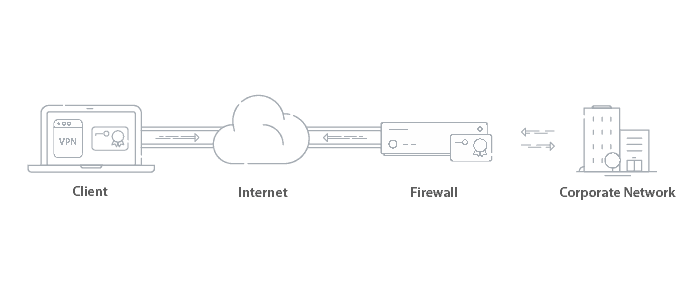
Certificates can be used to authenticate users for VPN access. Since VPNs can grant access to critical information, certificates are a preferred method of authentication over passwords. Usually the Root/Intermediate CA is stored on the Firewall and once the user is authenticated, a secure tunnel is created to access the network the user is trying to access.
Email Security
Encrypting emails with certificates utilizes the S/MIME (Secure/Multipurpose Internet Mail Extensions) protocol. Both the receiver and sender are required to have a certificate signed by the CA to establish trust between the users. S/MIME provides the cryptographic security required to guarantee the origin of the message with the digital signature from the certificate, encrypt the message, and authenticate the recipient’s certificate to decrypt the message.
Benefits of a PKI In a Network Environment
Improve End-User Experience
Passwords require repeated input and frequent resets. When combined with multi-factor authentication (MFA), the user experience becomes frustrating, since the user is now burdened with passwords plus an additional device or factor for authentication. As complexity increases, users tend to bypass the MFA requirement, leaving the network vulnerable to attacks. MFA is also susceptible to fatigue attacks, where an attacker bombards the end user with multiple notifications, hoping the user will accept one.
As more organizations adopt passwordless authentication methods, digital certificates with a PKI are becoming the preferred choice. The National Institute of Standards and Technology (NIST) prescribes specific frameworks to secure critical data in an enterprise network. It strongly recommends using digital certificates with a Public Key Infrastructure (PKI) for Wi-Fi and VPN authentication.
Prevent Breaches Due to Stolen Credentials
Implementing a PKI with digital certificates eliminates security risks that arise with stolen credentials. When a device attempts to connect to the network, it must prove possession of its private key, which cannot be phished or reused like a password.
Even if a malicious actor intercepts the certificate or gains access to the network traffic, they cannot authenticate without the corresponding private key, which remains securely stored and inaccessible. This cryptographic identity verification ensures only authorized users and trusted devices can access network resources.
Reduce Password-Related Support Tickets
Switching to digital certificates allows an organization to reduce IT overhead by minimizing the volume of password-related support tickets. Since digital certificates replace passwords for authentication, users no longer need to remember, reset, or frequently change credentials. Automated certificate issuance and renewal also streamline onboarding and access management, reducing manual intervention and support costs.
Greater Visibility Over Network Access
With a PKI, authentication events are tied to cryptographically verified identities. Unlike passwords, which can be shared or stolen, digital certificates are device-bound and traceable. Detailed RADIUS logs show who and what connected or accessed the network when a device authenticates using a certificate.
Core Cryptographic Algorithms Behind PKI
Now that we’ve seen how the certificate trust chain builds trust through digital signatures, let’s look under the hood at the actual cryptographic algorithms that power it all.
PKI relies on a clever combination of asymmetric (public-key) algorithms for secure key exchange, digital signatures, and certificate signing, plus symmetric algorithms for fast, efficient encryption after establishing trust.
While modern PKI increasingly favors efficient options like elliptic curve cryptography (ECC/ECDSA), the classics, including RSA for signing and key exchange, DSA for signatures, Diffie-Hellman for secure key agreement, and AES-256 for session encryption, remain widely used or historically important.
Here’s a breakdown of some key cryptographic algorithms you’ll encounter in PKI systems today:
AES 256 Encryption
AES-256 is a symmetric encryption algorithm widely used for encrypting session data after secure key exchange. In TLS, asymmetric cryptography establishes trust and negotiates a symmetric session key (often AES), which is then used for efficient bulk encryption. An AES 256 certificate is a long length key that makes brute force attacks by would-be credential thieves virtually impossible.
Diffie-Hellman
Diffie-Hellman, also known as exponential key exchange, is a method of encryption that uses numbers raised to specific powers that produce decryption keys on the basis of components that are never directly shared, making it essentially impossible for potential threats to penetrate. The algorithm creates a mathematically complex encryption that is shared between two parties during a secret communication over a public network so that they can allow an exchange of a private encryption key.
RSA Key Exchange
RSA (Rivest–Shamir–Adleman), named after its inventors Ron Rivest, Adi Shamir, and Leonard Adleman, is much like the Diffie-Hellman algorithm. It uses two very large prime numbers as the user’s private key, while the user’s public key is the product of the prime numbers. RSA key exchange uses public and private keys, while the public key can be shared with everyone, the private key must be kept secret. However, in RSA encryption either of the public or private key can be used to encrypt a message while the other is used to decrypt.
RSA vs Diffie-Hellman
RSA and Diffie-Hellman are both core public-key cryptographic algorithms used in PKI and TLS, but they serve different roles.
RSA is commonly used for digital signatures and certificate signing. A Certificate Authority (CA) signs a certificate using its private key, and clients verify that signature using the CA’s public key. RSA security relies on the difficulty of factoring large integers, and modern best practice recommends at least 2048-bit keys.
Diffie-Hellman (DH) is used for secure key agreement. It allows two parties to derive a shared secret over an insecure channel without transmitting the secret itself. Modern implementations use Ephemeral Diffie-Hellman (DHE or ECDHE), which provides forward secrecy, meaning past sessions remain secure even if long-term keys are later compromised.
On its own, Diffie-Hellman does not provide authentication and can be vulnerable to man-in-the-middle attacks. That’s why in TLS, it is combined with certificate-based authentication (RSA or ECDSA).
DSA
The DSA, or digital signature algorithm, is used to create digital signatures. DSA was created in 1991 by the National Institute of Standards and Technology and is the standard for government agencies.
The pitfall of the DSA algorithm is that it can only do digital signatures and not public key encryption. However, the advantage lies within the algorithm’s speed of producing a digital signature.
What is TLS Cipher Suite?
A TLS cipher suite defines the combination of key exchange, authentication, encryption, and message authentication algorithms used during a TLS session. Before TLS came to be, SSL was the go-to protocol. Some wrappers only support certain versions of TLS, whereas the SecureW2 wrapper supports any version of TLS when onboarding a user’s device. However, like most, TLS 1.0 support has been dropped due to growing vulnerabilities.
What is a Microsoft PKI?
Microsoft offers a commonly used PKI called Active Directory Certificate Services (ADCS). It was designed to work with the Microsoft environments like Active Directory (AD), Network Policy Server (NPS), and Group Policy Objects (GPO) that historically dominated IT infrastructures.
While some still use ADCS, many organizations are moving away from it due to the limitations that come with being designed for legacy infrastructure. It requires a lot of human resources to deploy and maintain, and it requires everything to be on-premise, which can prevent organizations from moving to an all-cloud environment.
Does EAP-TLS use a PKI?
The EAP-TLS authentication method does use a PKI. EAP-TLS is a WPA2-Enterprise network protocol that is used for encrypted, certificate-based authentication. As a user connects or enrolls to the secure network, EAP-TLS authentication confirms the identity of the user and the server in an encrypted EAP tunnel that prevents outside users from intercepting credentials or other information sent over-the-air. They can safely transmit data through the tunnel, resulting in a fast, secure, and successful authentication.
Best PKI Implementation Practices For Your Network
PKI implementation needs a strategy and a far-sighted approach to build a secure network. With digital certificates, your network will be ready for secure communication through identity and context-based device trust. However, a PKI alone won’t address security needs unless properly implemented.
Follow these best practices for PKI success:
Use an Intermediate CA For Certificate Issuance
The Root CA is the main anchor of trust in a PKI and should never be compromised. An Intermediate CA can be established under an organization’s central CA and then separated based on geographical locations, departments, etc. The Root CA would remain separate and well-guarded, maintaining trust throughout. An Intermediate CA can segregate users/devices based on roles, locations, departments, and third-party-issued certificates to simplify policy enforcement. Intermediate CAs can integrate with Identity Providers (IdPs) and Mobile Device Management (MDM) to validate user identity before certificate issuance and revoke certificates for devices as they become uncompliant, enforcing context-based device trust in a network.
Automate Certificate Lifecycle Management
A certificate lifecycle typically includes enrollment, issuance, renewal, revocation, and ongoing maintenance. As an organization, you should automate certificate management through a managed PKI that streamlines the certificate lifecycle. This prevents the risk of network outages due to certificate expiration and subsequent renewal. With a managed PKI, an organization can implement granular visibility and access policies and continuously monitor users and devices.
A managed PKI keeps track of all certificates and can send alerts to renew them before expiration. You can also set specific revocation policies to prevent devices with rogue certificates, certificates that need renewal due to certificate policy changes, or misconfigured certificates from accessing the network.
Regular Audits and Compliance Checks
A PKI should maintain an audit trail for all certificates issued, renewed, revoked, and stored in the network. Security teams should regularly monitor these logs to respond quickly to incidents and detect unusual activities. If any unusual incident is detected, an automated alert should be set up to alert and prevent further access.
Integration with a Security Information and Identity Management (SIEM) tool provides real-time alerts from all access points, firewalls, servers, and cloud platforms in a network environment. With an SIEM tool, you can detect certificate-based anomalies and use them to troubleshoot, audit, and ensure compliance, maintaining a secure network perimeter.
Integrate PKI With Identity and Access Management Tools
By integrating PKI with IdPs and MDMs, organizations can use EAP-TLS to strengthen security and link users and devices to certificate-based authentication for identity and access management (IAM) tools. An IAM system allows administrators to automate certificate issuance, revocation, and renewal as users or devices are added or removed from an organization.
Identity and access management tools ensure that people can access resources within a network through context-based, granular policies, achieved through the real-time integration of IdPs with a PKI. Context-based policies ensure that only trusted users and devices can access resources and applications in accordance with established policies and rules.
Protect Private Keys Using Hardware Security Modules (HSMs)
The private key is the central pillar of a PKI security framework. Organization should ensure that the secure keys, i.e., the root and intermediate keys, never leave the hardware security module. All keys must be generated with the HSM to avoid exposure during creation. Any key stored in an HSM should be used solely for cryptographic functions, such as developing new keys, signing, and decryption. There should be limited access and restrictions on viewing and exporting cryptographic keys.
In a managed PKI, an HSM can integrate with CAs to automate key usage, ensuring private keys are never exposed to administrators within the network and maintaining complete integrity.
Onboarding Software to Authenticate Managed and BYODs to a Network
Onboarding software automates certificate issuance to managed devices using protocols such as the Dynamic Simple Certificate Enrollment Protocol (SCEP) and Automated Certificate Management Environment (ACME). It also helps BYOD and guest devices self-enroll for certificates and authenticate safely to a network with limited access, preventing unauthorized access.
On-Premise PKI vs. Managed Cloud PKI: Which Is Right for You?
The physical installation of a PKI to existing infrastructure is a common method of deployment. It involves the setup and configuration of all the PKI components, as well as ongoing maintenance and a requirement to store it in a secure area to protect against a physical breach.
Maintaining strong security around the PKI is of utmost importance. If private keys or the Root CA are compromised, every certificate would be at risk and need to be replaced and the organization would be highly susceptible to data theft. The term for responding to such an event is disaster recovery, and restoring a local PKI can be an intensive process.
A managed cloud PKI solution, like the PKI offered by SecureW2, requires no forklift upgrades to integrate directly with existing infrastructure. Your IT team needs only connect the PKI to the network and configure the settings and onboarding software to distribute certificates. Since the PKI is externally hosted, the responsibility of maintaining and securing the PKI falls to the vendor.
A cloud PKI also has strong scalability, so as an organization grows, the PKI can easily grow with it. The costs over the lifetime of a cloud PKI are significantly lower than the costs of a local PKI because there’s no need for on-premise installation or security.
A managed PKI provides straightforward solutions to many problems and inefficiencies faced by all organizations with unsecured wireless networks. Network admins never have to manually configure each device for certificates, and they can easily monitor network activity, investigate connection issues, and revoke certificates when they are no longer needed.
SecureW2 offers affordable managed Cloud PKI options for organizations of all shapes and sizes. Click here to see how SecureW2 could work in your environment.